Home›Support›English Support›[Resolved] I need a custom language which is not possible using the current available options
[Resolved] I need a custom language which is not possible using the current available options
This thread is resolved. Here is a description of the problem and solution.
Problem: The client needs a language switcher similar to the one on a specific website but struggles with limited customizability using standard options. They have purchased WPML and seek guidance on implementing a custom UI for the language switcher. Solution: We recommend creating a custom language switcher using WPML's PHP functions or shortcodes, which allow for full customization. You can use the wpml_active_languages filter to retrieve an array of all active languages, including their codes, URLs, and active states. This enables you to loop through these languages and apply custom classes for styling, thus gaining complete control over the HTML structure and appearance. For further guidance, please refer to the following documentation:
If this solution does not apply to your case, or if it seems outdated, we highly recommend checking related known issues at https://wpml.org/known-issues/, verifying the version of the permanent fix, and confirming that you have installed the latest versions of themes and plugins. Should you need further assistance, please open a new support ticket at WPML Support Forum.
This is the technical support forum for WPML - the multilingual WordPress plugin.
Everyone can read, but only WPML clients can post here. WPML team is replying on the forum 6 days per week, 22 hours per day.
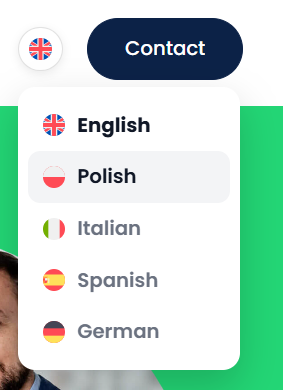
I need a language switcher identical to the one on hidden link
I’ve explored multiple approaches, but none have worked due to limited customizability. I even purchased WPML, as I noticed this site is using it, but I still need guidance on implementing this UI correctly. Could you please guide me on the best way to achieve this?
Languages: English (English )Spanish (Español )German (Deutsch )
Timezone: Europe/Madrid (GMT+01:00)
Hi,
The UI is custom-built specifically for that Elementor design. The best way to understand how it was implemented is to review the site’s stylesheet—particularly the inline Elementor styles—from the link you shared.
Recreating this setup requires a substantial amount of custom CSS along with multiple media queries. Below is what the site itself uses as a reference:
However, I recommend reaching out to a freelancer who can assist you with creating a custom integration like this, as custom coding falls outside the scope of our support policy.
I’m a web developer and I’m comfortable extracting and implementing the required elements. I actually extracted it yesterday. You can see my progress here: hidden link
The main issue I’m facing is that the HTML structure on delante.com differs from the structure being rendered on our site (growston.com). Because of this difference, the implementation isn’t working dynamically as expected.
Could you please advise on how to handle this? Alternatively, could you share the exact shortcode or code snippet that generates the required HTML structure so I can replicate it properly on our end?
Languages: English (English )Spanish (Español )German (Deutsch )
Timezone: Europe/Madrid (GMT+01:00)
Hi,
yes, but you can't copy/paste the existing implementation. This site uses their own classes (.ww-*, .ww-wpml-*;) you will need to create your own language switcher based on these classes or adjust the CSS of the existing switcher.
WPML provides PHP functions (as well as shortcodes) that allow you to create a fully custom language switcher. This lets you wrap it in your own HTML and apply your own classes. For example, see this filter: wpml_active_languages.
This filter returns an array of all active languages, including their codes, URLs, and active states. You can loop through this array to add custom classes for styling, giving you complete control over the HTML structure and appearance—without having to rely on the default language switcher.
Ok, if I keep the classes same, how can I get the same user experience? I just want to know where to paste which code so it will work dynamically. Can you please guide me a bit on this?
Languages: English (English )Spanish (Español )German (Deutsch )
Timezone: Europe/Madrid (GMT+01:00)
Hi,
I’m sorry, but there isn’t a video of a finished solution that I can share, nor is there a way to simply copy and paste the existing implementation.
On your site, you’re currently using the standard WPML language switcher. The site you referenced is using a custom-built switcher, injected via shortcode (See class="elementor-shortcode") and structured with its own specific HTML and class names. For that reason, the two implementations are technically different.
What you’re referring to is a fully custom language switcher. To replicate it, it would need to be first developed specifically for your site so that the HTML structure matches the expected .ww-* classes and behavior.
WPML provides the necessary functions and documentation (such as wpml_active_languages and shortcode options) to build this properly. However, matching the exact structure and styling requires custom development work.
Please note that we’re not able to provide custom coding services and can only share with you the available APIs and documentation, as I’ve already done, but the final implementation would need to be handled on your side.