
This thread is resolved. Here is a description of the problem and solution.
Problem:
The client was experiencing fatal errors that prevented access to both the front-end and back-end of their site, and they were unable to view or create support tickets due to these errors.
Solution:
We addressed the issue by patching the missing database tables and deactivating then reactivating all plugins. This resolved the error messages and restored backend functionality. We also scanned the theme for strings, ensuring that they appeared in the string translation table, indicating that the string translation is functioning correctly. We recommend the client to verify the changes from their end and report any discrepancies.
If this solution does not resolve your issue, or if it seems outdated or irrelevant to your case, please visit our known issues page and check if you have the latest versions of themes and plugins installed. If the problem persists, we highly recommend opening a new support ticket here.
This is the technical support forum for WPML - the multilingual WordPress plugin.
Everyone can read, but only WPML clients can post here. WPML team is replying on the forum 6 days per week, 22 hours per day.
Tagged: Exception
This topic contains 19 replies, has 0 voices.
Last updated by Lauren 2 months, 1 week ago.
Assisted by: Lauren.
| Author | Posts |
|---|---|
| January 20, 2026 at 2:25 pm #17746812 | |
 martijnv-52 |
I just created a ticket but after skipping the debug info screen (which I can't access - fatal error) I was brought to an empty ticket screen and I have no past tickets ... Guess that was another fatal error? Anyway. These errors won't solve, and I can't do anything else due to fatal errors. My site content isn't shown anymore either on the front- or backend. For now I'm renaming the plugin so I can access my site again and I'll wait a bit for support although I honestly regret going for WPML instead of Polylang as I had planned before being convinced this plugin would be "easier and better" 🙁 Thanks for any help and hope you don't keep me waiting the extra 5 hours for not having debug info. 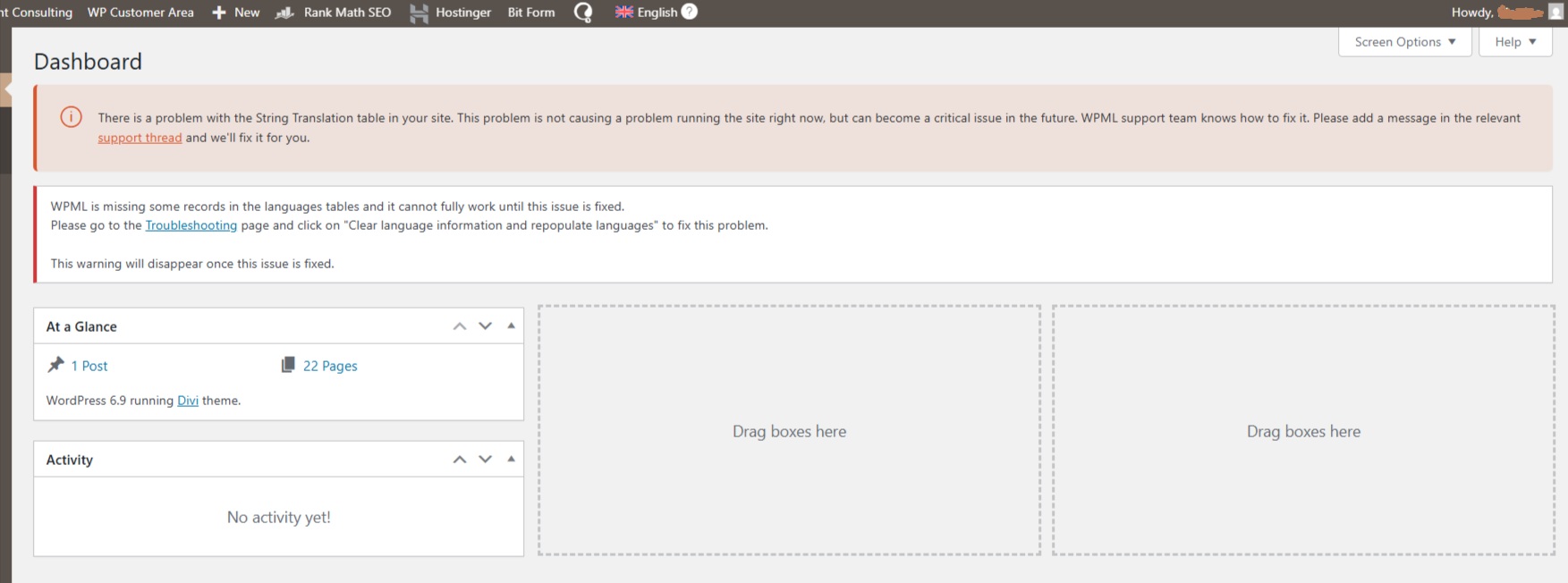 |
| January 20, 2026 at 2:38 pm #17746978 | |
 Lauren |
Thank you for contacting WPML support. I'll be happy to help you with this. Can you please paste the error that you got when you had WPML activated so I can see the details? If you don't have the details, you can enable the debug log in wp-config.php and then reactivate it so we can see exactly what is happening. WordPress includes a debug mode that helps reveal PHP problems. Let's enable this and see if there are any errors we can locate. To enable it, open your wp-config.php file and look for
define('WP_DEBUG', false);
Change it to: define( 'WP_DEBUG', true ); define( 'WP_DEBUG_LOG', true ); define( 'WP_DEBUG_DISPLAY', false ); In this case the errors will be saved to a debug.log log file inside the /wp-content/directory. The wp-config.php is located in your WordPress root directory. It’s the same file where the database configuration settings are. You will have to access it by FTP or SFTP in order to edit it. /* That's all, stop editing! Happy blogging. */ Please note that you’ll see everything, not only related to our Plugins. This will most likely include messages from other plugins, your theme, and sometimes even WordPress core. The messages appear all over the place. DOC: After enabling the debug mode, please try to replicate the issue. Navigate to the page where the error message being displayed. The errors will be either displayed on the screen or logged in the debug.log log file inside the /wp-content/directory. Paste the latest lines here. No need to paste the entire log file, just 50 lines or so will do. Please censor any sensitive information. |
| January 20, 2026 at 2:40 pm #17746997 | |
|
martijnv-52 |
Due to inactivity?! See attachment for the errors on the main screen. Re-installing now and will just install the main plugin, no add-ons, and see how far I get. 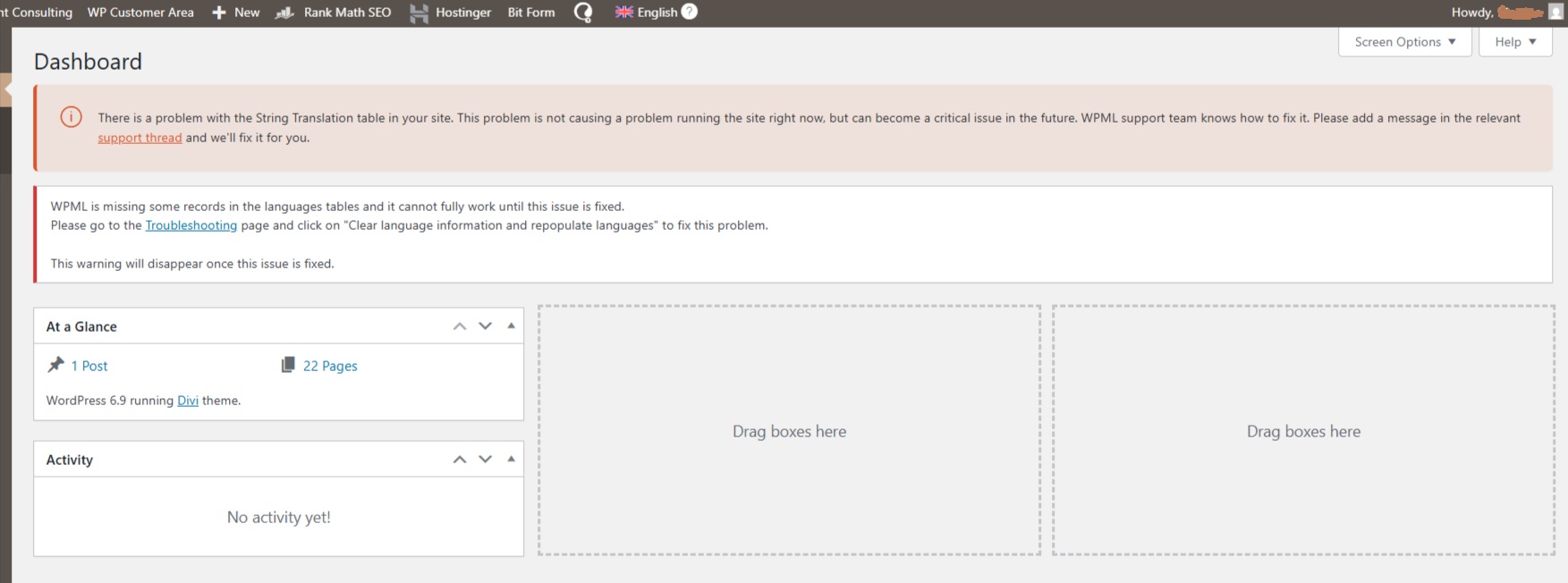 |
| January 20, 2026 at 2:49 pm #17747053 | |
|
martijnv-52 |
OK, I have access to my WP Admin again. Re-installed the main plugin but NOT the add-ons. I'm back to this error now: Clearly, it won't. I also have no more access to my pages and the front-end is 404'ing now. I do have access to the debug-info now -- tho again, I had add-ons active that are NOT active now. |
| January 20, 2026 at 3:14 pm #17747166 | |
|
martijnv-52 |
This workday only has an hour left for me (Netherlands) so it would be great if we could at least get the basics to work before end of day so I can start translating tomorrow ... |
| January 20, 2026 at 3:21 pm #17747194 | |
|
martijnv-52 |
Is it possible to talk to a human being? |
| January 20, 2026 at 4:21 pm #17747475 | |
|
Lauren |
Did you go to the Troubleshooting page and click on "Clear language information and repopulate languages" to fix this problem? If that didn't resolve it, it could be missing WPML tables. Please try running the script below to try and automatically recreate them. Place the script in your theme's functions.php file and reload your homepage. Once you have done that, remove the script from functions.php.
It looks like your site could be missing some WPML tables. Please try running the script below to try and automatically recreate them. Place the script in your theme's functions.php file and reload your homepage. Once you have done that, remove the script from functions.php.


function wpmlsupp_1891_fix_missing_icl_tables() {
    if( function_exists( 'icl_sitepress_activate' ) )
        icl_sitepress_activate();
}
add_action( 'wp_footer', 'wpmlsupp_1891_fix_missing_icl_tables' );
If that does not resolve the issue, please let me know and I can further troubleshoot. Also, I removed the debug information from the public ticket for security reasons. You can use the debug tab to safely send that information. |
| January 20, 2026 at 4:31 pm #17747496 | |
|
martijnv-52 |
Did you go to the Troubleshooting page and click on "Clear language information and repopulate languages" to fix this problem? >> As I said in my ticket: yes I did and no it didn't Please try running the script below to try and automatically recreate them >> As expected, no dice. Is there someone available who can look at our install? Cos I can't leave the site like this, with all the pages and content gone I can't do anything and we have a deadline approaching. If not possible please let me know so I can request a refund. Thanks. |
| January 20, 2026 at 4:33 pm #17747508 | |
|
Lauren |
Sure, I'll be happy to login and take a look. Please make sure to include both WordPress and FTP info incase I encounter any errors. Also, please go to WPML -> Languages and let me know if any languages are showing there. I have marked the next reply as private so that you can safely share credentials, make sure to use the private fields. |
| January 20, 2026 at 7:24 pm #17748157 | |
|
Lauren |
I found that there were no languages installed at WPML -> Languages. I added English, and ran through some clean up steps. I'm not seeing any error on the frontend, but I am still seeing those WPML warnings. May I install the Adminer plugin so i can access the database and remove the WPML notice? Then, if there is still an issue with string translation, I can troubleshoot further. But at this point, those warnings might be false postiives that were caused by not having any languages installed. |
| January 21, 2026 at 4:56 am #17748825 | |
|
martijnv-52 |
Go ahead. It's 6am here and I need to start work on the site at 9am. I've never had a chance to get into the settings as installing the add-ons resulted in the site throwing fatal errors at every single click. Only after renaming the plugins through FTP could I continue. I'm hoping to get the plugin to a point where it shows some kind of configuration wizard or something to get started with it. |
| January 21, 2026 at 7:52 am #17749050 | |
|
martijnv-52 |
Since the settings are now available without issues (thank you!) I added Dutch as well. The WP email about the fatal errors arrived delayed, but here is the content: Error Details |
| January 21, 2026 at 10:49 am #17749855 | |
|
martijnv-52 |
I am sorry, but this is starting to take way too long. It's now almost lunchtime where I am, which equals to an entire workday waiting on fixes for a plugin we only just bought and should have worked without major issues. I'll check once more after lunch, and if it's still just waiting I'll start the refund process as I really do need to get to work on translating the site -- and I'm not starting with a plugin that may or may not work as it should or may even be replaced. Hope this wasn't all just a giant waste of time and energy for all of us. |
| January 21, 2026 at 1:41 pm #17750559 | |
|
Lauren |
Hi there, I am just starting my day since I am in the US, and I can transfer this ticket to someone closer to your time zone. What is your working time zone so I can look into moving this for you? I'm logging in now to look at those notices. Now that English and Dutch languages are installed, is the site working as expected other than those messages? Feel free to send me any thing you are seeing that is not working, as I'm going to continue troubleshooting right now and will update you as soon as possible. |
| January 21, 2026 at 1:52 pm #17750659 | |
|
martijnv-52 |
As already stated earlier in this thread, to avoid these time-zone issues: I am in the Netherlands. It's 02:50PM where I am. The plugin is not working as it should with Divi and Rankmath - but I haven't been able to fully check it out as the admin is still a mess and I would like Support to make sure everything is working correctly before spending more time on this plugin. I would appreciate it if all the error messages can be removed, as they take up a lot of space. But that's removing a symptom - something clearly isn't right with this install and if the underlying issues aren't fixed, they'll just create more issues later on. Since I don't plan on spending a 3rd day on this, lets hope whatever is going on can be fixed before 5pm my time (that's 2 hours from now). Thank you for your time and efforts, I sincerely hope you can find an actual fix and the plugin will be worth all the time it took to get it to run. |