
This is the technical support forum for WPML - the multilingual WordPress plugin.
Everyone can read, but only WPML clients can post here. WPML team is replying on the forum 6 days per week, 22 hours per day.
| Sun | Mon | Tue | Wed | Thu | Fri | Sat |
|---|---|---|---|---|---|---|
| - | 13:00 – 18:00 | 13:00 – 18:00 | 13:00 – 18:00 | 13:00 – 18:00 | 13:00 – 18:00 | - |
| - | 20:00 – 23:00 | 20:00 – 23:00 | 20:00 – 23:00 | 20:00 – 23:00 | 20:00 – 23:00 | - |
Supporter timezone: Asia/Singapore (GMT+08:00)
Tagged: Bug
This topic contains 15 replies, has 1 voice.
Last updated by olegA-5 1 year, 2 months ago.
Assisted by: Kor.
| Author | Posts |
|---|---|
| November 27, 2024 at 9:55 pm #16451803 | |
 olegA-5 |
Background of the issue: Symptoms: Questions: |
| November 27, 2024 at 10:02 pm #16451813 | |
 Mihai Apetrei WPML Supporter since 03/2018 Languages: English (English ) Timezone: Europe/Bucharest (GMT+02:00) |
Hello, Could you please provide more details about the matter before this ticket is assigned to one of my colleagues? The more information you share from the beginning, the better we will understand your concerns and how we can assist you. Rest assured, we will address your concerns promptly. Also, if you have a screen recording or screenshots, that would also be very helpful. Thank you. Mihai Apetrei |
| November 27, 2024 at 10:09 pm #16451816 | |
|
olegA-5 |
I believe I have provided a very detailed description of the problem with specific examples. I would like to add that WPML also does not correctly handle line breaks in the text of mails from the corresponding WPCF7 tab if these mails have _NO_ html formatting. WPML either doesn't see line breaks (even if there's a blank line between lines), or it adds the <br> tag that shouldn't be there, as well as any other tag, in emails that are _NOT_ in html. |
| November 29, 2024 at 8:03 am #16457998 | |
 Kor WPML Supporter since 08/2022 Languages: English (English ) Timezone: Asia/Singapore (GMT+08:00) |
Thanks for your reply. I will need to closely examine your website. Therefore, I will require temporary access (WP-Admin and FTP) to a test site where the problem has been replicated, if possible. This will enable me to provide better assistance and determine if any configurations need to be modified. Please note that it is important to have a backup for security purposes and to prevent any potential data loss. You can use the UpdraftPlus plugin (https://wordpress.org/plugins/updraftplus/) to fulfill your backup requirements. Your upcoming reply will be treated with confidentiality and will only be visible to you and me. ✙ To resolve the issue, I may need your consent to deactivate and reactivate plugins and the theme, as well as make configuration changes on the site if necessary. This emphasizes the significance of having a backup. |
| November 29, 2024 at 5:40 pm #16460878 | |
|
olegA-5 |
Kor, No problem at all, I can provide access, but it might be easier if I reproduce all the problems I'm talking about in a sandbox. |
| November 29, 2024 at 5:44 pm #16460891 | |
|
Kor WPML Supporter since 08/2022 Languages: English (English ) Timezone: Asia/Singapore (GMT+08:00) |
Thanks for your reply. I've prepared a sandbox site here for you to replicate the issue. Feel free to install the required plugins and theme. hidden link |
| November 29, 2024 at 5:58 pm #16460896 | |
|
olegA-5 |
Kor, It seems to me that the Contact Form 7 Multilingual add-on should be enabled in the sandbox, but I am unable to do so due to an error: Connection failed! Please refresh the page and try again. (Unable to register: Site key not matching) |
| November 29, 2024 at 11:32 pm #16461274 | |
|
olegA-5 |
OK, I re-registered the sandbox under my account and everything worked. However, in the sandbox, form translation doesn't work the same way. The only error that persists is the inability to translate what is written in the From field of the Mail tab. As for the other problems, there are none in the sandbox because I can see that WPML adds its own < wpml_linebreak > tags to the original text. These are added both between options in the select tag and between lines of text in the Mail tab. As a result, the translations look correct: each variant in the select tag is quoted, and all line breaks in the Mail tab are preserved. This is not the case on my site, because WPML does not use < wpml_linebreak >. Or rather, it does. On my site, when translating new forms, WPML behaves exactly as it does in the sandbox. However, old forms (created and translated a long time ago, but to which I have now made changes) are translated with many of the errors I mentioned. Of course, I can correct these errors manually. However, when I make a new change to the form, I have to find and correct all the errors manually again. It seems that it is possible to create new forms with the same content and translate them without errors. However, when I create new forms with the same content, all the errors are saved when they are translated. |
| December 2, 2024 at 8:13 am #16464468 | |
|
Kor WPML Supporter since 08/2022 Languages: English (English ) Timezone: Asia/Singapore (GMT+08:00) |
Thanks for your reply. Are you able to import the older forms to our sandbox site? I'd like to see if there are some compatibility issues. These will be addressed if confirmed. |
| December 3, 2024 at 8:19 pm #16473690 | |
|
olegA-5 |
Kor, I copied part of the form into the sandbox. And absolutely all the problems I see on my site are repeated in the sandbox. 1. As you can see, all variants of the tag [select menu-languages include_blank "keep it English only" "français" "Deutsch" "русский язык" "español" "italiano" "български" "čeština" "dansk" "Nederlands" "eesti keel" "suomi" "ελληνικά" "magyar" "latviešu valoda" "lietuvių kalba" "norsk" "polski" "português" "română" "slovenčina" "slovenščina" "svenska" "Türkçe" "українська"] are registered for translation as one variant, i.e. as if the form were as follows [select menu-languages include_blank "keep it English only français Deutsch Russian español italiano Bulgarian čeština dansk Nederlands eesti keel suomi ελληνικά magyar latviešu valoda lietuvių kalba norsk polski português română slovenčina slovenščina svenska Türkçe Ukrainian"] . I have found through experimentation that if a tag has no more than 16 variants (in my example there are 25) it is translated correctly, and if it has more it is not. 2. The content of the 'Mail' tab ('Message body' without html) is not correctly 'registered' for translation: - no line breaks - part of the text is not 'registered' (not added to the left column) for translation (of course it can be found and translated by search, but it should be 'registered' anyway; and in any case line breaks are not saved). I think I've found the cause of these errors. This error does not occur if the <br> tag used in a form (in a completely different place!) is written like this </br> (this is crazy!) 3. The text in the 'From' field of the 'Mail' tab (before the email address itself) is not 'registered' for translation and cannot be translated by search because it is not recognised. This problem occurs in all forms, old and new, so it's a kind of permanent bug. |
| December 5, 2024 at 4:20 am #16479166 | |
|
Kor WPML Supporter since 08/2022 Languages: English (English ) Timezone: Asia/Singapore (GMT+08:00) |
Thanks for your reply. I'm still checking on this and I will come back to you if I require further clarification from your end. |
| December 6, 2024 at 10:29 am #16485406 | |
|
Kor WPML Supporter since 08/2022 Languages: English (English ) Timezone: Asia/Singapore (GMT+08:00) |
Thanks for your reply. I can replicate the issue with the "variants" when I translated the form here hidden link . As for your 2nd issue, it is not clear to me. Could you please record a short screen recording explaining the Mail tab issue? You can use this free tool hidden link |
| December 6, 2024 at 1:36 pm #16486255 | |
|
olegA-5 |
Kor, I made a recording. hidden link As you can see, if a contact form has the <br> tag (without the slash in front), WPML 'doesn't see' line breaks in the 'Mail' tab (where no html is used), and if you add that slash, everything is fine, we can see in ATE that line breaks are added and saved accordingly, i.e. inserted in the right places in the translation. |
| December 9, 2024 at 6:05 am #16491015 | |
|
Kor WPML Supporter since 08/2022 Languages: English (English ) Timezone: Asia/Singapore (GMT+08:00) |
Thanks for your reply. I can see the issue now. Let me escalate this to our 2nd Tier Support for further investigation. |
| December 11, 2024 at 5:44 pm #16504914 | |
|
Kor WPML Supporter since 08/2022 Languages: English (English ) Timezone: Asia/Singapore (GMT+08:00) |
Thanks for your reply. We have a workaround and you'll need to disable the "I prefer bigger segments" as shown in the attached screenshot in the Advanced Translation Editor. Then, make minor edits to the form so that it rescans the contents. 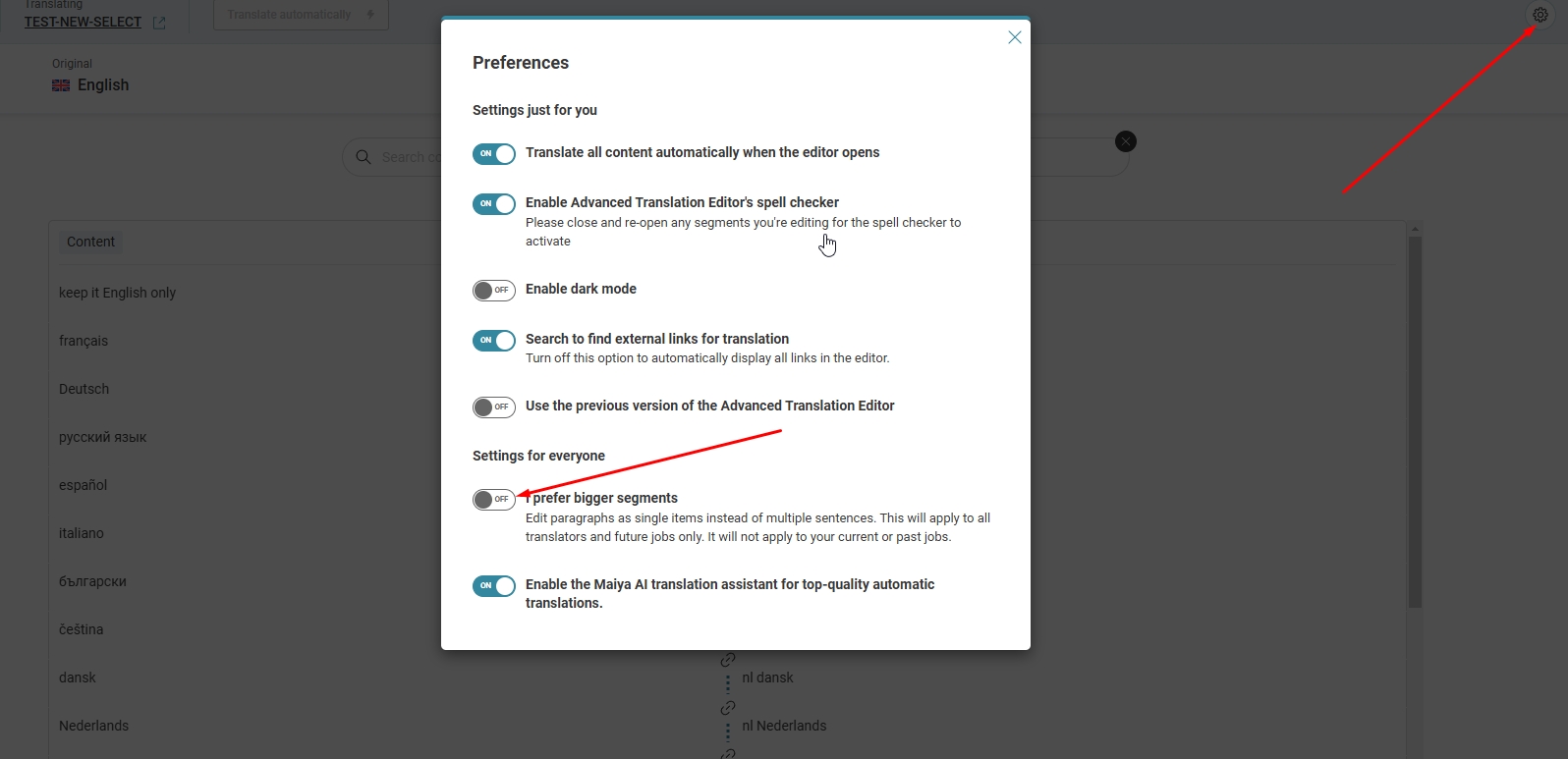 |






