
This is the technical support forum for WPML - the multilingual WordPress plugin.
Everyone can read, but only WPML clients can post here. WPML team is replying on the forum 6 days per week, 22 hours per day.
Tagged: Exception
This topic contains 4 replies, has 0 voices.
Last updated by mikeS-64 6 months, 2 weeks ago.
Assisted by: Mihai Apetrei.
| Author | Posts |
|---|---|
| August 29, 2025 at 6:34 pm #17358715 | |
 mikeS-64 |
Background of the issue: Symptoms: Questions: |
| September 1, 2025 at 4:22 am #17361130 | |
 Mihai Apetrei WPML Supporter since 03/2018 Languages: English (English ) Timezone: Europe/Bucharest (GMT+02:00) |
Hi there. As far as I know, the payment method you are using is set only once in your WPML.org account, and then you can use it as many times as needed. Also, you should be able to change the payment method if you ever need it: If you want to use the "pay as you go" subscription, though, the payment method will need to be added to the backend of the site you are activating the subscription on (WPML > Translation Management > Tools > the proper payment/subscription tab). Please let me know how that goes. Kind regards, |
| September 2, 2025 at 10:04 am #17365208 | |
| mikeS-64 |
Hi Mihai, Instead my colleague just purchased pre paid package credits which can be done at the WPML dashboard instead of on the WP website. However, currently the keytalk.com/wp website does not recognize that I have assigned credits to it. I did unregister/register the site again in the hope that it helps but it did not. When I go to "translation tools" tab I get the window to purchase "Automatic Translation" and the pay-as-you-go. How to make my WP site recognize the added credits? Another question in this regard is, we have 2 sites. A live site (keytalk.com) and a dev site (stg-wwwkeytalkcom). When I migrate from dev to live website it seems that I need to register the WPML site code. However, at some point there are multiple instances mentioned in the "connected sites" on the WP site. I have removed all of them as of now. But in the future, how to go about this? New threads created by Mihai Apetrei and linked to this one are listed below: |
| September 2, 2025 at 10:08 am #17365219 | |
| mikeS-64 |
Here is the screen I am referring to. See that multiple dev sites are mentioned as "connected site" on the live website. The dev WP site has the same sites mentioned as being "connected site." New threads created by Mihai Apetrei and linked to this one are listed below: 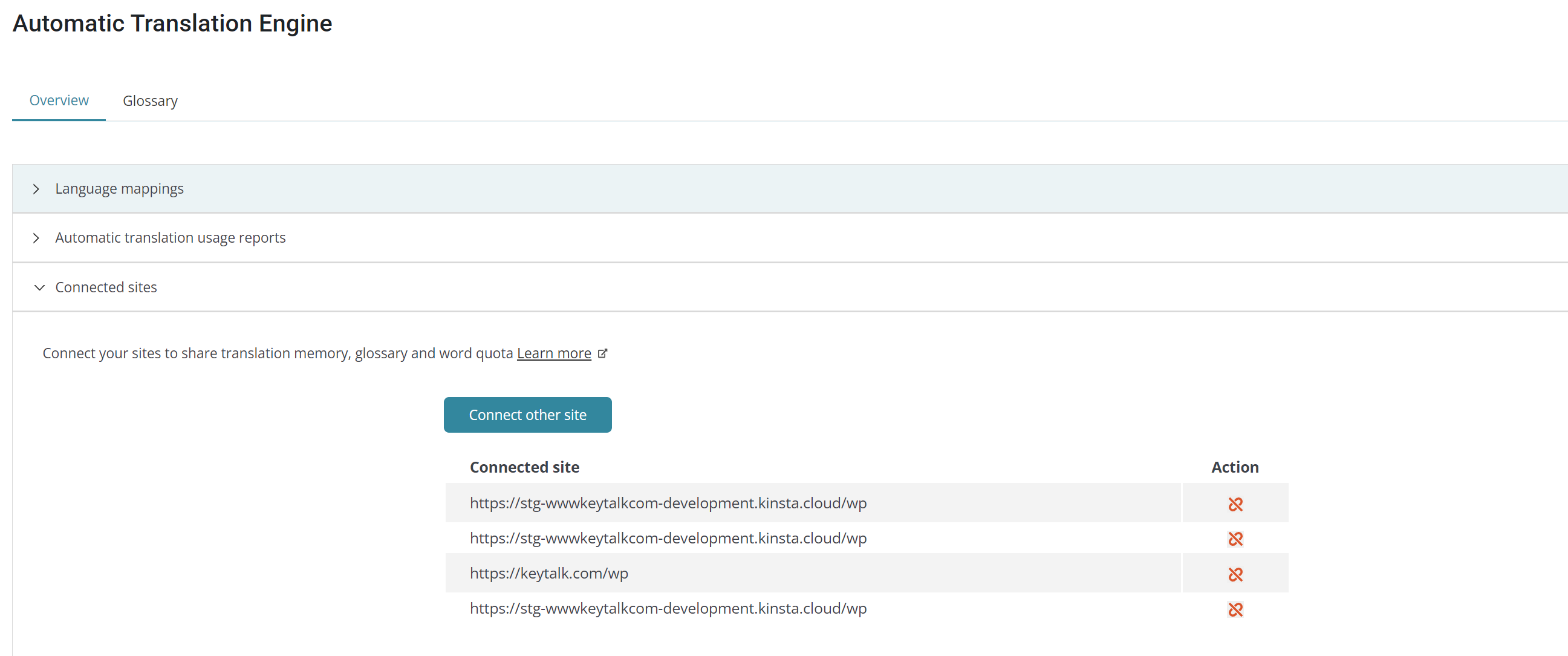 |
| September 2, 2025 at 1:53 pm #17366460 | |
|
Mihai Apetrei WPML Supporter since 03/2018 Languages: English (English ) Timezone: Europe/Bucharest (GMT+02:00) |
Hi there. We can handle only one request per ticket so let me create a separate ticket for each of the other topics and I will answer to you ASAP to those, too. How to assign credits: Multiple instances mentioned in the "connected sites" on the WP site: Mihai |
| September 3, 2025 at 10:47 am #17369868 | |
|
mikeS-64 |
Co-worker added payment method via dashboard for prepaid credits. |






