
This is the technical support forum for WPML - the multilingual WordPress plugin.
Everyone can read, but only WPML clients can post here. WPML team is replying on the forum 6 days per week, 22 hours per day.
| Sun | Mon | Tue | Wed | Thu | Fri | Sat |
|---|---|---|---|---|---|---|
| - | - | 9:00 – 18:00 | 9:00 – 18:00 | 9:00 – 18:00 | 9:00 – 18:00 | 9:00 – 18:00 |
| - | - | - | - | - | - | - |
Supporter timezone: America/Lima (GMT-05:00)
Tagged: Exception
This topic contains 58 replies, has 2 voices.
Last updated by Andreas W. 4 weeks ago.
Assisted by: Andreas W..
| Author | Posts |
|---|---|
| September 18, 2025 at 3:13 pm #17414080 | |
 rhettY |
Background of the issue: Symptoms: Questions: 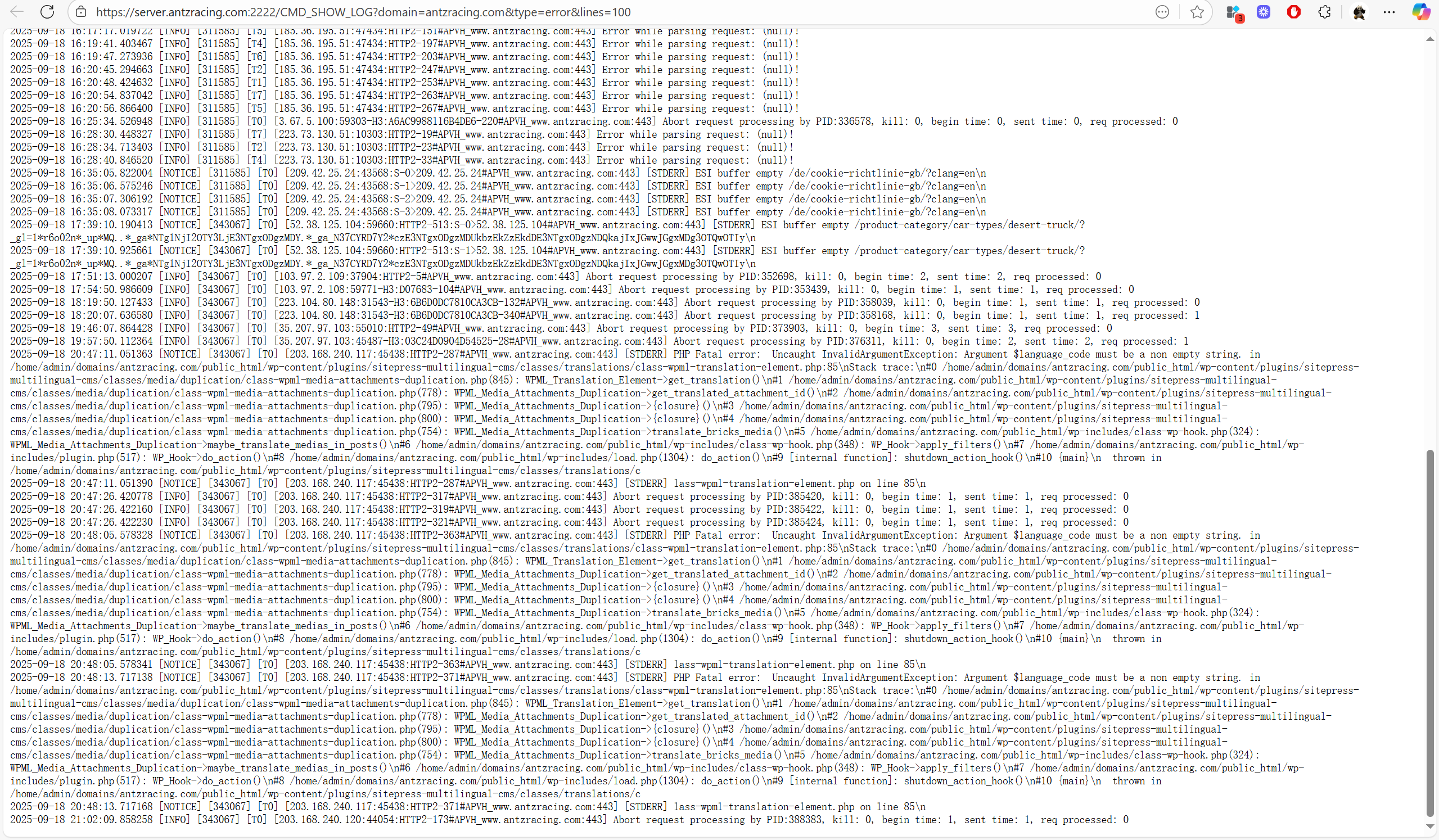 |
| September 18, 2025 at 7:39 pm #17414743 | |
 Mihai Apetrei WPML Supporter since 03/2018 Languages: English (English ) Timezone: Europe/Bucharest (GMT+02:00) |
Hi there. Before this ticket is assigned to one of my colleagues, I will try to help. Maybe we can resolve this issue more quickly, even before a colleague is assigned. I found three existing tickets related to the same fatal error message, and I was wondering if you could review the conversations to see if the recommended solutions from my colleagues help you resolve this. - https://wpml.org/forums/topic/website-went-down-after-activating-wpml-multilingual-cms/ Please let us know how that goes. Mihai Apetrei |
| September 20, 2025 at 2:51 am #17417950 | |
|
rhettY |
I didn't implement those fixes yet. This morning, I found this error log and there are a lot of logs since Sept 7. Please check if it's related and how to fix it: |
| September 20, 2025 at 8:02 pm #17418498 | |
 Andreas W. WPML Supporter since 12/2018 Languages: English (English ) Spanish (Español ) German (Deutsch ) Timezone: America/Lima (GMT-05:00) |
Hello, Could it be that you removed one of the languages? According to the error, it sounds as if there was still a job in progress for a language that is no longer active on the site. Please revise WPML > Translation Dashboard > Translation jobs and cancel any old jobs, especially such jobs that are still in progress, if there are any. You can order the jobs by status for this purpose. If this does not solve the issue, I can offer to take a closer look at the site. Best regards, |
| September 20, 2025 at 8:04 pm #17418499 | |
|
Andreas W. WPML Supporter since 12/2018 Languages: English (English ) Spanish (Español ) German (Deutsch ) Timezone: America/Lima (GMT-05:00) |
Hello, I would like to request temporary access (wp-admin and FTP) to the website to investigate the issue further. You can find the required fields below the comments section when you log in to leave the next reply. The information you provide is private, meaning only you and I can see and access it. IMPORTANT The private reply form looks like this: Click "I still need assistance" the next time you reply. Video: Please note that we are required to request this information individually on each ticket. We are not permitted to access any credentials that were not specifically submitted on this ticket using the private response form. Best regards, |
| September 21, 2025 at 6:15 am #17418713 | |
|
rhettY |
My site was down. I just restored it with a backup. The wp-admin login credential is useless now. Please re-share the private reply form |
| September 22, 2025 at 2:04 pm #17422211 | |
|
rhettY |
Please check the video record: hidden link A lot of errors in server log, and new error notification in WPML dashboard. I am scared. I've implemented those fixes in mentioned in your first response. No help. |
| September 22, 2025 at 2:22 pm #17422288 | |
|
rhettY |
In addition, all my site content have been translated to German days ago. The notice "Your default language, English, must be mapped to a supported language in order to use automatic translation" appeared 2 hours ago. |
| September 23, 2025 at 4:59 am #17423488 | |
|
rhettY |
Hi, Anyone can respond, please. Issue persists: hidden link Regarding "Api error missing resource: No sitekey found for this website", I've tried unregistering and then re-registering 3 times. The issue doesn't disappear. I've also tried below method you mentioned in first response: No help. Site is about to launch. Please help solve the issue. |
| September 23, 2025 at 7:05 am #17423606 | |
|
Andreas W. WPML Supporter since 12/2018 Languages: English (English ) Spanish (Español ) German (Deutsch ) Timezone: America/Lima (GMT-05:00) |
Hello, My apologies for the delay in answering, as I work from Tuesdays to Saturdays. First, please let us handle the registration issue: Revise WPML > Support > Installer Support after clicking "Check now". Can you confirm that the site is using a valid site key? In case not: WPML must be re-registered after each website migration or after changing the domain or domain provider. 1) Go to https://wpml.org/account/websites/ 2) If the site URL is already registered, delete it from the list. 3) Re-enter the site URL. This will create a new site key. 4) Click "Show key" and copy it. 5) Enter the key under Plugins > Install > Commercial (tab) to re-register WPML. If WPML is still registered there, de-register it first. Next, I would like to request temporary access (wp-admin and FTP) to the website to investigate the issue further. The required fields are located below the comments section when you log in to leave the next reply. The information you provide is private, meaning only you and I can see and access it. IMPORTANT The private reply form looks like this: Click "I still need assistance" the next time you reply. Video: Please note that we are required to request this information individually on each ticket. We are not permitted to access any credentials that were not specifically submitted on this ticket in the private response form. Best regards |
| September 23, 2025 at 10:43 am #17424577 | |
|
Andreas W. WPML Supporter since 12/2018 Languages: English (English ) Spanish (Español ) German (Deutsch ) Timezone: America/Lima (GMT-05:00) |
There is a language mapping issue on your site, and languages can not be mapped, as all translation engines are disabled. If you want to continue using automatic translation, you need to activate at least one translation engine at WPML > Translation Dashboard > Translation Tools > Automatic translation engines. After enabling at least one engine, please map the languages again at WPML > Translation Dashboard > Translation Tools > Language mappings. If this will not solve the issue, please let me know. 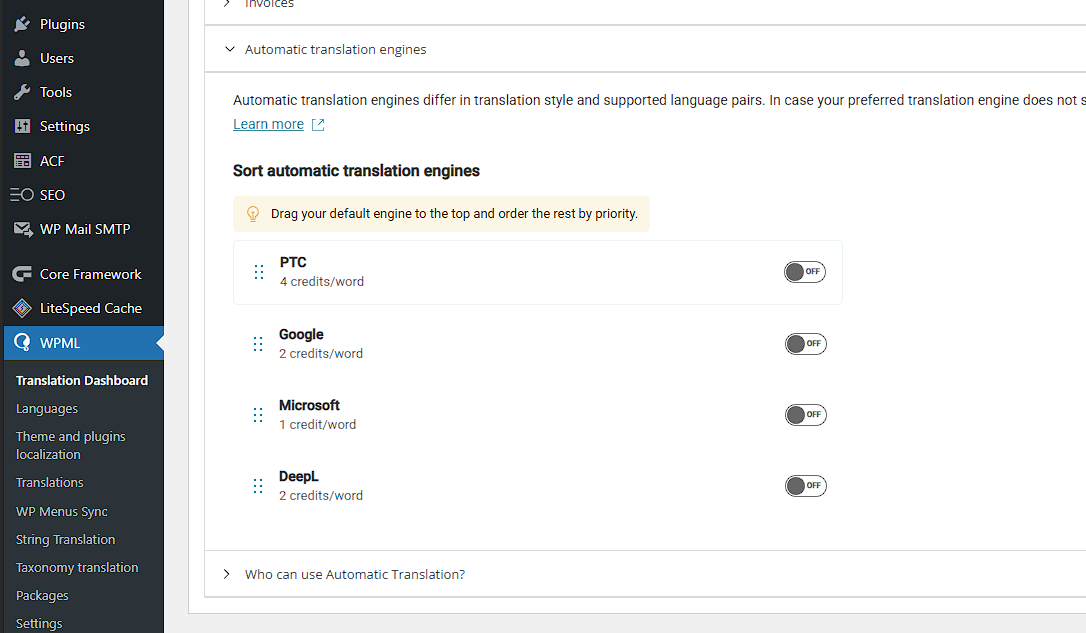 |
| September 23, 2025 at 10:50 am #17424607 | |
|
rhettY |
Thanks Andreas, I followed the guide and solved the mapping issue. But this seems to be a bug that I can't disable all the translation engines which will cause the mapping issue. How about the "Api error missing resource: No sitekey found for this website" issue? |
| September 23, 2025 at 11:56 am #17424822 | |
|
Andreas W. WPML Supporter since 12/2018 Languages: English (English ) Spanish (Español ) German (Deutsch ) Timezone: America/Lima (GMT-05:00) |
I will be glad to take another into this for you, but when logging in again now, my user account is no longer an admin account, and I can not access the whole backend. Please change the user role for the account to "admin" and drop me a comment once you are done with this task. --- About the error: Examples: If any of these criteria are met, you usually should not be able to disable all translation engines. I will be glad to escalate this internally. |
| September 23, 2025 at 12:32 pm #17425120 | |
|
rhettY |
Sorry. I've changed the user role. Please check again. |
| September 24, 2025 at 1:57 am #17427235 | |
|
rhettY |
Today it logged this error again: |







The topic ‘[Closed] PHP Fatal error: Uncaught InvalidArgumentException:’ is closed to new replies.