This thread is resolved. Here is a description of the problem and solution.
Problem: The client is experiencing issues with the WPML language switcher not appearing correctly in the menu when using a custom theme. The switcher either does not show up at all when set to display flags only, or appears messy when set to display names. Solution: We determined that the issue is related to how the custom theme handles the header/menu output, which affects the display of the WPML language switcher. Since this behavior is controlled by the theme and not WPML, we recommend contacting the theme author to adjust the header template or custom menu walker to support the WPML menu language switcher output properly. As a temporary workaround, you can add custom CSS to visually include the flags. You can do this by navigating to your WordPress admin, going to Appearance → Customize → Additional CSS, and adding the following code:
Please note, this solution may not work if the switcher is configured as a dropdown, as dropdowns are usually controlled by the theme’s JavaScript and custom markup.
If this solution does not resolve your issue or seems outdated, we highly recommend checking related known issues at https://wpml.org/known-issues/, verifying the version of the permanent fix, and confirming that you have installed the latest versions of themes and plugins. If the problem persists, please open a new support ticket.
This is the technical support forum for WPML - the multilingual WordPress plugin.
Everyone can read, but only WPML clients can post here. WPML team is replying on the forum 6 days per week, 22 hours per day.
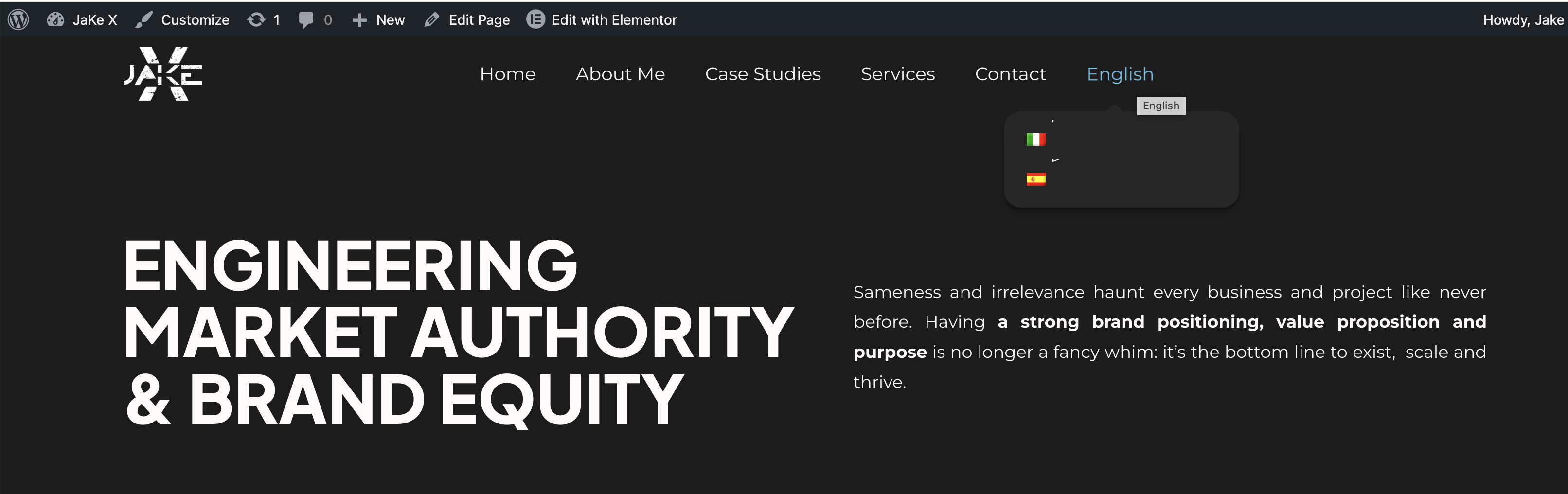
I'm attaching a couple of screens that explain the problem. If I select a flag only switcher, it doesn't even appear on the menu. If I select the word, it shows quite messy. Btw, I want the flag only to appear, without the word
I tested this further and found that the WPML language switcher works correctly when using a default-supported theme such as Astra.
Because of that, this does not seem to be a WPML configuration issue. It points instead to the current theme and how it renders the header/menu output.
In other words, WPML is adding the language switcher correctly, but the active theme appears to override or customize the menu/header rendering, which is why the switcher does not show as expected.
I could not find this theme from our side as officially compatible so some issue may happen. I would recommend checking this with the theme author/developer, as they may need to adjust the header template or custom menu walker to properly support the WPML menu language switcher output.
My bad, they had actually suggested me this: "As for the switch, this is a custom element in the header section of the site, you may need to apply an additional CSS style using the capabilities of the WordPress customizer." However, I'm not that familiar with this action, could you guide me to understand how to apply this additional CSS style and where?
I checked this further and the behavior is related to how the current theme renders the language switcher in the header. Instead of using the standard WPML menu language switcher output, the theme is displaying the languages as a custom header element with simple links. Because of that, the WPML flags are not rendered automatically as they normally would be when the switcher is added as a regular menu item.
Technically, providing custom code falls outside of WPML’s scope, since this behavior is controlled by the theme implementation not us. The best long-term solution would be to check with the theme author so they can adjust how the language switcher is rendered in the header or they can join our programe and we would glad to work together in makng their theme compatible.
However, as a temporary workaround, we can visually add the flags with custom CSS.
You can add the following CSS from your WordPress admin, Appearance → Customize → Additional CSS
Please note that the flag URLs below are based on your staging site, so you may need to adjust them for your production site.
This CSS simply adds a small flag image before the language links.
Please note that this workaround works when the language switcher is displayed as a list of links.
If the switcher is configured as a dropdown, the same approach may not work correctly because dropdowns are usually controlled by the theme’s JavaScript and custom markup, which CSS alone cannot reliably modify.
Ok I see what you mean, however I don't like the solution, aesthetically speaking. I just reported your words to the theme author, let's see what he says.
Yes, I completely understand your concern. Adjusting in the theme code would be cleaner and better solution. They would be able to modify how the switcher is rendered in the header and include the flags properly.
If they need our help implementing compatibility with WPML, they are welcome to join our Go Global program, where we collaborate with theme and plugin authors to ensure proper integration with WPML: https://wpml.org/documentation/support/go-global-program/
Please let me know if there is anything else we can do for you.