
This is the technical support forum for WPML - the multilingual WordPress plugin.
Everyone can read, but only WPML clients can post here. WPML team is replying on the forum 6 days per week, 22 hours per day.
| Sun | Mon | Tue | Wed | Thu | Fri | Sat |
|---|---|---|---|---|---|---|
| - | - | 9:00 – 18:00 | 9:00 – 18:00 | 9:00 – 18:00 | 9:00 – 18:00 | 9:00 – 18:00 |
| - | - | - | - | - | - | - |
Supporter timezone: America/Lima (GMT-05:00)
Tagged: WCML
Related documentation:
This topic contains 24 replies, has 0 voices.
Last updated by sigurdurB 1 day, 16 hours ago.
Assisted by: Andreas W..
| Author | Posts |
|---|---|
| March 19, 2026 at 10:33 am #17910515 | |
 sigurdurB |
I duplicated a product, tweaked it a bit, and retranslated it with PTC ATE and the translated page gets a 404 error when I switch from the origional language to a translation language. |
| March 20, 2026 at 11:49 am #17913810 | |
 Marcel Supporter Languages: English (English ) Spanish (Español ) German (Deutsch ) Timezone: Europe/Vienna (GMT+02:00) |
Hi, Do you have a staging site where I can take a look? I would eventually also need to request temporary access (WP-Admin and FTP) to your site Your next answer will be private which means only you and I have access to it. ❌ Please backup your database and website ❌ ✙ I would additionally need your permission to de-activate and re-activate Plugins and the Theme, and to change configurations on the site. This is also a reason the backup is really important. ✙ Please add the Links to the […] Edit Screen, the Page/Post where you insert the […] and the corresponding Front End Page/Screen Best Regards, |
| March 23, 2026 at 4:00 pm #17919582 | |
|
Marcel Supporter Languages: English (English ) Spanish (Español ) German (Deutsch ) Timezone: Europe/Vienna (GMT+02:00) |
Thanks for the access. Here is the backend link to an example product: The issue is that the products are currently saved as drafts. Because of this, the system generates a temporary permalink such as: You only need to publish these drafts to resolve the issue. Best regards, |
| March 23, 2026 at 4:58 pm #17919712 | |
|
sigurdurB |
OK so why did WPML create the translation as a draft, that has never happened before. The origional english is not in draft. Also the Icelandic slug is the english name with (copy) or (copy)(copy). What's up with that? |
| March 23, 2026 at 5:27 pm #17919737 | |
|
sigurdurB |
NEW URGENT varient. All categories on production site are now giving 404. I can do a fresh restore on the site you have access too so you can troubleshoot |
| March 23, 2026 at 5:34 pm #17919748 | |
|
sigurdurB |
Crisis averted, went to hidden link and re-saved the translation for product-categories, and that kicked something. Might be good to figure out what could have happened. |
| March 23, 2026 at 5:42 pm #17919752 | |
|
sigurdurB |
FYI I was working in string translation right before I noticed the problem, don't know if that is related or not. |
| March 24, 2026 at 10:53 am #17921289 | |
|
Marcel Supporter Languages: English (English ) Spanish (Español ) German (Deutsch ) Timezone: Europe/Vienna (GMT+02:00) |
Hi, In this ticket, we are only addressing the issue with the draft. If you still need assistance with the new report, we can split the ticket and handle that separately.
In WPML/WCML, when a product is duplicated, the duplication process copies the full database entry. Because of this, the translation state and post status can also be copied to the translated product. If the product was duplicated while in a different state, the translation may be created as a draft and the slug can receive the “(copy)” suffix. This behavior is related to how duplication works in WooCommerce core. Please see the following workaround, which prevents the translation state from being copied during duplication: https://wpml.org/forums/topic/product-bundle-dissapear/?paged=3#post-17885887 Applying this workaround should prevent the draft state and the “(copy)” suffix from being added in future duplications. Best regards, |
| March 25, 2026 at 11:49 am #17926134 | |
|
sigurdurB |
As I've stated before, the product was in published state when I translated it. Sounds like you are saying that root cause analysis (RCA) is not your job, that all you care about is that I'm not experiencing the issue right now and that this is just how things works and I just need to get used to it. |
| March 25, 2026 at 6:54 pm #17927384 | |
 Andreas W. WPML Supporter since 12/2018 Languages: English (English ) Spanish (Español ) German (Deutsch ) Timezone: America/Lima (GMT-05:00) |
Hello, My colleague Marcel is not available today, which is why I am stepping in. According to your provided debug information, you are using WPML's settings for document translation options to publish new translations as "Draft". Please revise WPML > Settings > Translated documents options When you receive completed translations Set this option to "Publish the translated post when original is also published (default)". Best regards |
| March 25, 2026 at 7:05 pm #17927392 | |
|
sigurdurB |
That is incorrect, I have always had it set to publish the translation. I have never touched this setting. 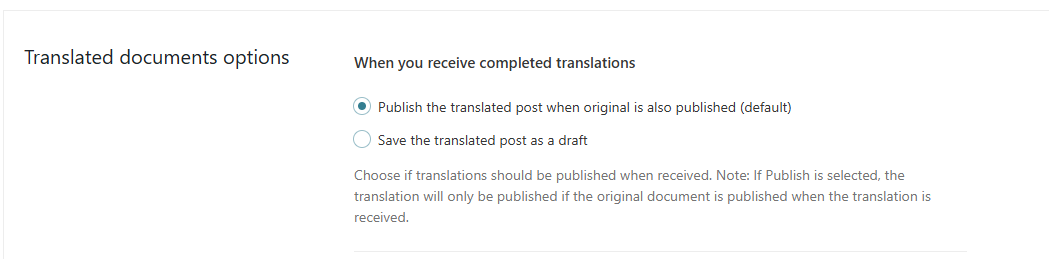 |
| March 25, 2026 at 8:46 pm #17927570 | |
|
Andreas W. WPML Supporter since 12/2018 Languages: English (English ) Spanish (Español ) German (Deutsch ) Timezone: America/Lima (GMT-05:00) |
Can you still recreate the issue with a newly created published post or does this only happen on existing untranslated posts? |
| March 25, 2026 at 9:31 pm #17927623 | |
|
sigurdurB |
I just reproduced this on the dev site I gave Marcel access to. See cybersecurity awerness 4 april hidden link |
| March 26, 2026 at 2:42 am #17927739 | |
|
Andreas W. WPML Supporter since 12/2018 Languages: English (English ) Spanish (Español ) German (Deutsch ) Timezone: America/Lima (GMT-05:00) |
The login is sadly not working out for me, no matter if I use the provided credentials of the fetch link: Could you please simply add admin access by using the private reply form? |
| March 26, 2026 at 10:54 pm #17930720 | |
|
Andreas W. WPML Supporter since 12/2018 Languages: English (English ) Spanish (Español ) German (Deutsch ) Timezone: America/Lima (GMT-05:00) |
In your first comment, you are saying: I went to Products > All products and duplicated the product "Cybersecurity Awareness April 4 2026". - Note that WooCommerce will create this new product as a "Draft" and if the product is already translated, this step will also duplicate the translation. As the original product is a "Draft" after duplicating it in WooCommerce, the translation should also become a "Draft". This is expected and related to the fact that WooCommerce does not publish a duplicated product directly. If you want to avoid WPML creating a duplicate translation, you can use this snippet:
/**
 * Prevent WCML from also duplicate the translations
 * when duplicating a product.
 */
add_action( 'admin_init', function() {
	/** @var \woocommerce_wpml $woocommerce_wpml */
	global $woocommerce_wpml;

	if ( isset( $woocommerce_wpml->duplicate_product ) ) {
		remove_filter( 'woocommerce_product_duplicate', [ $woocommerce_wpml->duplicate_product, 'woocommerce_duplicate_product' ] );
	}
} );
WPML will only sync the status for products once, when translated for the first time. If you want to keep the statuses in sync, you might need to use a custom snippet, for example this snippet would work for any post type:
add_action('transition_post_status', 'stk_sync_translation_status', 10, 3);

function stk_sync_translation_status($new_status, $old_status, $post) {
    // Bail out if nothing changed or during autosave
    if ($new_status === $old_status || (defined('DOING_AUTOSAVE') && DOING_AUTOSAVE)) {
        return;
    }

    // Ensure WPML is loaded
    if (!did_action('wpml_loaded')) {
        return;
    }

    $post_type = get_post_type($post->ID);

    // Restrict to specific post types
    $allowed_types = ['post', 'page', 'product'];
    if (!in_array($post_type, $allowed_types, true)) {
        return;
    }

    $element_type = 'post_' . $post_type;
    $trid = apply_filters('wpml_element_trid', null, $post->ID, $element_type);

    if (!$trid) {
        return;
    }

    $translations = apply_filters('wpml_get_element_translations', null, $trid, $element_type);

    if (empty($translations)) {
        return;
    }

    // Prevent recursion
    remove_action('transition_post_status', 'stk_sync_translation_status', 10);

    foreach ($translations as $translation) {
        // Skip the original post
        if ($translation->element_id == $post->ID) {
            continue;
        }

        // Ensure user has permission
        if (!current_user_can('edit_post', $translation->element_id)) {
            continue;
        }

        // Ensure the translation post exists
        if (!get_post($translation->element_id)) {
            continue;
        }

        wp_update_post([
            'ID'         => $translation->element_id,
            'post_status'=> $new_status,
        ]);
    }

    // Re‑attach the hook
    add_action('transition_post_status', 'stk_sync_translation_status', 10, 3);
}
|







