Skip to content Skip to sidebar

This is the technical support forum for WPML - the multilingual WordPress plugin.

Everyone can read, but only WPML clients can post here. WPML team is replying on the forum 6 days per week, 22 hours per day.

Sun Mon Tue Wed Thu Fri Sat
12:00 – 20:00 12:00 – 20:00 12:00 – 20:00 12:00 – 20:00 12:00 – 20:00 - -
- - - - - - -

Supporter timezone: Asia/Karachi (GMT+05:00)

This topic contains 9 replies, has 0 voices.

Last updated by Noman 2 weeks, 6 days ago.

Assisted by: Noman.

Author Posts
December 3, 2025 at 2:18 am #17628939

zekkeiL

WPML String Translation is attempting to write .mo files with translations to folder:

Languages folder already set the permission 755 and files set to 664 but still issue permission related how can i fix this

December 3, 2025 at 10:57 am #17630235

Noman
WPML Supporter since 06/2016

Languages: English (English )

Timezone: Asia/Karachi (GMT+05:00)

Hi,

Thank you for contacting WPML Support. To take a closer look at this issue, please provide temporary access (WP-Admin and FTP Login info) to your site (preferably staging site), so that I can look into your setup and debug the issue.

Your next answer will be private, meaning only you and I can access it.

=== Please backup your database and website ===

✙ I would need your permission to deactivate and reactivate Plugins and the Theme and to change configurations on the site. This is also a reason the backup is essential.

Thank you

December 4, 2025 at 9:36 am #17633199

Noman
WPML Supporter since 06/2016

Languages: English (English )

Timezone: Asia/Karachi (GMT+05:00)

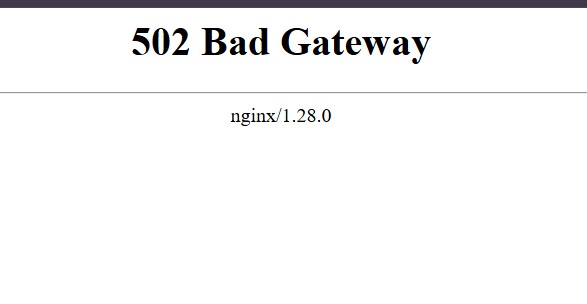
Thanks for sharing the login details. I’m unable to access the wp-admin page as it’s showing a Bad Gateway error, as you can see in the screenshot. Could you please check this on your side?

Thank you

bad gateway.jpg
December 5, 2025 at 4:28 pm #17639341

Noman
WPML Supporter since 06/2016

Languages: English (English )

Timezone: Asia/Karachi (GMT+05:00)

Sorry for the delay, I am off for my weekend (Friday-Saturday). Thanks for the update, I will continue to work on this issue the first thing on Sunday and get back to you with an update.

Thank you for your cooperation and patience.

December 7, 2025 at 7:42 am #17641043

zekkeiL

Hello Please let us know when you checked and fixed ?

please don't waste our time

December 7, 2025 at 10:19 am #17641653

Noman
WPML Supporter since 06/2016

Languages: English (English )

Timezone: Asia/Karachi (GMT+05:00)

I’m debugging the issue on your site and will get back to you with an update soon.

Thank you for your cooperation and patience

December 7, 2025 at 6:57 pm #17642294

Noman
WPML Supporter since 06/2016

Languages: English (English )

Timezone: Asia/Karachi (GMT+05:00)

I checked the issue, and the “WPML Languages Folder Writable Issues” message disappears as soon as the “Use directory for default language” option is turned off. This means the problem is linked to how the site handles the default language directory.

To isolate the cause of this issue, I have set up a fresh WP site on a test server(cloudways). Please migrate your site there using the details I shared in my earlier private reply, and let me know once the migration is complete.

Thank you for your cooperation

December 9, 2025 at 3:34 am #17645735

zekkeiL

Hello

Now migration is completed

hidden link

Screenshot : hidden link

Please look into this and let us know what we do next

December 9, 2025 at 10:34 am #17646875

Noman
WPML Supporter since 06/2016

Languages: English (English )

Timezone: Asia/Karachi (GMT+05:00)

Thanks for confirming the migration. I’ll start checking the issue on the test site now and will update you as soon as I have the findings.

Thank you for your cooperation and patience

December 9, 2025 at 5:26 pm #17648929

Noman
WPML Supporter since 06/2016

Languages: English (English )

Timezone: Asia/Karachi (GMT+05:00)

I enabled “Use directory for default language” on the migrated site on our Cloudways test server, and it works without any issues, even without deactivating any theme/plugin or changing any configuration. On your live server, the AJAX requests get the language code added, which breaks page creation. Since this doesn’t happen on Cloudways, it’s very likely caused by a server-side rewrite, proxy, caching, or security rule on your hosting.

Could you please ask your hosting support to review anything that might be rewriting or blocking AJAX URLs, such as:

1. Redirect or rewrite rules (Nginx configuration)
2. Reverse proxy or load-balancer rules
3. Server caching layers
4. Security modules (mod_security, WAF, Cloudflare rules)
5. Any custom URL-rewrite logic on the server

Here is the example of the affected request:

Correct:
hidden link

Live (incorrect):
hidden link

Thank you

The topic ‘[Closed] WPML languages Folder Writable Issues’ is closed to new replies.