
This is the technical support forum for WPML - the multilingual WordPress plugin.
Everyone can read, but only WPML clients can post here. WPML team is replying on the forum 6 days per week, 22 hours per day.
Tagged: Compatibility
This topic contains 6 replies, has 0 voices.
Last updated by Itamar 1 month, 1 week ago.
Assisted by: Itamar.
| Author | Posts |
|---|---|
| February 17, 2026 at 3:11 pm | |
 getgain-solutionsL |
Hello, We are translating the website using WPML, but several errors and/or incompatibilities are occurring that should not happen. We are able to translate the page content and view the translated pages in the browser, but this only works correctly by duplicating the page and editing it independently. If we translate the pages using the WPML Translation Editor, multiple strings that do not exist on the page are pulled into the translation, including theme option titles and theme editing boxes that are not present on the page. In the case of the header and footer, their translations are never displayed. In other words, when creating a translation for the header and footer, both the original language and the translated versions are listed in the theme options for selection. If the default header and footer are set to the original language version, both will always be displayed in that language on the site, regardless of the language currently being viewed. This is incorrect, as it should display either the original or the translated version according to the language being viewed. We have also tested translating pages, headers, and footers using the WPML Translation Editor, and the problems are exactly the same. Instead of using the “Header” and “Footer” modules to create them, we tried another approach by recreating them in “Templately > Theme Builder.” However, as soon as WPML is activated, an error occurs: when creating new headers or footers in “Templately > Theme Builder,” they are not available for editing in the back office. Additionally, any headers or footers created before activating WPML start generating errors when attempting to edit them with Elementor (and we also have no way to define them as the header and footer to be displayed on the site). Theme: AI Globe - Artificial Intelligence Startup & Technology WordPress Theme, By designthemes |
| February 17, 2026 at 4:25 pm #17829900 | |
 Itamar WPML Supporter since 02/2016 Languages: Hebrew (עברית ) Timezone: Asia/Jerusalem (GMT+03:00) |
Hi, We need to replicate this issue on a fresh WordPress installation. Then I'll be able to escalate it to our compatibility team. To do this, I created a test website with a clean WordPress installation. You can access it through this link: hidden link With this link, you'll be directly logged in. Could you please install the AI Globe theme and see if the issue is replicable on a clean WordPress installation? Please also make sure that you are installing the latest version of the theme. The problems we will check arethe following: When everything is finished, and you can replicate the problem, please let us know. |
| February 17, 2026 at 5:35 pm #17830118 | |
|
getgain-solutionsL |
I installed the theme in the sandbox and tried to import the base demo so we could run the tests, but an error occurs during the import process. |
| February 17, 2026 at 5:37 pm #17830120 | |
|
getgain-solutionsL |
.  |
| February 17, 2026 at 8:43 pm #17830419 | |
|
Itamar WPML Supporter since 02/2016 Languages: Hebrew (עברית ) Timezone: Asia/Jerusalem (GMT+03:00) |
Hi, I can see this problem. The following message is shown. URL error 6: Could not resolve host: phpstack-209721-3692979.cloudwaysapps.com Please see the attached screenshot. Please consider adding some content manually. We just need the minimum for investigating this issue. Regards, 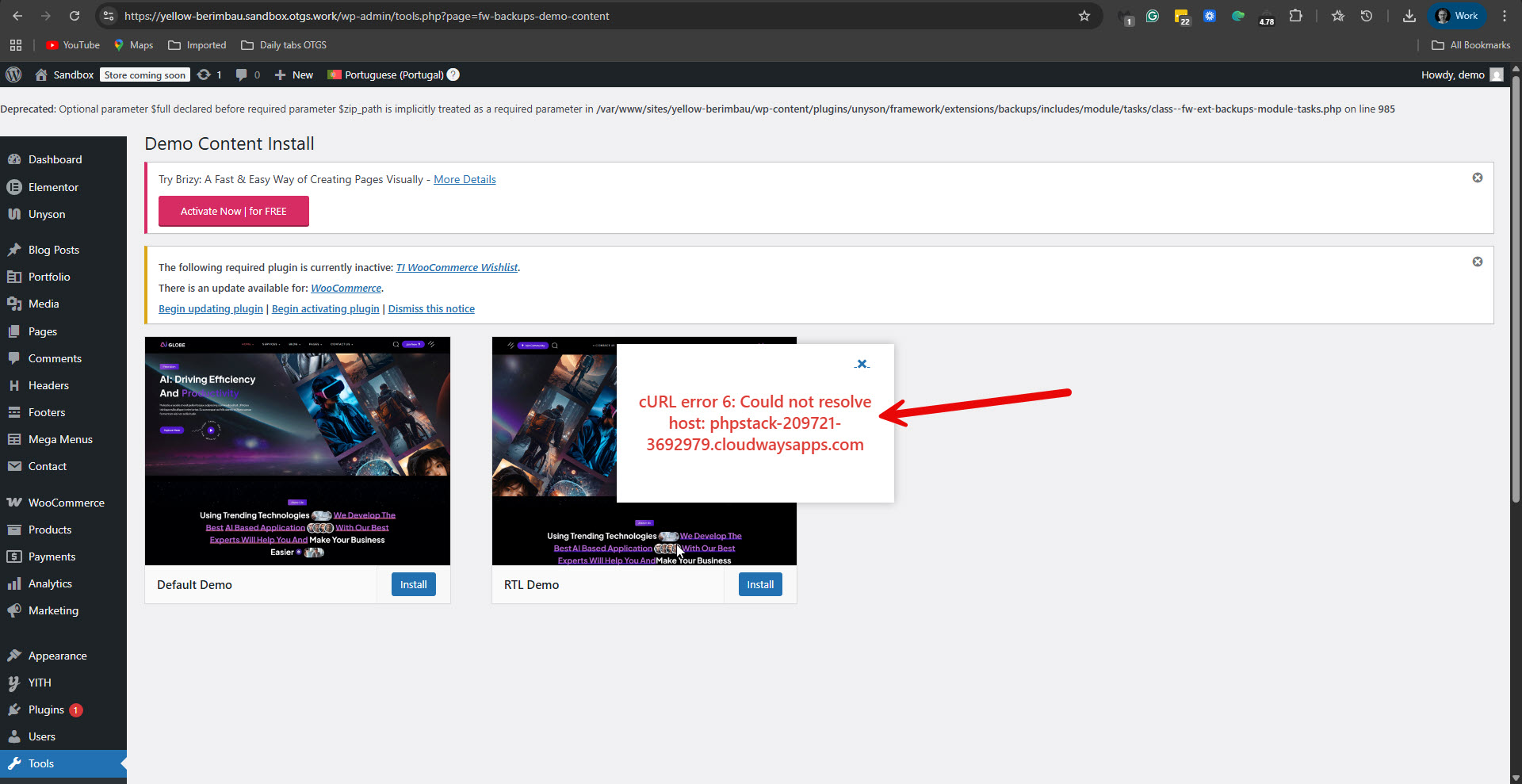 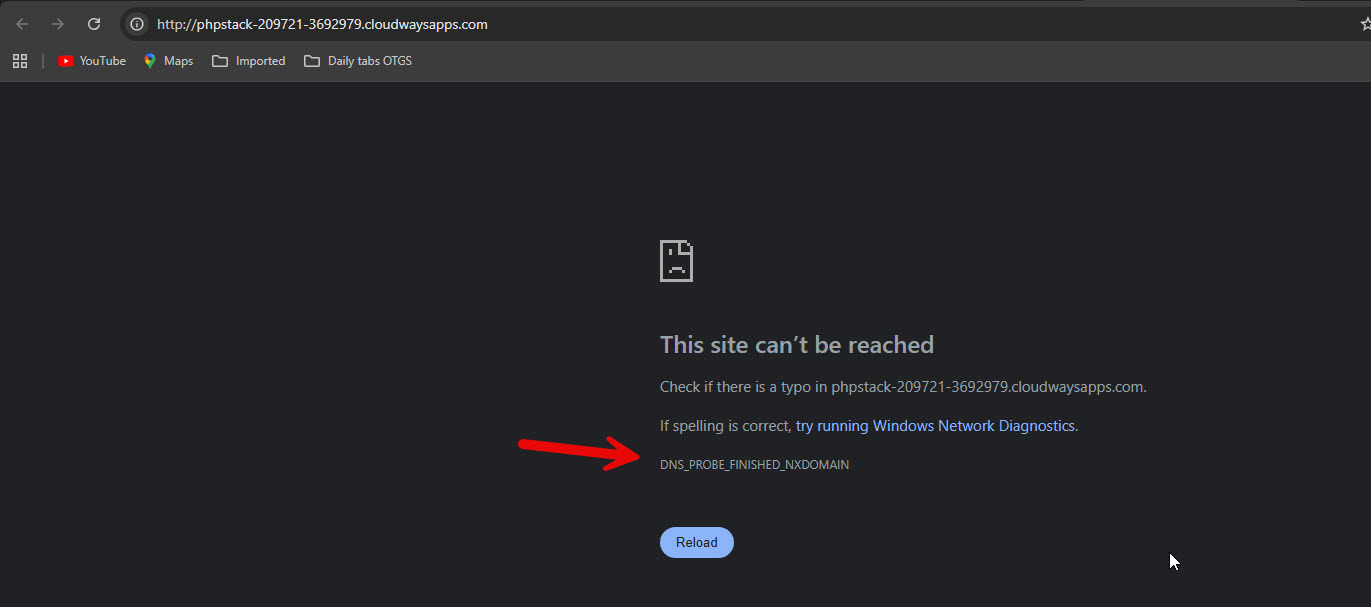 |
| February 23, 2026 at 2:25 pm #17843484 | |
|
getgain-solutionsL |
I apologize for the delay, but I no longer had access to respond. |
| February 24, 2026 at 8:44 pm #17848854 | |
|
Itamar WPML Supporter since 02/2016 Languages: Hebrew (עברית ) Timezone: Asia/Jerusalem (GMT+03:00) |
Hi, Thanksfor setting up the sandbox site. I was able to solve the header issue. (In a similar way, it is also possible to solve the footer issue.) Here is what you need to do. 1. Go to WPML -> Strings Translation -> Admin Texts Translation. It is here: hidden link 2. Use the search field and search for "site_custom_header". 3. Select "[aiglobe-customiser-option]site_custom_header" and add it to Strings Translation. Please see the attached screenshot, add-to-strings.jpg. 4. Return to Strings Translation, and switch the string's language to Portuguese. Please see the attached screenshot, switch-lang.jpg. 5. Translate this string. The string (87) is a numeric value representing the header ID in Portuguese. So in the translation, you need to insert the ID of the English header (206). Please see the attached screenshot 206.jpg. 6. Check if it works. If it does not work, go to Appearance -> Customize -> Site General -> Header. and re-save / Publish the settings. Please let me know if you have any further questions. Regards, 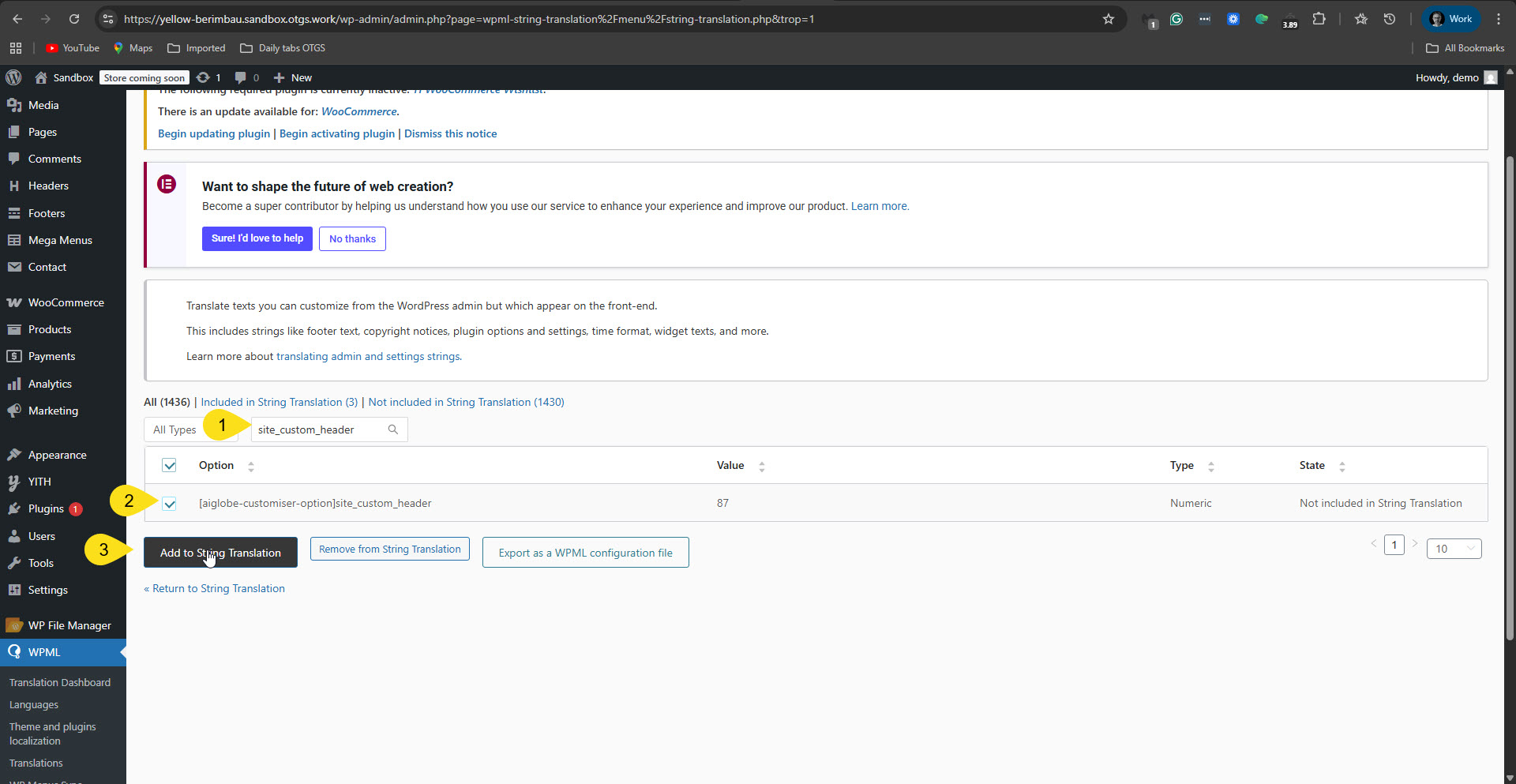 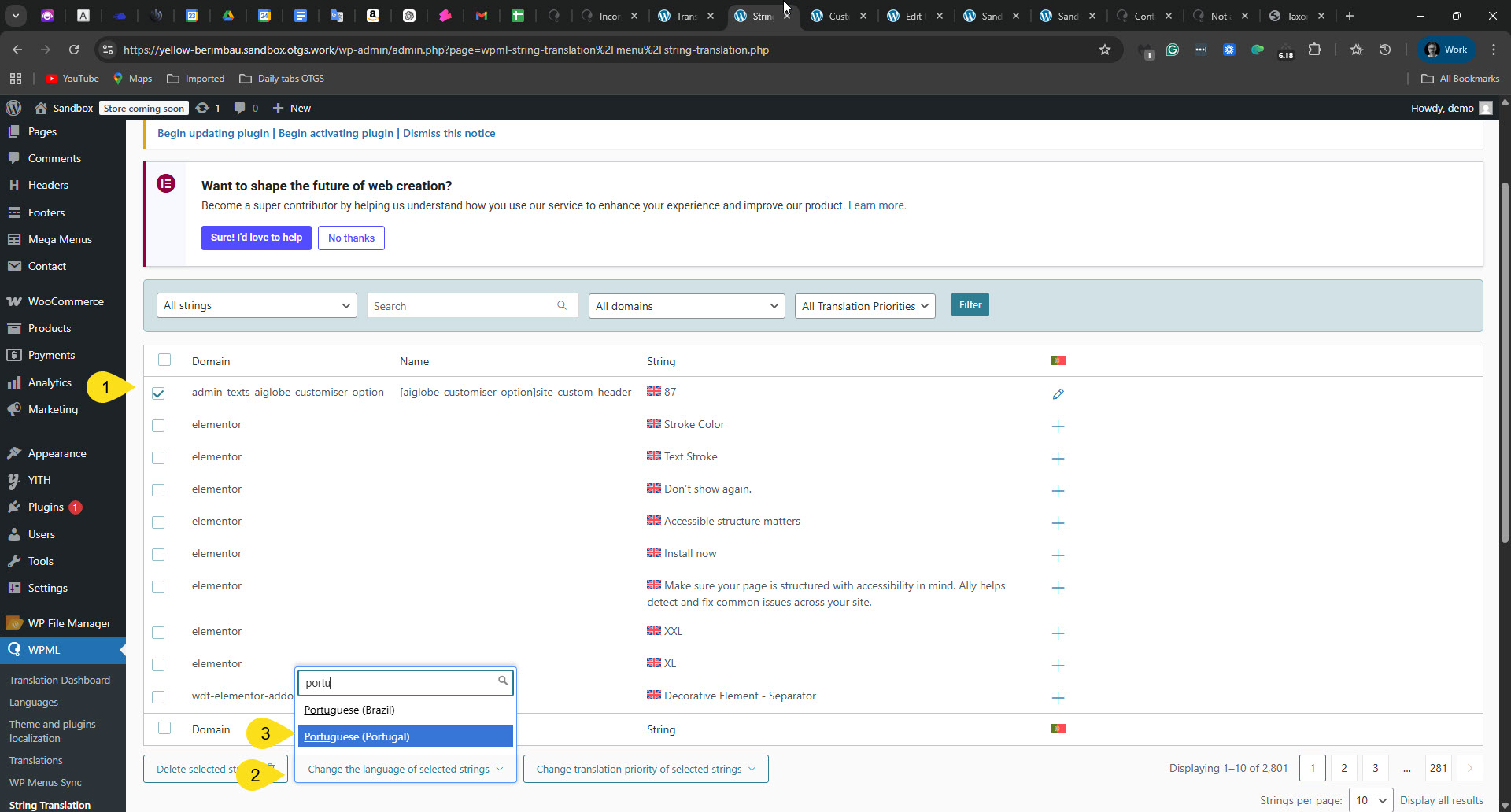 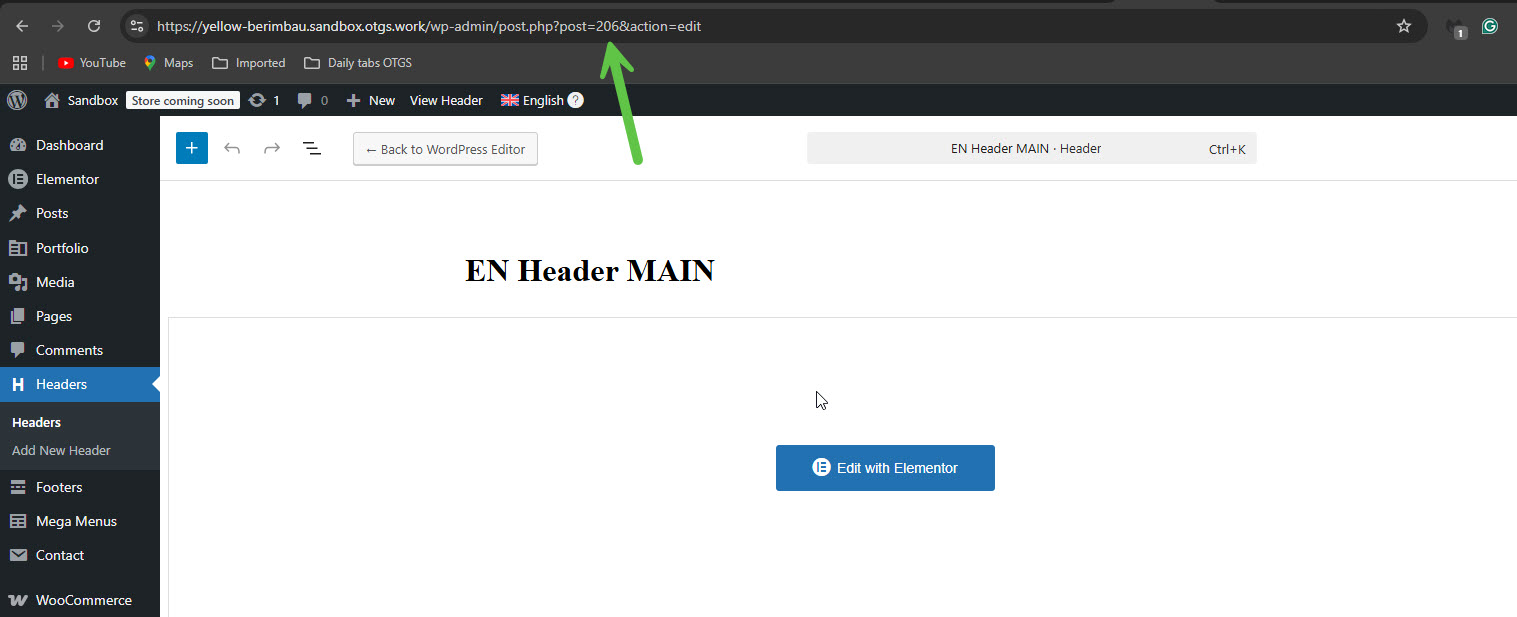 |






