This thread is resolved. Here is a description of the problem and solution.
Problem:
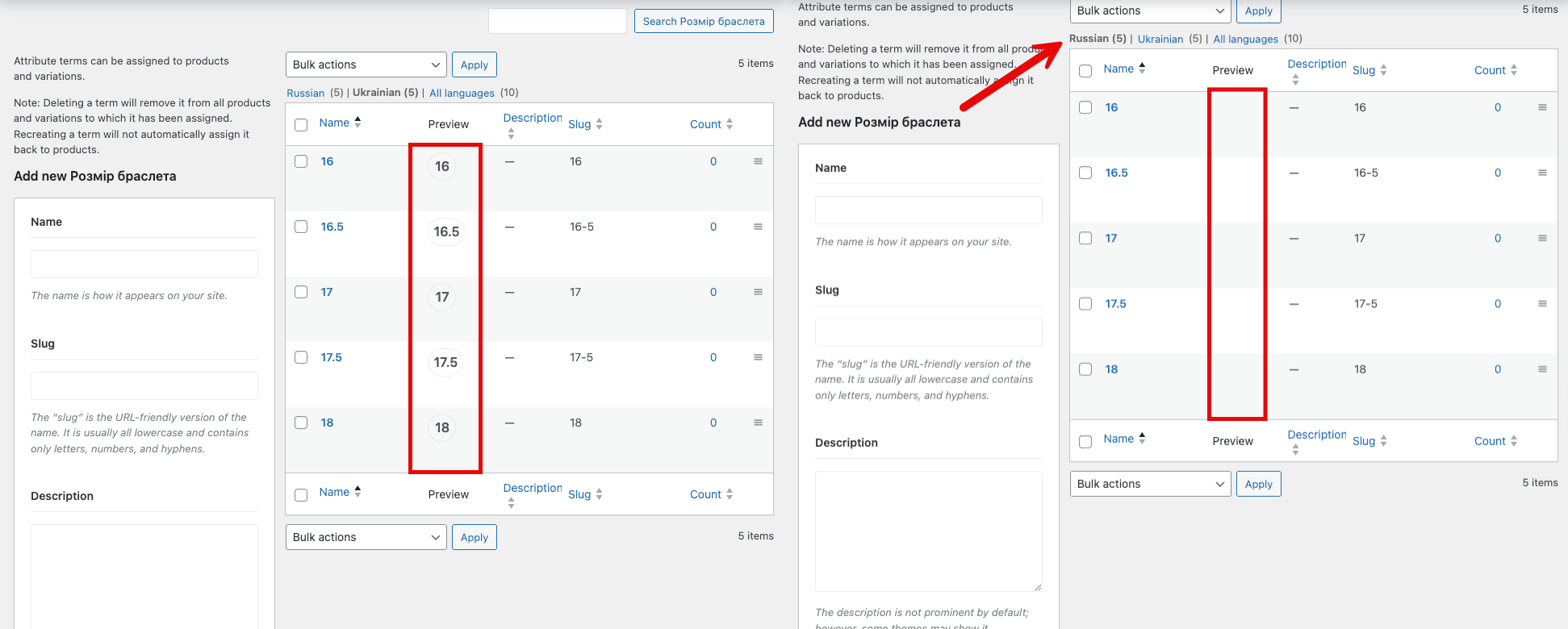
You are experiencing an issue where variation swatches display as image/button swatches on the original language page, but show as dropdown selects on the translated version.
Solution:
We found that the translated terms don't have the text swatch enabled. To resolve this, please edit the translated terms and enable the text swatch. Afterward, update the product in the default language by making a minor edit and then update it. This should ensure consistency across both languages.
If this solution does not apply to your case, or if it seems outdated, we highly recommend checking related known issues at https://wpml.org/known-issues/, verifying the version of the permanent fix, and confirming that you have installed the latest versions of themes and plugins. If issues persist, please do not hesitate to open a new support ticket at WPML support forum.
This is the technical support forum for WPML - the multilingual WordPress plugin.
Everyone can read, but only WPML clients can post here. WPML team is replying on the forum 6 days per week, 22 hours per day.
This topic is split from https://wpml.org/forums/topic/product-pages-with-custom-woodmart-layout-not-rendering-when-wpml-is-active-blank-page-on-products/
This topic contains 1 reply, has 0 voices.
Last updated by 1 day, 22 hours ago.
Assisted by: Osama Mersal.