
This thread is resolved. Here is a description of the problem and solution.
Problem:
The client was unable to open the WPML editor and encountered a WordPress Critical Error message due to PHP warnings and deprecated function notices related to the WPML plugin.
Solution:
We recommend the following steps to resolve the issue:
1. Navigate to WPML > Settings > Custom Fields Translation.
2. Search for _themify fields within system fields. You will find that _themify_builder_settings_json is incorrectly set to 'translate'.
3. Change this setting to 'do not translate'. This adjustment resolved the issue on a staging site.
For new posts or pages, you should now be able to proceed with translations. For existing ones, please delete or cancel the existing translation job and try again.
If this solution does not resolve your issue, or if it seems outdated or irrelevant to your case, we highly recommend checking related known issues at https://wpml.org/known-issues/, verifying the version of the permanent fix, and confirming that you have installed the latest versions of themes and plugins. If problems persist, please open a new support ticket.
This is the technical support forum for WPML - the multilingual WordPress plugin.
Everyone can read, but only WPML clients can post here. WPML team is replying on the forum 6 days per week, 22 hours per day.
This topic contains 0 reply, has 1 voice.
Last updated by Waqas Bin Hasan 1 year ago.
Assisted by: Waqas Bin Hasan.
| Author | Posts |
|---|---|
| February 19, 2025 at 6:00 pm #16726344 | |
 oudinS |
Background of the issue: Symptoms: Questions:  |
| February 19, 2025 at 8:10 pm #16726698 | |
 Otto |
Thank you for contacting WPML support. While you are waiting for one of my colleagues to take this ticket and work on it, let me provide you with the first debugging steps or if I can perhaps help with the issue quickly. The errors you shared should not cause the "There has been a critical error on this website." screen. Because, as far as I can see, there are warnings and deprecation notices. There should be a fatal error somewhere in the debug.log file. Can you share it with us? Please upload it to a file-sharing (Dropbox, Google Drive, etc.) system and share the link so we can inspect it. Meanwhile, if it's possible for you, do the following test to discard compatibility issues: Best Regards, |
| February 19, 2025 at 8:27 pm #16726715 | |
|
oudinS |
Here is the Fetal Error: Fatal error: Uncaught TypeError: strtr(): Argument #1 ($string) must be of type string, array given in /home/customer/www/automaticrentalcars.com/public_html/wp-content/plugins/sitepress-multilingual-cms/classes/utilities/Labels.php:23 Stack trace: #0 /home/customer/www/automaticrentalcars.com/public_html/wp-content/plugins/sitepress-multilingual-cms/classes/utilities/Labels.php(23): strtr(Array, Array) #1 /home/customer/www/automaticrentalcars.com/public_html/wp-content/plugins/sitepress-multilingual-cms/classes/xliff/class-wpml-tm-xliff-writer.php(578): WPML\Utilities\Labels::labelize(Array) #2 /home/customer/www/automaticrentalcars.com/public_html/wp-content/plugins/sitepress-multilingual-cms/classes/xliff/class-wpml-tm-xliff-writer.php(318): WPML_TM_Xliff_Writer->get_extra_data(Object(stdClass), Object(stdClass)) #3 /home/customer/www/automaticrentalcars.com/public_html/wp-content/plugins/sitepress-multilingual-cms/classes/xliff/class-wpml-tm-xliff-writer.php(295): WPML_TM_Xliff_Writer->process_elements(Object(stdClass), Object(stdClass), Array, true) #4 /home/customer/www/automaticrentalcars.com/public_html/wp-content/plugins/sitepress-multilingual-cms/classes/xliff/class-wpml-tm-xliff-writer.php(111): WPML_TM_Xliff_Writer->get_job_translation_units_data(Object(stdClass), true) #5 /home/customer/www/automaticrentalcars.com/public_html/wp-content/plugins/sitepress-multilingual-cms/inc/functions-load-tm.php(575): WPML_TM_Xliff_Writer->generate_job_xliff(243, true) #6 /home/customer/www/automaticrentalcars.com/public_html/wp-content/plugins/sitepress-multilingual-cms/inc/functions-load-tm.php(548): wpml_tm_get_job_xliff(243, true) #7 /home/customer/www/automaticrentalcars.com/public_html/wp-content/plugins/sitepress-multilingual-cms/classes/ATE/Hooks/class-wpml-tm-ate-jobs-actions.php(153): wpml_tm_create_ATE_job_creation_model(243, true) #8 [internal function]: WPML_TM_ATE_Jobs_Actions->{closure}(243, 0) #9 /home/customer/www/automaticrentalcars.com/public_html/wp-content/plugins/sitepress-multilingual-cms/vendor/wpml/fp/core/Fns.php(151): array_map(Object(Closure), Array, Array) #10 [internal function]: WPML\FP\Fns::WPML\FP\{closure}(Object(Closure), Array) #11 /home/customer/www/automaticrentalcars.com/public_html/wp-content/plugins/sitepress-multilingual-cms/vendor/wpml/fp/core/functions.php(154): call_user_func_array(Object(Closure), Array) #12 [internal function]: WPML\FP\Fns::WPML\FP\{closure}(Object(Closure), Array) #13 /home/customer/www/automaticrentalcars.com/public_html/wp-content/plugins/sitepress-multilingual-cms/vendor/wpml/collect/src/Illuminate/Support/Traits/Macroable.php(56): call_user_func_array(Object(Closure), Array) #14 /home/customer/www/automaticrentalcars.com/public_html/wp-content/plugins/sitepress-multilingual-cms/classes/ATE/Hooks/class-wpml-tm-ate-jobs-actions.php(152): WPML\FP\Fns::__callStatic('map', Array) #15 /home/customer/www/automaticrentalcars.com/public_html/wp-includes/class-wp-hook.php(324): WPML_TM_ATE_Jobs_Actions->added_translation_jobs(Array, 1, Object(WPML_TM_Translation_Batch)) #16 /home/customer/www/automaticrentalcars.com/public_html/wp-includes/class-wp-hook.php(348): WP_Hook->apply_filters('', Array) #17 /home/customer/www/automaticrentalcars.com/public_html/wp-includes/plugin.php(517): WP_Hook->do_action(Array) #18 /home/customer/www/automaticrentalcars.com/public_html/wp-content/plugins/sitepress-multilingual-cms/inc/translation-management/translation-management.class.php(1507): do_action('wpml_added_tran...', Array, 1, Object(WPML_TM_Translation_Batch)) #19 /home/customer/www/automaticrentalcars.com/public_html/wp-content/plugins/sitepress-multilingual-cms/classes/class-wpml-translation-job-factory.php(112): TranslationManagement->send_jobs(Object(WPML_TM_Translation_Batch), 'post', 1) #20 /home/customer/www/automaticrentalcars.com/public_html/wp-content/plugins/sitepress-multilingual-cms/classes/jobs/Manual.php(164): WPML_Translation_Job_Factory->create_local_job('22', 'pl', NULL, 'post_page', 1, '') #21 /home/customer/www/automaticrentalcars.com/public_html/wp-content/plugins/sitepress-multilingual-cms/classes/jobs/Manual.php(43): WPML\TM\Jobs\Manual->createLocalJob('22', '', 'pl', 'post_page') #22 /home/customer/www/automaticrentalcars.com/public_html/wp-content/plugins/sitepress-multilingual-cms/vendor/wpml/fp/core/Either.php(207): WPML\TM\Jobs\Manual->createOrReuse(Array) #23 /home/customer/www/automaticrentalcars.com/public_html/wp-content/plugins/sitepress-multilingual-cms/classes/editor/Editor.php(103): WPML\FP\Right->map(Array) #24 /home/customer/www/automaticrentalcars.com/public_html/wp-content/plugins/sitepress-multilingual-cms/classes/menu/translation-queue/class-wpml-translations-queue.php(52): WPML\TM\Editor\Editor->open(Array) #25 /home/customer/www/automaticrentalcars.com/public_html/wp-includes/class-wp-hook.php(324): WPML_Translations_Queue->load(Object(WP_Screen)) #26 /home/customer/www/automaticrentalcars.com/public_html/wp-includes/class-wp-hook.php(348): WP_Hook->apply_filters(NULL, Array) #27 /home/customer/www/automaticrentalcars.com/public_html/wp-includes/plugin.php(517): WP_Hook->do_action(Array) #28 /home/customer/www/automaticrentalcars.com/public_html/wp-admin/includes/class-wp-screen.php(424): do_action('current_screen', Object(WP_Screen)) #29 /home/customer/www/automaticrentalcars.com/public_html/wp-admin/includes/screen.php(243): WP_Screen->set_current_screen() #30 /home/customer/www/automaticrentalcars.com/public_html/wp-admin/admin.php(212): set_current_screen() #31 {main} thrown in /home/customer/www/automaticrentalcars.com/public_html/wp-content/plugins/sitepress-multilingual-cms/classes/utilities/Labels.php on line 23 |
| February 20, 2025 at 10:08 am #16728768 | |
 Waqas Bin Hasan WPML Supporter since 05/2014 Languages: English (English ) Timezone: Asia/Karachi (GMT+05:00) |
Hi, Thank you for contacting the support and providing error details. I suspect there's a conflict which is causing this. Can you please try the following? 1) Take a full backup of your site and database before proceeding. It is highly advised to try these on a dev or staging site first, so your live site isn't compromised. Please let me know and I'll try my best to help you further on the matter. Regards. |
| February 21, 2025 at 5:08 pm #16734658 | |
|
oudinS |
I have disabled all plugins and switched to the default theme. However, the issue is still present. I have also discovered that the Fetal Error issue is mainly present for existing pages. If I create a new page the translation editor will open as normal but will generate the error for pages that existed before the last major update. This issue did not happen before the V4.7.0 update. |
| February 24, 2025 at 6:14 am #16738971 | |
|
Waqas Bin Hasan WPML Supporter since 05/2014 Languages: English (English ) Timezone: Asia/Karachi (GMT+05:00) |
Thank you for the updates. I need to take a closer look at your site. So I request temporary access (WP-Admin and FTP), preferably to a test site where the problem has been replicated. Your next answer will be private, to share this information safely. Also provide detailed steps to reproduce the issue and links to pages in the admin and on the frontend. IMPORTANT: Please take a complete backup of the site to avoid data loss. I may need to activate/deactivate plugins also. See https://wpml.org/purchase/support-policy/privacy-and-security-when-providing-debug-information-for-support/ for details on privacy and security. P.S.: If you don't see the section for providing access information, do not write in the message box or the information may appear as public. |
| February 28, 2025 at 7:11 am #16759060 | |
|
Waqas Bin Hasan WPML Supporter since 05/2014 Languages: English (English ) Timezone: Asia/Karachi (GMT+05:00) |
Thank you for providing the access, I was able to investigate the issue. It happens only when a block or widget from Themify builder is added to the content. If there's no such widget/block, then there's no issue. I'm trying to reproduce the issue in a plain/fresh sandbox site and may need to escalate. I'll get back to you accordingly. |
| February 28, 2025 at 7:53 am #16759284 | |
|
Waqas Bin Hasan WPML Supporter since 05/2014 Languages: English (English ) Timezone: Asia/Karachi (GMT+05:00) |
Thank you for your patience and cooperation. I've tried reproducing in a fresh sandbox site (hidden link one-click login), but here it is working just fine. So after discussion with my team there seem to be a job creation issue. So we need to check the database tables. I tried with a couple of plugins (i.e. phpMyAdmin and Adminer), but since this is a multisite (network) installation, access to the database is forbidden. If you understand database, I'll recommend checking icl_translate and other tables for their structures and indexes (i.e. primary keys and other indexes). You can check https://wpml.org/documentation/support/wpml-tables/ for a reference and comparison with the structures in your database. If that's not possible for you, I'll then need a Duplicator package of your site. So I can then install and check locally. I've set your next reply as private, in case if you want to provide the duplicator package. |
| March 3, 2025 at 6:07 am #16766856 | |
|
Waqas Bin Hasan WPML Supporter since 05/2014 Languages: English (English ) Timezone: Asia/Karachi (GMT+05:00) |
Thank you for the database, I am working on this and 'll get back to you as soon as I find something or have a solution. |
| March 4, 2025 at 5:53 am #16771451 | |
|
Waqas Bin Hasan WPML Supporter since 05/2014 Languages: English (English ) Timezone: Asia/Karachi (GMT+05:00) |
Thank you for your patience and cooperation. I was able to import and observe the database on my local. Looks like the table vdn_icl_string_packages is missing from the database, while all other WPML tables look fine. My first suspect is around that missing table. Please see the attached image for a reference and create the said table with exact name and structure in your database and then recheck. And let me know how it goes. Remember to pay special attention to the primary key and auto increment column. 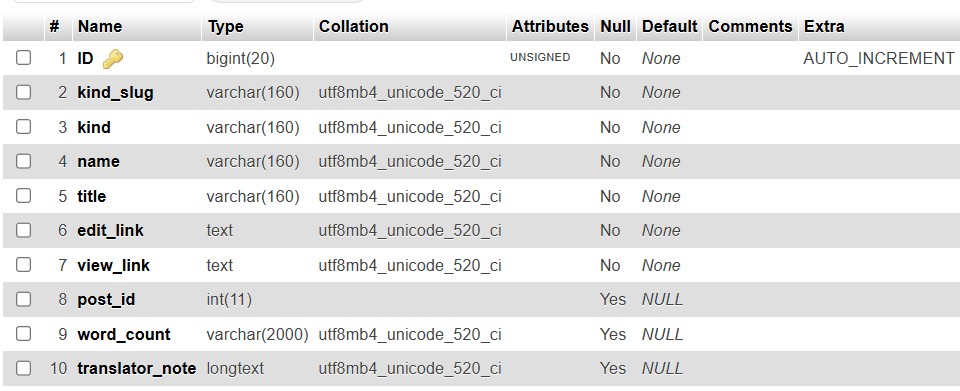 |
| March 4, 2025 at 5:54 pm #16775463 | |
|
oudinS |
Thanks for taking the time to investigate the issue. As suggested, I have checked the database. To clarify, the database dump provided is for a Multisite setup that we are using for testing. The WPML plugin is activated on the site with (ID-2), and I can see the icl_string_packages table for that site (see attached image: site-id2-phpMyAdmin-5-1-4.png). Does the missing table you mentioned also need to be created for the main site, even though the WPML plugin is not activated on it? For additional testing—without making any changes to the database—I created a new site (ID-9) on the same Multisite setup. This new site has the latest version of WPML installed and is using the same Themify theme. Interestingly, I did not encounter the issue there. This should already be in the DB dump that I provided. It seems that a table in the plugin's database for existing sites is not being updated or upgraded correctly when WPML is updated from an earlier version to v4.7.0+. Additionally, I checked the single site that originally had this issue. The missing table does exist there, yet the problem persists (see attached image: original-site-phpMyAdmin-5-1-4.png). Would you like me to send a database dump of that single site for further analysis? Let me know how you'd like to proceed. Note: I checked another single site that was recently upgraded to v4.7.0 which has the same issue and got the following: "Error Details So, this issue affects many sites. 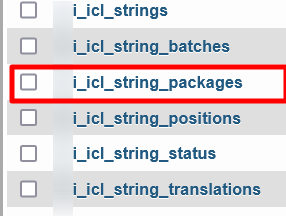 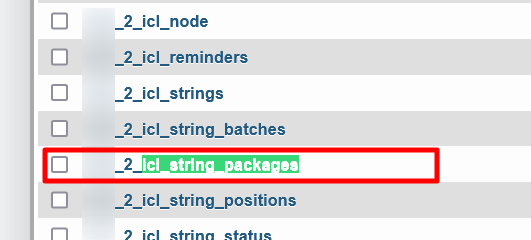 |
| March 5, 2025 at 5:52 am #16776617 | |
|
Waqas Bin Hasan WPML Supporter since 05/2014 Languages: English (English ) Timezone: Asia/Karachi (GMT+05:00) |
Thank you for the updates. Yes I noticed all those sites' tables in the database. But since the site you provided the access for previously, has "vdn_" as table prefix in wp-config.php. That's why I found about the missing table. However, other variations like 9, 2 or etc have this table available. And yes that'd be great if you can provide access to that "single" site. It'd be wise to create a separate/single staging or test site for that "single" site. So I investigate accordingly. This 'll also rule out any stuff related to a multisite, as well as, 'll not compromise your client's live site. I've enabled your next reply as private to provide the access to that site safely. Please also confirm about the following when providing the access: - Do you have the latest backup of the site? I can then test within the site and if I need help from our 2nd tier team, I'll try to create a package of site and/or the database (or 'll request to you accordingly). |
| March 7, 2025 at 5:39 am #16786059 | |
|
Waqas Bin Hasan WPML Supporter since 05/2014 Languages: English (English ) Timezone: Asia/Karachi (GMT+05:00) |
Thank you for the access and the confirmations, I am working on this and 'll get back to you as soon as I find something or have a solution. |
| March 7, 2025 at 10:58 am #16787674 | |
|
Waqas Bin Hasan WPML Supporter since 05/2014 Languages: English (English ) Timezone: Asia/Karachi (GMT+05:00) |
Thank you for your patience and cooperation. While I'm working on the issue, I need to add a few plugins to access files and database but looks like my WP Admin access is restricted. Because I can not see "Add New" option in Plugins and Themes (see attached). While trying to access, for example, /wp-admin/plugin-install.php throws "Sorry, you are not allowed to access this page" error. I know I've FTP access which I can use to access files, but uploading plugin/theme via FTP takes much time than uploading the zip file directly in WP Admin (or installing from WP repository). Please check on your side and allow me full admin (unrestricted) access to the site's WP Admin. 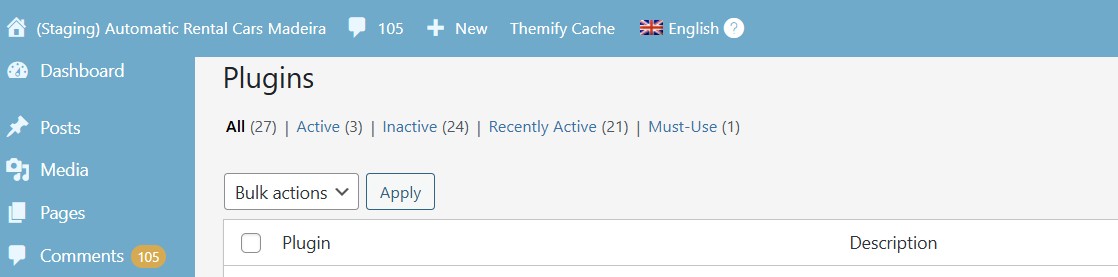 |
| March 10, 2025 at 7:37 pm #16798261 | |
|
oudinS |
Hi You now have full privileges to upload plugins and themes as needed. Please note: On other sites using the same Themify theme, I was able to downgrade the plugins to WPML Multilingual CMS v4.6.15 and String Translation v3.2.18. I can confirm that this issue does not occur on those older versions. This suggests that the problem may have been introduced in v4.7.0+. |






