[Resolved] wpml function to display translated strings
This thread is resolved. Here is a description of the problem and solution.
Problem: You are developing a site and want to display both the English and Welsh translations of the company name on the same template using
bloginfo('name')
. However, using the Site name for English and the tagline for Welsh causes issues when the Site name is translated in String Translation. Solution: We recommend registering the strings manually with fixed source values to ensure they display correctly in both languages on the same page. Here’s how you can do it:
add_action( 'init', function() {
    do_action( 'wpml_register_single_string', 'site_settings', 'blogname_en', 'Your Site Name in English' );
    do_action( 'wpml_register_single_string', 'site_settings', 'blogname_cy', 'Your Site Name in Welsh' );
});
After registering the strings, you can retrieve them on the frontend with the following code:
$en = apply_filters( 'wpml_translate_single_string', 'Your Site Name in English', 'site_settings', 'blogname_en' );
$cy = apply_filters( 'wpml_translate_single_string', 'Your Site Name in Welsh', 'site_settings', 'blogname_cy' );

echo esc_html( $en ) . ' ' . esc_html( $cy );
This approach ensures that both the English and Welsh names appear on the page regardless of the selected language.
Please note that this solution might be irrelevant if it’s outdated or not applicable to your case. We highly recommend checking related known issues at https://wpml.org/known-issues/, verifying the version of the permanent fix, and confirming that you have installed the latest versions of themes and plugins. If this does not resolve your issue, please open a new support ticket.
This is the technical support forum for WPML - the multilingual WordPress plugin.
Everyone can read, but only WPML clients can post here. WPML team is replying on the forum 6 days per week, 22 hours per day.
Background of the issue:
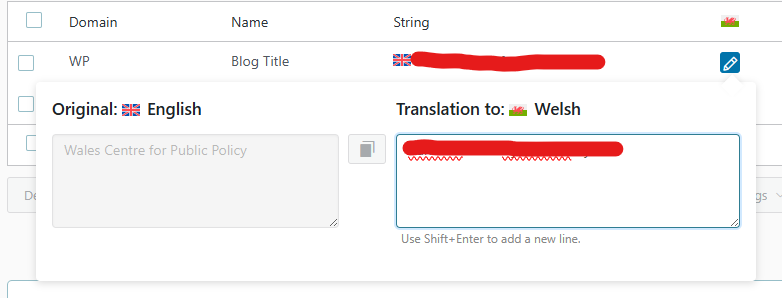
I am developing a site and want to display a string and its translation on the same template, specifically using bloginfo('name'). The site's header should show both the English and Welsh translation of the company name. Currently, I use the Site name for English and the tagline for Welsh, but this causes issues when the Site name is translated in String Translation.
Symptoms:
The current setup causes problems when the Site name is translated in String Translation.
Questions:
What can I put in my templates to get both the English and Welsh on the same page so that it looks the same no matter which language is chosen in the language switcher?
But this returns the same as bloginfo('name'). Basically, on teh English site, both strings are English, and on the Welsh site, both strings are Welsh.
No, that doesn't work either... There are new entries in the String translation section, but blogname_en and blogname_cy have the same English name.
Putting a Welsh translation in for them just does the same as putting in a Welsh translation for the original blogname, ie shows the same language as the rest of the site.
All I want to do is something like get_string_translation ($name, $domain, $lang_code);.
Surely something like this exists?
Anyhow, it seems my proposal was not 100% correct, as instead we should register the strings only once. You will then translate this newly registered string on WPML > String Translation and then call this newly registered string in your template.
We seem to be doing lots of replying at the same time.
In response to #17398738 above, your code only outputs one string. I want to output both languages.
In the header, I want to have:
ENGLISH SITE NAME
WELSH SITE NAME
and this should be the same whether the rest of the site is in English or Welsh, ie it should stay exactly the same when the language switcher is pressed.
... and to clarify what I mean above, I want to output the original string AND the string translation at the same time... and what is output should NOT be translated when the language is switched.
Languages: English (English )Spanish (Español )German (Deutsch )
Timezone: America/Lima (GMT-05:00)
Thank you for your feedback!
The string translation from English to Welsh can only show up on the Welsh part of the website. Due to language filtering, it is not possible to display a string that was translated into Welsh on the English website.
You would need to register the strings manually with fixed source values:
add_action( 'init', function() {
    do_action( 'wpml_register_single_string', 'site_settings', 'blogname_en', 'Your Site Name in English' );
    do_action( 'wpml_register_single_string', 'site_settings', 'blogname_cy', 'Your Site Name in Welsh' );
});
This will register both strings with the English source language, as they are supposed to show up on the English website. If needed, you translated them on WPML > String Translation, but even if they are not translated, the following code should display the same strings in all languages.
To retrieve the strings on the frontend, use:
$en = apply_filters( 'wpml_translate_single_string', 'Your Site Name in English', 'site_settings', 'blogname_en' );
$cy = apply_filters( 'wpml_translate_single_string', 'Your Site Name in Welsh', 'site_settings', 'blogname_cy' );

echo esc_html( $en ) . ' ' . esc_html( $cy );
// To get the string rather than echo it, an output buffer is required.
// I expected get_bloginfo() to work to retrieve the string without echoing, but it did not work as expected.