[Resolved] EN-DA relationship is broken due to None in products
This thread is resolved. Here is a description of the problem and solution.
Problem: The client mistakenly set the language translation of all products to 'none', which disrupted the English-Danish translation relationships and caused issues with price display and possibly other translations on the Danish frontend. The client wants to restore the correct language assignments and links without automatic re-translation or overwriting existing content. Solution: We recommended that the client disconnect the products by setting their language to 'none' and then reconnect them to the correct default language product. This approach helps in re-establishing the intended product relationships without initiating automatic translations. It's crucial to ensure that backups are made regularly, especially after making significant changes.
If this solution does not resolve your issue, or if it seems outdated or irrelevant to your case, we highly recommend opening a new support ticket. Additionally, please check related known issues at https://wpml.org/known-issues/, verify the version of the permanent fix, and confirm that you have installed the latest versions of themes and plugins. For further assistance, you can also visit our support forum at https://wpml.org/forums/forum/english-support/.
This is the technical support forum for WPML - the multilingual WordPress plugin.
Everyone can read, but only WPML clients can post here. WPML team is replying on the forum 6 days per week, 22 hours per day.
Hi there,
I have made a real mess, due to a misunderstanding of your language settings within products.
I did not disable automatic translation correctly - which was what I wanted to do.
What I did: All products (around 150) were each manually set to language translation = none, - which removed their language assignment and broke the EN–DA translation relationships in stead. I found out - as prices etc. are not showing correctly on the danish frontend.
Automatic translation is turned off now, which should be ok, but setting products to “none” has caused prices - and perhaps also translations to stop working correctly.
I have tried to find out to restore the previous setting without finding a way to do that (for hours). Please note, that I still do not want to have products translated automatically when I am changing a small thing in the English version - causing long hours of reviewing the danish versions due to overwriting.
I need you to help restore correct language assignments, prices etc and EN–DA links without re-translating or overwriting existing content.
I have made a full database backup and I really hope you have tools to solve this problem.
Thank you for sharing the details. On a first glance, I don't see a way to undo that via the UI, in Bulk. Perhaps we can find a solution to fix it manually, or programmatically, depending on what's been changed. There are a few things I need to check before getting to a conclusion.
1. The first one, is how you "manually set to language translation = none". If possible, please share the steps you took, and screenshots showing where you changed this setting.
2. Second, is website access.
I would like to look at this directly on your site. For this I would need temporary access (WP-Admin and FTP) to your site, preferably to a test/staging site where the problem has been replicated if possible.
The required fields can be found below the comments section. The information you enter is private, i.e. only you and I can see it and have access to it.
I may need to replicate your website locally. To do this, I need to temporarily install a plugin called "Duplicator" or "All in One WP Migration" on your website. This will allow me to create a copy of your website and content. Once the issue is resolved, I will delete the local website. Let me know if this works for you.
IMPORTANT
Please make a backup copy of the site files and database before giving us access.
- If you do not see the wp-admin/FTP fields, this means your post and site login details are being made PUBLIC. DO NOT post your website details if you do not see the required wp-admin/FTP fields. If you do not, ask me to enable the private box. The private box looks like this:
Thank you for getting back to me.
I do not think it is necesarry that you go into the account at this stage.
I think I managed to find a solution - although creating a new problem, which I will explain further down.
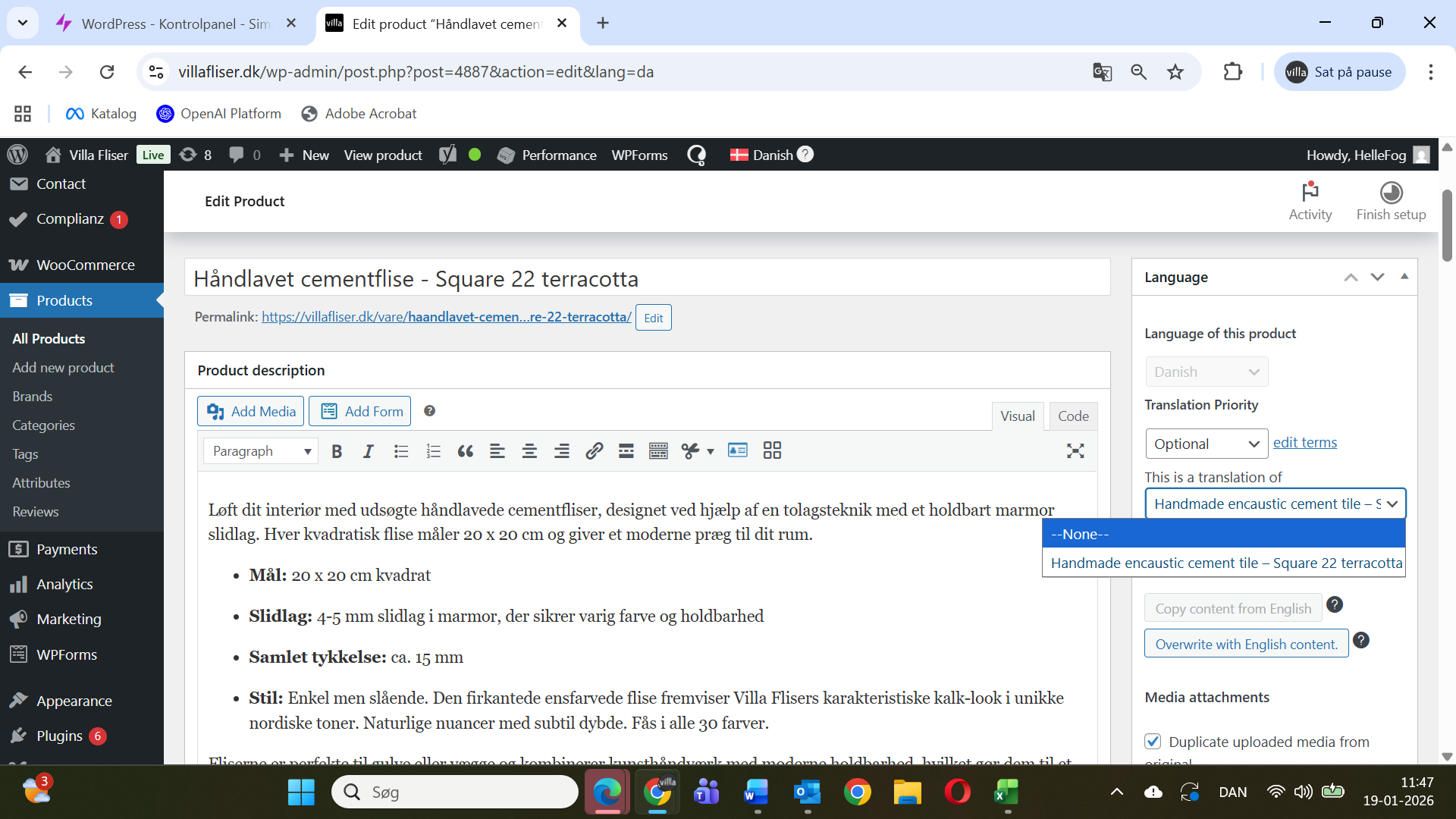
When I made the mistake to disconnect the relationship between EN and DA - I used the settings panel on the right site within products - where it says "this is a translation of" - here you can choose "none". That was what I did - and you can find a screenprint attached.
Well, after some time waiting for your response, I chose to try some things out to undo this "none" setting. I chose "connect to a translation" (or similar) in the same panel (right side in products) - at the top. I found the English products - and as it seemed to work, I chose to do this for all 148 products. That works - the prices are ok again on the danish site and the translations have not changed - it seems.
BUT - it is easy to make mistakes and get mixed up when product names are similar (same product for outdoors and indoors) - although being very careful.
So the new problem is: I managed to connect 3 products falsely - to the wrong products in English.
This, I need to change again.
Right now the English site is ok - as before.
But the danish site has three wrong items within indoors - and they are missing in the outdoors section.
My question: Can I disconnect them again with setting to "none" and then connect them again. Or am I just creating a bigger problem? You see: I am still not sure what the consequences are when setting to "none".
I was able to better understand the issue now - thanks for clarifying. First and foremost, please ensure to create backups regularly, specially after making progress just like you did.
I understand this process can be confusing. Again, please ensure to have a backup before proceeding.
"Can I disconnect them again with setting to "none" and then connect them again. Or am I just creating a bigger problem? "
Yes, that's the best solution here. Disconnect them, so you can reconnect them to the correct default language product.
The consequences of setting to "none" are actually simple. Since WPML allows you to create products in any language (default or secondaries), the products set to be the translation of none, are stand alone products on your secondary language. That only means that they're not set as a translation of another product.
Let me know how it goes, and if you have any other questions.