Home›Support›English Support›[Resolved] Product bundles bug, not automatically displaying on other languages
[Resolved] Product bundles bug, not automatically displaying on other languages
This thread is resolved. Here is a description of the problem and solution.
Problem: The client is experiencing issues with WooCommerce Product Bundles not displaying correctly in other languages on their website. Specifically, bundled products do not automatically reflect in other languages, and essential fields remain empty despite other elements like price being copied over.
Solution: We recommend the following steps to address the issue: 1. Ensure that all individual products included in the bundle are fully translated and published in the secondary language. 2. Translate the main product bundle itself into the target language and ensure it is published. 3. Check the WPML → Settings → Custom Fields Translation for any custom fields used by the Product Bundles plugin that are essential to the bundle’s functionality. Change their translation preference from “Not Translatable” to “Copy” to ensure critical data is carried over to the translated products. 4. If the issue persists, consider creating a staging site and testing if the problem occurs with new bundled products. This can help determine if the issue is data-related or systematic.
If these steps do not resolve the issue, or if the solution seems outdated or not applicable to your case, we highly recommend checking related known issues at https://wpml.org/known-issues/, verifying the version of the permanent fix, and confirming that you have installed the latest versions of themes and plugins. If problems persist, please open a new support ticket at WPML support forum for further assistance.
This is the technical support forum for WPML - the multilingual WordPress plugin.
Everyone can read, but only WPML clients can post here. WPML team is replying on the forum 6 days per week, 22 hours per day.
Background of the issue:
I am trying to use the WPML plugin with WooCommerce Product Bundles on our website. We noticed that when we add a bundled product, it does not automatically display on other languages. The fields for the bundled products are empty, although other elements like price are copied over automatically. Here is the plugin link: https://wpml.org/plugin/woocommerce-product-bundles-2/.
Symptoms:
Bundled products do not automatically reflect on other languages, and the fields are empty.
Questions:
Why are the bundled products not automatically displaying on other languages?
Why are the fields for bundled products empty when other elements are copied over?
While one of my teammates is handling your ticket, I’d like to offer some initial debugging steps to help move things forward:
- Check Translations for Bundled Products
Ensure that all individual products included in the bundle are fully translated and published in the secondary language.
- Translate the Main Bundle Product
Translate the main product bundle itself into the target language and publish it.
- Review Custom Field Settings
Identify any custom fields used by the Product Bundles plugin that are essential to the bundle’s functionality.
Go to WPML → Settings → Custom Fields Translation, locate these custom fields, and change their translation preference from “Not Translatable” to “Copy”. This ensures critical data is carried over to the translated products.
- Test with New Products
Does the issue also occur when you create and translate a new bundled product? Testing this can help determine if the issue is data-related or systematic.
Yes we've taken those steps with no avail. I believe we have found the potential culprit.
We're seeing the below warning in WP-admin, indicating that the product_type taxonomy was translated. After further inspection, we can see this was indeed done and shouldn't have happened. I have no idea however when, or why this was done. The error shows;
"We detected that the product_type field was set incorrectly for some product translations. This happened because the product_type taxonomy was translated. You can fix this in the WooCommerce Multilingual & Multicurrency troubleshooting page."
I can confirm that product_type is indeed set as Translateable, but on the troubleshooting page in WPML & MC Troubleshooting page it's not in the taxonomy dropdown list to fix. Also on the regular WPML troubleshooting page I cannot see any feature that could reset the product_type taxonomy.
When we go into the taxonomy translation settings for Product_Type and try to change e.g. bundle-th back into bundle, it simply changes to bundle-th-2. It doesn't stick, probably because wordpress recognizes an already existing product_type taxonomy slug with the name 'bundle'.
Could you provide any instructions to update this? As you can see we have many products already linked to the -th taxonomies and we're a bit worried about mingling in our SQL database without consulting with you first.
Please let concentrate on 1 issue, original one you reported, then later if you still have issue we can check it out in new ticket. As it is confusing to work on many issue at same time, and they might not be related to each other.
I am checking "Bundle Products Display Empty on Thai Version" issue.
I have checked backend and front end of the product and I can see it fine and add to cart: hidden link
1) Can you please explain how can I see the mentioned issue and what is wrong?
2) I also see in WPML > Settings > You have unlocked and set almost everything "Translatable
use translation if available or fallback to default language", that is not correct and can cause issue, if you have backup before doing this change it would be good to revert.
Note I have disabled all other not needed plugins for this problem.
1) Can you please explain how can I see the mentioned issue and what is wrong?
This simple product has issue:
- After translating the parent bundle product, it no longer appears on the Thai version of the website.
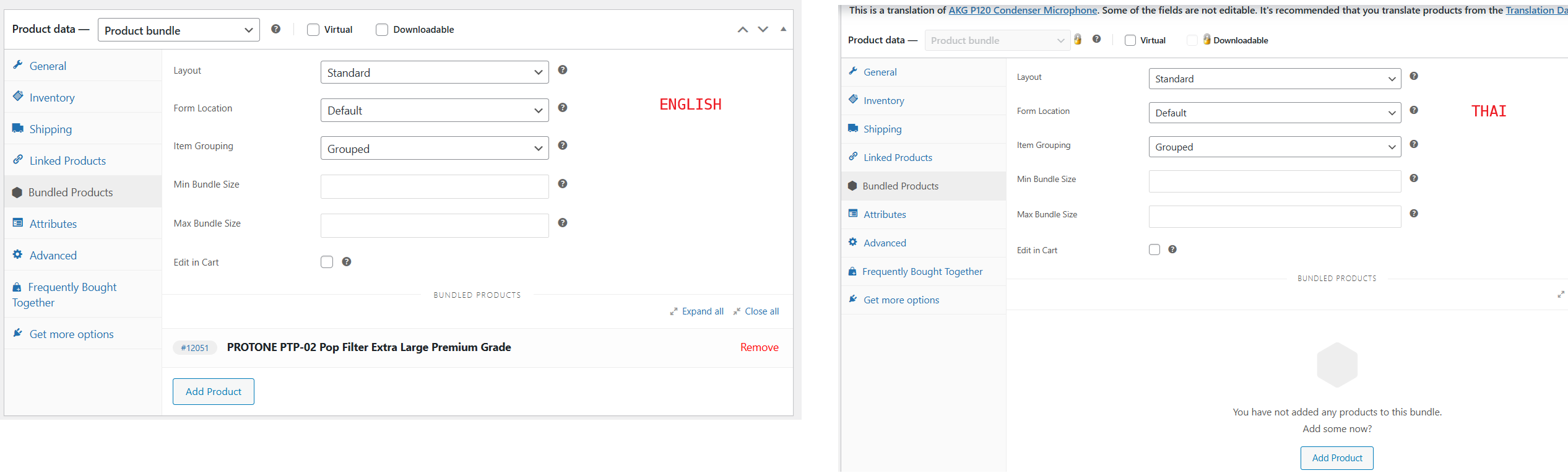
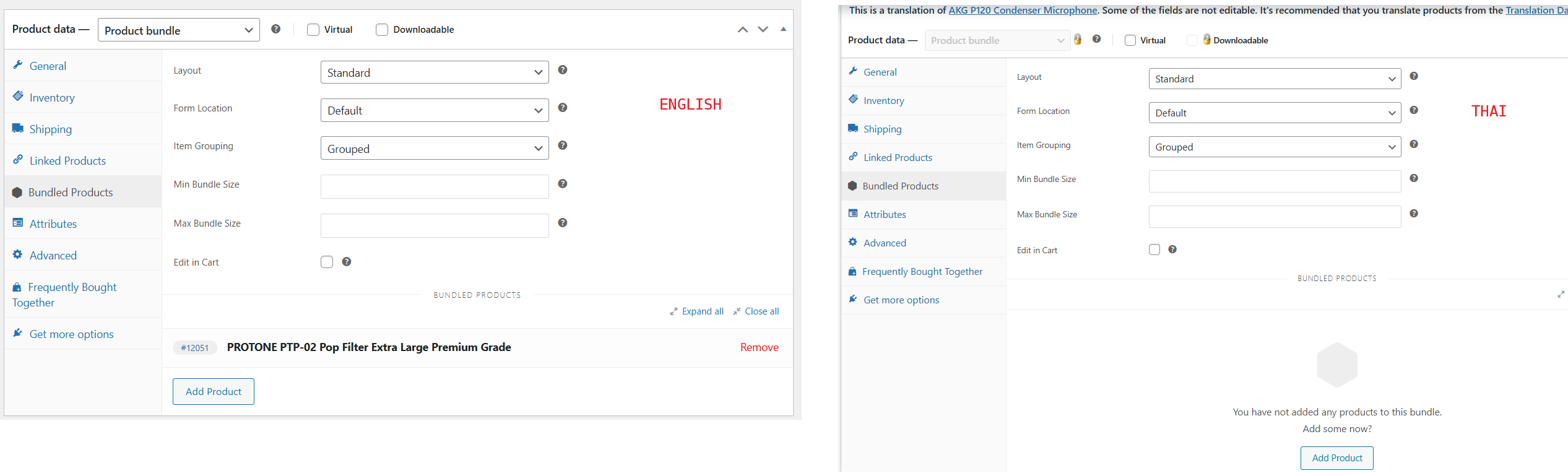
When we try to edit the Thai version of the product, we cannot find the parent bundle product unlike what is shown in the first image attached to this ticket/conversation(17343732-ENTH.png).
You can view the simple product has issue here: hidden link
2) I also see in WPML > Settings > You have unlocked and set almost everything "Translatable
use translation if available or fallback to default language", that is not correct and can cause issue, if you have backup before doing this change it would be good to revert.
- This may have been my mistake, but I'm concerned that restoring a backup could cause multiple issues, we've had negative experiences with this in the past.
Could you recommend a safe and reliable process for reverting a backup with back up all translation?
1) I see and understand the issue now, but seems I can not find route cause, it could be the settings you have.
I created a minimal installation of WordPress, WPML, and all necessary WPML add-ons, and themes.
You can access the WordPress dashboard using the link below:
- hidden link
Please install Bundles plugin there and try to reproduce the issue with 1 product. Lets see if issue happens there, if not I will compare settings with your website and try to sett correct.
2) There is no way, if you revert the backup you are reverting website to that state.
Good thing to hear it works fine if you create new product, before I have set product_type as Not Translatable as it should be, could be that caused the issue in first place, also enabled Object cache can cause such issue, I have kept it disabled.
Do you have many products with such issue, and would re-creating them be a viable solution?
We had around 10 products affected by this issue, but we have already fixed them manually.
This is in reference to Reply #17361104.
Could you please confirm whether we should open a new ticket, or if you can continue assisting us within this existing ticket?
I am not sure what do you mean with reference to #17361104? Is there any other issue happening that you wish to report, if yes then we would need a new ticket.
For your existing, best is to set prodact_type to Not Translatable and disable Object cache while you are doing translation.