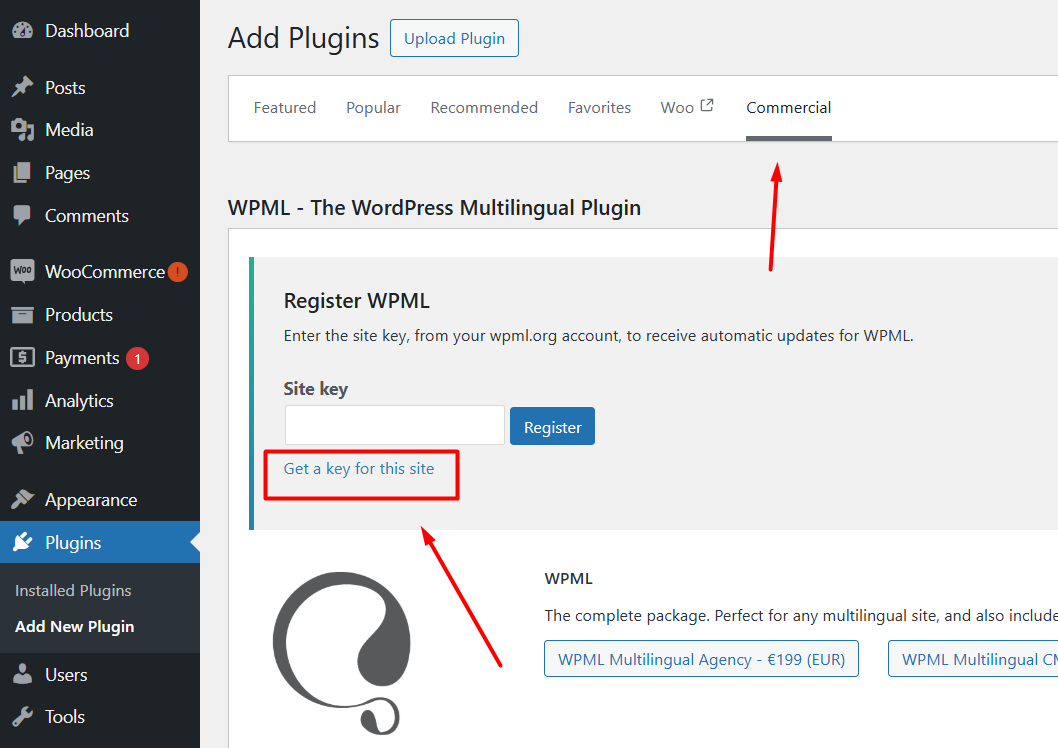
I have acknowledged the site as “Moved”, deleted all WPML registration options, and generated a fresh site key for community.footyfcweekly.com. Please reset the site fingerprint / UUID on your backend. I did everything that was recommended the first time around and it is not working. I am stuck in and endless loop of not recognizing the key , even a new key and not wanting to connect or install. Register WPML
Enter the site key, from your wpml.org account, to receive automatic updates for WPML.
Site key
2b037xxxxx
Get a key for this site
Unable to register: Site key not matching << This is current key I just generated and it keeps telling me my key doesnt match even though it is registered to this site and the url link in my wpml account goes straight to this site. I have been messing with this for about 9 hours today and nothing works.
I walked thru steps with your AI unregistered the site key and deleted URL in my account and redid it, it matched the site url perfectly and redirected to the site from my wpml account , but then wouldn't load the plug in say the link was expired and the key was incorrect. I have gone thru pretty much every possible scenario and referenced multiple AIs no luck.
Thank you for contacting WPML Support. Could you please make sure you have followed the exact same steps which are listed below:
1. Login to your WPML.org account >> Go to the Sites page: https://wpml.org/account/sites/
2. Delete the existing site key by pressing the little trash icon (if that key exists).
3. Login to your site and go to the Dashboard >> Plugins >> Add new > Commercial tab and click the Unregister WPML from this site link as you can see in the attached screenshot.
4. Then click the Register WPML link.
5. Click the Get a key for this site link (screenshot attached).
6. It will generate the Key for your site.
7. Copy the key, and paste it back into the input box, and press the Register button and see if this resolves the issue.
If the issue persists, kindly provide a screenshot of the error where you are seeing “link was expired and the key was incorrect.” error.