Skip to content Skip to sidebar

This is the technical support forum for WPML - the multilingual WordPress plugin.

Everyone can read, but only WPML clients can post here. WPML team is replying on the forum 6 days per week, 22 hours per day.

Sun Mon Tue Wed Thu Fri Sat
- 9:00 – 13:00 9:00 – 13:00 9:00 – 13:00 9:00 – 13:00 9:00 – 13:00 -
- 14:00 – 18:00 14:00 – 18:00 14:00 – 18:00 14:00 – 18:00 14:00 – 18:00 -

Supporter timezone: America/Los_Angeles (GMT-07:00)

This topic contains 7 replies, has 0 voices.

Last updated by Bobby 9 months, 1 week ago.

Assisted by: Bobby.

Author Posts
June 15, 2025 at 7:39 am #17135909

cbP

Background of the issue:
I have two connected sites on the same WPMU installation, both sharing translation credits. In testing, I translated strings on one site using WPML and again translated the same string on another site.

Symptoms:
Translation memory is not being shared between the two sites, resulting in the deduction of translation credits from the account for the same strings.

Questions:
What should I do to avoid consumption of credits when translating the same strings on two different subsites?

what is the life of translation memory, will it persist if I fail to renew subscription before expiry date and resubscribe at a later date

June 16, 2025 at 7:07 pm #17140207

Bobby
WPML Supporter since 04/2015

Languages: English (English )

Timezone: America/Los_Angeles (GMT-07:00)

Hi there,

Please share the URL of both sites that should share the translation memory so I can review them from our side.

The translation memory remains even after a missed renewal as it is saved in the cloud under your site's Organization ID.

Related documentation:
https://wpml.org/documentation/automatic-translation/automatic-translation-subscription-for-multiple-sites/

June 21, 2025 at 5:46 pm #17156286

cbP

hidden link

hidden link

issue tested on the Hindi translation on both site

June 21, 2025 at 7:09 pm #17156330

cbP

hidden link

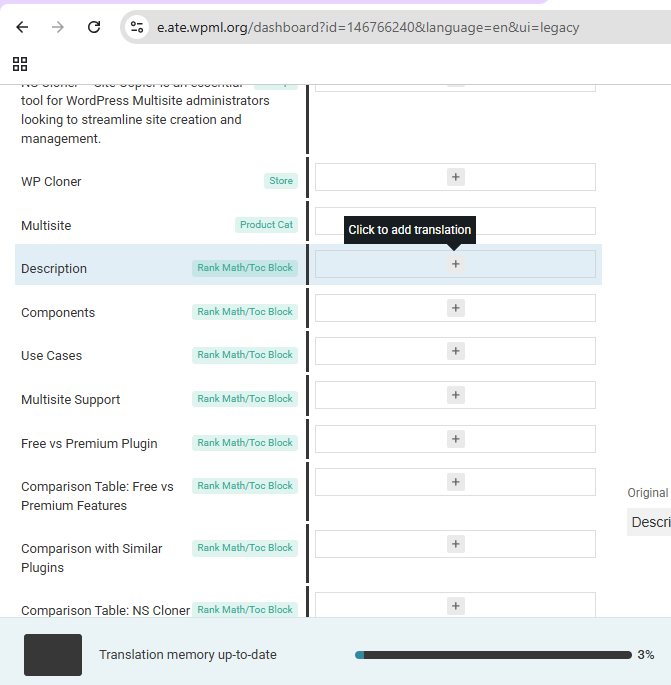
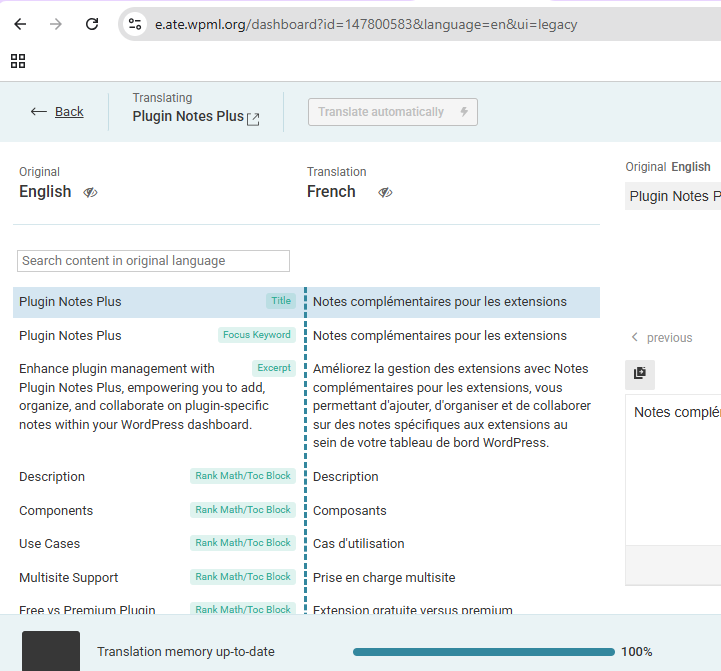
following terms from memory were not taken from memory, even though they were there in previous translation done from english to spanish

Components
Use Cases
Multisite Support
Free vs Premium Plugin
Description
Multisite

June 21, 2025 at 7:12 pm #17156334

cbP

here are screenshots

Capture2.PNG
Capture.PNG
June 24, 2025 at 7:49 pm #17166630

Bobby
WPML Supporter since 04/2015

Languages: English (English )

Timezone: America/Los_Angeles (GMT-07:00)

Thank you for the screenshots!

For "Description" if you click on the item to add the translation, does it display the translation via translation memory or is it still blank?

I can verify that both URLs are under the same organization and sharing the same translation memory.

July 3, 2025 at 10:34 am #17196769

cbP

tested on new product

no translation appearing from memory

"description" in English appearing in translation box

"Descripción" appear after clicking on icon "" translate this text automatically" and also consuming credits

July 3, 2025 at 9:26 pm #17199402

Bobby
WPML Supporter since 04/2015

Languages: English (English )

Timezone: America/Los_Angeles (GMT-07:00)

I would like to request temporary access (wp-admin and FTP) to your site to test the issue.
(preferably to a test site where the problem has been replicated if possible)

**Before we proceed It is necessary to take FULL BACKUP of your database and your website. Providing us with access, you agree that a backup has been taken **

I often use the Duplicator plugin for this purpose: http://wordpress.org/plugins/duplicator/
You will find the needed fields for this below the comment area when you log in to leave your next reply.
The information you enter is private which means only you and I have access to it.

NOTE: If access to the live site is not possible and the staging site does not exist please provide me with a duplicator package created with the duplicator plugin.

Thank you,
Bobby

The topic ‘[Closed] translation memory not available for string translation’ is closed to new replies.