
This is the technical support forum for WPML - the multilingual WordPress plugin.
Everyone can read, but only WPML clients can post here. WPML team is replying on the forum 6 days per week, 22 hours per day.
| Sun | Mon | Tue | Wed | Thu | Fri | Sat |
|---|---|---|---|---|---|---|
| - | 13:00 – 18:00 | 13:00 – 18:00 | 13:00 – 18:00 | 13:00 – 18:00 | 13:00 – 18:00 | - |
| - | 19:00 – 22:00 | 19:00 – 22:00 | 19:00 – 22:00 | 19:00 – 22:00 | 19:00 – 22:00 | - |
Supporter timezone: Asia/Kathmandu (GMT+05:45)
Tagged: Bug
This topic contains 19 replies, has 2 voices.
Last updated by Subash Chandra Poudel 2 years, 5 months ago.
Assisted by: Subash Chandra Poudel.
| Author | Posts |
|---|---|
| May 24, 2023 at 8:09 am | |
 grzegorzK-16 |
How should I configure WPML and WooCommerce plugins to achieve the following goal? If my client turns on the Polish language on the website, the prices of products are displayed in Polish currency. However, if he turns on the English version of the site, then the same products, in their English-language versions, are displayed in dollars. In addition, for English-speaking customers, these will be completely different prices, which are not the result of converting at the current exchange rate. An example product (PL Album) in the Polish language version will cost 222zł, and in the English version (EN Album) $113. To conduct tests with the product filter, I set these prices so that they are the largest among my products in both language versions. Below is my current configuration. Unfortunately, the applied product filter was not working properly. For the WooCommerce Multilingual & Multicurrency plugin settings see configuration_1.jpg screenshot. For the product (PL Album/ EN Album) price settings see configuration_2.jpg. After opening the ”EN Album” product edition we can see that the price is 222zł, not $113 (configuration_3.jpg). Perhaps this is the reason why the product filter on my website, regardless of the language of the website, takes into account only Polish prices. Please take a look: After switching to English, the maximum amount in the price slider remains the same (222) instead of 113 (store_page_2.jpg). After switching to English, changing filter criteria causes the filtering by Polish prices, not English ones. As a result, the filtering is done correctly, but at Polish and not English prices (store_page_3.jpg). It seems to me that with the current configuration, we have such a situation: If you could do the following assignment, everything would work fine: But how to do it? |
| May 24, 2023 at 11:38 am #13706651 | |
|
grzegorzK-16 |
Would you like me to send you FTP access data? |
| May 24, 2023 at 11:39 am #13706657 | |
 Subash Chandra Poudel |
Hi Grzegorz, Sure if FTP details are available it will help me troubleshoot the issue further. I have enabled the private reply for you to share the credentials safely. Regards, |
| May 25, 2023 at 9:33 pm #13719313 | |
|
Subash Chandra Poudel |
Hi there, Thank you fir the details and sorry for the delayed response here. After further troubleshooting I can see the issue is there on the site even with minimal setup. I am preparing the issue details further and escalating the issue to our 2'nd tier team. I will send you further update here as it happens. Thank you for your co-operation and patience in the mean time. Regards, |
| May 26, 2023 at 8:46 am #13721255 | |
|
Subash Chandra Poudel |
Hi Grzegorz, Our 2'nd tier team are looking into the issue now. I will send you an update here as soon as we have an update from the team. Thank you for your patience and co-operation in the mean time. Regards, |
| May 29, 2023 at 7:27 am #13729341 | |
|
grzegorzK-16 |
Good morning! |
| May 29, 2023 at 4:24 pm #13734313 | |
|
Subash Chandra Poudel |
Hi Grzegorz, Our 2'nd tier team are still working on it. It might take some time given the complexity of the issue and our current queue. I will send you an update here as soon as I have an update from our 2'nd tier team. Thank you for your patience and co-operation in the mean time. Regards, |
| May 31, 2023 at 4:08 pm #13748823 | |
|
Subash Chandra Poudel |
Hi Grzegorz , The issue has now been identified and is escalated to our Development team to be fixed in a future WPML version. As a workaround in the mean time can you please: - Install the "Classic Widgets" plugin ( https://wordpress.org/plugins/classic-widgets/ ) Regards, |
| June 1, 2023 at 11:09 am #13753171 | |
|
grzegorzK-16 |
Hi, 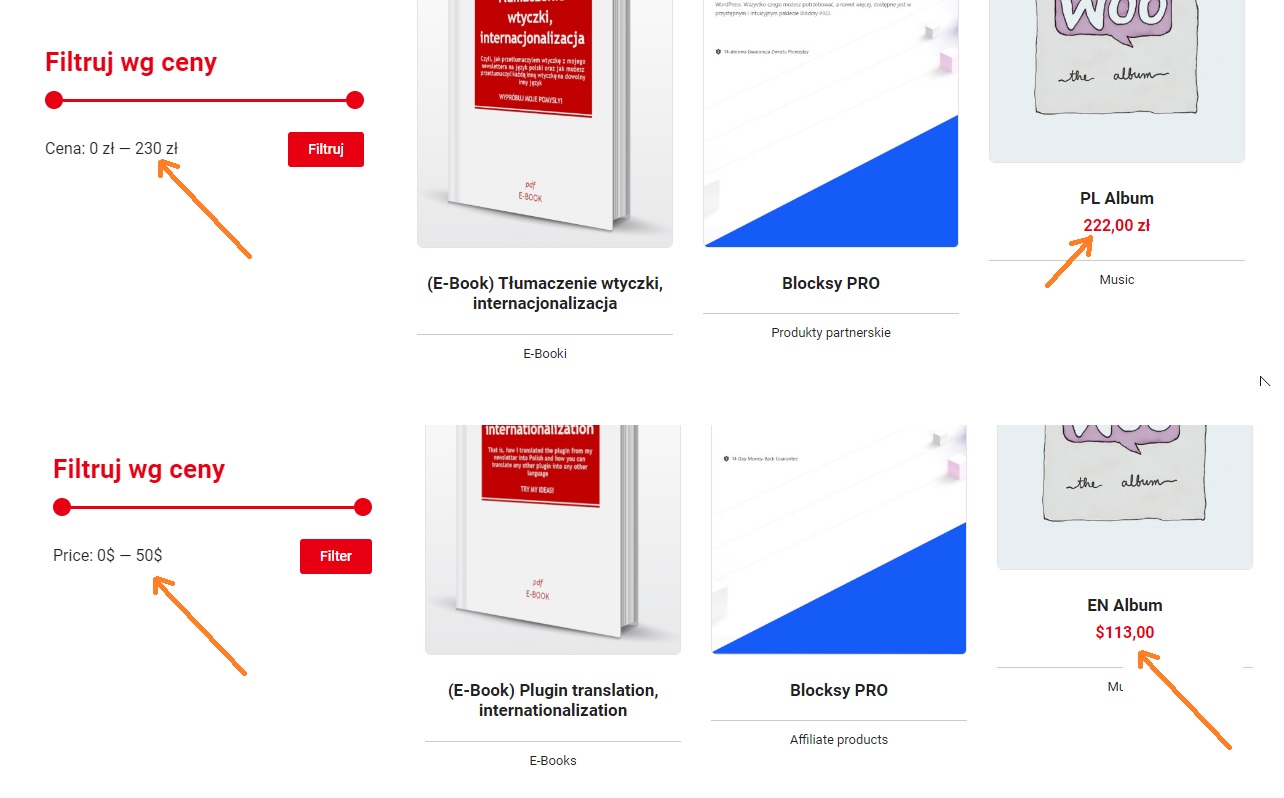 |
| June 2, 2023 at 11:26 am #13761217 | |
|
Subash Chandra Poudel |
Thank you for pointing out these further issues. I can also replicate this on a test site. The issue has been escalated to our developers and they should release a final fix fixing all issues in the future. However, I have further escalated this to our second tier team to troubleshoot further and see if this could be resolved with an workaround or a temporary fix. I will send you an update here as soon as we have an update from the team. |
| June 6, 2023 at 12:21 pm #13778749 | |
|
grzegorzK-16 |
I would like to ask if my problem has already been solved? |
| June 6, 2023 at 4:49 pm #13780765 | |
|
Subash Chandra Poudel |
The issue is escalated to our development team and they are currently working on it. Also, our second tier team is looking if we can provide a complete Wordaround for the issue in the mean time till our development team release a fix. I will send you an update here as soon as we have an update from the team. Lets wait for an update from the team. |
| June 8, 2023 at 4:12 pm #13794439 | |
|
Subash Chandra Poudel |
Hi Grzegorz, So here are a few updates regarding the issues. Regarding the price showing 230 instead of 222 maximum in primary language this is the default behaviour of the WooCommerce price filter to round up the maximum price and not related to WPML. Regarding the issue that the secondary price shows a maximum of $50 , this is calculated from 222 converted to $ based on your settings in WCML settings at WooCommerce -> WooCommerce Multilingual & Multicurrency -> Multicurrency. The filter price in secondary currency is not based on the custom price and this is a known issue. The issue has been escalated to our developer and we will release a fix in the future. However it could take some time and I am sorry to say that there is no workaround available in the mean time due to the complexity of the issue. I will send you an update here as soon as we have an update from the team. |
| July 3, 2023 at 1:15 pm #13933047 | |
|
grzegorzK-16 |
Hi! |
| July 3, 2023 at 3:05 pm #13934543 | |
|
Subash Chandra Poudel |
Hi Grzegorz, The issue ( that when using custom price for products the Price Filter widgets still uses the settings done at WooCommerce -> Commerce Multilingual and Multicurrency -> Multicurrency ) has been escalated to our developers and our team will release a fix in the future. However I should tell you that this could take some time and will not happen sometime soon. This is because our team are trying to come up with a solution for the issue without affecting other features and without causing a performance impact. Our team also tried to see if a workaround could be possible for the issue but because of the complexity of the issue ( it looks simple but is a bit complex due to how the data are stored and displayed in WooCommerce and WCML ) it looks like we will need to wait for a final fix for the issue. I will let you know here as soon as we have an update from our development team. Though it will take some time and I don't have an ETA yet. I am very sorry for the inconveniences caused to you due to this. Subash |