
This is the technical support forum for WPML - the multilingual WordPress plugin.
Everyone can read, but only WPML clients can post here. WPML team is replying on the forum 6 days per week, 22 hours per day.
| Sun | Mon | Tue | Wed | Thu | Fri | Sat |
|---|---|---|---|---|---|---|
| - | 8:00 – 15:00 | 8:00 – 15:00 | 8:00 – 15:00 | 8:00 – 15:00 | 8:00 – 15:00 | - |
| - | 16:00 – 17:00 | 16:00 – 17:00 | 16:00 – 17:00 | 16:00 – 17:00 | 16:00 – 17:00 | - |
Supporter timezone: Europe/Rome (GMT+02:00)
Tagged: Exception
This topic contains 12 replies, has 0 voices.
Last updated by Alejandro 1 week, 2 days ago.
Assisted by: Alejandro.
| Author | Posts |
|---|---|
| February 12, 2026 at 5:30 pm #17818143 | |
 jean-sebastienC-2 |
We moved ai.aponiawebsolutions.ca to a new domain as it is now ready to launch. The website is now on accesidentite.com However, when we update translations, the old domain is still showing up. We did a database search and replace, cleared the cache in troubleshooting, and regenerated the mo files as well to no avail. We also did this: Look for Clean up and click the following: Did not work. I've added 3 screenshots, to show you what happens, in order. In 1.jpg, we can see that the translated page has the correct link. In 2.png we go to update the translation of that page. In 3.png, we see the domain is now hidden link for the same link i nstead of hidden link. It's as if the translation has some memory that is not in the DB. Does it remember the license was activated on the old website? That would be weird as we reactivated the license on the new website as well. 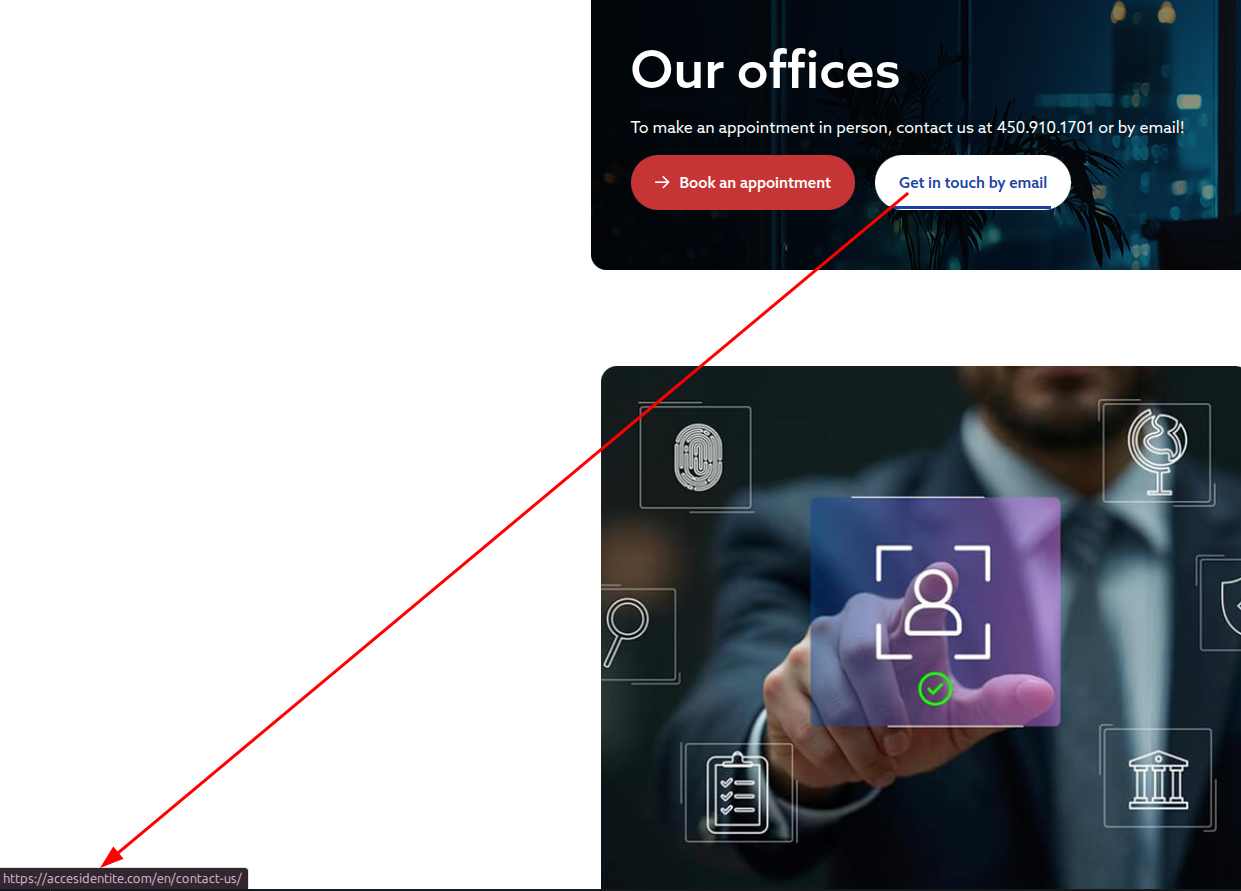  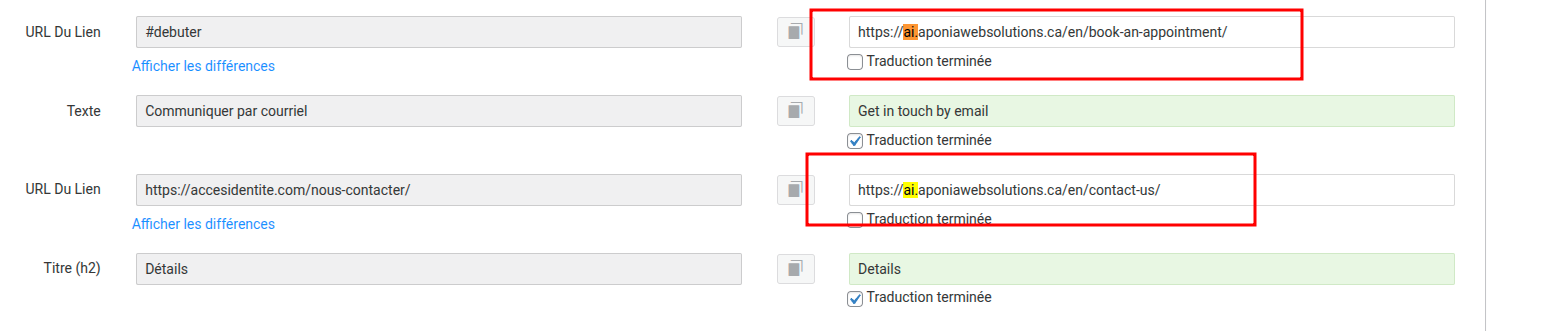 |
| February 12, 2026 at 7:18 pm #17818556 | |
|
jean-sebastienC-2 |
Unfortunately did not work. I tried a few kinds of Search queries but none of them returned results for "aponiawebsolutions", only 2 in wp_options (Serialized data for notices from WPML from when the website was on the web server), and 2 others in an SEO plugin.  |
| February 12, 2026 at 8:03 pm #17818820 | |
 Lauren |
Since there are no remaining references to the old domain in WordPress or WPML tables, this suggests the URL is being generated from WPML’s site registration layer rather than stored translation content. Please try the following: 1. Go to Plugins -> Add New -> Commercial and unregister WPML (click the link on the right). This forces WPML to regenerate the internal site identity and should resolve the editor link using the old domain. Please let me know once this is done and we’ll confirm whether it resolves the issue. |
| February 17, 2026 at 9:27 pm #17830483 | |
|
jean-sebastienC-2 |
Unfortunately, the dev domain string still show up in values. |
| February 18, 2026 at 6:32 pm #17833723 | |
|
Lauren |
I would like to request temporary access (wp-admin and FTP) to your site to take better look at the issue. You will find the needed fields for this below the comment area when you log in to leave your next reply. The information you will enter is private which means only you and I can see and have access to it. Our Debugging Procedures I will be checking various settings in the backend to see if the issue can be resolved. Although I won't be making changes that affect the live site, it is still good practice to backup the site before providing us access. In the event that we do need to debug the site further, I will duplicate the site and work in a separate, local development environment to avoid affecting the live site. Privacy and Security Policy We have strict policies regarding privacy and access to your information. Please see: **IMPORTANT** - Please make a backup of site files and database before providing us access. - If you do not see the wp-admin/FTP fields this means your post & website login details will be made PUBLIC. DO NOT post your website details unless you see the required wp-admin/FTP fields. If you do not, please ask me to enable the private box. The private box looks like this: hidden link |
| February 26, 2026 at 3:15 pm #17857258 | |
|
Lauren |
I've checked the contact page translation and I'm not finding any reference to the old URL. This is where I was checking: hidden link Can you tell me which page you were viewing the translation for in the original screenshot? ANd a link to edit the translation would help save time as well. Thank you. |
| February 27, 2026 at 4:09 pm #17860583 | |
|
jean-sebastienC-2 |
Please check any of the pages under the "Services" Custom Post Type. E.g. hidden link Thank you |
| March 9, 2026 at 1:52 pm #17882234 | |
 Alejandro WPML Supporter since 02/2018 Languages: English (English ) Spanish (Español ) Italian (Italiano ) Timezone: Europe/Rome (GMT+02:00) |
Hello, those remaining strings are part of the string packages and you may not be able to fix it as you want. they are in the MO Files. you can try to download he entire languages folder and try to run a search and replace there and upload it again. I'm not sure if it would be better to just update the pages via the editor at this point, though? |
| March 13, 2026 at 1:31 am #17894147 | |
|
jean-sebastienC-2 |
I understand but how do we avoid those then? Usually we do a website on a test domain, translate the pages and then and only then put the website live. But if those strings all go into the MO files, how should we proceed to avoid this issue arising in the first place? |
| March 16, 2026 at 12:41 pm #17900292 | |
|
Alejandro WPML Supporter since 02/2018 Languages: English (English ) Spanish (Español ) Italian (Italiano ) Timezone: Europe/Rome (GMT+02:00) |
Please allow me some time to try to figure this out. I am consulting with our devs to see how we can help you solve this in a good way without having to edit each page that has the domain. I'll let you know if we can figure out another solution for you, ok? |
| March 18, 2026 at 4:42 pm #17908888 | |
|
Alejandro WPML Supporter since 02/2018 Languages: English (English ) Spanish (Español ) Italian (Italiano ) Timezone: Europe/Rome (GMT+02:00) |
Hello, I checked your site with our developers and we can see that all the strings from the classic translation editor are found under the icl_strings table. which page can you send us as a reference to check better that domain you mentioned? because we indeed could not find any reference to aponiawebsolutions, but we did find a few shortcodes and a few "aponia.ca" domains instead. Please let us know so we can continue with the investigation. However please know that when we search for aponiawebsolutions using the adminer plugin, we find several tables with references to that domain which means that the method you were using likely skipped some tables. |
| March 22, 2026 at 6:20 pm #17916791 | |
|
jean-sebastienC-2 |
We actually fixed it as the issue couldn't stay live for so long. Let me put the backup on a test domain. |
| March 23, 2026 at 2:30 pm #17919081 | |
|
Alejandro WPML Supporter since 02/2018 Languages: English (English ) Spanish (Español ) Italian (Italiano ) Timezone: Europe/Rome (GMT+02:00) |
If you fixed the issue, then would you let me know how? I'm not sure if you're putting or using the backup to check for something or because you wanted us to check something for you. Please let me know. |









