
This is the technical support forum for WPML - the multilingual WordPress plugin.
Everyone can read, but only WPML clients can post here. WPML team is replying on the forum 6 days per week, 22 hours per day.
| Sun | Mon | Tue | Wed | Thu | Fri | Sat |
|---|---|---|---|---|---|---|
| - | 9:00 – 13:00 | 9:00 – 13:00 | 9:00 – 13:00 | 9:00 – 13:00 | 9:00 – 13:00 | - |
| - | 14:00 – 18:00 | 14:00 – 18:00 | 14:00 – 18:00 | 14:00 – 18:00 | 14:00 – 18:00 | - |
Supporter timezone: America/Los_Angeles (GMT-07:00)
This topic contains 16 replies, has 1 voice.
Last updated by simonM-37 1 day, 20 hours ago.
Assisted by: Bobby.
| Author | Posts |
|---|---|
| December 3, 2025 at 10:20 pm #17632302 | |
 simonM-37 |
For the 2nd time in 2 weeks, facing issue with our homepage due to Display Conditions on Elementor Containers. Last time one container which was set to "show to logged in users" which was at fault. Now it's reversed: 3 of 6 containers set for guest users are causing the error. Advanced properties for the offending containers shows as blank, also in Elementor Safe Mode. Publish button fails to work. debug.log file: fatal error in JSON produced is not parsable (attached). Editing Page ID 91 "Home": Bad containers this time are 2,3,4. They should only show for logged out users. Last time it was 5, which should only show for logged in users. 1 & 6 have no display conditions. Last time was able to fix by deleting and recreating container 5, but now containers 2, 3 and 4 are problematic. I installed workaround given here: But the page continues not to display correctly. I already contacted Elementor Support (Case #TSR3HUAA512N). They say "This confirms that the crash is not being caused by core Elementor functionality itself, but rather by the way WPML is handling Elementor Display Conditions. The repeated “JSON not parsable” errors, blank advanced settings (even in Safe Mode), and failed publishing all strongly point to a compatibility issue between these two plugins, where corrupted data is being written at save time." It is our homepage, so this is very urgent! All other pages work fine currently thankfully. Kind regards   |
| December 3, 2025 at 10:28 pm #17632331 | |
|
simonM-37 |
PS I have created Admin credentials. Please give me a private message so i can deliver you the credentials safely. |
| December 3, 2025 at 10:59 pm #17632336 | |
 Bobby WPML Supporter since 04/2015 Languages: English (English ) Timezone: America/Los_Angeles (GMT-07:00) |
I would like to request temporary access (wp-admin and FTP) to your site to test the issue. **Before we proceed It is necessary to take FULL BACKUP of your database and your website. Providing us with access, you agree that a backup has been taken ** I often use the Duplicator plugin for this purpose: http://wordpress.org/plugins/duplicator/ NOTE: If access to the live site is not possible and the staging site does not exist please provide me with a duplicator package created with the duplicator plugin. Thank you, |
| December 4, 2025 at 11:37 am #17633801 | |
|
simonM-37 |
Btw Bobby, the Homepage on our dev site, hidden link, which was configured identically, continues to work correctly, despite also upgrading there to the latest version 4.8.6 on 1/12/2025. You may want to use it for reference. If you need dev credentials as well, please give me a shout. Kind regards |
| December 5, 2025 at 9:49 am #17637536 | |
|
simonM-37 |
Hi Bobby We haven't had any actionable support in almost 2 days, and the files I sent in the ticket will also expire in two days (over the weekend). Perhaps it would make sense to transfer this case to a European colleague in my timezone? (I'm in Germany). It's very urgent for us as it is our homepage which is affected by the bug! Kind regards |
| December 5, 2025 at 8:59 pm #17639729 | |
|
Bobby WPML Supporter since 04/2015 Languages: English (English ) Timezone: America/Los_Angeles (GMT-07:00) |
Hi Simon, I am working on this, but will ensure it's assigned to a supporter closer to your timezone and update them with my findings. Thank you! |
| December 6, 2025 at 6:02 pm #17640654 | |
|
simonM-37 |
Hi Bobby I'm not getting emails when you update this ticket. Has something changed? Do I need to activate notifications or something? Until now I have usually received updates about WPML tickets automatically without a problem. Furthermore, 2) the Duplicator plugin was installed, although we already have Duplicator Pro, was that you too? 3) Since you have logged in, the site is responding differently when loading the homepage hidden link. It is redirecting to some random nanny-ad, and I can't even determine which one, it seems random to me. Also I notice, there is no longer /de/ or /en in the URLs. On inspection of the WPML > Languages > Language URL Format settings, I see it has been changed from the first option "Different languages in directories ( (hidden link - English, hidden link - German) )" to the third option "Language name added as a parameter (hidden link - German) Also after changing it back to the first option, and clicking Save, I got a message saying I "may" need to re-save the permalinks. That's a bit crazy and vague. How I am supposed to know if I MAY or MUST re-save them?? There is no other information provided. If it is a MUST, surely the software should do that automatically, no? 4) Also I noticed the default flag format was changed from SVG to PNG. Can you confirm if you did that too? 5) Did you make any other changes? I'm not particularly happy about the fact that all these things were changed without informing me. Especially the Language URL setting. I hope our translations are all still working, many strings have hardcoded translations which require the /en or /de on the URL!! Thanks and regards  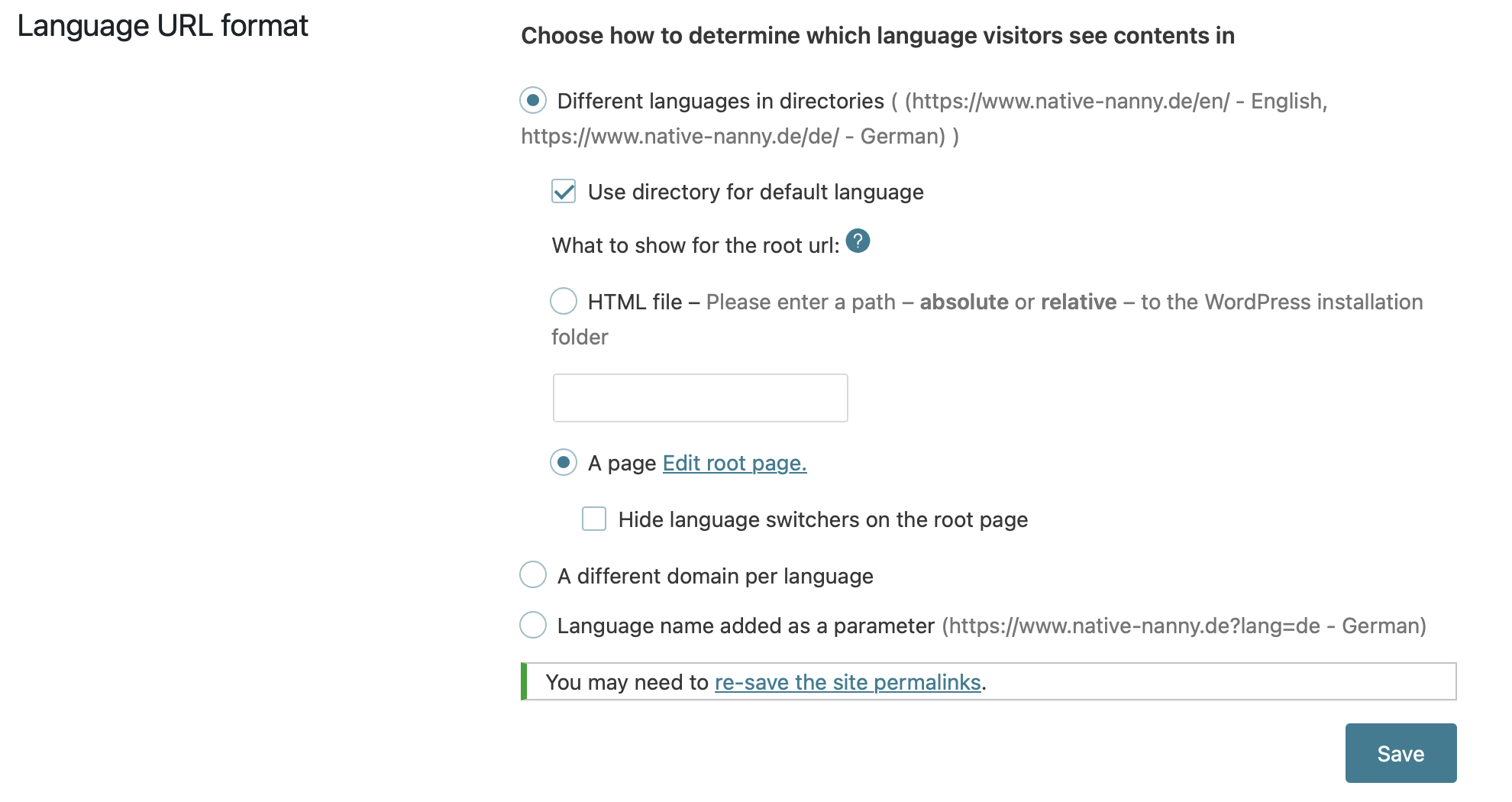 |
| December 7, 2025 at 10:15 pm #17642543 | |
|
simonM-37 |
hidden link (New link to same troubleshooting files, as the other one will expire tonight I guess) Kind regards |
| December 8, 2025 at 7:00 pm #17645239 | |
|
Bobby WPML Supporter since 04/2015 Languages: English (English ) Timezone: America/Los_Angeles (GMT-07:00) |
Hi Simon, Everything up to #4 was done by me during troubleshooting. (no alteration to the images/flags or any other changes were done) My apologies for not reverting them to default after troubleshooting was finished, this was an oversight and won't happen again. Rest assured that the change in the url format will not affect your permalinks and no update is needed. I have pin pointed the issue and what is possibly causing it in the code, I am now escalating this further to our compatibility team. |
| December 8, 2025 at 7:19 pm #17645252 | |
|
Bobby WPML Supporter since 04/2015 Languages: English (English ) Timezone: America/Los_Angeles (GMT-07:00) |
Hi Simon, while we are waiting on our compatibility team to verify and provide a more permanent solution, I've traced this error further and found the issue in the code. The problem seems to be that Elementor now sends display-condition data as arrays, but WPML still expects JSON strings. Please try the following and let me know your results: 1. Have an active backup (based on the duplicator pro looks like this step is good to go) 2. Go to wp-content/plugins/sitepress-multilingual-cms/addons/wpml-page-builders/classes/Integrations/Elementor/Hooks/DisplayConditions.php 3. LINE 107 , there is the following code
/**
 * @param string $conditionJson
 *
 * @return array|null
 */
private function parseConditionJson( $conditionJson ) {
    $condition = json_decode( $conditionJson, true );
    if ( json_last_error() === JSON_ERROR_NONE && is_array( $condition ) ) {
        return $condition;
    }
    return null;
}
Replace it with this version
private function parseConditionJson( $conditionJson ) {
    // Elementor (newer versions) may already pass an array – nothing to decode.
    if ( is_array( $conditionJson ) ) {
        return $conditionJson;
    }

    // Fall-back for legacy JSON string format.
    if ( is_string( $conditionJson ) ) {
        $condition = json_decode( $conditionJson, true );

        if ( json_last_error() === JSON_ERROR_NONE && is_array( $condition ) ) {
            return $condition;
        }
    }

    // If decoding fails, return an empty array so callers can safely handle it.
    return [];
}
4. Save the file 5. Clear your cache Reload and the error should be resolved. Please let me know your results, as this worked OK for me on my test environment. |
| December 8, 2025 at 11:17 pm #17645525 | |
|
simonM-37 |
Hi Bobby Thanks for confirming. 1) That workaround displays the homepage again successfully. Which is great progress! The weird thing is that everything works with the normal WPML code on our dev.native-nanny.de site without any workarounds. How is that possible!? 2) If WPML sends out a new update, that code will be bumped back to the original, right? In other words, the workaround will have to be re-applied, correct? Or is WPML planning to change the file to cope with Elementor Display Conditions changes in a future update? 3) What still doesn't seem to be working is saving in Elementor now. When I make a small change on the homepage, eg change the word "babysitters" to "babysitter" and back again to "babysitters" to force Elementor to notice a change, pressing the pink Publish button looks like it saves the change, but bottom left I see Server Error message briefly and the button goes pink again. Normally when the page saves successfully in Elementor, the pink Publish button goes black to indicate that there are no unsaved changes. It looks like I can save edits to the Hompage (ID 91) only in Elementor Safe Mode. Previously this was not an issue. 4) I also currently have the workaround implemented, which is documented here: Thanks and kind regards |
| December 8, 2025 at 11:54 pm #17645533 | |
|
simonM-37 |
Btw still not getting email updates when you update this ticket... Has the email address changed? We used to get updates from noreply@wpml.org. I got only the first notification when I opened the ticket from support.manager@onthegosystems.com. It would be great if we could get the notifications working again too. Thanks and regards |
| December 10, 2025 at 1:49 am #17649723 | |
|
Bobby WPML Supporter since 04/2015 Languages: English (English ) Timezone: America/Los_Angeles (GMT-07:00) |
Hi Simon, 1. The dev site -- is it on the same server? Possibly using a different version of PHP ? If the PHP version is the same - is it possible to share access to that environment with us? 2. I have reported this to our devs and if it can be reproduced we will be introducing a permanent fix in future versions - unfortunately at the moment this is only a workaround and yes it would be overwritten with an update. 3. I will need to further test and get back to you. 4. The Errata workaround is no longer needed as this was added as a permanent solution in the latest versions of the plugin. If possible please remove it and let me know if it resolves maybe that issue from #2. Regarding the email notifications -- when I check your notifications are activated for info@native-nanny.de  |
| December 11, 2025 at 4:26 pm #17656999 | |
|
simonM-37 |
Hi Bobby 1) Yes, the dev site is on the same server, same PHP version: 8.3.28 2) Yes, I can provide credentials 3) OK, please let me know your findings. 4) I have removed specified workaround (https://wpml.org/errata/fatal-error-triggered-when-using-display-conditions-for-elementor-widgets/). The homepage continues to display properly, but the saving of the page is still not possible in Elementor. 5) Regarding the emails notifications: has the email address changed on WPML's side, from which notifications are sent, or is it still "noreply@wpml.org"? I checked with my host and they have whitelisted *@wpml.org, so let's see what happens with your next update! Kind regards |
| December 15, 2025 at 6:14 pm #17665573 | |
|
Bobby WPML Supporter since 04/2015 Languages: English (English ) Timezone: America/Los_Angeles (GMT-07:00) |
Hi Simon, I have enabled the private field reply. The email notifications are still coming from noreply@wpml.org with no recent changes. If you continue having issues, please let me know and I will check in with our systems team. ( I just checked my own emails and I was getting notifications OK as of today) |






