Skip to content Skip to sidebar

This thread is resolved. Here is a description of the problem and solution.

Problem:
The client is experiencing an issue where the original product page on a WooCommerce site using WPML does not correctly switch to its translated version. Instead, it redirects to the translated homepage.
Solution:
We reviewed the client's setup and noticed that the translated product is visible and published, but the language switch issue persists on the original product page. We recommend the following steps:
1. Ensure that the original and translated products are properly connected in WPML. This can be checked under the 'Languages' section in the WordPress admin.
2. Verify that the language switcher settings are correctly configured to redirect to the translated product pages rather than the homepage. This setting can be adjusted in WPML's 'Language URL format' settings.
3. Clear any cache on the site, as caching plugins or server-side caching can sometimes cause issues with dynamic content like language switching.
4. If these steps do not resolve the issue, we suggest checking for any custom CSS or JavaScript that might interfere with the proper functioning of the language switcher.

If the problem persists, please visit our support forum at WPML support forum for further assistance. We also highly recommend checking related known issues at https://wpml.org/known-issues/, verifying the version of the permanent fix, and confirming that you have installed the latest versions of themes and plugins. If the solution provided here becomes irrelevant due to updates or does not apply to your case, please open a new support ticket.

This is the technical support forum for WPML - the multilingual WordPress plugin.

Everyone can read, but only WPML clients can post here. WPML team is replying on the forum 6 days per week, 22 hours per day.

This topic contains 2 replies, has 0 voices.

Last updated by Andrey 1 month, 1 week ago.

Assisted by: Andrey.

Author Posts
March 10, 2026 at 1:30 am #17883754

ningfengZ

Hello,

I’m having an issue with language switching on WooCommerce product pages.

Here is the situation:

* I created product translations with WPML.
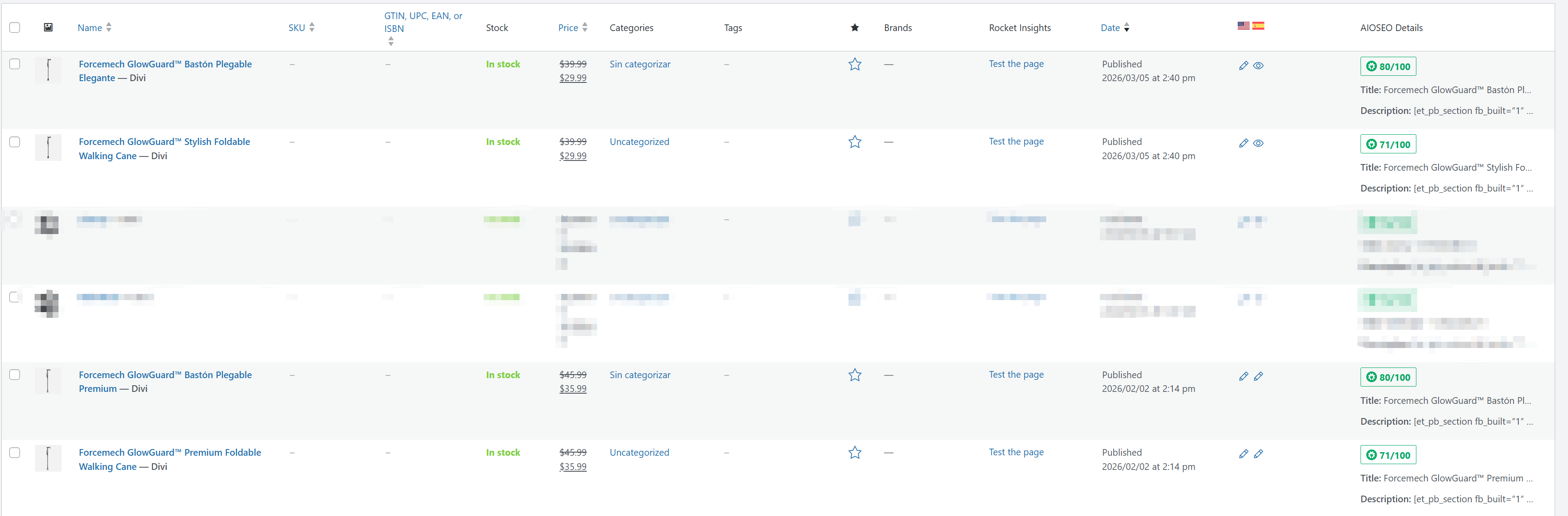
* In the WordPress admin, the translated products are published and visible in the product list.
* If I open the translated product on the frontend, I can switch between English and Spanish normally.
* But if I open the original product on the frontend, I cannot switch to the other language correctly. It redirects to the translated homepage instead.

What seems strange is that:

* The translated product page can switch languages correctly.
* The original product page cannot switch languages, even though the translated product exists and is published.

Could you please help me check:

1. why the original product page cannot switch to its translated version,
2. whether the original and translated products are properly connected in WPML,
3. and how to fix this so language switching works correctly from both versions of the product page?

Thank you.

March 10, 2026 at 11:02 pm #17887228

Andrey
WPML Supporter since 06/2013

Languages: English (English ) Russian (Русский )

Timezone: Europe/Kyiv (GMT+03:00)

Thank you for contacting WPML support.

I need to request temporary access (wp-admin and FTP) to your site—preferably to a test site where the problem has been replicated if possible—in order to be of better help. When you log in to leave your next reply, you will find the needed fields below the comment area. The information you will enter is private, meaning only you and I can see and access it.

March 11, 2026 at 2:33 pm #17889256

Andrey
WPML Supporter since 06/2013

Languages: English (English ) Russian (Русский )

Timezone: Europe/Kyiv (GMT+03:00)

I have checked both the live and staging sites for the product:
/product/forcemech-glowguard-stylish-foldable-walking-cane/.

I can see that the product is translated into Spanish on both sites. However, I’m unable to view the product translation on the frontend, as the product page appears to display only some custom CSS styles, at least from what I can see.

Could you please clarify what I am missing here?

Forcemech-GlowGuard™-Bastón-Plegable-Elegante-FORCEMECH.png
Edit-product-“Forcemech-GlowGuard™-Stylish-Foldable-Walking-Cane”-‹-FORCEMECH-—-WordPress.png