
This is the technical support forum for WPML - the multilingual WordPress plugin.
Everyone can read, but only WPML clients can post here. WPML team is replying on the forum 6 days per week, 22 hours per day.
| Sun | Mon | Tue | Wed | Thu | Fri | Sat |
|---|---|---|---|---|---|---|
| 9:00 – 18:00 | 9:00 – 18:00 | 9:00 – 18:00 | 9:00 – 18:00 | 9:00 – 18:00 | - | - |
| - | - | - | - | - | - | - |
Supporter timezone: Africa/Cairo (GMT+02:00)
This topic contains 0 reply, has 1 voice.
Last updated by Osama Mersal 11 months, 3 weeks ago.
Assisted by: Osama Mersal.
| Author | Posts |
|---|---|
| January 12, 2025 at 10:40 am #16585348 | |
 jin-juanG |
نبذة عن المشكلة: أعراض: أسئلة: 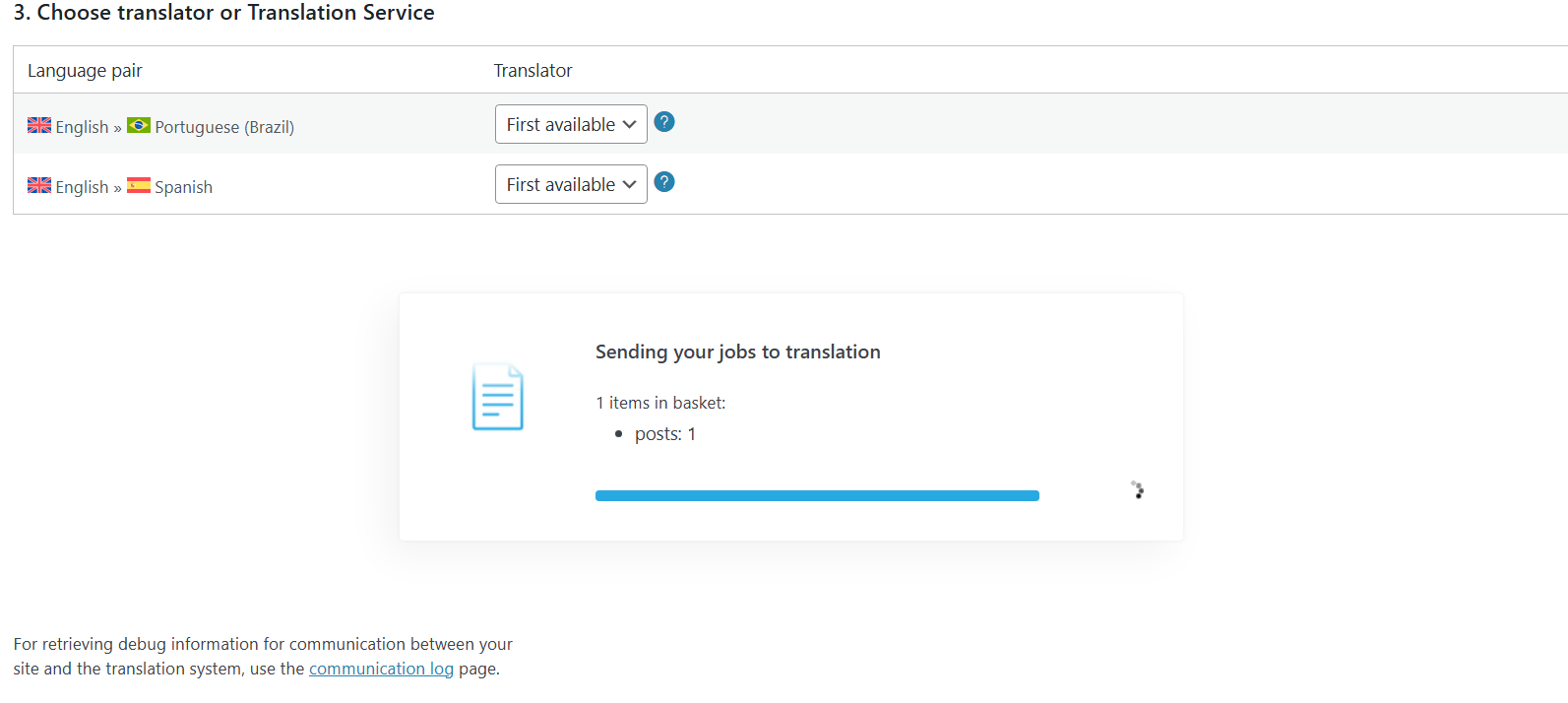 |
| January 13, 2025 at 5:52 am #16586654 | |
 Kor WPML Supporter since 08/2022 Languages: English (English ) Timezone: Asia/Singapore (GMT+08:00) |
Thank you for contacting WPML support. While you are waiting for one of my colleagues to take this ticket and work on it, let me provide you with the first debugging steps and try to help with the issue quickly. While checking the debug info, I see that the WordPress Memory Limit is below the requirements. The minimum requirements are 128M, but we do recommend 256M and the debug information of your site shows it set to 40M. Please check this link for more details define( 'WP_MAX_MEMORY_LIMIT', '256M' ); define( 'WP_MEMORY_LIMIT', '128M' ); After adding the code you can confirm that the memory was changed correctly from WPML > Support > WordPress > Memory limit. Once it's increased, please try to resend the form for translation again. |
| January 13, 2025 at 8:31 am #16586878 | |
|
jin-juanG |
Hello 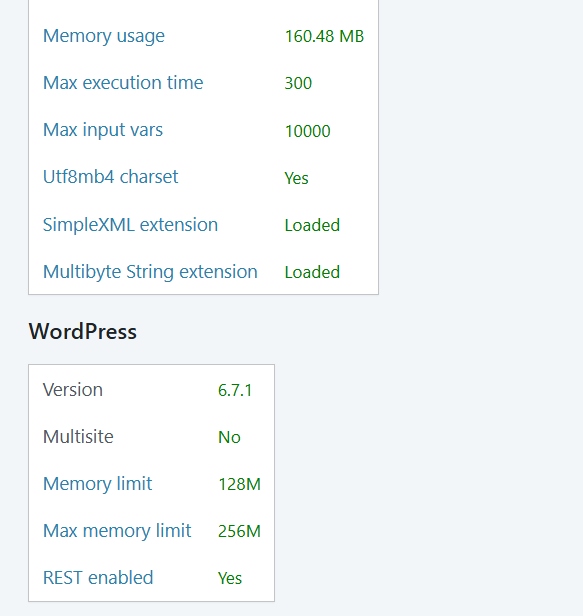 |
| January 13, 2025 at 10:38 am #16587694 | |
 Osama Mersal WPML Supporter since 02/2020 Languages: English (English ) Arabic (العربية ) Timezone: Africa/Cairo (GMT+02:00) |
Hi, I'm Osama from WPML forums support. I'll be glad to help you today. I would need to look closely at your site, so I would need to request temporary access (WP-Admin and FTP) Your answer will be private, meaning only you and I can access it. ❌ Please backup your database and website ❌ ✙ I need your permission to deactivate and reactivate the plugins and themes and change site configurations. This is also why the backup is critical. ✙ I also need your permission to take a local copy of your site to debug the issue without affecting your live site. Best regards, |
| January 13, 2025 at 11:44 am #16588155 | |
|
Osama Mersal WPML Supporter since 02/2020 Languages: English (English ) Arabic (العربية ) Timezone: Africa/Cairo (GMT+02:00) |
Hi, Thanks for the access details. I checked the issue, and there is an error in the browser console. Please provide the WordPress debug.log; this will allow us to see if any PHP errors are being produced. More Info: https://wordpress.org/support/article/debugging-in-wordpress/ To enable it, open your wp-config.php file and look for the following line:
define('WP_DEBUG', false);
And change it to:
define('WP_DEBUG', true);
// Enable Debug logging to the /wp-content/debug.log file
define('WP_DEBUG_LOG', true);
// Disable display of errors and warnings, which is recommended on a live site.
define('WP_DEBUG_DISPLAY', false);
@ini_set('display_errors',0);
Then, try reproducing the issue and checking whether any errors were saved to the debug.log log file inside the /wp-content/ directory. It would be great if you could paste your debug.log to https://pastebin.com/ and provide me with that link! Best regards, |
| January 13, 2025 at 1:50 pm #16588797 | |
|
jin-juanG |
Fatal error: Uncaught RuntimeException: Failed to locate and load object cache API in /home/1372192.cloudwaysapps.com/nmuympcuap/public_html/wp-content/object-cache.php:56 Stack trace: #0 /home/1372192.cloudwaysapps.com/nmuympcuap/public_html/wp-includes/load.php(832): require_once() #1 /home/1372192.cloudwaysapps.com/nmuympcuap/public_html/wp-settings.php(126): wp_start_object_cache() #2 /home/1372192.cloudwaysapps.com/nmuympcuap/public_html/wp-config.php(89): require_once('...') #3 /home/1372192.cloudwaysapps.com/nmuympcuap/public_html/wp-load.php(50): require_once('...') #4 /home/1372192.cloudwaysapps.com/nmuympcuap/public_html/wp-admin/admin.php(34): require_once('...') #5 /home/1372192.cloudwaysapps.com/nmuympcuap/public_html/wp-admin/index.php(10): require_once('...') #6 {main} thrown in /home/1372192.cloudwaysapps.com/nmuympcuap/public_html/wp-content/object-cache.php on line 56 |
| January 13, 2025 at 1:52 pm #16588804 | |
|
Osama Mersal WPML Supporter since 02/2020 Languages: English (English ) Arabic (العربية ) Timezone: Africa/Cairo (GMT+02:00) |
Hi, Thanks for sharing the debug log. Please go to the wp-content folder and delete or rename the "object-cache.php" file. After that, please try to reproduce the issue. Best regards, |
| January 13, 2025 at 2:13 pm #16588857 | |
|
jin-juanG |
Hello! |
| January 13, 2025 at 2:27 pm #16588903 | |
|
Osama Mersal WPML Supporter since 02/2020 Languages: English (English ) Arabic (العربية ) Timezone: Africa/Cairo (GMT+02:00) |
Hi, Thanks for your update. Did you check the debug.log after renaming the file and reproducing the issue? Best regards, |
| January 14, 2025 at 6:23 am #16591227 | |
|
jin-juanG |
Notice: Function _load_textdomain_just_in_time was called incorrectly. Translation loading for the becustom domain was triggered too early. This is usually an indicator for some code in the plugin or theme running too early. Translations should be loaded at the init action or later. Please see Debugging in WordPress for more information. (This message was added in version 6.7.0.) in /home/1372192.cloudwaysapps.com/nmuympcuap/public_html/wp-includes/functions.php on line 6114 Deprecated: WPCF7_TagGenerator::add(): Use of tag generator instances older than version 2 is deprecated. Version 1 instance (verification) detected. in /home/1372192.cloudwaysapps.com/nmuympcuap/public_html/wp-includes/functions.php on line 6114 Deprecated: WPCF7_TagGenerator::add(): Use of tag generator instances older than version 2 is deprecated. Version 1 instance (verification otp) detected. in /home/1372192.cloudwaysapps.com/nmuympcuap/public_html/wp-includes/functions.php on line 6114 |
| January 14, 2025 at 10:16 am #16592230 | |
|
Osama Mersal WPML Supporter since 02/2020 Languages: English (English ) Arabic (العربية ) Timezone: Africa/Cairo (GMT+02:00) |
Hi, Thanks for your reply. Please let me know if you have a staging site where we can try the following test: 1- Deactivate all the plugins except WPML CMS, String Translation, Contact Form 7, and Contact Form Multilingual. If the issue is gone, activate them one by one to see which one is causing an interaction issue. ❌ Please backup your database before performing the above test ❌ Best regards, |
| January 15, 2025 at 8:34 am #16595960 | |
|
jin-juanG |
Hello! |
| January 15, 2025 at 8:51 am #16596110 | |
|
Osama Mersal WPML Supporter since 02/2020 Languages: English (English ) Arabic (العربية ) Timezone: Africa/Cairo (GMT+02:00) |
Hi, Would it be possible to share the staging site access details? I'll install the duplicator plugin to take a local copy of your site to debug the issue further and consult our 2nd tier support team if needed. Best regards, |
| January 15, 2025 at 8:58 am #16596135 | |
|
jin-juanG |
Hello! Best regards |
| January 15, 2025 at 9:06 am #16596152 | |
|
Osama Mersal WPML Supporter since 02/2020 Languages: English (English ) Arabic (العربية ) Timezone: Africa/Cairo (GMT+02:00) |
Hi, I enabled the private reply. Best regards, |





The topic ‘[Closed] translate the contact form stuck’ is closed to new replies.