
This is the technical support forum for WPML - the multilingual WordPress plugin.
Everyone can read, but only WPML clients can post here. WPML team is replying on the forum 6 days per week, 22 hours per day.
| Sun | Mon | Tue | Wed | Thu | Fri | Sat |
|---|---|---|---|---|---|---|
| 9:00 – 18:00 | 9:00 – 18:00 | 9:00 – 18:00 | 9:00 – 18:00 | 9:00 – 18:00 | - | - |
| - | - | - | - | - | - | - |
Supporter timezone: Asia/Yerevan (GMT+04:00)
Tagged: Compatibility
This topic contains 8 replies, has 0 voices.
Last updated by Christopher Amirian 2 months ago.
Assisted by: Christopher Amirian.
| Author | Posts |
|---|---|
| November 17, 2025 at 10:59 am #17583450 | |
 nikolaosM-6 |
Background of the issue: Symptoms: Questions: |
| November 17, 2025 at 6:38 pm #17585920 | |
 Noman WPML Supporter since 06/2016 Languages: English (English ) Timezone: Asia/Karachi (GMT+05:00) |
I followed the below steps to replicate this issue: 1. Created a bookable product with 2 slots in the default language. Here is auto login URL of fresh WP site: Could you please try to replicate the issue there and, if it still happens, share a short screencast of the steps you follow? This will help us pinpoint the cause quickly. Thank you for our cooperation |
| November 20, 2025 at 12:18 pm #17595466 | |
|
nikolaosM-6 |
Please check the created product, it has availability of 2 and 1 booking, but it wont let us book the other slot. The issue persists. |
| November 20, 2025 at 7:53 pm #17596996 | |
|
Noman WPML Supporter since 06/2016 Languages: English (English ) Timezone: Asia/Karachi (GMT+05:00) |
Thanks for creating the product. I’m still checking this on my side and will update you soon. From what I see, the slot seems to be counted twice, once per language as you can see in the attached screenshot. Just to confirm, did you only make one booking in the default language, and the second one appeared automatically in the translated version? Thanks for your cooperation and patience 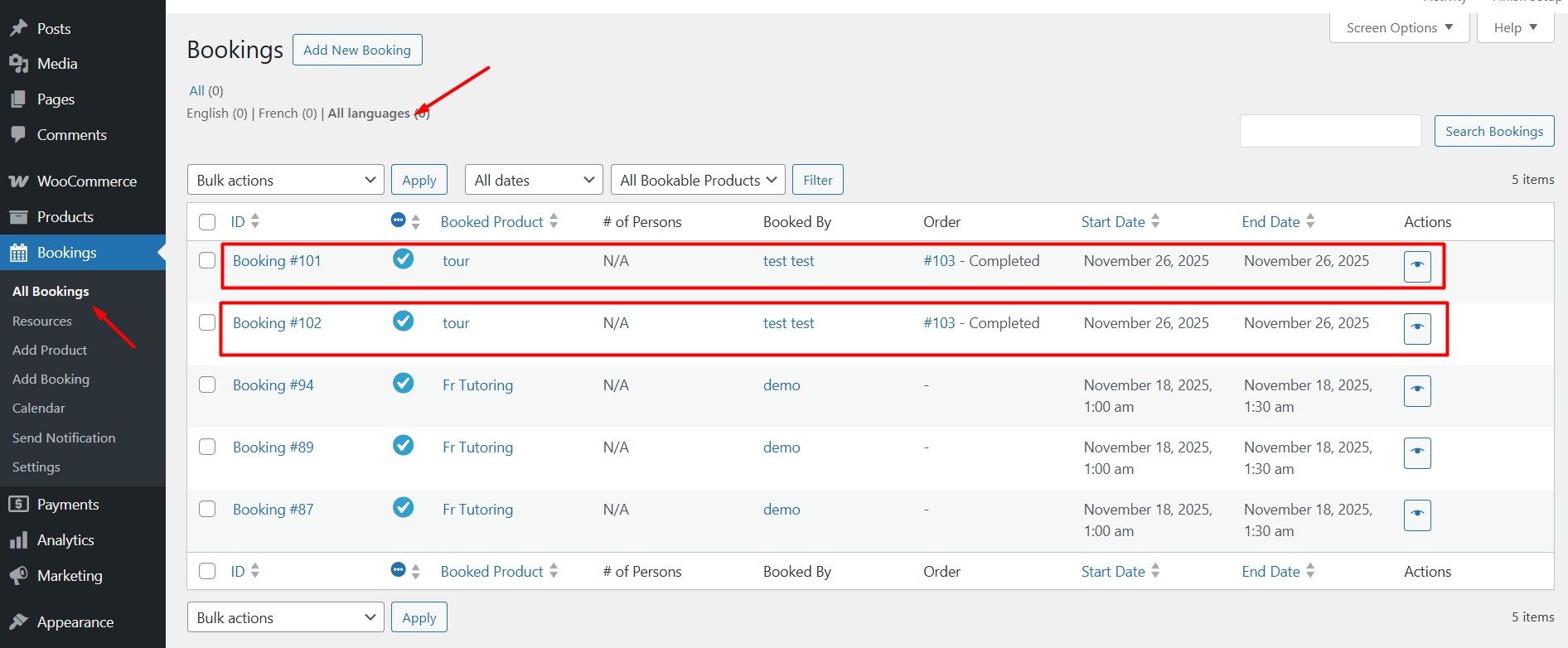 |
| November 21, 2025 at 10:59 am #17598506 | |
|
nikolaosM-6 |
I said from the beginning what the issue is, and I showed it to you on your test environment. YES I only made one booking. |
| November 23, 2025 at 1:18 pm #17602056 | |
 Christopher Amirian WPML Supporter since 07/2020 Languages: English (English ) Timezone: Asia/Yerevan (GMT+04:00) |
Hi, This is Christopher continuing with this ticket. I asked for a second opinion and I will get back to you as soon as I have an answer. Thanks. |
| November 25, 2025 at 1:13 pm #17608214 | |
|
Christopher Amirian WPML Supporter since 07/2020 Languages: English (English ) Timezone: Asia/Yerevan (GMT+04:00) |
Hi, I have a workaround given from the second tier support. Please go to: /wp-content/plugins/woocommerce-multilingual/compatibility/WcBookings/class-wcml-bookings.php And replace the content of duplicate_booking_for_translations function with:
	public function duplicate_booking_for_translations( $booking_id, $lang = false ) {
		$booking_object = get_post( $booking_id );

		$booking_data = [
			'post_type'   => self::POST_TYPE,
			'post_title'  => $booking_object->post_title,
			'post_status' => $booking_object->post_status,
			'ping_status' => 'closed',
		];

		$active_languages = $this->sitepress->get_active_languages();

		foreach ( $active_languages as $language ) {

			$booking_product_id = get_post_meta( $booking_id, self::BOOKING_PRODUCT_ID_META, true );
			$type = get_post_type($booking_product_id);
			$trid = apply_filters( 'wpml_element_trid', NULL, $booking_product_id, 'post_'. $type  );

			$translations = apply_filters( 'wpml_get_element_translations', NULL, $trid,  'post_'. $type );
			if (isset($translations[$language["code"]]) && $translations[$language["code"]]->source_language_code != NULL) {
				if ( ! $lang ) {
					$booking_language = $this->sitepress->get_element_language_details( $booking_product_id, 'post_product' );
					if ( $booking_language->language_code === $language['code'] ) {
						continue;
					}
				} elseif ( $lang !== $language['code'] ) {
					continue;
				}

				$booking_persons       = maybe_unserialize( get_post_meta( $booking_id, self::BOOKING_PERSONS_META, true ) );
				$trnsl_booking_persons = [];

				if ( is_array( $booking_persons ) && ! empty( $booking_persons ) ) {
					foreach ( $booking_persons as $person_id => $person_count ) {

						$trnsl_person_id = apply_filters( 'wpml_object_id', $person_id, 'bookable_person', false, $language['code'] );

						if ( is_null( $trnsl_person_id ) ) {
							$trnsl_booking_persons[] = $person_count;
						} else {
							$trnsl_booking_persons[ $trnsl_person_id ] = $person_count;
						}
					}
				}

				$trnsl_booking_id = wp_insert_post( $booking_data );
				$trid             = $this->sitepress->get_element_trid( $booking_id );
				$this->sitepress->set_element_language_details( $trnsl_booking_id, 'post_' . self::POST_TYPE, $trid, $language['code'] );

				$meta_args = [
					self::BOOKING_ORDER_ITEM_ID_META => 0,
					// translated product (id) may not exists
					self::BOOKING_PRODUCT_ID_META    => $this->get_translated_booking_product_id( $booking_id, $language['code'] ),
					self::BOOKING_RESOURCE_ID_META   => $this->get_translated_booking_resource_id( $booking_id, $language['code'] ),
					self::BOOKING_PERSONS_META       => $this->get_translated_booking_persons_ids( $booking_id, $language['code'] ),
					self::BOOKING_COST_META          => get_post_meta( $booking_id, self::BOOKING_COST_META, true ),
					self::BOOKING_START_META         => get_post_meta( $booking_id, self::BOOKING_START_META, true ),
					self::BOOKING_END_META           => get_post_meta( $booking_id, self::BOOKING_END_META, true ),
					self::BOOKING_ALL_DAY_META       => intval( get_post_meta( $booking_id, self::BOOKING_ALL_DAY_META, true ) ),
					self::BOOKING_CUSTOMER_ID_META   => get_post_meta( $booking_id, self::BOOKING_CUSTOMER_ID_META, true ),
					self::BOOKING_DUPLICATE_OF_META  => $booking_id,
					'_language_code'                 => $language['code'],
				];

				foreach ( $meta_args as $key => $value ) {
					update_post_meta( $trnsl_booking_id, $key, $value );
				}

				WC_Cache_Helper::get_transient_version( 'bookings', true );
			}

		}

	}
That should fix the issue. This is a workaround and the problem is already escalated to the development team. Thanks. |
| November 25, 2025 at 9:37 pm #17609884 | |
|
nikolaosM-6 |
Thanks for this code, however I'll be honest and say I do not trust pushing this to a live website. I've lost much of the confidence in WPML being able to handle such cases, and I have already been experimenting with other options, luckily they seem to handle it just fine out of the box. Do you realize that for years we had to put up with excuses from WPML team about this being normal behavior (when it clearly isn't!!!) (see tickets like https://wpml.org/forums/topic/multilingual-multicurrency-plugin-duplicates-orders-in-woocommerce-booking/ and https://wpml.org/forums/topic/multilingual-multicurrency-duplicates-bookings-in-woocommerce-bookings/ ) and all of a sudden for some weird reason you CHANGE this behavior and actually do what was the expected behavior all along. This caused us much distress, as for ALL THOSE YEARS our websites had to put up with calculations multiplying the available bookings by the number of languages, then you all of a sudden change it in version 5.5.1, making all those websites allowing a false amount of bookings that they weren't supposed to be allowing, clearly completely breaking the functionality. Then all of a sudden once again, you REMOVE this fix, and we're back to square one. I will keep this ticket as unresolved, until you officially patch the plugin to support this on a global scale and not just on my website. And hopefully, other people will eventually see this ticket BEFORE developing a WooCommerce Bookings multilanguage with WPML and thing twice before using those 2 plugins together. |
| November 26, 2025 at 1:14 pm #17612114 | |
|
Christopher Amirian WPML Supporter since 07/2020 Languages: English (English ) Timezone: Asia/Yerevan (GMT+04:00) |
Hi, Thank you for your feedback, we understand that there was indeed a back and forth happening that we will check to see what was the reason. The temporary solution is to make sure you can continue the work like the way you would do. We did report this to the development team and we will get back to you as soon as we have an ETA for an official fix release. Thank you. |










