Skip to content Skip to sidebar

This is the technical support forum for WPML - the multilingual WordPress plugin.

Everyone can read, but only WPML clients can post here. WPML team is replying on the forum 6 days per week, 22 hours per day.

Sun Mon Tue Wed Thu Fri Sat
- 9:00 – 17:00 9:00 – 17:00 9:00 – 17:00 9:00 – 17:00 9:00 – 17:00 -
- - - - - - -

Supporter timezone: America/La_Paz (GMT-04:00)

This topic contains 3 replies, has 0 voices.

Last updated by Claudio Palacios 3 weeks, 3 days ago.

Assisted by: Claudio Palacios.

Author Posts
February 5, 2026 at 5:01 am #17794315

benjaminK-50

Plugins involved

WPML Multilingual & Multicurrency for WooCommerce

WPML Core

Yoast SEO

Problem summary

We are seeing incorrect product category URLs generated only in the Yoast XML sitemap for translated (German) products.

After investigation, this issue does not originate from Yoast SEO. The root cause appears to be within WPML Multilingual & Multicurrency for WooCommerce, specifically how category links are filtered when generating sitemap URLs.

Technical findings

The issue is caused by the function:

translate_product_post_type_link_product_cat_when_display_as_translated()

When this function runs during sitemap generation, it:

Overrides the correct German primary category

Uses the wpml_object_id filter

Returns uncategorized as the primary category for German products

This results in incorrect product URLs inside the Yoast product sitemap

However:

When the same function runs on the frontend, it behaves correctly

The correct translated (German) primary category is returned

The issue happens only in the sitemap context

This strongly suggests a context-related issue in how WPML handles product category resolution when Yoast builds sitemap links.

Expected behavior

German products in the Yoast sitemap should use their correct translated primary product category

The sitemap URLs should match what is output on the frontend

Actual behavior

German product sitemap URLs contain /product-category/uncategorized/

This happens even though the product has a valid translated category

Frontend URLs are correct; only sitemap URLs are wrong

Additional context / configuration

This issue occurs when the following WPML setting is enabled:

WPML → Settings → Post Type Translation

Product is set to:
“Translatable – use translation if available or fallback to default language”

Changing this setting affects whether the issue occurs.

Summary

This is not a Yoast SEO bug

The issue lies in WPML’s WooCommerce Multilingual handling of product category links

Specifically, translate_product_post_type_link_product_cat_when_display_as_translated() behaves inconsistently between:

Sitemap generation

Frontend rendering

We believe WPML should avoid overriding the primary category with uncategorized when generating sitemap URLs.

February 5, 2026 at 8:02 am #17794679

Long Nguyen
WPML Supporter since 02/2022

Languages: English (English ) Vietnamese (Vietnamese )

Timezone: Asia/Ho_Chi_Minh (GMT+07:00)

Hi there,

I’m Long from the WPML Development team, I’m happy to help you with this issue.

I've tried to replicate the issue on my site but didn't see the same as you reported. What I have:
- a product in English and a translation in French
- a primary category in English and a translation in French
- a primary category in English and no translation in French

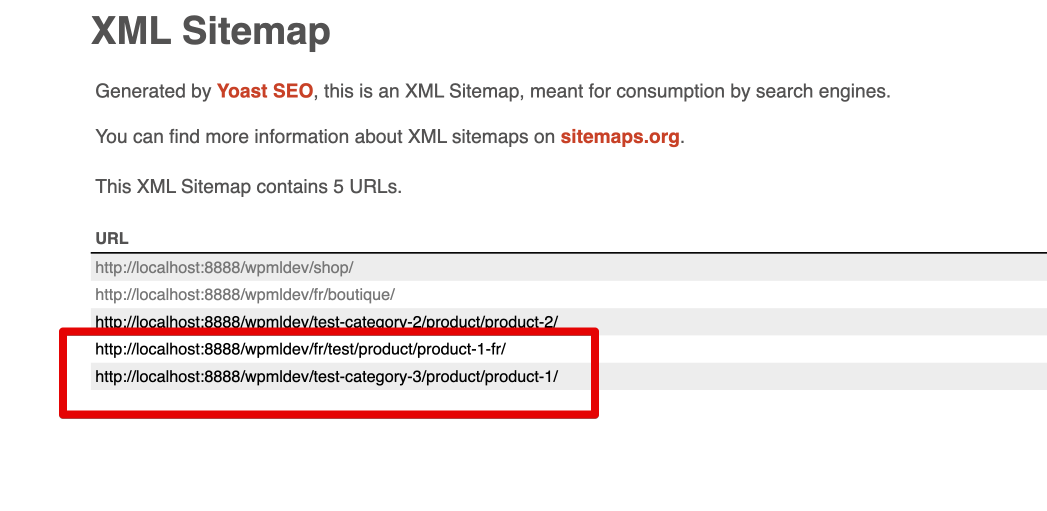
If the translation product has a different primary category, it still shows in the Yoast sitemap as well. Please check the attached screenshot.

Can you please share clear steps to replicate the issue? Or share the temporary access (wp-admin and FTP) to your site so I can take a better look at the issue. It would be better to have a testing site where the issue is replicated. Your next reply is set to private to share the info.

❌ IMPORTANT: Please backup your database and website before proceeding ❌
You can use this plugin to create the backup: https://wordpress.org/plugins/duplicator/

Looking forward to your reply.
Thanks

XML Sitemap 2026-02-05 14-43-42.png
February 10, 2026 at 5:58 am #17807248

benjaminK-50

Hi Long,

The steps are the same as i've written in the support ticket.
Language: French

Settings - for Product Fallback to original language.

What happens is the slug of the product is being shown in the original language.
I have confirmed this with the Yoast team too.

February 13, 2026 at 2:06 pm #17820953

Claudio Palacios
Supporter

Languages: English (English )

Timezone: America/La_Paz (GMT-04:00)

Hi,

Thank you for the clarification.

As I’ll be continuing the investigation from our side, I’d like to check the behavior directly on your installation to better understand why the product slug/category is resolving to the original language within the Yoast sitemap context.

Could you please provide temporary administrator access to the site so I can investigate further?
If possible, I would also appreciate:
- Confirmation that we’re allowed to create a copy (via Duplicator) for testing purposes, so we don’t affect the live site.

Your next reply is set to private, so you can safely share the credentials there.

Once I have access, I’ll begin the investigation right away.

Kind regards,

Claudio

The topic ‘[Closed] Yoast WPML Settings Conflict’ is closed to new replies.