Skip to content Skip to sidebar

This thread is resolved. Here is a description of the problem and solution.

Problem:
If you're experiencing issues with updating the

<meta name="robots" content="...">

tag on translated pages of your WordPress site using WPML, where changes apply only to the original language page and not the translations.
Solution:
We recommend following the steps to translate or copy custom fields as outlined in our guide. You can find detailed instructions here: Translating Custom Fields Guide. This guide will help you ensure that changes to meta tags like

<meta name="robots" content="...">

are correctly applied across all translated versions of your pages.

If this solution does not resolve your issue, or if it seems outdated or irrelevant to your specific case, we highly recommend checking related known issues at https://wpml.org/known-issues/, verifying the version of the permanent fix, and confirming that you have installed the latest versions of themes and plugins. Additionally, please feel free to open a new support ticket for further assistance at WPML Support Forum.

This is the technical support forum for WPML - the multilingual WordPress plugin.

Everyone can read, but only WPML clients can post here. WPML team is replying on the forum 6 days per week, 22 hours per day.

Tagged: 

This topic contains 4 replies, has 0 voices.

Last updated by Carlos Rojas 4 months ago.

Assisted by: Carlos Rojas.

Author Posts
October 26, 2025 at 5:46 pm #17519729

christianD-67

Background of the issue:
I am trying to update the `<meta name="robots" content="...">` tag on my WordPress site, baltrag.com, which uses WPML for translations. The original page baltrag.com/daniela-kubli/ is in English, and I have translated it into German and French. I updated the meta tag on the original page from `index` to `noindex`.

Symptoms:
The change to the `<meta name="robots" content="...">` tag only applies to the original page and not the translated versions.

Questions:
How can I update the `<meta name="robots" content="...">` tag on the translated pages as well?

October 27, 2025 at 1:44 pm #17522319

Carlos Rojas
WPML Supporter since 03/2017

Languages: English (English ) Spanish (Español )

Timezone: Europe/Madrid (GMT+01:00)

Hello,
Thank you for contacting us

Could you share a screenshot or a link to a video showing how you update the meta value in the content in the original language? This will help us identify what type of content it is.

Looking forward to your message.
Regards,
Carlos

October 28, 2025 at 5:00 am #17524060

christianD-67

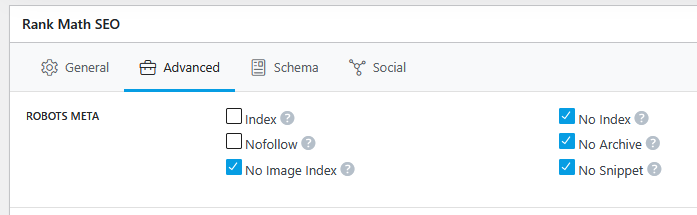
Hi, I’ve updated the <meta name="robots" ...> tag using the Rank Math SEO plugin on the original language page. Please see the attached screenshot.

index.png
October 28, 2025 at 12:02 pm #17525999

Carlos Rojas
WPML Supporter since 03/2017

Languages: English (English ) Spanish (Español )

Timezone: Europe/Madrid (GMT+01:00)

Thank you very much for your message.

This information is saved as custom fields, and to translate/copy them, you must follow the steps described in this guide: https://wpml.org/documentation/getting-started-guide/translating-custom-fields/

I kindly ask you to take a look at the guide and let me know if you need further help with the configuration 🙂

October 28, 2025 at 9:22 pm #17527660

christianD-67

Cool, that helped. me. I set "rank_math_robots " from "copy once" to "copy". Thank you.

October 29, 2025 at 9:44 am #17528668

Carlos Rojas
WPML Supporter since 03/2017

Languages: English (English ) Spanish (Español )

Timezone: Europe/Madrid (GMT+01:00)

Great!

Please don't hesitate to contact us if you need our assistance in the future with WPML. We are here to help 🙂

Have an excellent day!