
This is the technical support forum for WPML - the multilingual WordPress plugin.
Everyone can read, but only WPML clients can post here. WPML team is replying on the forum 6 days per week, 22 hours per day.
| Sun | Mon | Tue | Wed | Thu | Fri | Sat |
|---|---|---|---|---|---|---|
| - | - | 9:00 – 18:00 | 9:00 – 18:00 | 9:00 – 18:00 | 9:00 – 18:00 | 9:00 – 18:00 |
| - | - | - | - | - | - | - |
Supporter timezone: America/Lima (GMT-05:00)
Tagged: Exception
This topic contains 17 replies, has 0 voices.
Last updated by Andreas W. 2 days, 8 hours ago.
Assisted by: Andreas W..
| Author | Posts |
|---|---|
| March 12, 2026 at 7:26 pm #17893744 | |
 josuel-2 |
In english, the site works perfectly fine, Every page and product is up to date. When I switch to french or spanish languages, it's like if they are displaying an old version of the site. The widgets are the ones in the old version of the site, product prices are off, header is off, shortcode not updating. I am not an expert programmer, it is my first time using WPML. It could be a very obvious solution but I need help. |
| March 13, 2026 at 3:45 pm #17896332 | |
 Marcel Supporter Languages: English (English ) Spanish (Español ) German (Deutsch ) Timezone: Europe/Vienna (GMT+02:00) |
Hi, Could you please try to make a change in the original language so that it forces an update to the translation? If you need help with that, I’m happy to check it directly on your website. 🙂 Best regards, |
| March 17, 2026 at 11:08 am #17903909 | |
|
Marcel Supporter Languages: English (English ) Spanish (Español ) German (Deutsch ) Timezone: Europe/Vienna (GMT+02:00) |
Hi, Please make sure to perform a full backup first. After that, ensure that the following components are updated to their latest versions: Plugins Themes If possible, I also recommend updating the WordPress Core to version 6.9.4. Once this is done, we can review everything in detail. Best regards, |
| March 19, 2026 at 4:49 pm #17912004 | |
|
josuel-2 |
Hello Marcel, The website is backed up and all plugins and wordpress have been updated. Let me know the next steps. Thanks... |
| March 20, 2026 at 3:15 pm #17914726 | |
|
Marcel Supporter Languages: English (English ) Spanish (Español ) German (Deutsch ) Timezone: Europe/Vienna (GMT+02:00) |
Hi, The issue is that not all Elementor templates are being loaded correctly. For example, on If you move the mouse cursor over "Edit with Elementor", you can see which template is actually being used. This shows that the problem is related to missing translations. You need to translate all involved templates in: Go to Elementor Templates, as currently none of these templates are translated. Best regards, |
| March 20, 2026 at 7:01 pm #17915200 | |
|
josuel-2 |
I understand that I need to translate the elementor templates. When I do translate them nothing happens. For instance. I translated the elementor Products Archive #2299 in french and English. When I save the translation (which was previously already done before contacting support) nothing happens, it stays in the translation queu and nothing changes in the website even when it is correctly translated inside WPML. Maybe this is completely normal but I tried looking online at what to do but I did not find anything to help me. Thank you for being patient with me, I am a beginner with WPML. |
| March 23, 2026 at 4:03 pm #17919603 | |
|
Marcel Supporter Languages: English (English ) Spanish (Español ) German (Deutsch ) Timezone: Europe/Vienna (GMT+02:00) |
Hi, No worries, we’re happy to help with that 🙂 I checked the template you mentioned, and the reason nothing visible happened is that the translation is still in progress under your username: Please complete the translation to 100% in WPML → Translations, and it should then become visible on the frontend. Best regards, |
| March 23, 2026 at 6:15 pm #17919771 | |
|
josuel-2 |
Hi Marcel, All Elementor templates are translated at 100%. However, the translated versions are still not showing on the frontend — the old version keeps displaying in French and Spanish. The translations are complete but WPML is not pushing them to the frontend. Can you please access the site directly and investigate why completed translations are not being applied to Elementor templates? Go take a look at Elementor Products Archive #2299 for example. I have also tried Elementor Tools → Clear Files & Data and LiteSpeed Purge All with no results. |
| March 25, 2026 at 3:42 pm #17927069 | |
|
josuel-2 |
Hello Marcel, The template is translated at 100% this is the issue. It is translated yet nothing is happening. Go to the translations page and check it for yourself. Here is a screenshot: Also, Once I click save translation or if I try to cancel it, nothing happens. Is there a way we could schedule a call? it would be easier to discuss this in person? Thank you 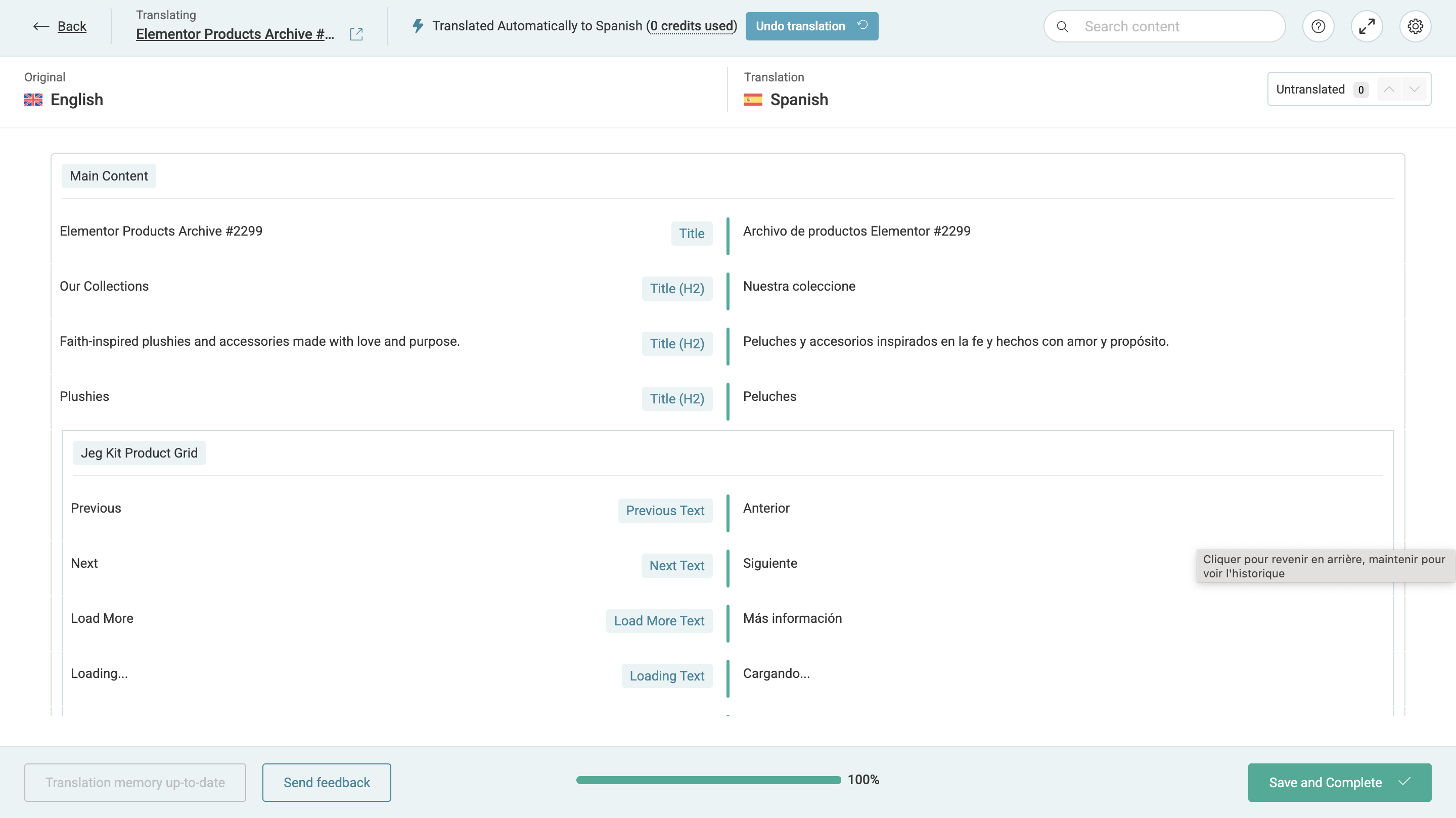 |
| March 25, 2026 at 7:03 pm #17927391 | |
 Andreas W. WPML Supporter since 12/2018 Languages: English (English ) Spanish (Español ) German (Deutsch ) Timezone: America/Lima (GMT-05:00) |
Hello, The minimum server requirements are not being met: Could you please increase the WordPress memory limit (WP Memory Limit) to at least 256 MB? WPML requires at least 128 MB. Your current values are: Current memory usage is at 120MB. To change the WP MEMORY LIMIT, you need to connect to your website's server and open the wp-config.php file in a text editor. The file is located in the WordPress root directory. Add this code to the wp-config.php file to increase WordPress's memory:
define ('WP_MEMORY_LIMIT', '256M');
Add this just before this comment: // That's all, stop editing! Happy blogging. The current values can be viewed under WPML > Support > WordPress. See screenshot. These settings can be restricted directly by your hosting provider. Therefore, I recommend contacting them and asking them to change them directly if the changes are not applied automatically. After adjusting the limit, please edit the original content, save it again, and then update the translations. Best regards, |
| March 26, 2026 at 4:06 pm #17930013 | |
|
josuel-2 |
Hello Andreas, I did what you asked, I even verified and my memory has been updated. I appreciate your response however the problem persists; I modified the original version (english) of the Elementor Products Archive #2299. I then updated the translation and the problem persists. Nothing Changes. Again, is there a way to schedule a call with a member of customer support? I am free anytime. This issue is dramatically slowing down our operations. Thank you for your response, Josué |
| March 26, 2026 at 6:58 pm #17930490 | |
|
Andreas W. WPML Supporter since 12/2018 Languages: English (English ) Spanish (Español ) German (Deutsch ) Timezone: America/Lima (GMT-05:00) |
The status symbol remains in progress, displaying the "Clockwork wheel". For some reason, WPML can not complete the translation. I will investgiate further and then get back to you. I suspect that this could be an issue between WPML and the Product Grid Widget from Jeg Kit for Elementor. |
| March 26, 2026 at 8:13 pm #17930589 | |
|
josuel-2 |
Perfect Thank you, I will be waiting for your response. Have a great day, |
| March 27, 2026 at 5:56 am #17930829 | |
|
Andreas W. WPML Supporter since 12/2018 Languages: English (English ) Spanish (Español ) German (Deutsch ) Timezone: America/Lima (GMT-05:00) |
Hello Josué, The issue does not occur on my sandbox while testing your template with Elementor PRO, Jeg Kit for Elementor, WooCommerce, and WPML. I will take a local copy of your site to investigate the cause of the problem. Best regards |
| March 27, 2026 at 12:14 pm #17932156 | |
|
Andreas W. WPML Supporter since 12/2018 Languages: English (English ) Spanish (Español ) German (Deutsch ) Timezone: America/Lima (GMT-05:00) |
The site was for some reason not correclty registered on our translation system. The issue is fixed now. |







