This thread is resolved. Here is a description of the problem and solution.
Problem: The client reported performance issues on their site, suspecting a conflict between the Uncode theme and WPML. After testing with a default theme, the site ran faster, indicating a potential issue with the Uncode theme. Solution: We recommended checking the known issue with the Uncode theme, which involves a high number of database requests. The suggested workaround includes modifying the theme's functions.php file by adding the following line:
We also advised making a full site backup before proceeding with any changes. Despite these efforts, the client experienced no improvement, and further investigation suggested that the performance issues might not be directly related to WPML but could be due to other factors, including a recent Uncode update and a WooCommerce issue.
If this solution does not resolve your issue or seems irrelevant due to being outdated or not applicable to your case, we highly recommend checking related known issues at https://wpml.org/known-issues/, verifying the version of the permanent fix, and confirming that you have installed the latest versions of themes and plugins. If problems persist, please open a new support ticket.
This is the technical support forum for WPML - the multilingual WordPress plugin.
Everyone can read, but only WPML clients can post here. WPML team is replying on the forum 6 days per week, 22 hours per day.
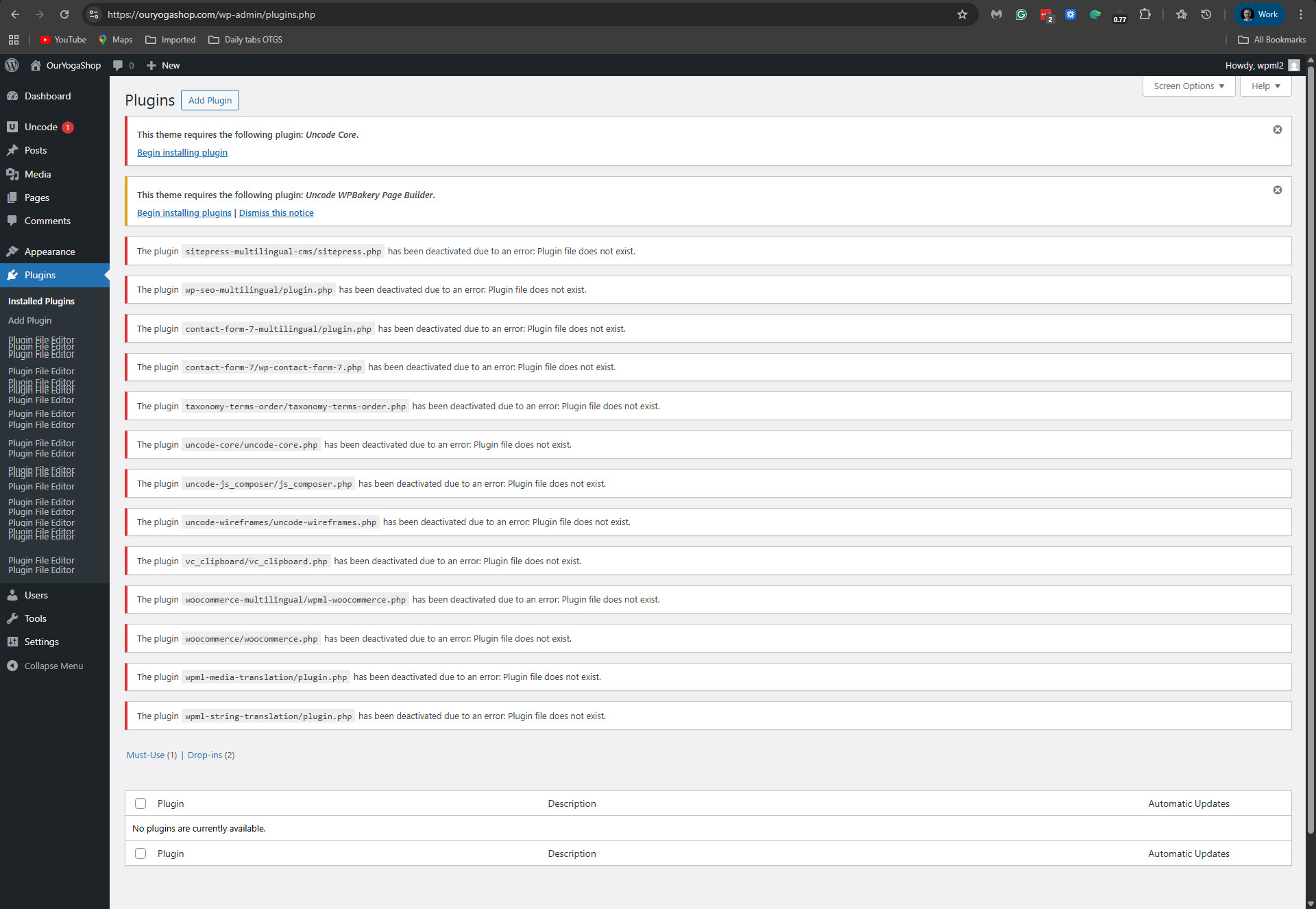
I accessed your site and found it without any plugins installed. Please see the attached screenshot. It seems you deleted the entire contents of the /wp-content/plugins/ folder. Naturaly in this situation, I cannot investigate the performance issue. Please restore your site to its normal state and let me know when it is done.
It was because the site was loading so slow and I had to go for a while. Still had to give you credentials so you could work. Just missed to rename it. - Sorry.
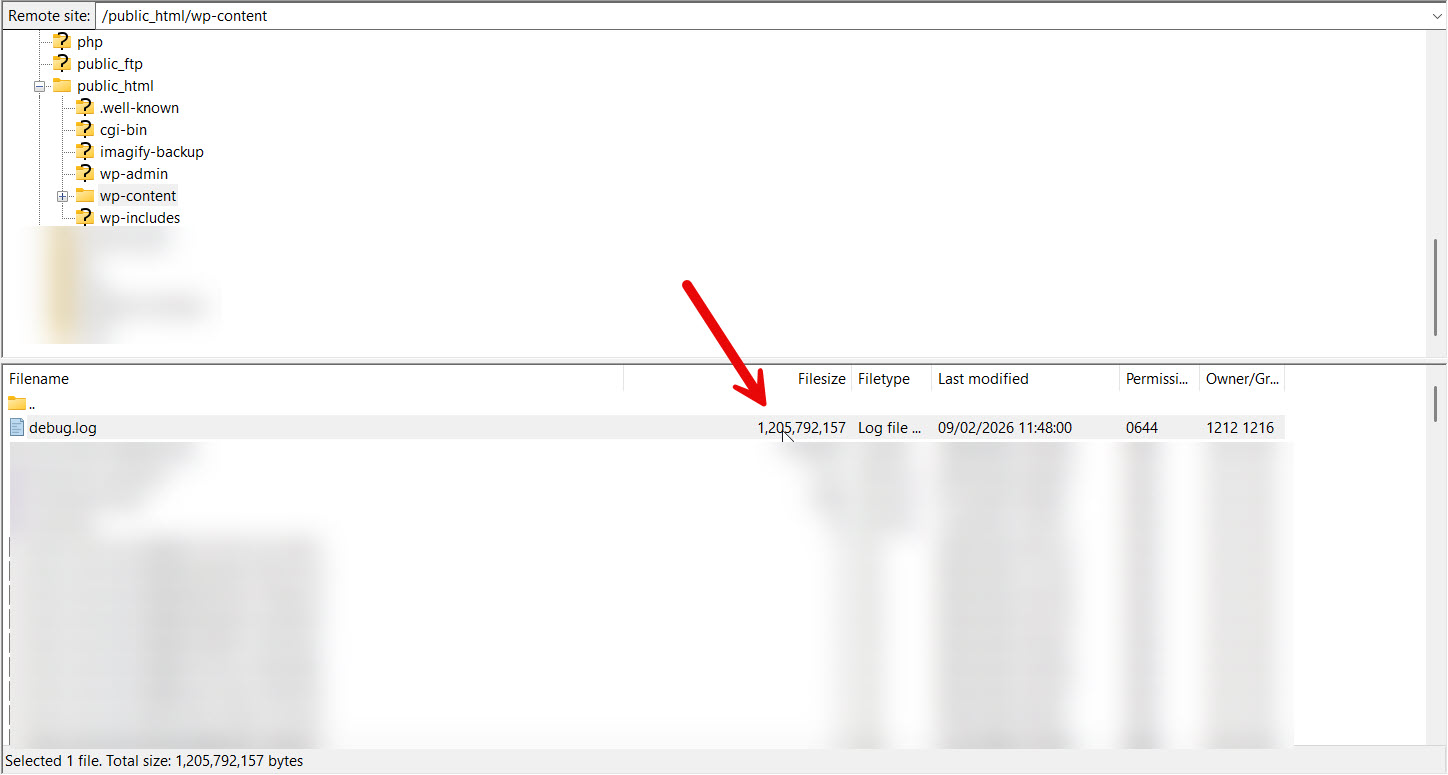
When I accessed your site now, I noticed that WPML and its add-ons are inactive. Nevertheless the site still loads slow. The frontend and backend loaded in around 20 seconds. I believe there is another cause of the performance problem on your site, besides WPML. I assume that when WPML is active, the site loads even more slowly. But this would be the case when activating any other plugin. I connected to your site with FTP to check the debug.log file in the /wp-content/ folder. And I discovered it is huge. Its size is 1.14 gigabyte and my code editor can't open it. Please see the attached screenshot. I assume that the errors in the debug.log file could tell us a lot about the performance issue. Therefore, please approve the following.
A. Allow me to delete the debug.log, so WordPress will create a new file which I can work with.
B. Allow me to deactivate plugins and switch the theme to a default WordPress theme.
Do you allow me to proceed with this?
**** Important! Please make a full site backup (files and DB) before you proceed with those steps****
I assume the problem was not directly caused by WPML, but rather by the Uncode and WooCommerce issue you mentioned.
In any case, I went ahead and deleted the huge debug.log. Then I navigated between some backend and frontend pages and checked the newly created debug.log. In it, I only found the following error, which mentions WPML.
WordPress database error Commands out of sync; you can't run this command now for query SHOW FULL COLUMNS FROM `wp_options` made by shutdown_action_hook, do_action('shutdown'), WP_Hook->do_action, WP_Hook->apply_filters, WPML_Notices->save_to_option, update_option
I then went to WPML -> Support -> Troubleshooting (link), and clicked the following options.
- 'Clear the cache in WPML'
- 'Remove ghost entries from the translation tables'
- 'Fix element_type collation'
- 'Fix WPML tables collation'
- 'Cleanup and optimize string tables'
This seems to have cleared the error, because I revisited some backend and frontend pages, and the error I mentioned no longer appears.
I've noticed that the debug.log on your site grows very quickly. This can, in itself, cause your server's free space to shrink, which can lead to performance issues. My general suggestion to you is to disable writing to debug.log and only enable it when you need it. You can do it by changing the following in the wp-config.php file.
Look for this code:
// Enable WP_DEBUG mode
define( 'WP_DEBUG', true );
// Enable Debug logging to the /wp-content/debug.log file
define( 'WP_DEBUG_LOG', true );
And change it to 'false' like this:
// Enable WP_DEBUG mode
define( 'WP_DEBUG', false );
// Enable Debug logging to the /wp-content/debug.log file
define( 'WP_DEBUG_LOG', false );
In conclusion, I'd say the following.
1. Your site runs smoothly now with no perfromance issue.
2. The performance issue was probably not because of WPML.
3. One error that was related to WPML was fixed by applying some troubleshooting options.
4. It would be better to disable the WordPress debug.log and only activate it when needed.
I'd be thankful if you mark this ticket as resolved.