[Resolved] WPML setup stuck on step 4 AI Translation loading
This thread is resolved. Here is a description of the problem and solution.
Problem: If you're experiencing an issue where the WPML setup gets stuck at step 4 (AI translation) and you see a blank screen with a spinner that quickly disappears, the problem might be related to the naming of the WPML plugin folder. Solution: We recommend checking the name of the WPML plugin folder in your plugins directory. It should be named
sitepress-multilingual-cms
. If it is incorrectly named (e.g.,
sitepress-multilingual-cms 2
), rename it back to
sitepress-multilingual-cms
. This should resolve the setup issue and allow you to proceed with the wizard.
If this solution does not resolve your issue or seems irrelevant due to being outdated or not applicable to your case, we highly recommend checking related known issues at https://wpml.org/known-issues/, verifying the version of the permanent fix, and confirming that you have installed the latest versions of themes and plugins. If the problem persists, please open a new support ticket at WPML support forum for further assistance.
This is the technical support forum for WPML - the multilingual WordPress plugin.
Everyone can read, but only WPML clients can post here. WPML team is replying on the forum 6 days per week, 22 hours per day.
Unfortunately, following the same steps did not solve the issue for me.
In short:
While trying to setup the plugin, step 4 (AI translation) leaves me staring at a blank step and there seems to be no way to proceed.
The spinner quickly rotates but then disappears and nothing happens.
Deactivating all other plugins and reverting back to the default theme didn't fix the issue.
Scanning through known issues didn't lead to more help so I see myself forced to open a new ticket.
Could you please check whether the cURL library is installed and enabled on your server? If you’re unsure how to verify this, your hosting provider should be able to confirm it for you.
Additionally, please temporarily increase the PHP memory limit to rule out any memory-related issues that might be affecting this behavior.
Are there any errors in the browser console?
Let me know what you find, and we can continue troubleshooting from there.
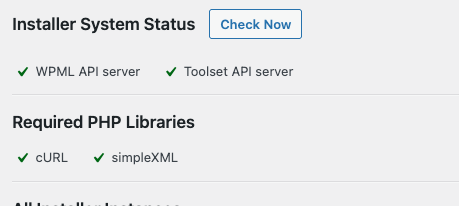
cURL is installed and confirmed by WPML installer support (see attached image).
PHP memory is at the max the hosting allows without manually overwriting it (128M).
The browser console shows no errors.
Server logs only show
"200 GET /wp-admin/admin.php?page=sitepress-multilingual-cms%202/menu/setup.php HTTP/1.0"
I've added both first and last name to the account (wouldn't have thought this would be a requirement). Didn't solve the issue.
Did both a reset and clean up of the plugin. That didn't help either.
Doing both together and doing them individually and then trying to restart the setup progress started me directly at step 4, showed the spinner for a second, and then ended with a blank page (frame still loaded but step 4 remained empty).
I have since:
- run the site with browser cache disabled
- restarted PHP services on the server and verified that cURL is working
- cross-referenced with another hosting on the same server, where WPML is already up and running (but setup was a few weeks ago)
- deactivated and where possible uninstalled other plugins (some had a one-time registration key)
- re-installed the default theme (twenty twenty-five)
- registered the site in WPML new and created a new registration key
None of the above have solved the issue.
When checking the exact requests in the browser tools the endpoint is reached (WPML\Setup\Endpoint\CurrentStep) and responds with {"success":true}
I need to request temporary access (wp-admin and FTP) to your site—preferably to a test site where the problem has been replicated, if possible—in order to be of better help. When you log in to leave your next reply, you will find the needed fields below the comment area. The information you will enter is private, meaning only you and I can see and access it.
If I need to check the problem further, I want to ask you about the possibility of replicating your site locally. I'll need to install a "Duplicator" temporarily or "All In One Migration" plugin on your site. This will allow me to create a copy of your site and your content.
Good news! I’ve investigated this further and identified the cause of the issue.
In your plugins directory, the WPML plugin folder was named sitepress-multilingual-cms 2 instead of the expected sitepress-multilingual-cms. This non-standard folder name was causing the WPML setup wizard to break.
I’ve renamed the folder back to sitepress-multilingual-cms, and after that, the wizard started working correctly, and the issue was resolved.
Thank you very much for your support in this.
Never in weeks would I have thought to check whether the folder name might have anything to do with this.
I suppose downloading the archive a second time might've renamed the file and with it the extracted folder.