This thread is resolved. Here is a description of the problem and solution.
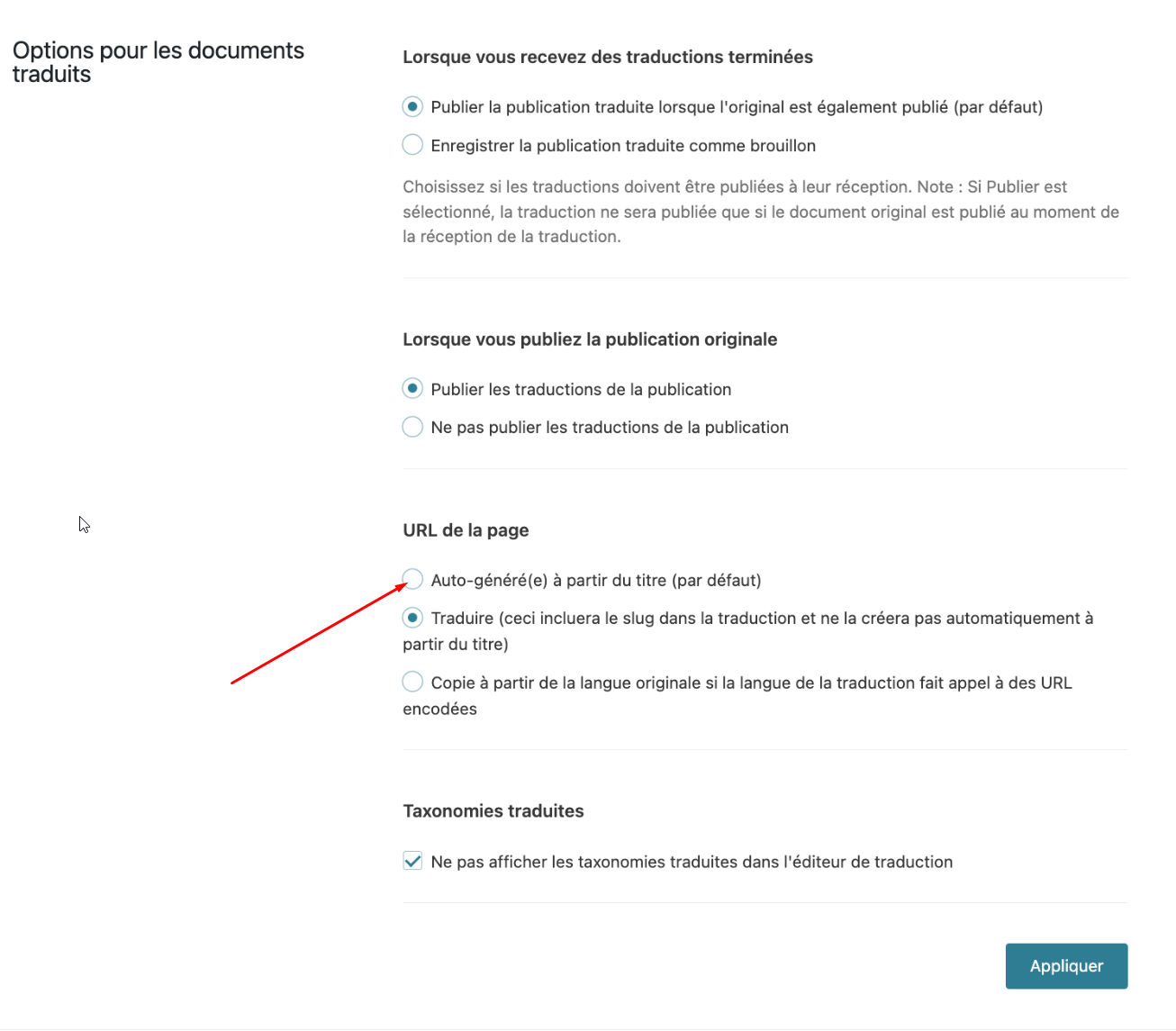
Problem: You are experiencing issues with untranslated URLs and a misalignment between the translation interface and the actual content displayed on the front page. Solution: For the untranslated URL, we recommend setting WPML to automatically generate translations from the title. You can do this by navigating to WPML > Settings, scrolling down to 'Translated documents options', and under 'Page URL', selecting the 'Translate' option. For detailed guidance, please refer to our documentation on translating page slugs. If the translation misalignment issue persists, it might be due to outdated or incorrect settings. We suggest checking for any discrepancies in your translation management settings and updating them accordingly. If these steps do not resolve your issues, please consider opening a new support ticket. We also highly recommend checking related known issues at https://wpml.org/known-issues/, verifying the version of the permanent fix, and confirming that you have installed the latest versions of themes and plugins.
If you need further assistance, please do not hesitate to contact us by opening a new support ticket at our support forum.
This is the technical support forum for WPML - the multilingual WordPress plugin.
Everyone can read, but only WPML clients can post here. WPML team is replying on the forum 6 days per week, 22 hours per day.
- the URL seems not translated, where is the setting to make it translated directly by WPML ?
- part of the 8% not translated in the translation interface : the first timeline field "Naissance au Plagnal le 25 décembre" is blank in terme of translation ; however when i look at the front page, the field contains a translation : "Nascita a Le Plagnal". Is this the sign of a complete misalignement between the page and the translated interface since the french field doesn't match with the italian one ?
Thanks for your patience. You can refer to this section of the documentation https://wpml.org/documentation/getting-started-guide/translating-page-slugs/ that explains how you can have WPML to "Auto Generate from Title" in WPML > Settings > scroll down to Translated documents options > under Page URL > choose the Translate option.
Thanks for your reply. You don't need to have the sticky link addon activated to enable this "Auto Generate from Title" option. Let me know how it goes.
The option for "Translated document options" under URL is already set at "Translate", i don't get the difference between "Auto-generated" versus "Translate", what should i do with this option?
Thanks for your reply. If you want WPML to translate the URL for you automatically, you can use the "Auto Generate from Title" option as shown in the attached screenshot.
Yes, this can be a good option so the slug receives the title translation. But what is the difference between the option "Auto-generated" and the option "Translate" ? For me to understand, can you please provide an example ?
Also, if i change the parameter now, do i need to run a translation job and will it change all my taxonomy and sitemap information ?
Thanks for your reply. If you use the "Auto Generate from Title" option, the slug will usually use the title from your translation and convert it into a URL slug.
If you use the "Translate" option, you'll have to manually translate the URL slug on your own.
Yes, you need to retranslate the page in your primary language after you've switched the option.
Okay, very clear; this option can help me a lot in handling dozens of pages and translations.
In case i choose the "Auto-generate" option now and run for translation now, all existing manual translations will be erased and regenerated ? or the new translation generation will be done only on the slug URL element ?
My website is equipped with RankMath which handles the automatic redirection. Can you confirm in case the new slug is created, whether an automatic redirection instruction can be sent by WPML to redirect to old slug to the new slug ?
Thanks for your reply. If you enable this option now, you’ll need to retranslate the page so the URLs can be generated correctly.
After that, if you notice any broken redirects, you can install the Sticky Links add-on via WP > Plugins > Add New > Commercial. This will automatically redirect your old links to the new ones.
Many thanks, shouldn't install Stick Links beforehand ?
Also what is the difference between the "Stick Links" option and the "regenerate internal links" option ?
And also in case i choose the "Auto-generate" option now and run for translation now, all existing manual translations will be erased and regenerated ? or the new translation generation will be done only on the slug URL element ?
The “Regenerate internal links” option only fixes internal links on a page or post if they are pointing to the wrong translated page or post.
If you retranslate a page, it will only update the URL, since that’s the only segment that isn’t translated. You can try this on one page first and let me know how it goes.