
This is the technical support forum for WPML - the multilingual WordPress plugin.
Everyone can read, but only WPML clients can post here. WPML team is replying on the forum 6 days per week, 22 hours per day.
Tagged: WCML
Related documentation:
This topic contains 3 replies, has 0 voices.
Last updated by steffenW-9 1 month ago.
Assisted by: Otto.
| Author | Posts |
|---|---|
| December 22, 2025 at 12:32 pm #17682101 | |
 steffenW-9 |
We are running a WooCommerce shop in three languages and started sending shipping notices a few weeks ago. Now we noticed that some of the emails contain strings in the wrong language. We were able to reproduce this: Select multiple orders (placed in different languages!) from WooCommerce -> Orders All email will have the subject and the "$email_heading" ("Good things are heading your way!") in the language of the oldest order. (On our production site, the footer "Thanks again! If you need any help with your order, please contact us at…" is also wrong.) Changing only one order to "Completed" sends a correct email. Choosing only orders placed in the same language also sends emails in the correct language. We set up a fresh installation only using: WordPress 6.9 And the bug is reproducible. I can supply a dump/archive of this via private message. I still have some doubts about this thing because this isn't an obscure scenario, but I could not find a bug report about it. 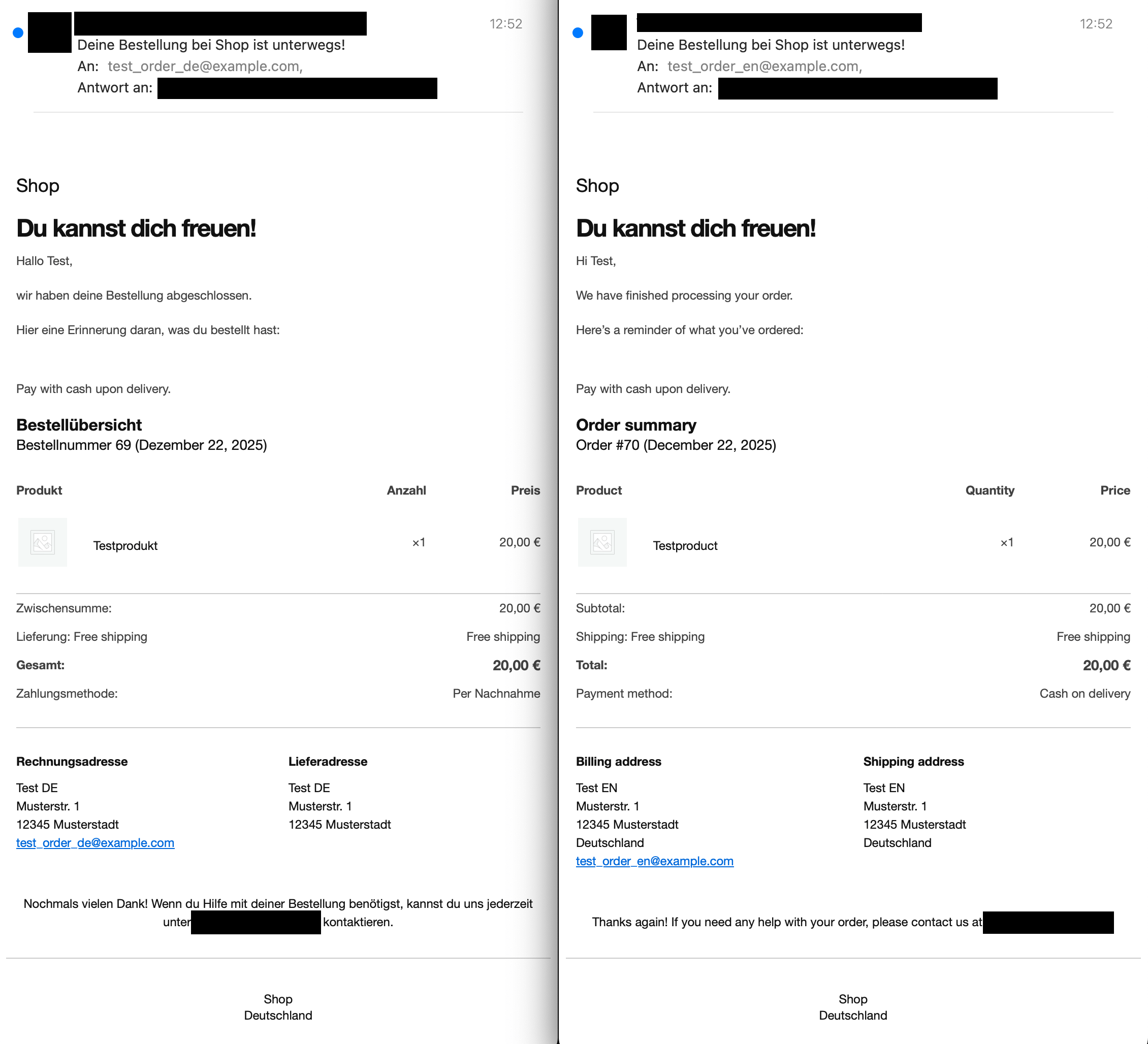 |
| December 23, 2025 at 12:40 pm #17684722 | |
 Otto WPML Supporter since 09/2015 Languages: English (English ) Spanish (Español ) Timezone: America/Argentina/Buenos_Aires (GMT-03:00) |
Hello, A while ago we had a similar issue. The problem was that the strings were translated in the "woocommerce" domain, but not in "admin_texts_woocommerce_customer_completed_order_settings" context. Can you please make sure that you enter a value in the e-mail - this will register it in WPML > ST. Then make sure that you select the context/domain in ST admin_texts_woocommerce_customer_completed_order_settings. Translate them and then send mail. To sum up, the steps are: If this does not work, please share the copy of the site where you already reproduced the problem. I enabled a private reply so you can provide us with a download link safely. Best Regards, |
| December 23, 2025 at 5:23 pm #17685291 | |
|
Otto WPML Supporter since 09/2015 Languages: English (English ) Spanish (Español ) Timezone: America/Argentina/Buenos_Aires (GMT-03:00) |
Hi Steffen, I understand your point. But it's the same issue. It only happens when updating orders in bulk. I tried the workaround I suggested in the copy of the site that you've provided, and it worked for me. Even if you want to use the default values for the email, you can still overwrite the placeholder with the same content, so it appears in WPML > String Translation in the text domain "admin_texts_woocommerce_customer_completed_order_settings". This is a workaround, the issue has been reported a while ago, but it didn't get traction. I am adding your vote so the priority increases, but as it may take some time until we have a fix deployed, I suggest giving this solution a try. I wish you happy holidays! The ticket will remain open for two weeks without activity. Best Regards, |
| January 5, 2026 at 12:22 pm #17703932 | |
|
steffenW-9 |
Ah, I did not realize it's a workaround to a known issue. I followed your steps and indeed it does work. Thanks! |




