Skip to content Skip to sidebar

This thread is resolved. Here is a description of the problem and solution.

Problem:
The client reported a critical error on their site, experiencing a PHP 8.3 infinite recursion issue leading to a 503 error. This was traced back to a potential bug in the WPML plugin with the newer WordPress version.
Solution:
1. We asked the client to check if the issue persists after following the steps described on the erratum page for PHP 8.3.x errors, which can be found here: PHP 8.3.x Fatal Error.
2. We requested a detailed description of the issue, including steps to reproduce it and any error messages, to better understand the problem.
3. We asked for access credentials to the site to investigate the configuration and reproduce the issue.
4. We inquired if the client would prefer to continue troubleshooting the issue or remain on the older WordPress version (v6.8.9) that did not exhibit the problem.

If this solution does not resolve your issue or seems irrelevant due to being outdated or not applicable to your case, we highly recommend checking related known issues at WPML Known Issues, verifying the version of the permanent fix, and confirming that you have installed the latest versions of themes and plugins. If further assistance is needed, please open a new support ticket at WPML Support Forum.

This is the technical support forum for WPML - the multilingual WordPress plugin.

Everyone can read, but only WPML clients can post here. WPML team is replying on the forum 6 days per week, 22 hours per day.

Tagged: 

This topic contains 12 replies, has 1 voice.

Last updated by Carlos Rojas 1 day, 9 hours ago.

Assisted by: Carlos Rojas.

Author Posts
December 8, 2025 at 3:38 pm #17644629

elvisL-3

i am having critical error on my site

December 8, 2025 at 3:48 pm #17644668

elvisL-3

https://wpml.org/forums/topic/critical-error-49/

i have something like this

December 9, 2025 at 10:51 am #17646894

Carlos Rojas
WPML Supporter since 03/2017

Languages: English (English ) Spanish (Español )

Timezone: Europe/Madrid (GMT+01:00)

Hello,
Thank you for contacting us

Can you tell me if the issue is solved after following the steps described in this erratum page? https://wpml.org/errata/php-8-3-x-fatal-error-maximum-call-stack-size-reached-due-to-possible-infinite-recursion/

Regards,
Carlos

December 9, 2025 at 11:07 am #17647026

elvisL-3

no i get error 503 with those values

December 9, 2025 at 11:07 am #17647056

elvisL-3

but why is there infinite recursin ?

December 9, 2025 at 11:20 am #17647174

elvisL-3

php 8.3 , but why there is infinite anyways?

December 9, 2025 at 11:28 am #17647266

Carlos Rojas
WPML Supporter since 03/2017

Languages: English (English ) Spanish (Español )

Timezone: Europe/Madrid (GMT+01:00)

Hi there,

Please elaborate on a message where you describe what you are seeing and what you are asking. You can attach screenshots and share the error messages you might be seeing. This way, we can understand the situation and provide a solution.

December 9, 2025 at 1:43 pm #17647964

elvisL-3

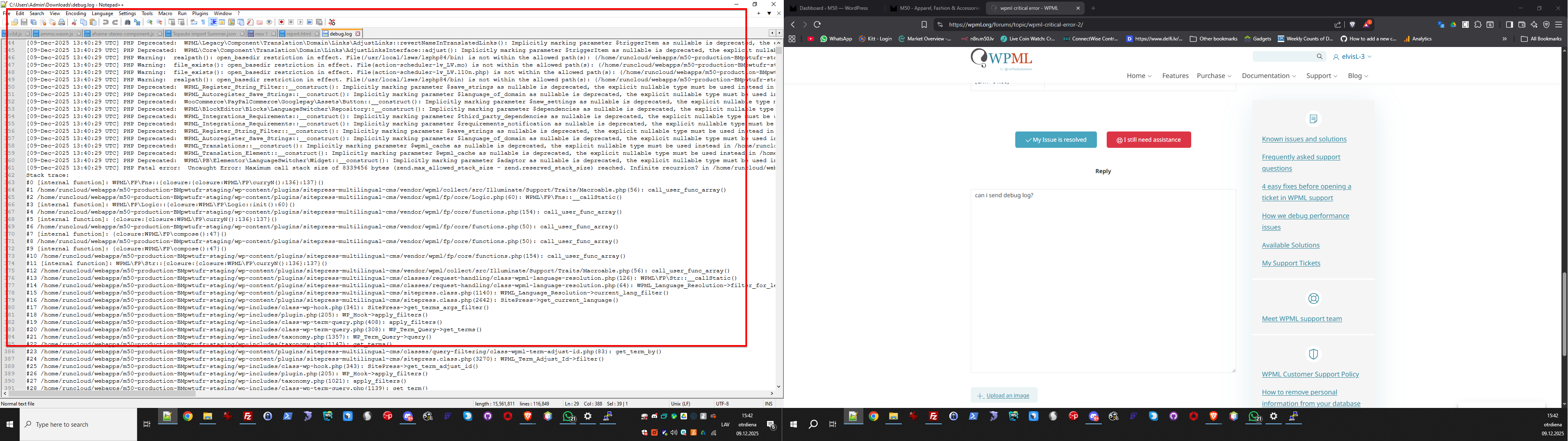
can i send debug log?

m50log.png
December 9, 2025 at 1:43 pm #17647981

elvisL-3

#27 /home/runcloud/webapps/m50-production-BMpwtufr-staging/wp-includes/taxonomy.php(1021): apply_filters()
#28 /home/runcloud/webapps/m50-production-BMpwtufr-staging/wp-includes/class-wp-term-query.php(1139): get_term()
#29 /home/runcloud/webapps/m50-production-BMpwtufr-staging/wp-includes/class-wp-term-query.php(795): WP_Term_Query->populate_terms()
#30 /home/runcloud/webapps/m50-production-BMpwtufr-staging/wp-includes/class-wp-term-query.php(308): WP_Term_Query->get_terms()
#31 /home/runcloud/webapps/m50-production-BMpwtufr-staging/wp-includes/taxonomy.php(1357): WP_Term_Query->query()
#32 /home/runcloud/webapps/m50-production-BMpwtufr-staging/wp-includes/taxonomy.php(1147): get_terms()
#33 /home/runcloud/webapps/m50-production-BMpwtufr-staging/wp-content/plugins/sitepress-multilingual-cms/classes/query-filtering/class-wpml-term-adjust-id.php(83): get_term_by()
#34 /home/runcloud/webapps/m50-production-BMpwtufr-staging/wp-content/plugins/sitepress-multilingual-cms/sitepress.class.php(3270): WPML_Term_Adjust_Id->filter()
#35 /home/runcloud/webapps/m50-production-BMpwtufr-staging/wp-includes/class-wp-hook.php(343): SitePress->get_term_adjust_id()
#36 /home/runcloud/webapps/m50-production-BMpwtufr-staging/wp-includes/plugin.php(205): WP_Hook->apply_filters()

this is the loop

December 9, 2025 at 1:52 pm #17647999

Carlos Rojas
WPML Supporter since 03/2017

Languages: English (English ) Spanish (Español )

Timezone: Europe/Madrid (GMT+01:00)

Thank you for your message.

1.- Please describe step-by-step how to reproduce the issue on the site

2.- Share the access credentials to the site in your next message, which I have set private. This will allow me to reproduce the steps you described in the previous point and double-check the configuration.

Confirm you have created a full site backup that you can restore if necessary.

December 10, 2025 at 9:13 am #17650719

Carlos Rojas
WPML Supporter since 03/2017

Languages: English (English ) Spanish (Español )

Timezone: Europe/Madrid (GMT+01:00)

Hi,

Would you like to continue working on this issue, or will you stay in v6.8.9?

December 10, 2025 at 10:06 am #17651217

elvisL-3

i will stay but then i would need to make staging site but no time for that now

December 10, 2025 at 11:07 am #17651810

Carlos Rojas
WPML Supporter since 03/2017

Languages: English (English ) Spanish (Español )

Timezone: Europe/Madrid (GMT+01:00)

I understand.

This ticket will be closed now, but please don't hesitate to contact us if you need our help in the future with WPML. We are here to help 🙂