Home›Support›English Support›[Resolved] WPML not translating internal links, slugs, and page titles correctly
[Resolved] WPML not translating internal links, slugs, and page titles correctly
This thread is resolved. Here is a description of the problem and solution.
Problem: You are trying to translate a test page built with Elementor and encountering issues: The Image Box title remains in French across all languages. Solution: For the Image Box title not translating, we provided a workaround: 1. Backup your site. 2. Edit the functions.php file of your theme. 3. Add the following function:
4. Save the file. You might need to update existing translations for the fix to take effect.
If this solution does not resolve your issue or seems outdated, we recommend checking related known issues at https://wpml.org/known-issues/, verifying the version of the permanent fix, and confirming that you have installed the latest versions of themes and plugins. If needed, please open a new support ticket at https://wpml.org/forums/forum/english-support/.
This is the technical support forum for WPML - the multilingual WordPress plugin.
Everyone can read, but only WPML clients can post here. WPML team is replying on the forum 6 days per week, 22 hours per day.
Background of the issue:
I am trying to translate a test page built with Elementor ('WPML Service') created in French: hidden link. I added an Elementor Image Box with an internal link pointing to a product ('Service de maintenance – Contrôle technique des défibrillateurs DEA').
Symptoms:
1. The Image Box title remains in French in all languages. 2. The internal link keeps the French slug /produit/ instead of the translated ones (/product/, /produkt/, /prodotto/, /producto/). 3. The slug page name also remains in French ('WPML Service') instead of its translation in each language.
Questions:
Why is the Image Box title not translating automatically in all languages?
Why is the internal product link slug not translating correctly?
Why is the slug page name not translating in each language?
If you need further help with this, please share the access details to your site with me. I'm enabling a private message for the following reply.
Privacy and Security Policy
We have strict policies regarding privacy and access to your information. Please see: https://wpml.org/purchase/support-policy/privacy-and-security-when-providing-debug-information-for-support/ **IMPORTANT**
- - Please back up the site files and database before providing us access. --
-- If you have a staging site where the problem can be reproduced, it is better to share access to the staging site.--
I've investigated this issue on your site, and this is what I can see.
1. The Image Box title remains in French in all languages.
I can see this problem and replicate it on my test site. I'll esclate it to our second-tier supporters.
2. The internal link keeps the French slug /produit/ instead of the translated ones (/product/, /produkt/, /prodotto/, /producto/).
I can see a problem on your site, but not on my test site. I need to investigate further why it is occurring on your site.
3. The slug page name also remains in French ('WPML Service') instead of its translation in each language.
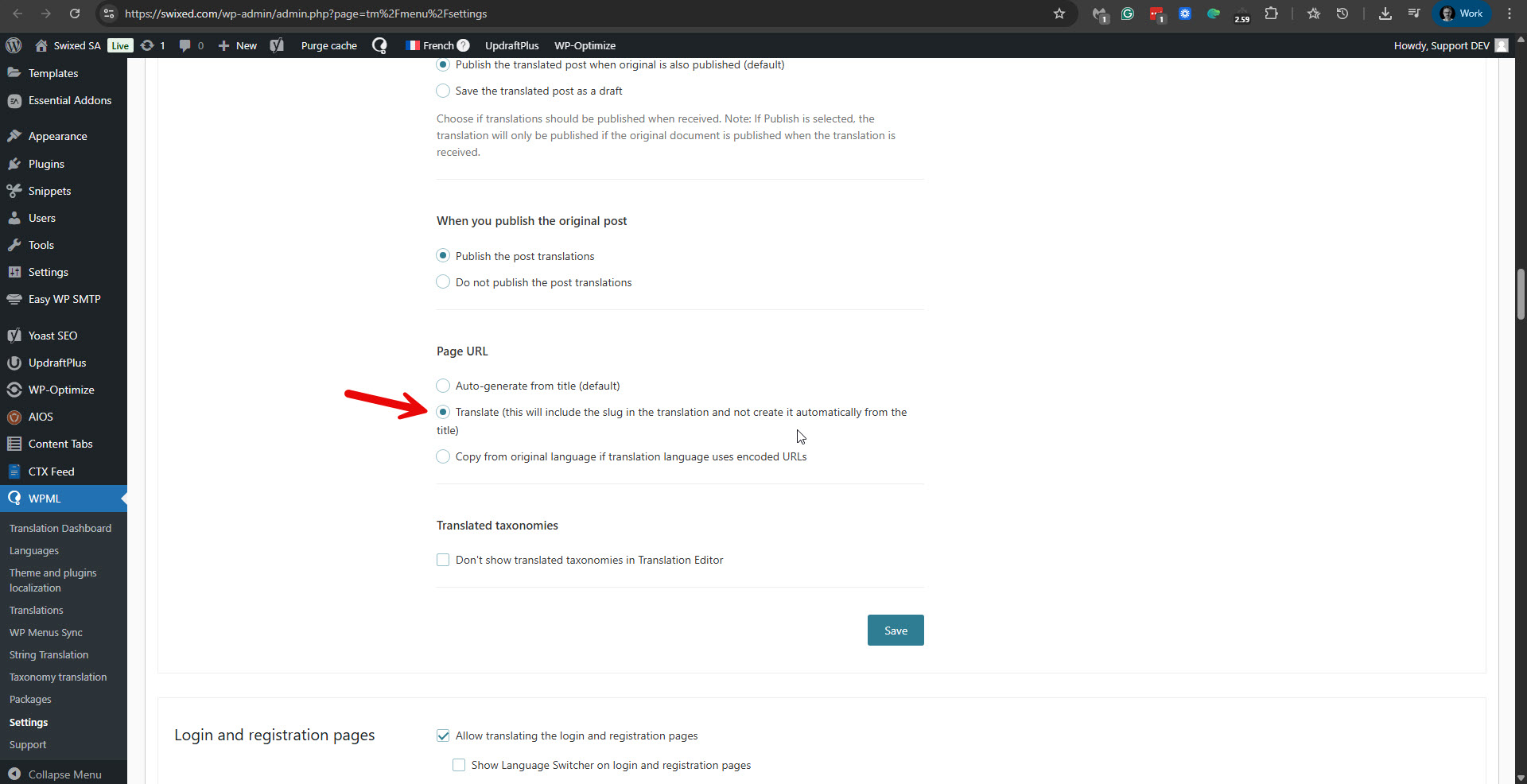
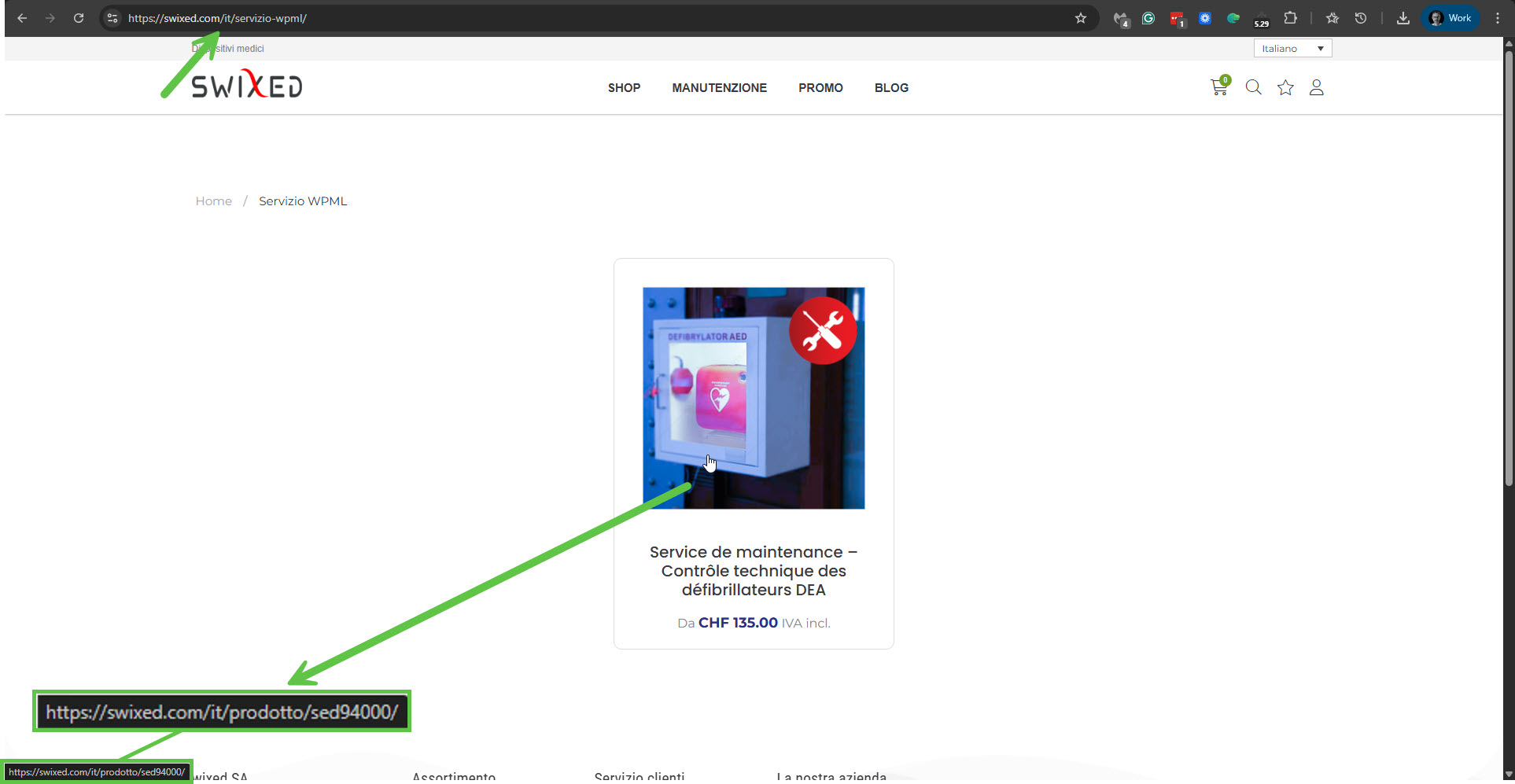
This is because in WPML -> Settings -> Page URL, you have selected the option 'Translate (this will include the slug in the translation and not create it automatically from the title)'. Please see the attached screenshot trans-url.jpg. In this case, the slug will be available for translation when you edit the translation with WPML's Advanced Translation Editor. And I can see that it is working as expected. I edited the Italian version of the page and saw the option to translate the page's slug. Please see the attached screenshot page-slug.jpg. I translated it into: servizio-wpml, and now you can see it works in Italain: hidden link. You should proceed with the same for the other languages. Or, for future page translations, consider changing the option to 'Auto-generate from title (default)'
I could replicate the problem with the product's title on a fresh test site. Indeed, when using the Image Box element to display a product dynamically, the translated page will display the title of the original product. You can see my translated product and page on the test site here.
Product: hidden link
Page: hidden link
I've escalated this issue to our compatibility team, and they will work to find a fix. I'll update you here on any news regarding this issue.
Regarding problem number 2: The internal link keeps the French slug /produit/ instead of the translated ones (/product/, /produkt/, /prodotto/, /producto/).
I was not able to replicate it on my test site, nor do I currently see it on your site. If I check the Italian page (hidden link), for example, the link correctly points to the Italian product (hidden link) and the slug is /prodotto/. Please see the attached screenshot.
As for problem number 3, please see my previous reply. It is an issue of settings.
Hi Itamar,
Thanks for your detailed investigation.
1. Image Box title issue
OK, I will wait for feedback from the compatibility team.
2. Internal link slug issue
The problem is still present.
If I modify anything on the page, save, and then update the translation with ATE, the issue comes back.
I added additional Boîte d’image widgets and also tested with the Essential Addons – Wrapper Link plugin, and the problem persists in all cases.
So this behaviour is reproducible and not limited to a single widget.
3. Page slug translation
I have changed WPML → Settings → Page URL to “Auto-generate from title (default)”.
That part is OK.
Please note that the Administrator access link I provided is still valid, so you can continue checking directly on the site whenever needed.
Thank you,
Yann
New threads created by Itamar and linked to this one are listed below:
Hi Itamar,
Thank you for the workaround and for escalating the issue.
Regarding issue #1 (the Image Box title issue):
I wanted to let you know that this problem no longer occurs on my site since I stopped using the Medizin theme and switched to Hello Elementor.
With the new theme active, the Image Box title is translated correctly in all languages, and I cannot reproduce the issue anymore.
The workaround you provided may still be useful in other situations, but for now the Image Box title translation works correctly with the Hello Elementor theme.