
This is the technical support forum for WPML - the multilingual WordPress plugin.
Everyone can read, but only WPML clients can post here. WPML team is replying on the forum 6 days per week, 22 hours per day.
This topic is split from https://wpml.org/forums/topic/memidos-vip-support/
| Sun | Mon | Tue | Wed | Thu | Fri | Sat |
|---|---|---|---|---|---|---|
| - | 9:00 – 14:00 | 9:00 – 14:00 | 9:00 – 14:00 | 9:00 – 14:00 | 9:00 – 14:00 | - |
| - | 15:00 – 18:00 | 15:00 – 18:00 | 15:00 – 18:00 | 15:00 – 18:00 | 15:00 – 18:00 | - |
Supporter timezone: Asia/Dhaka (GMT+06:00)
Tagged: Translation Service
This topic contains 13 replies, has 0 voices.
Last updated by peterJ-48 1 day, 5 hours ago.
Assisted by: Prosenjit Barman.
| Author | Posts |
|---|---|
| December 11, 2025 at 2:40 pm #17656508 | |
 peterJ-48 |
Hi Yvette I have to update this blog post because it was containing a dead link: So far, I have only update the Danish and German translation. When I update the translation, the text displayed on the Danish and German page is still English. When I look in the ATE I can see the translated text, but it is not displayed on the actual page. This is also a very common problem when it comes to product translations. If the first translation of the product was made 2 – 3 years ago, and you have to update the translation. The same thing very often happens. Prosenjit has some guest user credentials if you want to try and update the translation yourself, however if you need to do other than that, then please let me know and I can enter the same guest user credentials into sandbox.memidos.com. Please help me solve this. Best regards |
| December 12, 2025 at 9:21 am #17658388 | |
 Prosenjit Barman WPML Supporter since 03/2023 Languages: English (English ) Timezone: Asia/Dhaka (GMT+06:00) |
Hi Peter, I've checked the page and understand the issue clearly. When I looked in our system, I can see that the translation has been delivered successfully and there's nothing showing as blocked on our end. Based on our previous discussion, I believe you have the WordPress debug log enabled on your site. Since it's active and you encountered this issue during translation, any errors should have been captured there. Could you please share the WordPress debug log so I can check if there's anything related to the error you experienced? You also raised an important point about this issue occurring previously when translations were last made 2-3 years ago and then updated recently. I'll investigate this angle as well and discuss it with the team to see if there's a pattern we need to address. In the meantime, please share the debug log when you get a chance so I can continue the investigation from my end. I really appreciate your patience as we work through all the issues on your site, and thank you for your continued cooperation throughout this process. Best regards, |
| December 12, 2025 at 3:43 pm #17659982 | |
|
peterJ-48 |
Hi Prosenjit, As you most likely know from the mail Prakash send, does we not run the debug log on the production server, but we can enable it on the sandbox server. Would you like us to do that? Please only do debugging activities on the sandbox server. You find the login credentials in this ticket: https://wpml.org/forums/topic/slug-translation-on-product-pages/ Best regards |
| December 15, 2025 at 4:14 am #17662606 | |
|
Prosenjit Barman WPML Supporter since 03/2023 Languages: English (English ) Timezone: Asia/Dhaka (GMT+06:00) |
Hi Peter, If the same post exists on your sandbox site, please go ahead and enable WordPress debug logging there. Once you've enabled it, just let me know, and I'll work on replicating the issue on the sandbox site so I can continue the investigation without affecting your production environment. Looking forward to hearing from you. Best regards, |
| December 15, 2025 at 6:32 am #17662643 | |
|
peterJ-48 |
Hi Prosenjit, Prakash here. Debug logs are enabled on the sandbox server. You can continue debugging—let me know if you need anything. |
| December 17, 2025 at 11:18 am #17670651 | |
|
Prosenjit Barman WPML Supporter since 03/2023 Languages: English (English ) Timezone: Asia/Dhaka (GMT+06:00) |
Hi there, I wanted to give you a quick update — we haven't forgotten about you at all! We're still actively investigating what's causing the translations not to appear. One of our team members from the Translation Editor team is also looking into this alongside me. We're examining every possible scenario that could be causing the issue. I know this is taking longer than we'd hoped, but I want you to know we're treating this as a priority. As soon as I have more information or a solution, I'll update you right away. In the meantime, if you've discovered any additional clues, have any questions, or want to share any observations, please don't hesitate to let me know. Sometimes, small details can be the key to solving these types of issues. Thank you so much for your continued patience and cooperation. Best regards, |
| December 17, 2025 at 12:32 pm #17670893 | |
|
peterJ-48 |
Hi Prosenjit, The only thing I can think of, is that I have changed the way the 3 images on row is added in the blog post. They are now added as a simple image gallery. However, I doubt this is what is causing the issue, and it does also not explain why we are having similar problems when updating old products. As long as you are on the sandbox server, then feel free to try and delete the image gallery, if you want to test if the translation is handled differently. Best regards |
| December 18, 2025 at 7:53 am #17673348 | |
|
Prosenjit Barman WPML Supporter since 03/2023 Languages: English (English ) Timezone: Asia/Dhaka (GMT+06:00) |
Hi Peter, Thank you so much for that hint! I've investigated the issue and am pleased to inform you that I've identified the root cause. Here's what was happening: When the post was originally created 2-3 years ago, it was created using the Classic WordPress Editor. I confirmed this through database investigation — there are no Gutenberg block markers (`<!-- wp:`) in the content. However, at some point (likely when Gutenberg became the default editor), WPML registered this post as a "Gutenberg" package and created string translations under that package type. Since the actual post content never had Gutenberg block markers, WPML couldn't process the translations correctly. This is an edge case that I couldn't replicate locally, but we're currently discussing how to handle it properly in the code. As soon as we have an update or a permanent fix, I'll let you know right away. In the meantime, you can use this workaround to get the translations showing correctly. Before updating any translation, follow these steps: 1. Open the post in the default language in the editor I tested this approach on your sandbox site, and the Danish translation now displays correctly in the UI. Please give this a try on your production site and let me know how it goes. Once we have any updates from our team discussion about a permanent solution, I'll reach out immediately. Thank you for your patience as we work through this! Best regards, 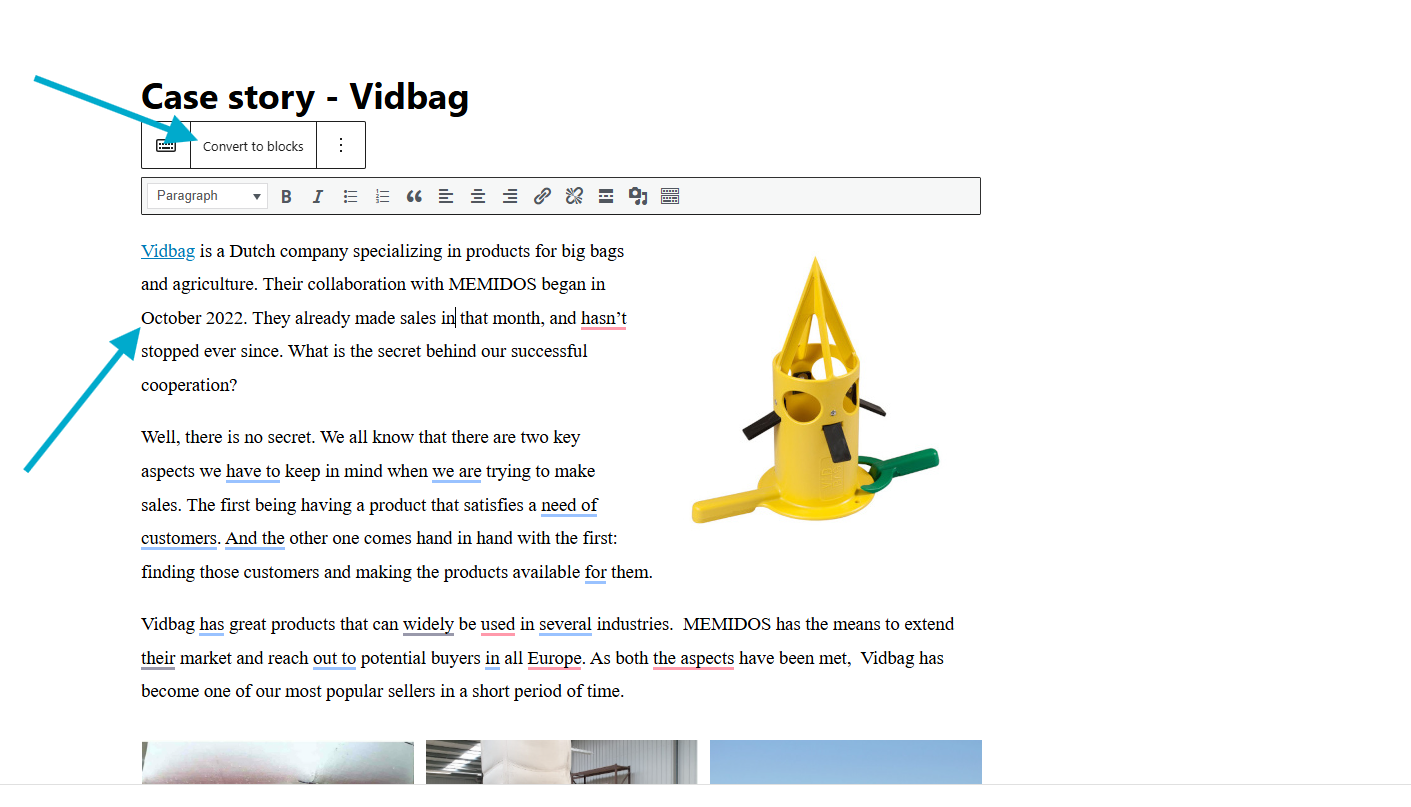 |
| December 18, 2025 at 10:58 am #17674133 | |
|
peterJ-48 |
Hi Prosenjit, I followed your advice and made the workaround. The text is now getting translated, but I am facing an issue with a link. The first word in the article is “Vidbag”. Here i am linking to the company page: hidden link If you look in the ATE for Bulgarian the link is translated correct to: hidden link but the translated link is not active on the Bulgarian version of the blog page (this appears to be the same for all languages) The image links appears to be translated and working correct, but in Bulgarian they are not visible in the ATE. For other languages they are visible, but not necessarily showing the correct translated link even though it is working correct on the respective blog page. Best regards |
| December 19, 2025 at 5:13 am #17676497 | |
|
Prosenjit Barman WPML Supporter since 03/2023 Languages: English (English ) Timezone: Asia/Dhaka (GMT+06:00) |
Hi Peter, Thanks for the detailed explanation and for implementing the workaround. I’ve reviewed the Bulgarian version, and the “Vidbag” link is working correctly and points to the appropriate translated company page. At least in the sandbox environment, after completing the translation, the link behaves as expected and is fully functional on my end. Regarding the images, I checked and couldn't find any links attached to them on the page, which could be why they're not showing up consistently in the ATE. I want to make sure I'm looking at exactly what you're experiencing. Could you help me understand a bit more: 1. When you say the translated link is not active, does it mean the link isn't clickable at all, or is it clicking through to the wrong page? If you could share a screenshot or screen recording of what you're seeing on your end, that would really help me replicate the exact issue and get you a proper fix. Looking forward to hearing back from you. Best regards, |
| December 19, 2025 at 2:13 pm #17678083 | |
|
peterJ-48 |
Hi Prosenjit, Now the translated links to the Vidbag company page also seems to be working on the production server. Very strange - I cleared the W3TC cache several times yesterday. Regarding image links: I have attached screenshots from the ATE for Bulgarin, Croatian and Danish. As you can see are all 3 different, and it is not possible to edit the image link url in Bulgarian. Best regards 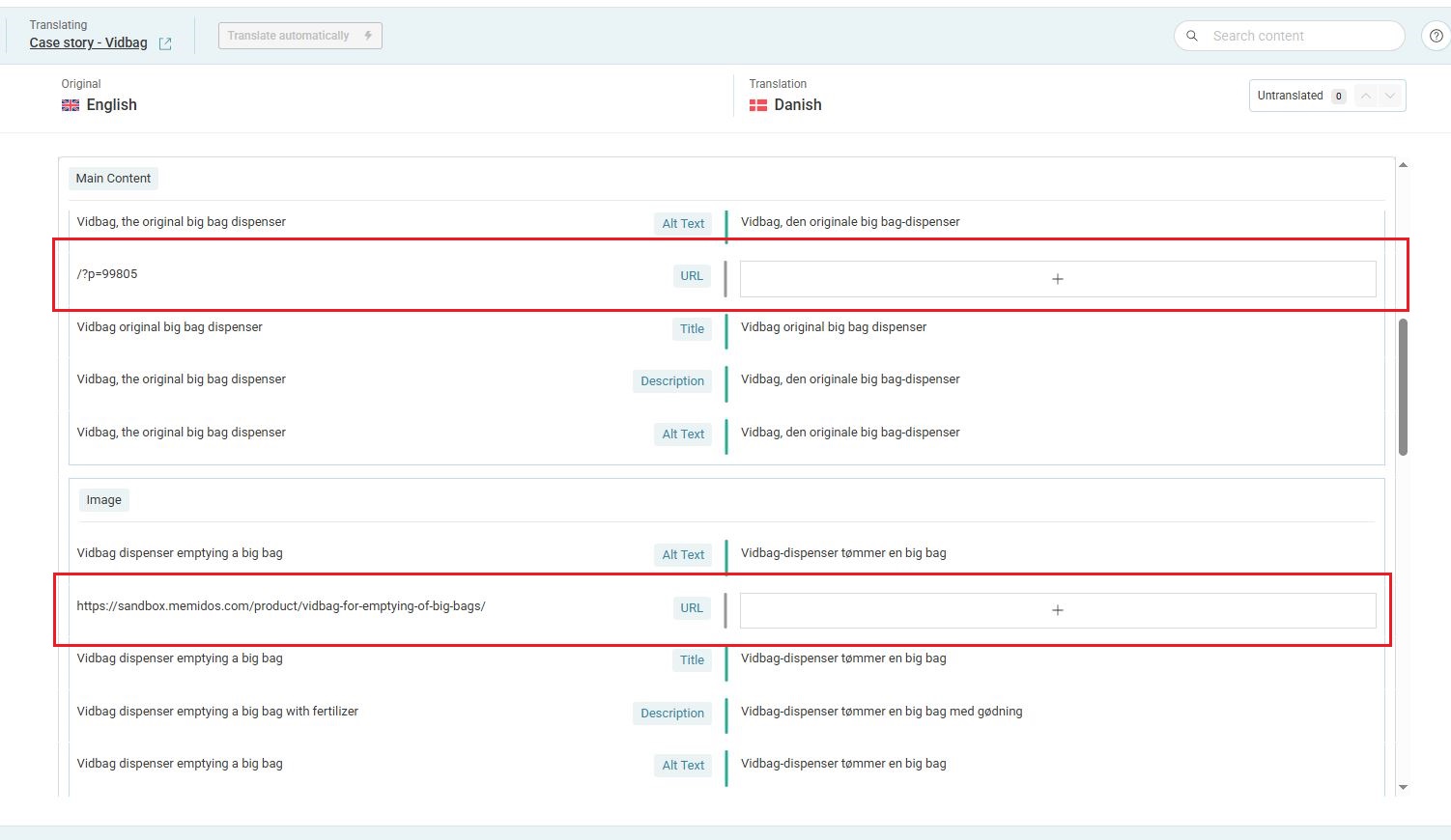 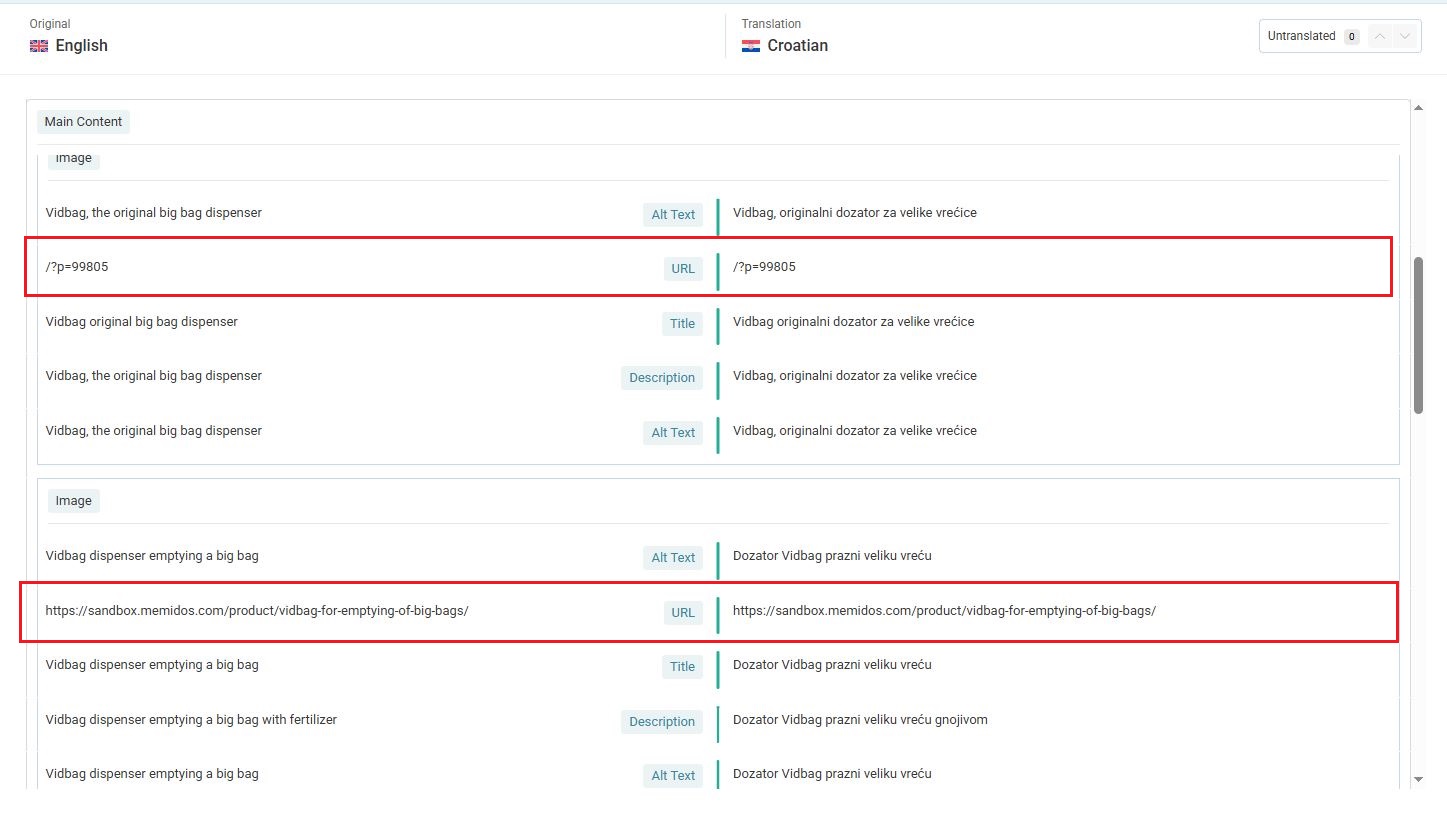 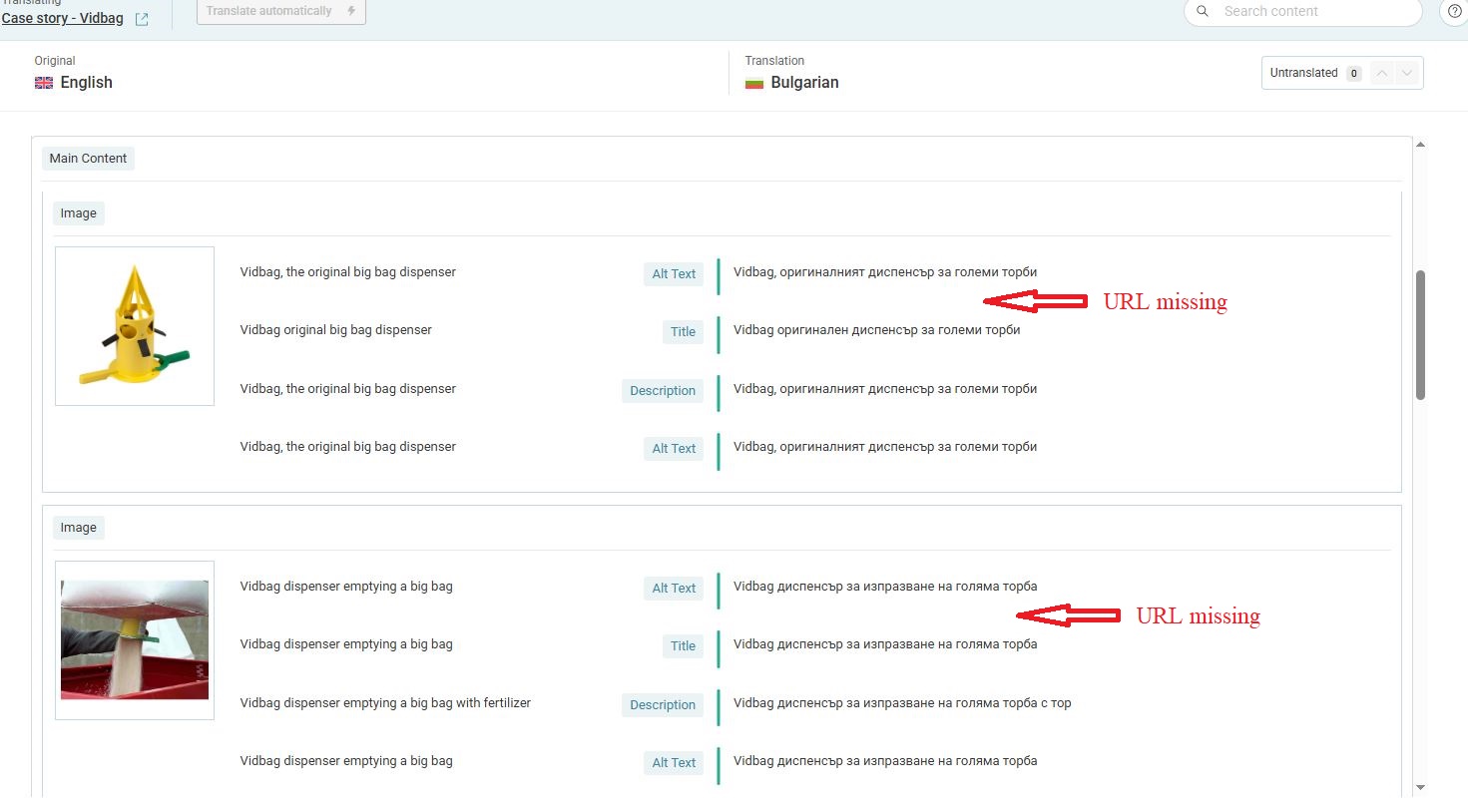 |
| December 22, 2025 at 6:34 am #17681150 | |
|
Prosenjit Barman WPML Supporter since 03/2023 Languages: English (English ) Timezone: Asia/Dhaka (GMT+06:00) |
Hi Peter, Hope you're doing well. Sorry for the delayed response over the weekend. Thank you so much for sharing those details. I understand you're reporting an inconsistency with how links are being handled in the translation editor. Since you made updates in the sandbox, I took a look and found that the links attached to the images are not appearing in ATE. To make sure I was investigating correctly, I made an update to the link in the first image (and also modified some text slightly), saved the changes, and then tried to update the translation. When the editor opened, I still didn't see the links attached to the image. Please note that when you use an internal page link, WPML should automatically handle it and update the link in the translated page based on whether that linked page exists in the target language. But that is for the frontend. However, I do see some inconsistencies with how links are appearing (or not appearing) in the translation editor. I'm currently discussing this internally with the team, and as soon as I have more information or a solution, I'll update you right away. Thank you for your patience and continued cooperation as we work through this! Best regards, |
| December 23, 2025 at 8:48 am #17684112 | |
|
Prosenjit Barman WPML Supporter since 03/2023 Languages: English (English ) Timezone: Asia/Dhaka (GMT+06:00) |
Hi Peter, Sorry for the delay in responding. The issue with translating URLs(attached to images) from the translation editor has been escalated to the Translation Editor team. They're investigating this further —it's possible that the URL handler in ATE was recently updated to fully depend on how WPML handles these links internally. As soon as I get concrete information from them, I'll update you right away. Rest assured that the links you're attaching to images should render correctly on the frontend and in the translated pages, as long as the page or post associated with the link has been translated. WPML will automatically handle the URL conversion in the background, even if you're not seeing them in the translation editor interface. I'll keep you posted on any updates from the team. Best regards, |
| December 24, 2025 at 7:16 am #17686041 | |
|
peterJ-48 |
Hi Prosenjit, Thanks for the update on this issue. For now, the translation of this blog post is ok. If I have to prioritize, then it is most important to get it solved so it is possible to update the translation of old product pages (and posts). Right now, we nearly don’t dare to make any correction to old product pages because updating the translation is a big headache. Best regards |



