
This is the technical support forum for WPML - the multilingual WordPress plugin.
Everyone can read, but only WPML clients can post here. WPML team is replying on the forum 6 days per week, 22 hours per day.
This topic contains 11 replies, has 0 voices.
Last updated by sigurdurB 2 months, 3 weeks ago.
Assisted by: Bobby.
| Author | Posts |
|---|---|
| January 14, 2026 at 10:50 pm #17731433 | |
 sigurdurB |
I've got some pages I manually translated before I trusted the system. Now I want to let the ATE keep them updated for me, How do I go about making that switch. I realize it involves having the ATE re-translate the entire page, but I'm not sure the best approach. |
| January 14, 2026 at 11:19 pm #17731448 | |
 Bobby WPML Supporter since 04/2015 Languages: English (English ) Timezone: America/Los_Angeles (GMT-07:00) |
Hi there, The best way to go about this would be to send the page for translation again and letting ATE re do it since the 2 methods of translations (manual vs ATE) do not communicate with each other. Regarding your second comment about the page being created in the secondary language first and then translated into the original one, what you can do is disconnect the two, and re connect them making the original language the default language https://wpml.org/faq/how-to-link-already-translated-pages/ OR since you will be re translating with automatic translation (ATE), you can simply delete the secondary language version and emtpy the trash then go to the original language and add a translation (I'd pick this method) |
| January 15, 2026 at 10:12 am #17732393 | |
|
sigurdurB |
Thanks I was considering deleting the translating page, but wasn't sure if that would send your tool into a tailspin or anything. Good to know that's safe. |
| January 15, 2026 at 6:59 pm #17735141 | |
|
Bobby WPML Supporter since 04/2015 Languages: English (English ) Timezone: America/Los_Angeles (GMT-07:00) |
We can manuall adjust the language of the page by disconnecting translations. Once you disconnect them either by deleting (make sure to empty trash) or 'disconnecting' then it gives you the option to change the language assigned. If you wish, you can share with me the URLs in question and I can screen recording the way to do this. (it's explained in our documentation above but i find that seeing the video is usually easier understood) Also, moving forward it's good practice with WPML to always create new content under the language that is considered the "default" language of your site. |
| January 15, 2026 at 8:13 pm #17735260 | |
|
sigurdurB |
So yeah I always create and maintain content under the origional language and translate into the secondary language. I fired a web master around a year ago and I'm still finding things he goofed up. Speaking of which, is there an easy way to find all the content that were created in the secondary language so I fix them all now and not have to stumble on them when I'm updating them. The article you sent me only discusses how to connect page, not how to disconnect them. I don't see any options there to disconnect pages. I prefer clear written instructions, with maybe a screenshot or two over a video. I made you a little video though demonstrating what I'm seeing. hidden link |
| January 15, 2026 at 10:13 pm #17735376 | |
|
sigurdurB |
Just completed an audit and found that the home page was written in the secondary language and then translated, as well as hidden link. |
| January 16, 2026 at 1:48 am #17735528 | |
|
Bobby WPML Supporter since 04/2015 Languages: English (English ) Timezone: America/Los_Angeles (GMT-07:00) |
Thank you for the update and the video! Unfortunately the access previously provided gets automatically removed for safety reasons. Steps to disconnect a translation. 0. Notice in your video when you click on the language dropdown it only shows the 1 language, this is because there is an active translation. 1. Edit the translation in the WP Editor and then click on the dropdown that says "translation of" and then select "none" This will disconnect them 2. Go back to the original page (the one thats assigned the wrong language) and now the language dropdown will allow you to select a language. Select English and update. NOTE: Do not add a new translation since you have one already. 3. Locate the previously connected tranlsation, and do the same, change it to the correct language. Once done, click on "connect with translations" and you should be able to link them together as the documentation shows. If further assistance is needed I have enabled the private field reply to share with me access. |
| January 16, 2026 at 10:23 am #17736443 | |
|
sigurdurB |
This helped a lot, thank you. I think have all these oddities straightened out. One final question about something I noticed that seems a bit strange but not sure what to make of it. 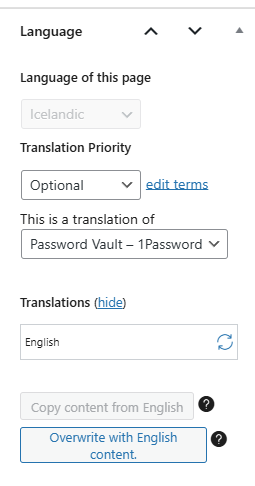 |
| January 16, 2026 at 3:17 pm #17737540 | |
|
sigurdurB |
Another weirdness I just noticed, hopefully it's OK that I add it here, instead of creating a new case. I have a page that is set to be duplicated. This page was written in English and I want it to show up in English even when switch to the Icelandic side. I have a note at the top of the page explaining to the reader why I'm doing this. This works beautifully for the most part. The only thing that is weird is that the feature image shows up on the origional one, but not on the duplicated one. What could be going on here? See attached screenshot for confirmation that it is set to duplicate and that there is a featured image. You can see the impacted page at hidden link and notice how it does not have the feature image that is visiable when you switch to English. As you switch between the two you should notice it is identical except for the lack of feater image.  |
| January 16, 2026 at 11:10 pm #17738576 | |
|
Bobby WPML Supporter since 04/2015 Languages: English (English ) Timezone: America/Los_Angeles (GMT-07:00) |
Yes, that is strange, you could try to dry update the default language page, this might just be something cached. Regarding the image, it should show in the translation especially since you are duplicating the page. What are your results if you edit the duplicate page and click on the button that says "overwrite with default language" does that help? If it does not please try going to WPML->Settings->Bottom of page and run the media actions and update the page again. Let me know your results, please. |
| January 19, 2026 at 9:52 am #17741611 | |
|
sigurdurB |
On the first issue, already tried to update both the origional or translated page, no change. When I say I updated, I went into edit mode and clicked on save without making any changes. Other issues, such as it refusing to let me edit non-translatable attributes on the origional page, saying it was a translation were fixed through this method. As far as the issue of the image not appearing on the duplicate, I went into edit on the duplicate and the only thing in the language box was a warning and button to switch to translate indipendently. While I was in there I noticed that feature image wasn't set. So I went to set it but got an error about needing to switch to translate indepentently, so I cancelled out of that. Apperantly that was enough to whatever was stuck, unstuck, because now the image is showing up and the page is still showing as duplicate. |
| January 22, 2026 at 2:19 am #17752292 | |
|
Bobby WPML Supporter since 04/2015 Languages: English (English ) Timezone: America/Los_Angeles (GMT-07:00) |
Glad to hear that the image issue has been resolved, please do let me know if this issue repeats as we should further investigate if it does. (for example, create a page, add the image and test duplication) Regarding the first item, I don't believe it's going to cause any issues and could possibly dismissed, however, I'd be happy to take a closer look at the backend if needed and also review the database for this entry to make sure all looks OK. |
| January 22, 2026 at 8:28 pm #17755365 | |
|
sigurdurB |
I can totally ignore it. |






