
This is the technical support forum for WPML - the multilingual WordPress plugin.
Everyone can read, but only WPML clients can post here. WPML team is replying on the forum 6 days per week, 22 hours per day.
| Sun | Mon | Tue | Wed | Thu | Fri | Sat |
|---|---|---|---|---|---|---|
| - | 9:00 – 13:00 | 9:00 – 13:00 | 9:00 – 13:00 | 9:00 – 13:00 | 9:00 – 13:00 | - |
| - | 14:00 – 18:00 | 14:00 – 18:00 | 14:00 – 18:00 | 14:00 – 18:00 | 14:00 – 18:00 | - |
Supporter timezone: America/Los_Angeles (GMT-07:00)
This topic contains 17 replies, has 0 voices.
Last updated by jaredD-3 3 weeks, 5 days ago.
Assisted by: Bobby.
| Author | Posts |
|---|---|
| March 2, 2026 at 1:34 pm #17864865 | |
 jaredD-3 |
The initial activation of the plugin worked great on my site. Now, as I'm working on translating posts, the WPML plugin is returning 500 errors on the site. I've increased PHP memory limits and other things, so these are not the issue. It is almost like posts get hung up in the translation/communication and are not processing. |
| March 2, 2026 at 1:47 pm #17864927 | |
 Otto |
Hello, To ensure the quickest and most accurate support, please provide your debug information so I can look at some of your configurations. We have an excellent article on how to locate it here: https://wpml.org/faq/provide-debug-information-faster-support/. Please do the following: 2. Minimal setup test to isolate/discard compatibility issues Best Regards, |
| March 2, 2026 at 1:50 pm #17864929 | |
|
jaredD-3 |
Here is the debug information. I have gone through deactivation of other plugins, the only cause of the issue is the WPML plugin. It happens when I attempt to convert any post to a different language. It seems to get hung into the queue and will not process, causing a 500 error to happen. |
| March 2, 2026 at 1:56 pm #17864934 | |
|
Otto |
Hello, Thanks. Can you provide me with the debug.log file? It will point us to the root cause of the problem. Please follow the instructions mentioned on this page: https://wpml.org/documentation/support/debugging-wpml/ Best Regards, |
| March 3, 2026 at 8:27 pm #17870133 | |
|
jaredD-3 |
[03-Mar-2026 20:20:50 UTC] PHP Fatal error: Maximum execution time of 180 seconds exceeded in /home/anotherwellorg/public_html/wp-content/plugins/sitepress-multilingual-cms/classes/utilities/class-debug-backtrace.php on line 66 These errors come up in the list |
| March 3, 2026 at 8:30 pm #17870134 | |
|
jaredD-3 |
I have an automatic update process that seems to coincide with it as well tomorrow morning. We will see if that gives us the debug log. |
| March 4, 2026 at 7:56 pm #17872938 | |
|
jaredD-3 |
The issue happened again. here's the debug info: |
| March 6, 2026 at 12:47 am #17876389 | |
 Bobby WPML Supporter since 04/2015 Languages: English (English ) Timezone: America/Los_Angeles (GMT-07:00) |
Hi there, The above error log is showing the WPML debug info, however, it would be best if we could get a copy of the WP debug log. From what I can see based on the previous errors shared this looks like a PHP Time Limit trigger. If possible please update PHP Time Limit to 300 and let me know your results. hidden link |
| March 6, 2026 at 4:00 pm #17878201 | |
|
jaredD-3 |
I was able to reset the PHP time limit as stated. I do not see a WP debug file that's been generated. |
| March 6, 2026 at 6:35 pm #17878398 | |
|
Bobby WPML Supporter since 04/2015 Languages: English (English ) Timezone: America/Los_Angeles (GMT-07:00) |
Did that help at all? If it did not, I would like to request temporary access (wp-admin and FTP) to your site to test the issue. **Before we proceed It is necessary to take FULL BACKUP of your database and your website. Providing us with access, you agree that a backup has been taken ** I often use the Duplicator plugin for this purpose: http://wordpress.org/plugins/duplicator/ NOTE: If access to the live site is not possible and the staging site does not exist please provide me with a duplicator package created with the duplicator plugin. Thank you, |
| March 7, 2026 at 1:43 pm #17879373 | |
|
jaredD-3 |
I will be running some more tests to see if this solved the problem today. As of right now, it does not appear that it has. I attempted to convert two more recent posts last night, but they seem to be stuck in the translation queue again and are not converting. When I go to translation jobs tab, nothing comes up. On the translation dashboard, they show as in progress. The 500 error occurs when this happens, and another automatic task occurs on the site, such as WPematico running to pull in a new post from my Substack. |
| March 7, 2026 at 7:11 pm #17879637 | |
|
jaredD-3 |
Every translation attempt creates jobs in icl_translate with content_id = 0, meaning the job never links to the actual post and translation never completes. This affects all posts regardless of length or content. |
| March 7, 2026 at 7:13 pm #17879638 | |
|
jaredD-3 |
All translation attempts fail regardless of method (automatic PTC, DeepL, or manual Translation Editor). Every attempt creates records in icl_translate with content_id = 0, meaning jobs never link to posts. This affects all posts. We have already: cleaned all orphaned records, reset stuck jobs, cleared string table from 1800+ to 650 strings, increased PHP execution time to 900 seconds, confirmed LiteSpeed is not the issue, and fixed NULL source_language_code on translations table. |
| March 7, 2026 at 7:33 pm #17879645 | |
|
jaredD-3 |
One final note, when I am finally able to get it to clear these out of the queue, it delivers approximately 30-50 copies of the post that I'm attempting ot translate at once. I'm hopeful that isn't being reflected in used credits on the account. |
| March 9, 2026 at 6:37 pm #17883127 | |
|
Bobby WPML Supporter since 04/2015 Languages: English (English ) Timezone: America/Los_Angeles (GMT-07:00) |
Hi there, Please go to your database tables and review the structure. You can start with wp_icl_translate -> do you see AUTO INCREMENT enabled? See screenshot attached of the _icl_tranlsate table. If you are seeing multiple entries with id = '0' that signals that AUTO INCREMENT is not enabled, and most likely missing from other tables as well. (check both WPML + standard WordPress tables) if that is the case the database is most likely corrupted and will need to be fixed. 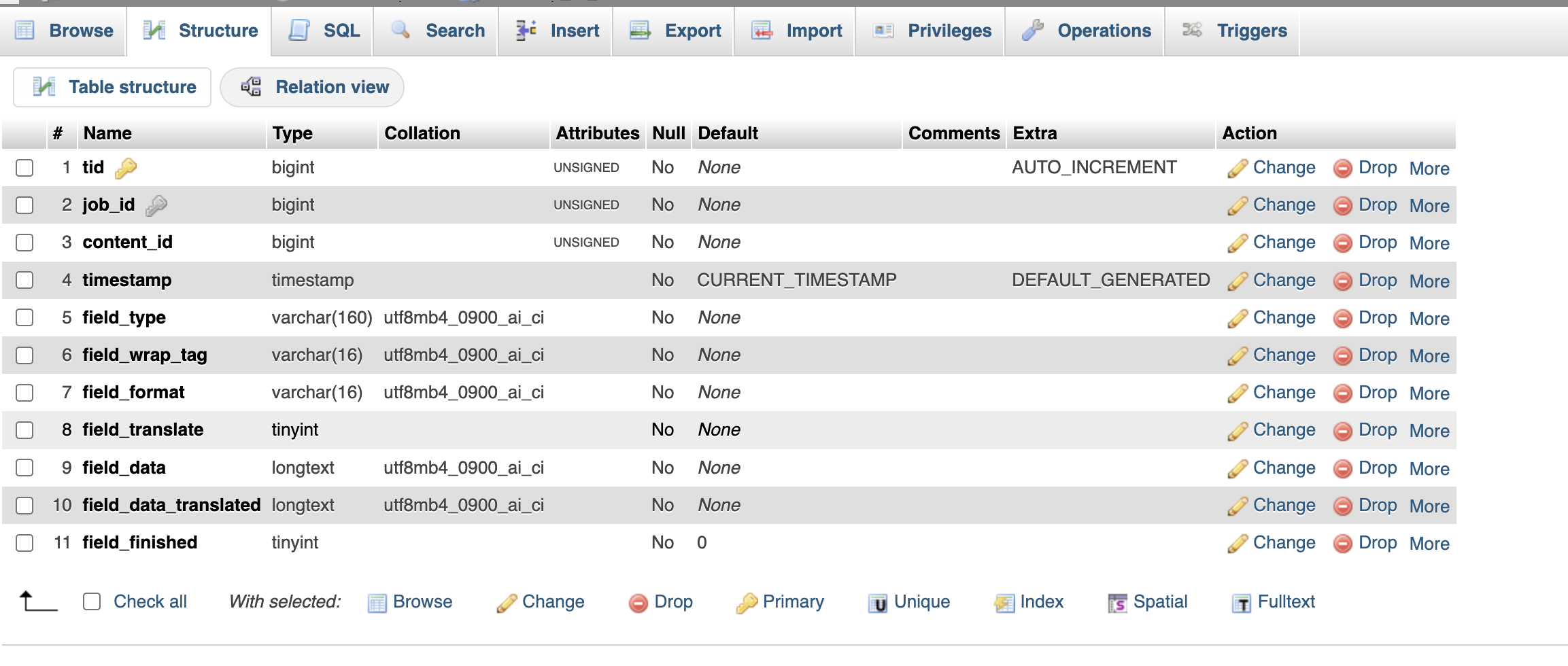 |







The topic ‘[Closed] 500 error’ is closed to new replies.