
This is the technical support forum for WPML - the multilingual WordPress plugin.
Everyone can read, but only WPML clients can post here. WPML team is replying on the forum 6 days per week, 22 hours per day.
Tagged: ATE
This topic contains 33 replies, has 0 voices.
Last updated by Sid Shenoy 2 months, 1 week ago.
Assisted by: Lauren.
| Author | Posts |
|---|---|
| February 5, 2026 at 6:35 pm #17797499 | |
 Sid Shenoy |
Sure, Please go ahead. |
| February 6, 2026 at 9:03 pm #17801250 | |
 Lauren |
Thanks for your patience — we’ve identified the cause of the issue. Your security firewall (Sucuri) is blocking required WordPress REST API requests. Specifically, this core endpoint is being blocked with a 403 error: /wp-json/wp/v2/users/me This endpoint is required by: Because Sucuri blocks this request, WPML Review cannot load correctly and troubleshooting actions stall mid-process. We confirmed this via browser network logs. The response headers show: Server: Sucuri/Cloudproxy X-Sucuri-Block: UAT007 Please update your Sucuri WAF configuration to allow authenticated REST API requests, specifically: Allow /wp-json/* Ensure /wp-json/wp/v2/users/me is not blocked Exclude REST API endpoints from firewall rules that block admin/editor requests Sucuri support will recognize this immediately if you mention: “Authenticated WordPress REST API requests to /wp-json/wp/v2/users/me are being blocked (403), which breaks the block editor and WPML.” In addition, Your WordPress memory limit is currently 40MB, which is too low for WPML and modern block-editor sites. Please increase it to at least 256MB:
define('WP_MEMORY_LIMIT', '256M');
define('WP_MAX_MEMORY_LIMIT', '256M');
Once the REST API is unblocked and memory increased: If you’d like, we can re-test immediately after the firewall adjustment. |
| February 9, 2026 at 12:06 pm #17804995 | |
|
Sid Shenoy |
Hi Lauren, Thanks for the update. We'll make the change and get back. |
| February 10, 2026 at 2:12 pm #17809548 | |
|
Lauren |
Sounds good, let us know if there is anything more we can assist with from our end. |
| February 10, 2026 at 4:11 pm #17810348 | |
|
Sid Shenoy |
Hi Lauren, While we are making the changes, I wanted to check regarding another point. Regarding translating custom pages. Can you share the process for that. |
| February 10, 2026 at 6:51 pm #17810920 | |
|
Sid Shenoy |
Hi Laruen, |
| February 11, 2026 at 4:35 pm #17813764 | |
|
Lauren |
At this point, I think it will be best to rule out any possible conflict with theme/plugins. Please test with only WPML plugins active and a default theme such as Twenty Twenty Five and let me know if the issue is still happening. This is best tested under a staging site, which your hosting provider may be able to set up for you, or you can use something like WP Staging. If those aren't available and you don't have a staging site, let me know and I'll be happy to set one up and we can migrate a copy of your site there. |
| February 11, 2026 at 6:06 pm #17814053 | |
|
Sid Shenoy |
Hi Lauren, Can you try with your login if you are able to the translations? If not, please help in setting up a staging site. |
| February 12, 2026 at 6:13 pm #17818286 | |
|
Lauren |
I created a test page and was able to translate it without issue. What page did you test previously so I can try to translate it? I'd like to test the same page that you did so I can compare exact steps. |
| February 13, 2026 at 5:14 pm #17821480 | |
|
Sid Shenoy |
Hi Lauren, I'm seeing the translation reviews now. I've attached the screenshot. 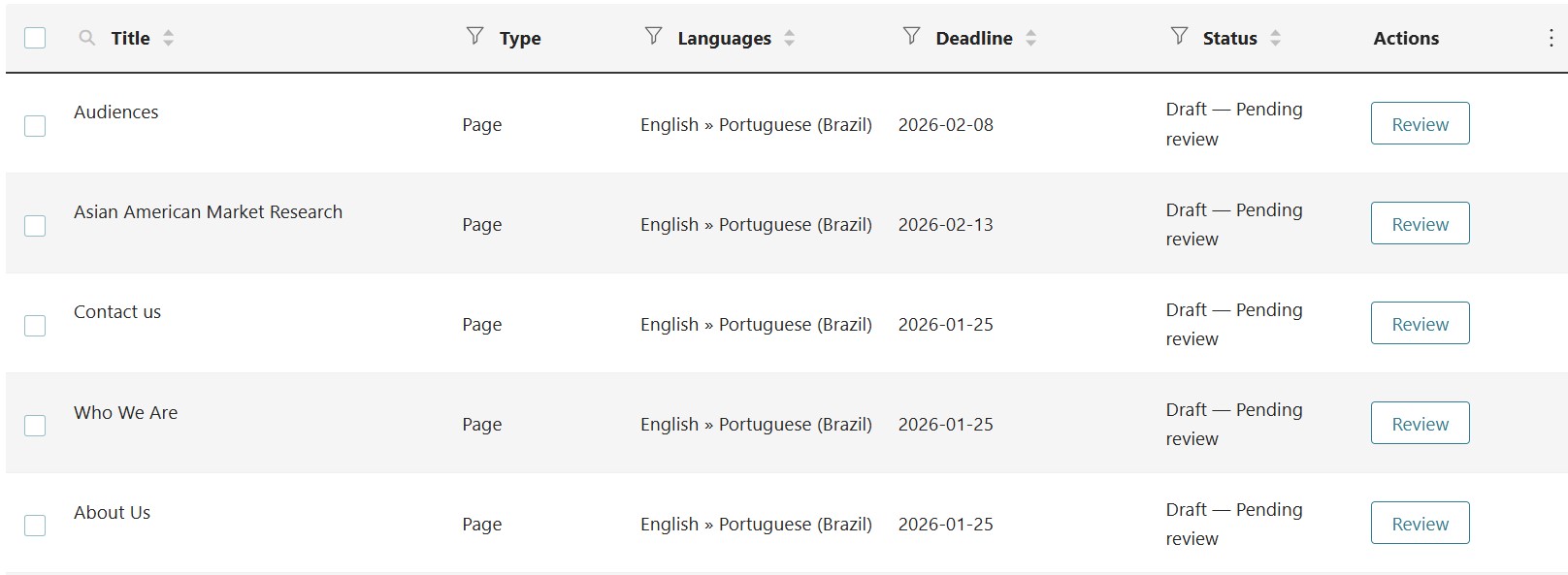 |
| February 13, 2026 at 6:48 pm #17821587 | |
|
Lauren |
By custom pages, do you mean custom post types? IF so, please go to WPML -> Settings and in the post types section, set your custom post type as Translatable. Then, you can translate the custom posts just as you would any regular post/page. Please let me know if you need any further assistance and I will be happy to help. |
| February 16, 2026 at 3:13 pm #17826266 | |
|
Sid Shenoy |
We have pages that are not listed under WPML translation pages section. So how do we translate these pages?  |
| February 17, 2026 at 8:12 pm #17830381 | |
|
Lauren |
What are the names of a few pages that are not showing in the translation dashboard, so I can take a look? |
| February 18, 2026 at 3:53 pm #17833202 | |
|
Sid Shenoy |
Hi Lauren, If you see under the translation dashboard there are 25 pages available, but we have 38 English pages published. I've attached a screenshot as an example of 2 pages - ThinkNow Government & Research, that are missing. These are showing under pages section in WP.  |
| February 18, 2026 at 6:52 pm #17833731 | |
|
Lauren |
It looks like those are a custom post type named Solutions. You can scroll down on the translation dashboard to Solutions and expand that area and then see Govnerment and Research. You can translate them from there just the same as you would posts and pages. If these are not the right posts that I am looking at, please send me the URL to these pages on the frontend and I will be happy to look further. |