
This is the technical support forum for WPML - the multilingual WordPress plugin.
Everyone can read, but only WPML clients can post here. WPML team is replying on the forum 6 days per week, 22 hours per day.
This topic contains 26 replies, has 3 voices.
Last updated by Waqas Bin Hasan 3 years, 7 months ago.
Assisted by: Waqas Bin Hasan.
| Author | Posts |
|---|---|
| August 23, 2022 at 9:17 pm #11915889 | |
 Guillaume Klein |
Hello, my support ticket was closed while I was on vacation. This is to report that we are still stuck. Please provide more help, this is becoming critical for us. Moreover, we're nearing the end of the month, which means if this is resolved in September we'll pay more (as we won't benefit from the august volume discount)  |
| August 23, 2022 at 9:19 pm #11915913 | |
|
Guillaume Klein |
Like I said before, there must be some issue with French. See the screenshot: 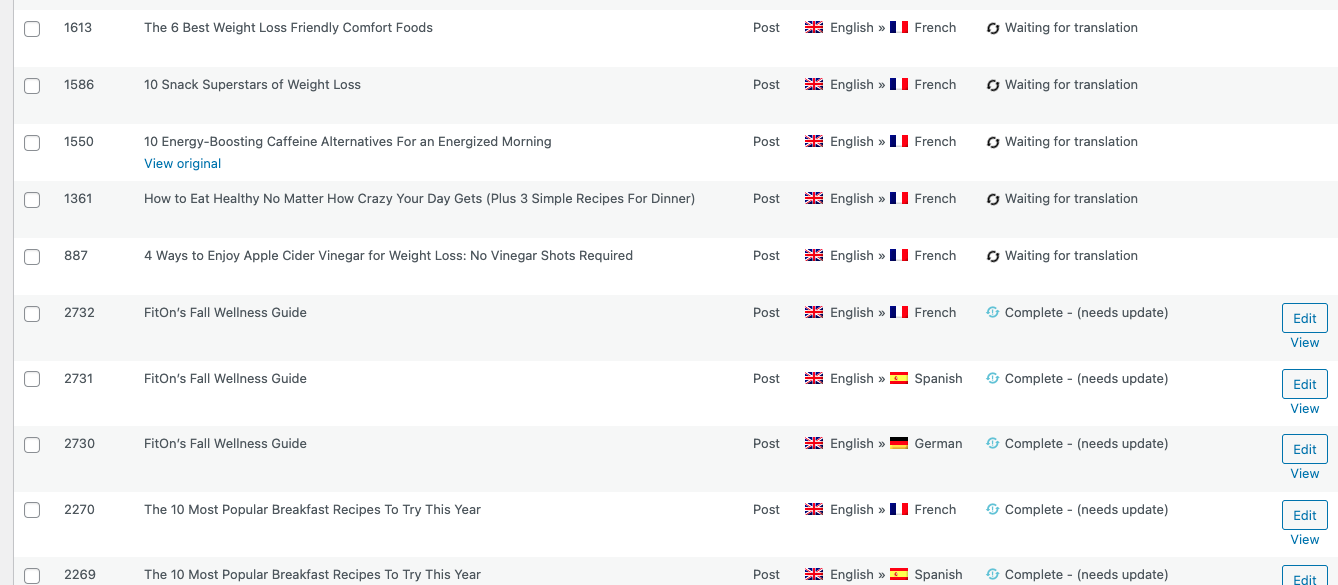 |
| August 24, 2022 at 9:28 am #11919313 | |
 Waqas Bin Hasan WPML Supporter since 05/2014 Languages: English (English ) Timezone: Asia/Karachi (GMT+05:00) |
Hi, Thank you for contacting the support. I've checked your other support ticket but I'll need fresh debug information for an overview of your site's current setup. Because as per that old information, I see there's been addressed only WP Memory Limit issue, while I see WordPress and PHP versions incompatible. If that's still the case: - please update WordPress to the latest version And then provide the updated debug information. Please see https://wpml.org/faq/provide-debug-information-faster-support/ for more information. I've enabled the debug information section for your next reply. Additionally you can also take a look at https://wpml.org/faq/checklist-before-opening-a-ticket-in-wpml-support/ and cross-check for a few initial fixes. Please see https://wpml.org/purchase/support-policy/privacy-and-security-when-providing-debug-information-for-support/ for details on privacy and security. Regards. |
| August 24, 2022 at 3:01 pm #11923571 | |
|
Guillaume Klein |
OK, I'll try doing that but with all due respect the problem must not be related to PHP/Wordpress version: I was able to automatically translate 90% of our articles without an issue. What else could it be? |
| August 24, 2022 at 3:11 pm #11923593 | |
|
Guillaume Klein |
For instance, on the dashboard it tells me I have 39 posts & pages left to translate, and 387 translations waiting for review. But when I click on the 387, it shows 0 pending review. I doubt this is because of PHP or WordPress version. To be clear, I'll try to update those, but I don't want to waste time and we should pursue other leads in the meantime.   |
| August 24, 2022 at 3:33 pm #11923855 | |
|
Guillaume Klein |
Also, like I mentioned, almost all the blocked jobs are for french translation. See screenshot. 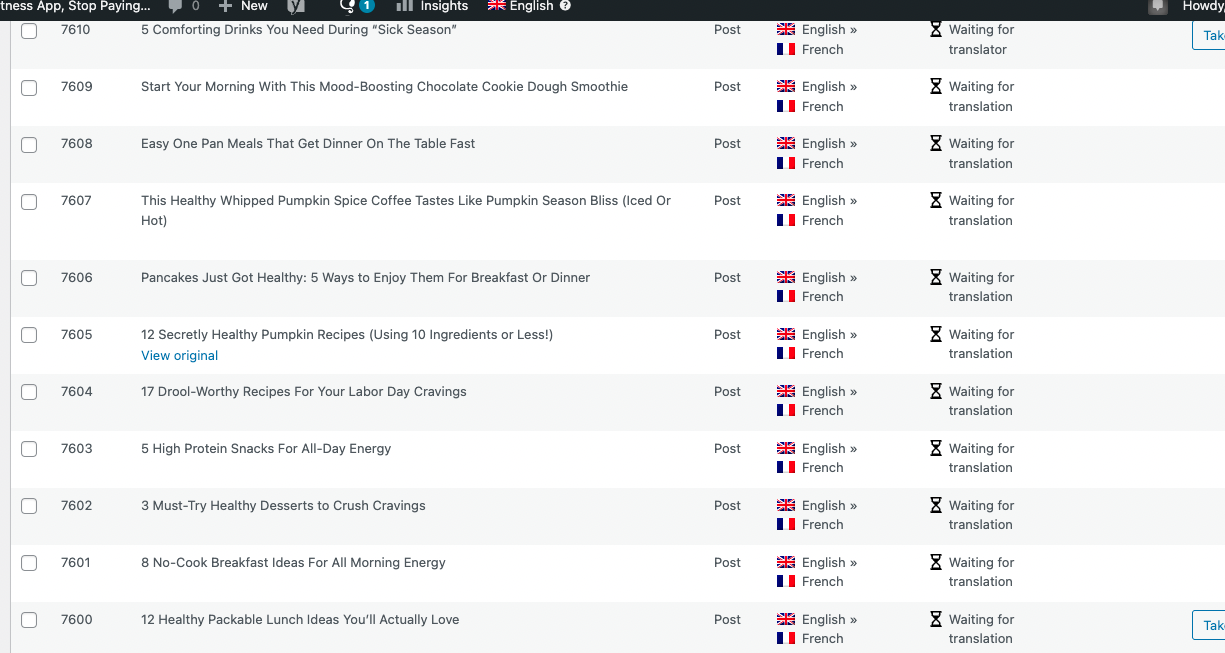 |
| August 24, 2022 at 3:40 pm #11923889 | |
|
Guillaume Klein |
Maybe the string translation is causing issues? Not sure what it is but I see a few other people with similar problems where this was the issue. Please help asap. |
| August 24, 2022 at 3:50 pm #11924005 | |
|
Waqas Bin Hasan WPML Supporter since 05/2014 Languages: English (English ) Timezone: Asia/Karachi (GMT+05:00) |
Hi, Thank you for taking that into consideration. The newer versions not only bring new features but also tend to fix previously known issues. That's why we always advise to keep the system (WordPress Core, Plugins and Theme) up-to-date. PHP is needed for WordPress core and there's a reason WordPress has mentioned the minimum requirement for this. For WPML, we do not support older versions of the plugin, since they tend to not work properly and that's why there are newer versions with bug fixes and features. Same is the case with the translation editors and services. Generally, I would agree with you for incomplete translations but we can not proceed until the system is upgraded as mentioned. Because these problems 'll get no resolution with the incompatible/older/outdated components in play. Please note that recently there have been new updated versions for WordPress and WPML plugins. Please remember to take full backup of your website and database before proceeding. Once the said parts of the system are upgraded, try the followings: - get latest debug information and share in your next reply for an overview of the system's current state Please let me know and I'll try my best to help you fix the issue. Regards. |
| August 25, 2022 at 8:56 am #11927209 | |
|
Guillaume Klein |
Hello, I've discussed with my CTO and we both agree we have low confidence this will resolve the issue. Like I said: It seems pretty clear there's something blocking the translation, like a corrupted article or something like that. Can we please escalate and start looking at the logs? There's only 6 days left in the month so this becomes critical. Thanks. |
| August 25, 2022 at 9:25 am #11927325 | |
|
Waqas Bin Hasan WPML Supporter since 05/2014 Languages: English (English ) Timezone: Asia/Karachi (GMT+05:00) |
Hi, I just discussed with the team about the issue. Usually meeting the minimum requirements and using latest version should fix most of these issue. However, before proceeding further, can you please check with the new beta on a staging/dev site and see if it helps. You can download the beta version from your WPML account after login. Go to downloads section and switch to beta channel (see screenshot). Please remember to take full backup of your website and database before proceeding. However, a staging/test site is highly recommended. If this does not resolve the issue, please try the solution mentioned in this errata: https://wpml.org/errata/jobs-are-stuck-in-pending-for-review-status/ And if this still does not help, please proceed with the followings. May I ask for admin access to your website to check the issue in detail? You can create a separate admin user for this purpose, which can be deleted afterwards. Also please provide following detail to investigate/observe the issue: - detailed steps to reproduce the issue Please remember to take full backup of your website and database before proceeding. However, a staging/test site is highly recommended, because I may need to try some changes/fixes on the site, which may cause conflicts with the live site otherwise. Please confirm it in your next reply or let me know if you do not agree with the mentioned. I've set your next reply as private to share this information safely. IMPORTANT: If you don't see the section for providing access information, please do not write in the message box or the information may appear as public. Please see https://wpml.org/purchase/support-policy/privacy-and-security-when-providing-debug-information-for-support/ for details on privacy and security. Regards. 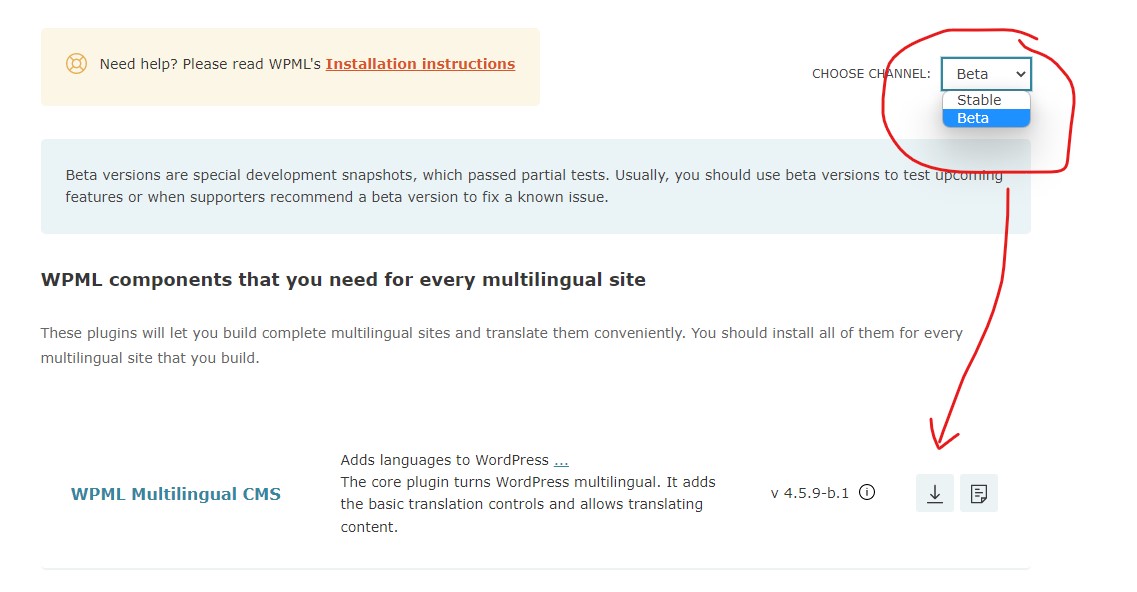 |
| August 25, 2022 at 1:53 pm #11929601 | |
|
Waqas Bin Hasan WPML Supporter since 05/2014 Languages: English (English ) Timezone: Asia/Karachi (GMT+05:00) |
Hi, Thank you for providing the access. Before continuing on the site, I'll need your confirmation and approval on each of the followings, in reply to this message: 1) Is this your staging/dev site, since address looks like a live site? Please confirm, thanks. |
| August 25, 2022 at 1:56 pm #11929609 | |
|
Guillaume Klein |
Hello, 1/this is our prod site. We are not a content company, our wordpress site is only used as a CMS. We don't have staging or dev environment. |
| August 25, 2022 at 2:10 pm #11929813 | |
|
Waqas Bin Hasan WPML Supporter since 05/2014 Languages: English (English ) Timezone: Asia/Karachi (GMT+05:00) |
Hi, Thank you for your confirmation. I am working on this and 'll get back to you as soon as I find something or have a solution. Regards. |
| August 25, 2022 at 2:18 pm #11929835 | |
|
Guillaume Klein |
Thanks. I'm sure it's a small detail that's blocking things and you'll find it quickly |
| August 26, 2022 at 9:13 am #11935635 | |
|
Guillaume Klein |
Any luck? |






