
This is the technical support forum for WPML - the multilingual WordPress plugin.
Everyone can read, but only WPML clients can post here. WPML team is replying on the forum 6 days per week, 22 hours per day.
This topic contains 26 replies, has 3 voices.
Last updated by Waqas Bin Hasan 3 years, 7 months ago.
Assisted by: Waqas Bin Hasan.
| Author | Posts |
|---|---|
| August 29, 2022 at 4:45 am #11946155 | |
 Waqas Bin Hasan WPML Supporter since 05/2014 Languages: English (English ) Timezone: Asia/Karachi (GMT+05:00) |
Hi, Thank you for your patience on this. Due to some ongoing work load at support and weekend, I was able to look into your site just now. But looks like access details are incorrect, as I am getting following error while trying to login: ERROR: Incorrect Username or Password I've tried twice. Please check and provide the correct one. I've enabled private message for your next reply, in case you want to supply a new one. Regards. |
| August 30, 2022 at 6:32 am #11954281 | |
|
Waqas Bin Hasan WPML Supporter since 05/2014 Languages: English (English ) Timezone: Asia/Karachi (GMT+05:00) |
Hi, Thank you for correcting the access information, I was able to login and check for the issue. I didn't make any change, only checked settings, configurations and ATE logs in WPML -> Support -> Advanced Translation Editor Error Logs. - WPML settings are fine The uploaded xliff file does not seem to be properly formed.<br>Missing or wrong data: target This means there's some data missing when translations are sent to ATE, for example: <source><![CDATA[2 tbsp walnuts, chopped, to serve]]></source> <target><![CDATA[]]></target> Notice missing information in ![CDATA[]] for "target" property. There are several in the Xliff file. This was a known issue, please see https://wpml.org/errata/stuck-status-processing-translation-that-could-take-a-few-minutes/ for details and workaround. Although this has been resolved in WPML 4.5.8 and there should be no more of this issue. But for the translations previously having this issue: - either you need to edit each translation and follow the workaround mentioned in the above said errata. On top of these, it is highly recommended to update WordPress and PHP to get the best out of WPML's latest versions. In any case, please remember to take full backup of your website and database before going with the above mentioned. However, it is highly advised to try these on a staging/dev site first. I hope you understand and this 'll help resolving the issue. Regards. |
| August 30, 2022 at 3:04 pm #11958661 | |
 Guillaume Klein |
Hello, I tried using the workaround on a specific post (5 Healthy Hacks For The Best Banana Bread Ever). There was a few instances where the # was missing/misplaced so I added it back (see screenshot). It's also interesting to note that in this case, the FR translation exists but as you can see some parts of the text have not been translated: A few other notes: 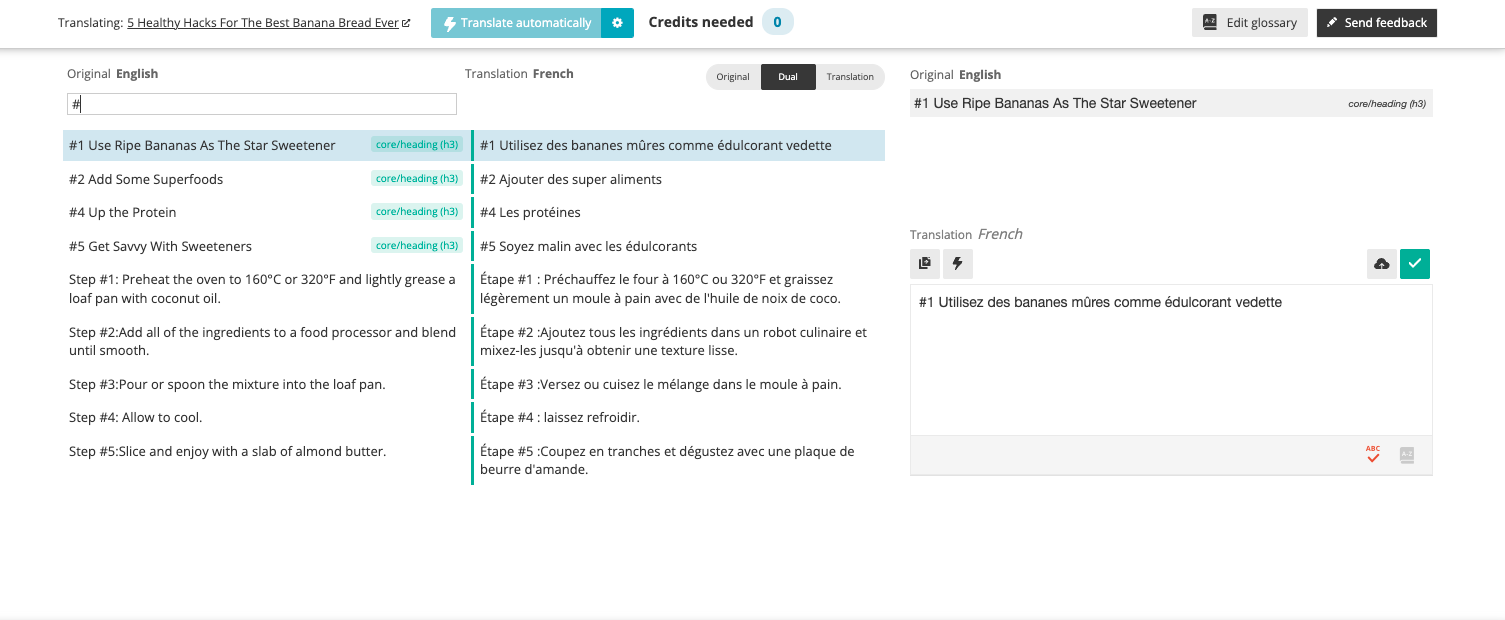 |
| August 31, 2022 at 5:42 am #11961389 | |
|
Waqas Bin Hasan WPML Supporter since 05/2014 Languages: English (English ) Timezone: Asia/Karachi (GMT+05:00) |
Hi, Thank you for taking time on this and checking the suggestions. I'll advise you to look into the following guides for better understanding about your questions: Translation Management Translation Editors Translators Generally, if you see a translation editor, like in your screenshot, that is Advanced Translation Editor (ATE). You can set translation editors in WPML -> Settings. The "Take and Translate" appears when the content has previously been translated and there's a new change. It may be a minor one which may not need an update or if needing an update. In any case, the user trying to "Take and Translate" must have been added as a Translator in WPML -> Translation Management -> Translators. Another important point for translators is, that their user profile (Users -> Edit a user) must have first name, last name and email filled and saved prior to adding them as a translator. If a translator was added first and then their user profile was updated with the said fields, that translator must be deleted and added again as translator with proper language pairs (or it may lead to some stuck translations in the system). Sometimes you may also need to do the followings for a stuck translation (due to any of the above mentioned reasons): 1- Go to WPML-> Settings, and select "Translate Some". Please go through the above mentioned guides and you'll have a good idea of how all this works. For the translations issue mentioned previously, you need to fix them as you did recently, mark them complete, wait for few seconds for their status to update. If needed, take and translate. For a translation to appear completely on the frontend, its status should be 100%, means no field should be left untranslated in the translation editor (that green progress bar at the bottom of the editor). Sometimes that progress bar shows 100% but there's some part of it showing a blue/purple area, that means the translation was 100% but some fields still needing attention to make it truly 100%. For this: - make sure to click that small-green-tick-mark button on the editor for each text, or at-least for those which are new or are incomplete. I hope these tips 'll also be helpful. Regards. |
| August 31, 2022 at 9:15 am #11963185 | |
|
Guillaume Klein |
Sorry, still stuck. Here's what I did. 1- Go to WPML-> Settings, and select "Translate Some". After this, the job was still stuck ("refreshing translation" status in the dashboard screen, "waiting for translator" in the jobs screen). At this stage I cancelled the job, and set the system back to "Translate everything", and we're back when we started. Then I went to this post and "take and translate", and verified all the #, green check marks were ok, and clicked "complete". This job went back to "waiting for translator" so I could either translate it or resign. I resigned. Anyway, it seem we're not any progress, even though you have full access to the logs. In order to move forward, here's what I'd like to do: - you take one example. Let's work with the post "5 Healthy Hacks For The Best Banana Bread Ever" (job 7719). If you succeed in getting this job unstuck, please share a step by step of what you did. If you don't succeed, please escalate the issue to another engineer. This is the only way I see we can move forward. |
| September 1, 2022 at 11:20 am #11970443 | |
 Dražen Supporter Languages: English (English ) Timezone: Europe/Zagreb (GMT+02:00) |
Hi there, Waqas is off today, so I am taking care of this ticket, hope that is OK. 🙂 I have checked your website and managed to translate the mentioned page without problem by using WPML ATE editor. Image: hidden link Steps I did on your website: My suggestion is to cancel all ongoing jobs and then resend the page in smaller batches for translation again, it should work fine. I hope I was helpful. Don't hesitate to ask if you find any problem along the way, I'll gladly help you. Regards, |
| September 1, 2022 at 2:20 pm #11971883 | |
|
Guillaume Klein |
I'm sorry Drazen, but you haven't solved this issue. That post has still "waiting for translator" for french. Check the screenshot attached. Moreover, if you go to that page, you will see that some text is in french and some other text is still in english. See for yourself: hidden link Please let's get serious about this issue now, it's been going on for too long. Can we escalate?  |
| September 5, 2022 at 12:21 pm #11989595 | |
|
Waqas Bin Hasan WPML Supporter since 05/2014 Languages: English (English ) Timezone: Asia/Karachi (GMT+05:00) |
Hi, Thank you for your patience on this. I discussed with the team and then investigated issue in some more detail. I used the same post "5 Healthy Hacks For The Best Banana Bread Ever - test" for testing and investigation. Initially, when I translated this post, the status went to complete and I tried this a few time and it worked fine. BUT, as you mentioned that their are mixed language sentences on French translation on frontend (i.e. some were not translated and still showing in English), I tried to find those strings in ATE and String Translation and those were not found - strange! So after further investigation I found that this post has been edited using different types of WordPress editors, for example Gutenberg and Classic editors. If you edit the post and switch to "Text" mode (instead of Visual), you'll notice that there are lot of following Gutenberg content in the code: <!-- wp:paragraph --> .... <!-- /wp:paragraph --> <!-- wp:heading --> <h2><b>5 Tips to Make Healthy Banana Bread </b></h2> <!-- /wp:heading --> ... This means that the post was either originally created using Gutenberg editor and later is being edited in Classic editor. Or may be sometime previously was edited using Gutenberg editor. In either case, Gutenberg left its control/formatting tags in the content which is ultimately confusing the translation editor. For a test, I removed <!-- wp:paragraph --> from the first line of the said post, saved and went to edit the French translation, I am able to see most of these sentences available for translation in ATE (screenshots attached). So at this point, you'll see the posts' translation status In progress, because you'll need to add the translations for these strings. As a conclusion: - Please use the same editor for editing the posts later. Mixing different editors 'll lead to such problems. - If you continue to using Classic editor, remember to remove Gutenberg footprints (like the above mentioned code) from your content before translating or re-translating. - Such issues have previously been reported to WordPress which have been fixed over the time, that's why, it is always advised to use latest version of WordPress, plugins and theme. I hope you understand and correct your content and translate accordingly. You may also need to consider the suggestions provided by my colleague Dražen in the previous message. Regards.  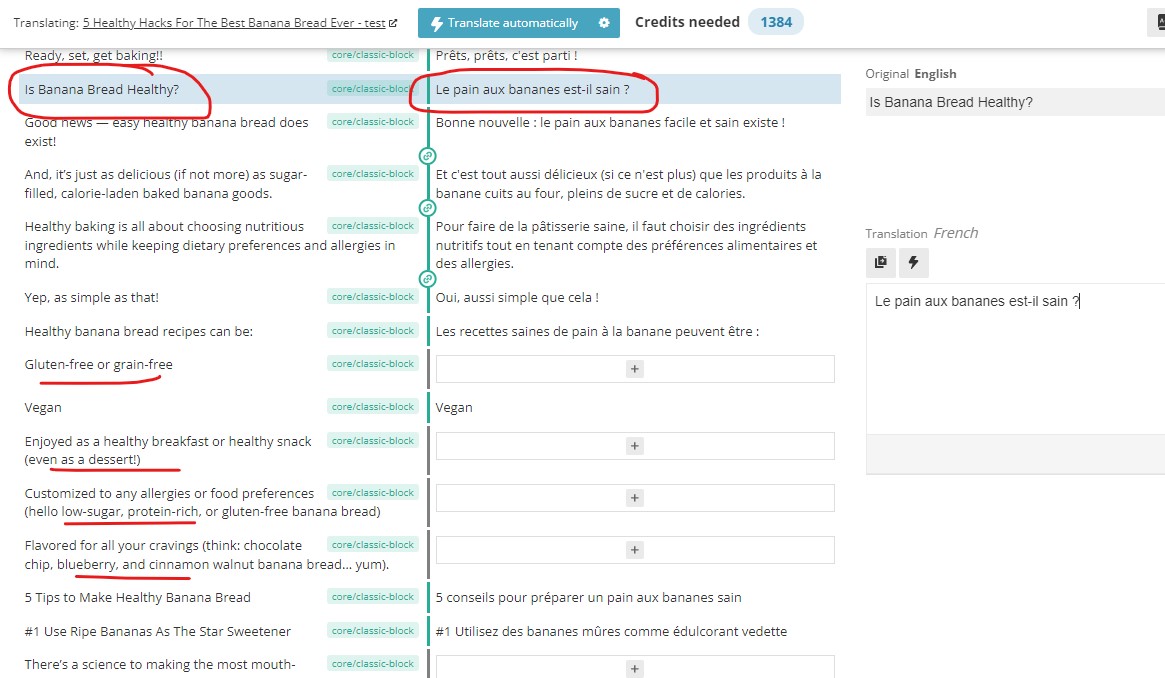 |
| September 8, 2022 at 9:58 am #12012355 | |
|
Guillaume Klein |
OK let me take a look. |
| September 8, 2022 at 12:56 pm #12014233 | |
|
Waqas Bin Hasan WPML Supporter since 05/2014 Languages: English (English ) Timezone: Asia/Karachi (GMT+05:00) |
Sure, please take your time. |
| September 15, 2022 at 12:20 am #12055239 | |
|
Guillaume Klein |
I still haven't had a chance to review this please don't close the ticket. |
| September 16, 2022 at 4:56 am #12065065 | |
|
Waqas Bin Hasan WPML Supporter since 05/2014 Languages: English (English ) Timezone: Asia/Karachi (GMT+05:00) |
Sure, please take your time and don't worry about ticket closing. You can always open a new one with reference to this. Have a nice weekend! |










