
This is the technical support forum for WPML - the multilingual WordPress plugin.
Everyone can read, but only WPML clients can post here. WPML team is replying on the forum 6 days per week, 22 hours per day.
| Sun | Mon | Tue | Wed | Thu | Fri | Sat |
|---|---|---|---|---|---|---|
| - | 9:00 – 13:00 | 9:00 – 13:00 | 9:00 – 13:00 | 9:00 – 13:00 | 9:00 – 13:00 | - |
| - | 14:00 – 18:00 | 14:00 – 18:00 | 14:00 – 18:00 | 14:00 – 18:00 | 14:00 – 18:00 | - |
Supporter timezone: America/Argentina/Buenos_Aires (GMT-03:00)
Tagged: Exception
This topic contains 47 replies, has 1 voice.
Last updated by Otto 9 months, 4 weeks ago.
Assisted by: Otto.
| Author | Posts |
|---|---|
| June 18, 2025 at 2:05 pm #17146932 | |
 Alejandro WPML Supporter since 01/2018 Languages: English (English ) Spanish (Español ) Italian (Italiano ) Timezone: Europe/Rome (GMT+02:00) |
Ok, for now you don't need to do anything more than send me a page that I can use as a reference that used to have the translation memory on it, for sure, and that it went away even now. I'll go and check directly with our devs and make sure we use that one as a reference to then fix the rest. |
| June 19, 2025 at 1:46 am #17148466 | |
 lic-2 |
Hi, After your explaination, I noticed 1st post (pic.1) is Chinese Cantonese, and the 2nd post (pic.2) is Chinese Taiwanese. 1st post is manually translated under Cantonese mode: 2nd post is manually translated under Taiwanese mode: If the situation is like what you said, you can make a little change of 1st post, and then go to Chinese translation with the circle (WPML editor), you will find the Chinese translations are missing and it will change to Taiwanese mode. I think the Cantonese mode was changed to Taiwanese when we were encountered some translation problem on 5/29, then we followed WPML's suggestions made the map setup, but I didnt noticed the change that time. Long time ago, when we starting to use WPML, our website consultant set up WPML for us, and he chose Cantonese mode, but we are actually a company base in Taiwan, so 5/29 when I tried to fix the problem with map setup, I chose Taiwanese mode without thinking. Pls. kindly help us to merge Chinese translation memories under Taiwanese mode if it is possible, if not, Cantonese mode is acceptble. The point is to find the Chinese translation back. Thank you so much. Nicole 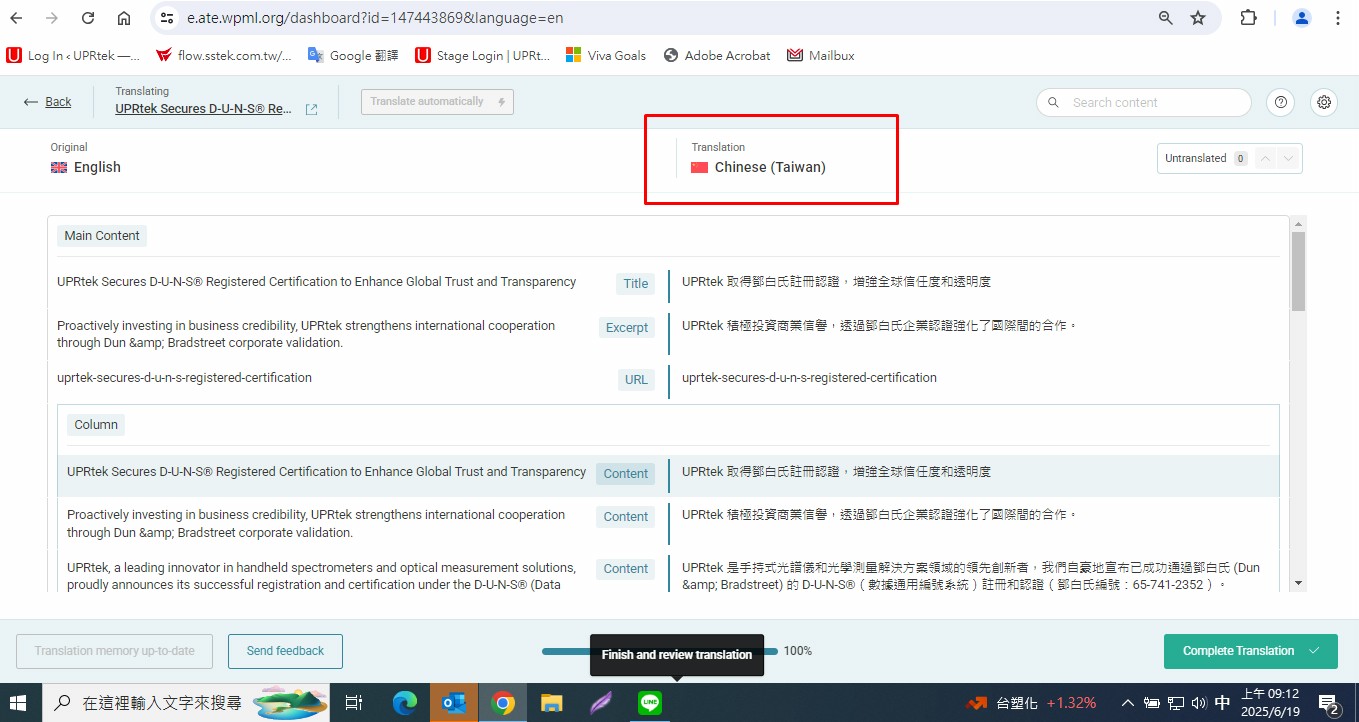  |
| June 19, 2025 at 1:49 am #17148495 | |
|
lic-2 |
Hi, After your explaination, I noticed 1st post (pic.1) is Chinese Cantonese, and the 2nd post (pic.2) is Chinese Taiwanese. 1st post is manually translated under Cantonese mode: 2nd post is manually translated under Taiwanese mode: If the situation is like what you said, you can make a little change of 1st post, and then go to Chinese translation with the circle (WPML editor), you will find the Chinese translations are missing and it will change to Taiwanese mode. I think the Cantonese mode was changed to Taiwanese when we were encountered some translation problem on 5/29, then we followed WPML's suggestions made the map setup, but I didnt noticed the change that time. Long time ago, when we starting to use WPML, our website consultant set up WPML for us, and he chose Cantonese mode, but we are actually a company base in Taiwan, so 5/29 when I tried to fix the problem with map setup, I chose Taiwanese mode without thinking. Pls. kindly help us to merge Chinese translation memories under Taiwanese mode if it is possible, if not, Cantonese mode is acceptble. The point is to find the Chinese translation back. BTW, we want to use zh_TW as usual, not zh-TW, can you pls. also fix this problem for us, thank you so much. Nicole |
| June 19, 2025 at 10:44 am #17150024 | |
|
Alejandro WPML Supporter since 01/2018 Languages: English (English ) Spanish (Español ) Italian (Italiano ) Timezone: Europe/Rome (GMT+02:00) |
Please watch this video: hidden link where i show you all the changes made and how/why they were made. Everything should be ok now, I fixed the locale to zh_TW and then asked our devs to move all the translation memory from other locales you had (zh, zh_hant, zh-TW) into the correct one which is the sole reason why you "lost" your translation memory. There's no need to change the locale again but if you do, please be aware that is like creating a new language, so the translation memory will NOT be ported to that new language. Since we don't have any translation engine that offers "taiwanese" as a language, then the mapping must stay off, if you do want to use automatic translation, you'll probably lose the current translation, but we may be able to fix this if you do want to use automatic translation, just let us know first before translating anything and we'll try to merge the content to zh_hant (cantonese). Regards. |
| June 20, 2025 at 10:20 am #17153766 | |
|
lic-2 |
Hi, Thanks for the video and the explanation. I entered a random post, and pls. see the attached picture. The Chinese wpml editor right now is showing Chinese Taiwan, I thought you merged all Chinese to Cantonese, so it should be Chinese Cantonese, right? I also entered to a random post and checked the url as below, hidden link the url of Chinese is still zh-TW, not zh_TW. So... are these ok? |
| June 21, 2025 at 3:11 am #17155552 | |
|
lic-2 |
Hi, Here is the picture I forgot to attach to you. BTW, you can see the Chinese at the wpml editor are still missing compared with the post on the website. Seems like the problem is not yet solved.  |
| June 23, 2025 at 3:31 pm #17161404 | |
 Otto |
Hello, 1. 2. Best Regards, |
| June 24, 2025 at 1:05 am #17162742 | |
|
lic-2 |
Hi, 1. Do you mean all my merged Chinese translations are combined under Chinese Taiwan? 2. All the Chinese content that we manually translated before and stored in the memory will auto show up if I resend the content for translation, am I right? 3. I still don't really understand why and how the url had been changed related to this issue. But I am worried about SEO if the url is different. So... Can we change the url back to zh_TW? and how to change it back? or... We don’t need to worry about the different url that wouldn't affect SEO? |
| June 24, 2025 at 3:57 pm #17166162 | |
|
Otto |
Hello, 1. 2. 3. Google recommends using hyphens (-) over underscores (_) in URLs. So, switching from zh_TW to zh-TW is beneficial for readability and SEO best practices. BUT this needs to be handled properly with a 301 redirect. ✅ Why it’s not a problem (if handled correctly) As you have installed the redirection plugin I suggest using it for this: ❌ Please make a full website backup before proceeding ❌ The Redirection plugin is popular and WPML-compatible. Steps: This will redirect everything under /zh_TW/ (like /zh_TW/blogs/...) to the matching path under /zh-TW/. Best Regards, |
| June 25, 2025 at 1:40 am #17166985 | |
|
lic-2 |
Hi, Thank you so much to explain the situation, I have 1 more question, it is about No.2 you had replied. So... what should I do after go back when I encountered the translations don't appear in the editor? I tried 2 links below and which are happening right now. I clicked go back and go inside again for serveal times already, the Chinese translations still dont appear. Most of the Chinese translations don't appear in the editor. Some of the Chinese translations don't appear in the editor. |
| June 25, 2025 at 6:44 am #17167203 | |
|
lic-2 |
Hi, Below link, I believed this post was translated with ATE which is suggested by WPML on 6/6. And WPML mentioned they will return the credits if it deducted our credits. hidden link I wanted to ask if you could restore our old manually translated Chinese for this post? And where can I check if those credits were returned or not?  |
| June 25, 2025 at 1:12 pm #17169393 | |
|
Otto |
Hello, I am sorry for the inconveniences. I escalated the issue to our second tier support, I'll get back to you as soon as I get a reply from them. Best Regards, |
| June 26, 2025 at 1:42 pm #17173943 | |
|
Otto |
Hello, I got feedback from our second tier support regarding the two pages with problems that you provided: 1. The problem here was that the job was created before the translation memory was merged. We made a small edit to the original page and reverted the change to trigger a new translation job ID, and it solved the issue. Take this solution into account if you see the problem in another post. 2. This page was translated to ZH on 2024-12-04. We checked the source for untranslated content in the current and the previously translated job, and there are differences. So, what's missing is new content. The missing content is expected because the original changed. Best Regards, |
| June 26, 2025 at 1:57 pm #17174008 | |
|
lic-2 |
Regarding the credit refund, you previously mentioned that you had added 10,000 credits to my WPML account, but I did not see any related records in my account. 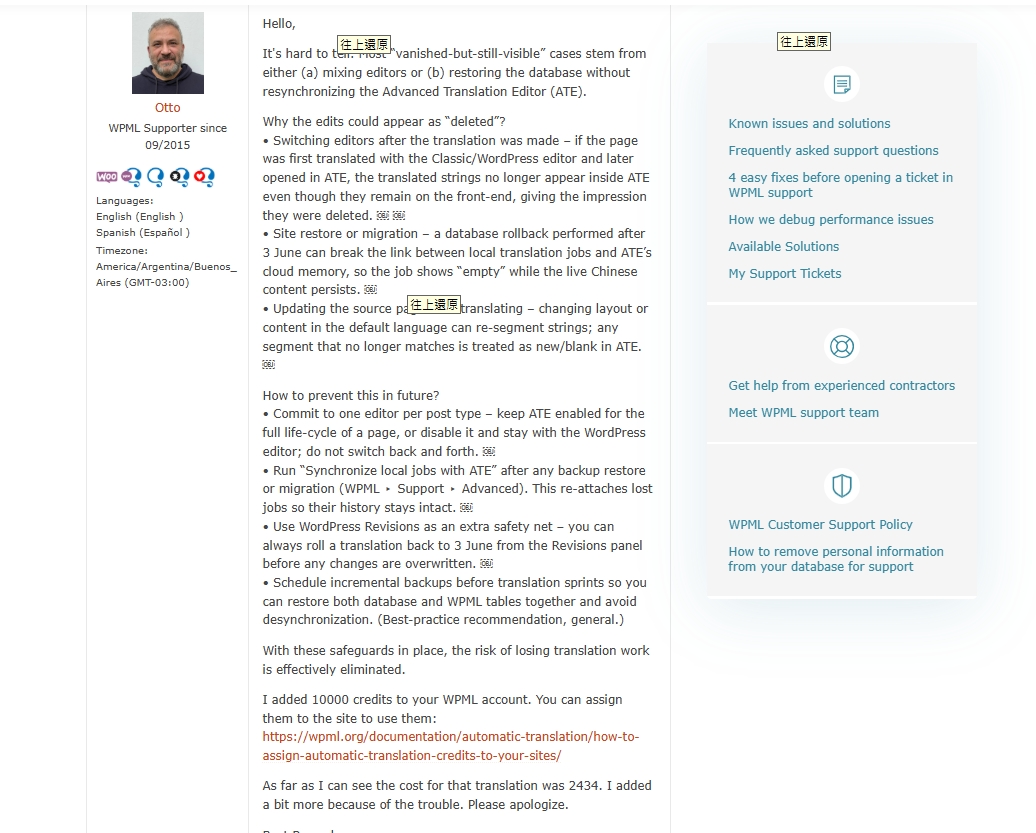 |
| June 26, 2025 at 6:03 pm #17174943 | |
|
Otto |
Hello, I didn't realize you were using "pay as you go" to translate your site. I added credits to your WPML.org account. To use them, you'll need to cancel pay as you go and assign the credits to your site following these steps: Once you use those credits, you can enable pay as you go again. Is this a suitable solution for you? Best Regards, |










The topic ‘[Closed] Chinese translation’ is closed to new replies.