
This thread is resolved. Here is a description of the problem and solution.
Problem:
If you're experiencing issues with saving CSS changes on the French version of a page using Elementor and WPML, where changes revert after refreshing the page, this might be due to WPML's handling of custom fields.
This issue will be handled by our development team and solved in a future version of WPML. There are three possible workaround provided on this ticket, too.
Please note that these solutions might become outdated or may not apply to your specific case. If these steps do not resolve your issue, we highly recommend checking related known issues at https://wpml.org/known-issues/, verifying the version of the permanent fix, and confirming that you have installed the latest versions of themes and plugins. If the problem persists, please open a new support ticket.
This is the technical support forum for WPML - the multilingual WordPress plugin.
Everyone can read, but only WPML clients can post here. WPML team is replying on the forum 6 days per week, 22 hours per day.
Tagged: Documentation request
This topic contains 9 replies, has 0 voices.
Last updated by samD-19 1 month, 3 weeks ago.
Assisted by: Andreas W..
| Author | Posts |
|---|---|
| March 5, 2026 at 1:40 pm #17875200 | |
 samD-19 |
Hello WPML Support, We are experiencing an issue on the French version of a page where it is impossible to save CSS changes. Issue: Could you please help us investigate what might be causing this and how we can resolve it?  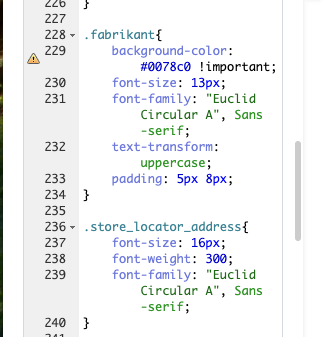 |
| March 5, 2026 at 10:11 pm #17876327 | |
 Andreas W. WPML Supporter since 12/2018 Languages: English (English ) German (Deutsch ) Timezone: America/Lima (GMT-05:00) |
Hello, Thank you for reaching out! If the French page is a translation, then it would be expected that layout and design are identical in each language. If you want to use different layouts and designs per language, then you need to switch the translation method to "WordPress Editor". Best regards |
| March 6, 2026 at 8:03 am #17876876 | |
|
samD-19 |
Hi Andreas, Thanks for reaching out. I’ve tried the steps you suggested, but I’m still unable to apply different CSS to the French page. When I edit the French page in Elementor and change the page CSS, I’m able to make the changes. However, once I save and refresh the page, those changes disappear, so the CSS is still not applied correctly. I’m wondering whether a specific setting might be causing this issue, but I’m not sure which one. If you need backend acces: hidden link Thanks in advance for your help.  |
| March 6, 2026 at 10:38 pm #17878721 | |
|
Andreas W. WPML Supporter since 12/2018 Languages: English (English ) German (Deutsch ) Timezone: America/Lima (GMT-05:00) |
Thank you! I was able to confirm this behavior on a sandbox running the latest versions of Elementor PRO and WPML. The CSS is saved in the custom field _elementor_page_settings which WPML by default is only copying once when translating the page for the first time. After that you should be able to save manual edits in Elementor in second languages. It is unclear at this point if WPML is actually continuing to copy the original value over again or if Elementor is not publishing the meta information for the translated content. We will be debugging this issue and then get back to you. |
| March 8, 2026 at 3:32 am #17879798 | |
|
Andreas W. WPML Supporter since 12/2018 Languages: English (English ) German (Deutsch ) Timezone: America/Lima (GMT-05:00) |
The issue is caused inside WPML. I am escalating to the Second Tier Support for further revision. Possible workaround: Inside \sitepress-multilingual-cms\addons\wpml-page-builders\classes\Integrations\Elementor\class-wpml-elementor-data-settings.php:get_field_to_copy() Change this function:
public function get_fields_to_copy() {
    return [
        '_elementor_version',
        self::META_KEY_MODE,
        '_elementor_page_settings',
        '_elementor_css',
        '_elementor_template_type',
        '_elementor_template_widget_type',
        '_elementor_popup_display_settings',
    ];
}
This function causes the settings are copied over again and again and WPML's custom field settings are not respected. Change it into:
\sitepress-multilingual-cms\addons\wpml-page-builders\classes\Integrations\Elementor\class-wpml-elementor-data-settings.php:get_field_to_copy()

public function get_fields_to_copy() {
    return [
        '_elementor_version',
        self::META_KEY_MODE,
        //'_elementor_page_settings',
        '_elementor_css',
        '_elementor_template_type',
        '_elementor_template_widget_type',
        '_elementor_popup_display_settings',
    ];
}
Now '_elementor_page_settings' is commented our from this function and will not longer be copied. After that, make sure to set '_elementor_page_settings' at WPML > Settings > Custom Fields Translation > Show system fields to "Copy once". This is the default setting, and it should copy the settings once and then not copy them again. IMPORTANT: |
| March 12, 2026 at 9:58 am #17891571 | |
|
samD-19 |
Hi Andreas, Thanks for looking into the issue. I was able to make the adaptations you've recommended. I am now indeed able to adapt the CSS of the FR-page (which was not the case earlier). However, the CSS is still not correctly loaded on the page and therefore the badges are still in the wrong design. Kind regards   |
| March 12, 2026 at 8:53 pm #17893947 | |
|
Andreas W. WPML Supporter since 12/2018 Languages: English (English ) German (Deutsch ) Timezone: America/Lima (GMT-05:00) |
Sounds as if Elementor PRO's global CSS is not able to display a different style per language. You basically have the same experience when using the Theme Customizer. Also here, changes can only be made in site's default language. Global CSS always counts for all content in all languages. Maybe you could solve this by using a different selector and rule set for your translated elements. I am forwarding this information to our Team and will get back to you once I receive feedback. |
| March 12, 2026 at 8:56 pm #17893978 | |
|
Andreas W. WPML Supporter since 12/2018 Languages: English (English ) German (Deutsch ) Timezone: America/Lima (GMT-05:00) |
I can not confirm this on my test site. Here, the translation worked out as expected after making the recommended change. Examples: Maybe your elements use a different class in the second language? |
| March 17, 2026 at 3:29 pm #17905292 | |
|
Andreas W. WPML Supporter since 12/2018 Languages: English (English ) German (Deutsch ) Timezone: America/Lima (GMT-05:00) |
The compatibility team proposed two possible workarounds for this issue: Workaround #1 Edit the original page in the Elementor editor and you use the :lang CSS selector to set different styles for each language Example to use in the original page:
body {
    background-color: lightblue!important;
}
*:lang(de-DE) body {
    background: lightgreen !important;
}
The default will be light-blue, but for German it will be light-green. Workaround #2 Look for the save function, line 27. Replace:
	public function save( $post_id, $original_post_id, $converted_data ) {
		$this->save_data( $post_id, $this->data_settings->get_fields_to_save(), $this->data_settings->prepare_data_for_saving( $converted_data ) );
		$this->copy_meta_fields( $post_id, $original_post_id, $this->data_settings->get_fields_to_copy() );
	}
With
	public function save( $post_id, $original_post_id, $converted_data ) {
		if ( WPML_PB_Last_Translation_Edit_Mode::is_translation_editor( $post_id ) ) {
			$this->save_data( $post_id, $this->data_settings->get_fields_to_save(), $this->data_settings->prepare_data_for_saving( $converted_data ) );
			$this->copy_meta_fields( $post_id, $original_post_id, $this->data_settings->get_fields_to_copy() );
		}
	}
You can now edit the translation in the Elementor Editor and manually translate the CSS. This issue will be solved in a future update of WPML. |
| March 19, 2026 at 2:09 pm #17911374 | |
|
samD-19 |
Works, thank you! You may close the ticket 🙂 |






