
This is the technical support forum for WPML - the multilingual WordPress plugin.
Everyone can read, but only WPML clients can post here. WPML team is replying on the forum 6 days per week, 22 hours per day.
| Sun | Mon | Tue | Wed | Thu | Fri | Sat |
|---|---|---|---|---|---|---|
| - | 9:00 – 13:00 | 9:00 – 13:00 | 9:00 – 13:00 | 9:00 – 13:00 | 9:00 – 13:00 | - |
| - | 14:00 – 18:00 | 14:00 – 18:00 | 14:00 – 18:00 | 14:00 – 18:00 | 14:00 – 18:00 | - |
Supporter timezone: America/Los_Angeles (GMT-07:00)
Tagged: Documentation request
This topic contains 23 replies, has 1 voice.
Last updated by Bobby 1 month, 1 week ago.
Assisted by: Bobby.
| Author | Posts |
|---|---|
| January 23, 2026 at 4:06 pm #17757833 | |
 emlynN |
Some Advanced Custom Fields have stopped saving on Welsh posts. If i provide Admin access can some take a look into it please? |
| January 23, 2026 at 4:41 pm #17757913 | |
 Otto |
Hello, Can you please let me know which fields stopped working? And where are those set (in which field group) and where are they displayed (on which page, post, or custom post type)? You mentioned that they "stop" working. Since when? Can you relate it to any change (update, migration, edit)? I want to request temporary access (wp-admin and FTP) to your site to take a better look at the issue. The information you will enter is private, which means only you and I can see and have access to it. **IMPORTANT** Best Regards, |
| January 29, 2026 at 8:18 pm #17775151 | |
|
Otto |
Hello Jon, Thanks. First, ensure that your Field Groups are set to 'Not translatable' in WPML > Settings > Post Type Translation: Then, you need to set the translation preference of the ACF custom fields as explained here: It looks like you chose expert mode, and then each field is set to "don't translate". As mentioned, first set the right translation status to the field group and then set the right settings for each group and field. Best Regards, |
| February 2, 2026 at 10:11 am #17783134 | |
|
emlynN |
Hi Thanks for the response. Can you confirm if i should be using "Same fields across languages" and not Expert. I have set ACF Field Groups to not translate (see attached) Thanks  |
| February 2, 2026 at 2:59 pm #17784446 | |
|
emlynN |
Hi I just noticed that the English fields for date, area and time and in the wrong language groups. See attached images. Note the "-cym" on the Welsh fields. Can these be moved without affecting all existing published posts? Not sure how this has happened Thanks 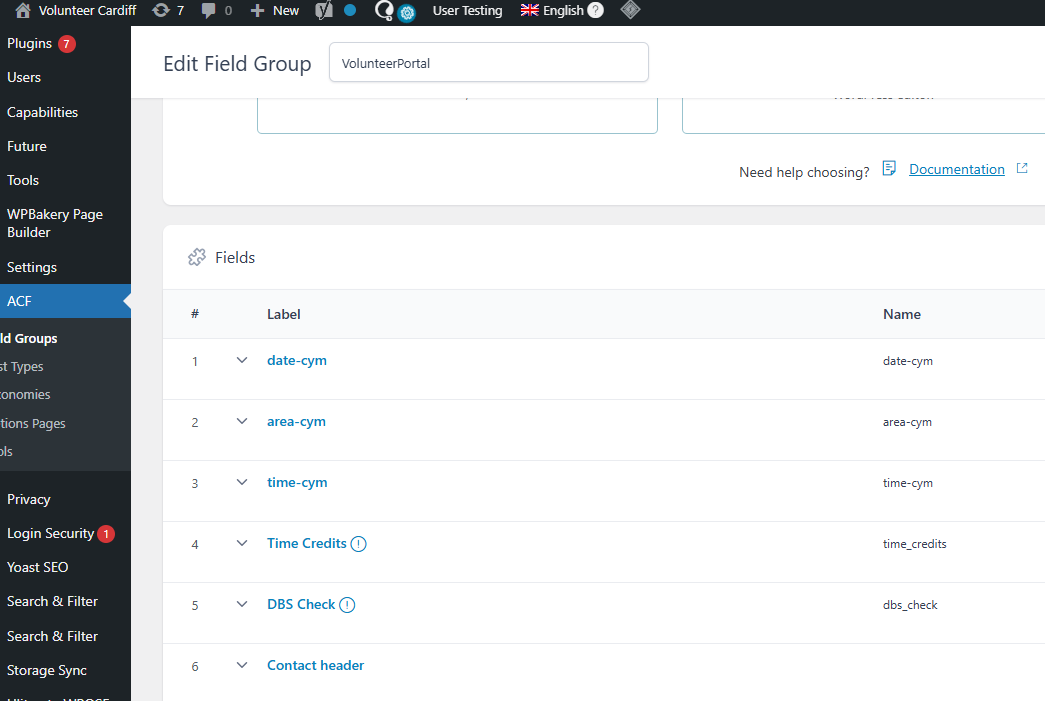 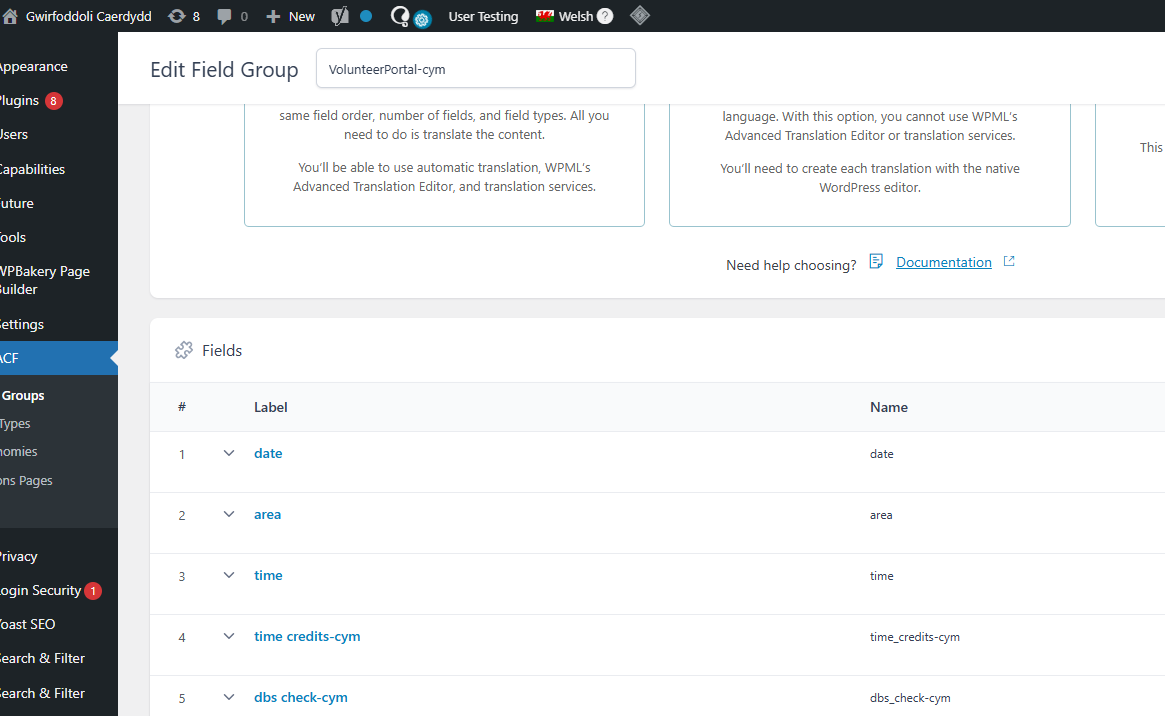 |
| February 3, 2026 at 5:23 pm #17789203 | |
 Bobby WPML Supporter since 04/2015 Languages: English (English ) Timezone: America/Los_Angeles (GMT-07:00) |
Hi Jon, Otto is currently away on holidays, and I will continue support on your ticket. I am currently reviewing this and will update you shortly. |
| February 4, 2026 at 7:17 am #17790016 | |
|
Bobby WPML Supporter since 04/2015 Languages: English (English ) Timezone: America/Los_Angeles (GMT-07:00) |
Hi Jon, The choice between Expert and "Same fields across languages" really comes down to the end goal, if you are simply planning on use these fields as they are in the translations and not having a more complex set up this is ("Same fields across languages") typically the way to go. Regarding the other issue -- I can see what happened here. When the ACF Field Groups were set to "translatable", you are essentially able to add a "translation" for each language, the moment they were switched to "not translatable" this was removed and the translations are now showing in the same screen as the default language. Same behavior would happen if you were to remove WPML without clearing the data, you would see the pages listed twice for example. Homepage Homepage-EN With that being said my recommendation is to do the following: 1. Remove the Duplicate from the secondary language Let me know your results, please. |
| February 5, 2026 at 10:49 am #17795517 | |
|
emlynN |
Hi. I've set the translation to "Same fields across languages". I've tried moving the Welsh fields from the English and English to Welsh, for example moving area_cym field to the English field group. It says it has moved but when i visit the field group again, the field is still there and hasn't moved. Can you take a please if i provide Admin access?  |
| February 5, 2026 at 9:35 pm #17797745 | |
|
Bobby WPML Supporter since 04/2015 Languages: English (English ) Timezone: America/Los_Angeles (GMT-07:00) |
I would like to request temporary access (wp-admin and FTP) to your site to test the issue. **Before we proceed It is necessary to take FULL BACKUP of your database and your website. Providing us with access, you agree that a backup has been taken ** I often use the Duplicator plugin for this purpose: http://wordpress.org/plugins/duplicator/ NOTE: If access to the live site is not possible and the staging site does not exist please provide me with a duplicator package created with the duplicator plugin. Thank you, |
| February 9, 2026 at 10:43 pm #17806976 | |
|
Bobby WPML Supporter since 04/2015 Languages: English (English ) Timezone: America/Los_Angeles (GMT-07:00) |
Thank you for the access details! The -cym items need to be removed. Since we are using ACF + ACFML the ACF fields groups are now set to be used on both languages, therefore the additional item is no longer required. At the moment it's actually causing the translations to have the fields twice. Seem a screen recording I put together explaining this: Let me know your results, please. |
| February 12, 2026 at 2:28 pm #17817382 | |
|
emlynN |
Hi. Thanks for the video. The main issue is that the Welsh ACF are not saving on the Welsh posts. This has just started in the last few weeks. It was working fine using the 2 versions (with _cym) in the past Have you tried saving changes on a Welsh post to see what i mean? On this default language post below, i only have area_cym and time_cym and not area and time. Did you move them? hidden link Thanks |
| February 16, 2026 at 2:48 pm #17826165 | |
|
emlynN |
Hi. If i do what you suggest and delete the -cym, will this affect and remove any translation for all/other posts? The site has a lot of posts, so i want to avoid this. Thanks |
| February 17, 2026 at 4:03 pm #17829763 | |
|
Bobby WPML Supporter since 04/2015 Languages: English (English ) Timezone: America/Los_Angeles (GMT-07:00) |
Hi Jon, "The main issue is that the Welsh ACF are not saving on the Welsh posts" The way the ACF items are et up is to be copied directly from the main language, notice the lock icon, that set up won't allow you to directly edit them. I have not altered or moved the ACF fields, if you do remove the -cym items it would remove anything that is being used via that item, however, you are now using the ACf + ACFML which is set to "copy" from the default language. Since the site has a lot of content, and I always advise being proactive, what i'd recommend is creating either a small test on the site OR even better migrating a copy of the site on a staging server and making the changes there first. Let me know your results, please. |
| March 2, 2026 at 5:14 pm #17865751 | |
|
emlynN |
HI. I've duplicated the site onto a staging site and deleted the _cym groups, as you suggested. hidden link The checkboxes are coming through in English on the Welsh page. Do these need to be manually translated now using the string translator? Thanks |
| March 2, 2026 at 9:15 pm #17866351 | |
|
Bobby WPML Supporter since 04/2015 Languages: English (English ) Timezone: America/Los_Angeles (GMT-07:00) |
If I am not mistaken you should be able to just update the default langauge, and then access the translation via the ATE editor and update the translation and it should work as expected. Let me know your results, please. |







The topic ‘[Closed] Custom fields not saving’ is closed to new replies.