Home›Support›English Support›[Waiting for user feedback] Errore: WPML ha provato a tradurre questa pagina tre volte e non ci è riuscito. Per risolvere il pr...
[Waiting for user feedback] Errore: WPML ha provato a tradurre questa pagina tre volte e non ci è riuscito. Per risolvere il pr...
This is the technical support forum for WPML - the multilingual WordPress plugin.
Everyone can read, but only WPML clients can post here. WPML team is replying on the forum 6 days per week, 22 hours per day.
Buongiorno, abbiamo completato la traduzione dell’intero sito, ma stiamo riscontrando un problema con due post appartenenti al custom post type Portfolio.
Vorremmo aggiornare la traduzione di questi due contenuti, tuttavia nel backend, nell’elenco dei post, al posto dell’icona della matita compare l’icona dell’ingranaggio. Quando clicchiamo sull’ingranaggio per modificare la traduzione, in alto viene mostrato il seguente messaggio di errore: “Errore: WPML ha provato a tradurre questa pagina tre volte e non ci è riuscito. Per risolvere il problema, contatta Assistenza di WPML”.
Potreste aiutarci a capire come sbloccare queste traduzioni e permetterci di aggiornarle correttamente?
Grazie.
Ho ragione a supporre che il problema riguardi solo due articoli di uno specifico tipo di post personalizzato?
In caso affermativo, procedi come segue:
- Copia l'articolo utilizzando il plugin Yoast Duplicate Post (che hai già installato).
- Apri la schermata di modifica dell'articolo copiato. Dovresti vedere un'icona a forma di matita/cerchio/ingranaggio nella barra laterale, nella sezione "Lingue".
- Apporta una piccola modifica, ad esempio, aggiungi uno spazio vuoto alla fine di una frase/paragrafo.
- Salva.
Ora dovresti vedere una freccia circolare accanto ai link della seconda lingua; questo significa che è necessario un aggiornamento.
- Modifica nuovamente la traduzione e salvala con una traduzione completa al 100%.
Se il problema persiste, procedi come segue:
- PASSO IMPORTANTE! Crea un backup del tuo sito web. In alternativa, esegui un test su una copia/versione di staging del sito web per evitare interruzioni al sito live.
- Vai su "Bacheca di WordPress > WPML > Supporto > Risoluzione dei problemi (link)".
Am I correct to assume that only two entries of a specific custom post type have the issue?
If yes, please do as follows:
- Copy the entry using the Yoast Duplicate Post plugin (you already have it)
- Open the edit screen of the copied post. You should see a pencil/circle/gear icon in the sidebar options under the "Languages" section.
- Make a small change, for example, add an extra blank space at the end of a sentence/paragraph.
- Save it.
- You should now see that a circular arrow appears beside the 2nd languages links, this means that an update is required.
- Edit the translation again and save it up to 100% translated.
If the issue persists, do as follows:
- IMPORTANT STEP! Create a backup of your website. Or better approach will be to test this on a copy/staging version of the website to avoid any disruption of a live website.
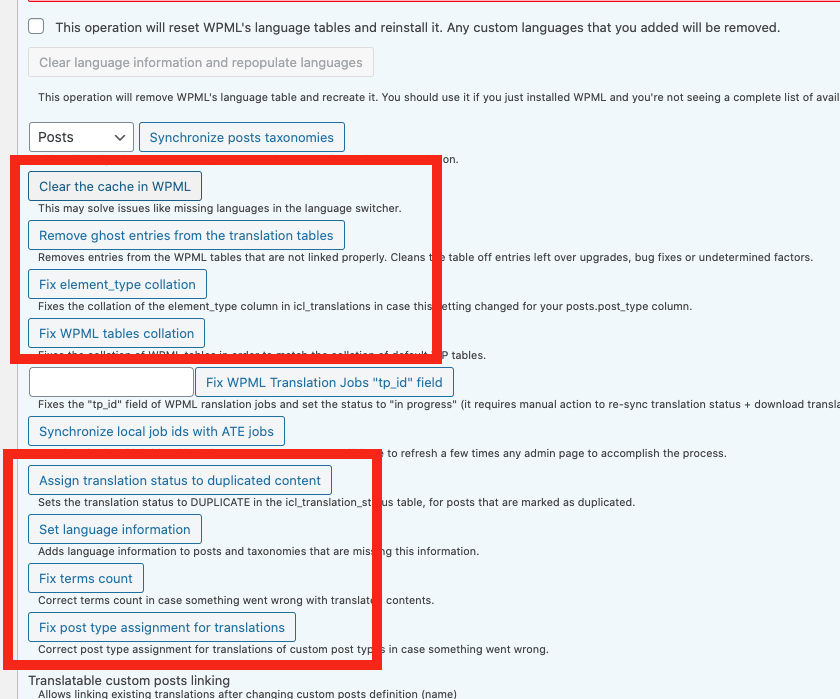
- Go to "WordPress Dashboard > WPML > Support > Troubleshooting (link)".
- Click the buttons annotated in the screenshot below one by one and wait for each button process to finish: https://wpml.org/wp-content/uploads/2020/10/7206941-buttons.png