
This thread is resolved. Here is a description of the problem and solution.
Problem:
If you're experiencing issues with the 'Rewrite-Republish' feature of the Yoast Duplicate Post plugin where drafts are created in the default language instead of the translated language, we have identified a couple of potential causes and solutions.
Solution:
1. When working with multiple language tabs, the language cookie is set to the language of the last tab opened. To avoid conflicts:
- We recommend not opening multiple language tabs simultaneously. If necessary, use different browsers for different languages (e.g., Chrome for English and Firefox for Italian).
2. If using the 'All languages' filter in the page list, drafts opened from this view will default to the site's main language.
- To ensure drafts are created in the correct language, select the specific language (e.g., Italian) in the page list before using the Rewrite & Republish feature.
Please note that these solutions might become outdated or may not directly address your specific issue. We highly recommend checking related known issues at https://wpml.org/known-issues/, verifying the version of the permanent fix, and confirming that you have installed the latest versions of themes and plugins. If these steps do not resolve your issue, please open a new support ticket.
This is the technical support forum for WPML - the multilingual WordPress plugin.
Everyone can read, but only WPML clients can post here. WPML team is replying on the forum 6 days per week, 22 hours per day.
Tagged: Compatibility
This topic contains 9 replies, has 0 voices.
Last updated by antonioN-6 9 months, 3 weeks ago.
Assisted by: Itamar.
| Author | Posts |
|---|---|
| June 23, 2025 at 11:49 am #17159763 | |
 antonioN-6 |
Background of the issue: Symptoms: Questions: |
| June 24, 2025 at 8:31 pm #17166820 | |
 Itamar WPML Supporter since 02/2016 Languages: Hebrew (עברית ) Timezone: Asia/Jerusalem (GMT+03:00) |
Hi, We need to replicate this issue on a fresh WordPress installation. Then I'll be able to escalate it to our compatibility team. To achieve this, I created a test website with a clean WordPress installation. You can access it through this link: hidden link With this link, you'll be directly logged in. Could you please install the Yoast Duplicate Post plugin and see if the issue is replicable on a clean WordPress installation? Please also make sure that you are installing the latest version of the plugin. When everything is finished and you can replicate the problem, please let us know. Important! Do not import your site to the test site. We must replicate the problem on a fresh, clean WordPress installation. Regards, |
| June 25, 2025 at 8:22 am #17167588 | |
|
antonioN-6 |
Hi, thank you so much for your reply! We can produce more information or tests, if you need it. In order to investigate the issue we noticed that sometimes it can't be reproduced. We notice that in some part of the YOAST Duplicate post plugin, the author took care of WPML integration (i.e. file /duplicate-post/compat/wpml-functions.php) We are not sure if the issue can be fixed in the duplicate-post plugin or in the WPML plugin? or with a work by both sides. We opened the issue into the Yoast post-duplicate forum too. Thank You |
| June 25, 2025 at 12:40 pm #17169248 | |
|
Itamar WPML Supporter since 02/2016 Languages: Hebrew (עברית ) Timezone: Asia/Jerusalem (GMT+03:00) |
Hi, Thanks for reproducing the problem on the sandbox site. However, I was unable to replicate it on the sandbox site. When escalating an issue to our second-tier support team, I must provide them with the steps to reproduce the issue. I know you said it does not happen every time. But I tried it in many ways. Here is one way I tried: 1. I created the page in English. I also tried by first creating the page in Italian and translating it into English. And also when the page was duplicated (WPML duplicate option) into another language. Could you please specify the steps to reproduce the problem? It would be great if you could share a video with me of the problem. You can use the free online screencast service Komodo - hidden link. Regards, 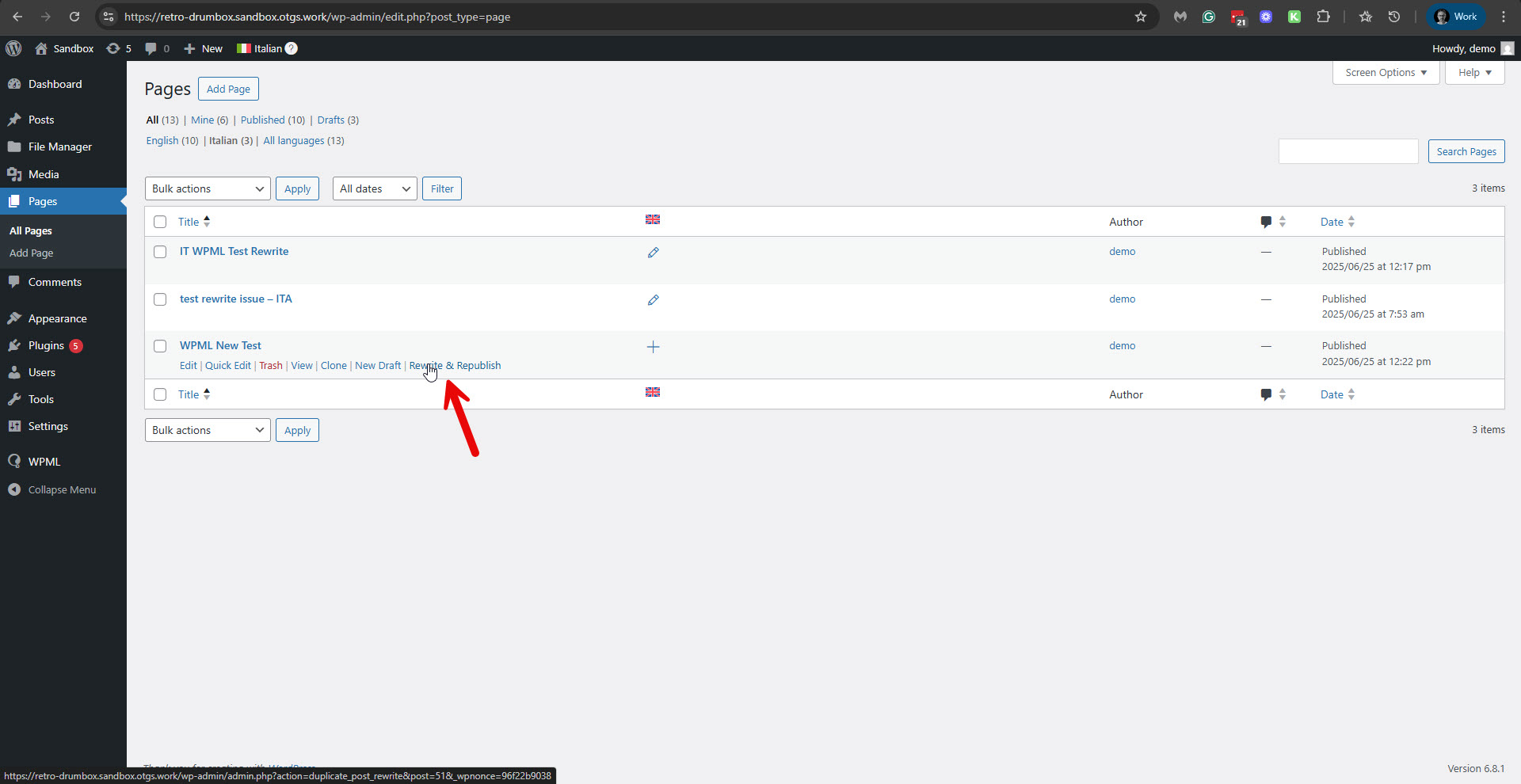 |
| June 26, 2025 at 9:46 am #17172588 | |
|
antonioN-6 |
Thank you for your patience and for your instructions! (I recorded and uploaded 4 screen records in a drive folder, but if you need it, i can use external services like komodo, let me know it) link to the drive folder of the record: - wpml-rewrite-issue-1 : - wpml-rewrite-issue-2 : as in recorded case 1, but with opposite languages. - wpml-rewrite-issue-3 : Monitoring the cookies we can find easily other cases, for instance |
| June 26, 2025 at 6:47 pm #17175010 | |
|
Itamar WPML Supporter since 02/2016 Languages: Hebrew (עברית ) Timezone: Asia/Jerusalem (GMT+03:00) |
Hi, I requested access to the GD folders. Please approve. Thanks, |
| June 26, 2025 at 6:52 pm #17175018 | |
|
antonioN-6 |
Hi, |
| June 29, 2025 at 7:29 pm #17180835 | |
|
Itamar WPML Supporter since 02/2016 Languages: Hebrew (עברית ) Timezone: Asia/Jerusalem (GMT+03:00) |
Hi, You only opened the GD for wpml-rewrite-issue-3. However, I was able to replicate the issue with this scenario. I'll esclate this to our second-tier supporters and keep you updated here. I appreciate your patience. |
| June 30, 2025 at 2:34 pm #17185064 | |
|
Itamar WPML Supporter since 02/2016 Languages: Hebrew (עברית ) Timezone: Asia/Jerusalem (GMT+03:00) |
Hi, This issue is now escalated to our compatibility team. We'll keep you updated on any news regarding this issue. I appreciate your patience. |
| July 8, 2025 at 1:34 pm #17214275 | |
|
Itamar WPML Supporter since 02/2016 Languages: Hebrew (עברית ) Timezone: Asia/Jerusalem (GMT+03:00) |
Hi, Here are our second-tier supporter's findings about this case. Regarding opening multiple tabs in different languages. When you open several tabs in different languages, the language cookie is set to the language of the last tab you opened. This is expected behavior since the cookie can only hold one value at a time. Regarding using the "All languages" filter Regards, |
| July 9, 2025 at 9:03 am #17217779 | |
|
antonioN-6 |
Thank you for your thorough investigation and the suggested workarounds. Furthermore, it would be extremely valuable to document this issue and its resolution within the WPML website’s documentation – particularly on the FAQs or compatibility page. This would help other users experiencing similar problems. Thank you again for your assistance. |






