
This is the technical support forum for WPML - the multilingual WordPress plugin.
Everyone can read, but only WPML clients can post here. WPML team is replying on the forum 6 days per week, 22 hours per day.
| Sun | Mon | Tue | Wed | Thu | Fri | Sat |
|---|---|---|---|---|---|---|
| - | - | 9:00 – 18:00 | 9:00 – 18:00 | 9:00 – 18:00 | 9:00 – 18:00 | 9:00 – 18:00 |
| - | - | - | - | - | - | - |
Supporter timezone: America/Lima (GMT-05:00)
Related documentation:
This topic contains 0 reply, has 0 voices.
Last updated by Andreas W. 1 year ago.
Assisted by: Andreas W..
| Author | Posts |
|---|---|
| March 24, 2025 at 5:56 pm #16853620 | |
 diogoT-2 |
Hello, you need to create booking rules, taxes and fees, and activate and configure woocommerce, it is a lot of unnecessary work, i think i am not forgetting anything, you need to see the motopress documentation to confirm, i have already configured taxes and fees and booking rules for you and also a fake address in woocommerce. I strongly suggest you to just edit the website valeprado.com, it is a lot easier and more fast, i will check if it needs any update now and i will update it again, theme and plugins. Please just test the site or else you will have a lot of work and also this issue will be delayed in its resolution, thanks, hope to hear from you soon Diogo T |
| March 25, 2025 at 6:21 pm #16859512 | |
 Andreas W. WPML Supporter since 12/2018 Languages: English (English ) German (Deutsch ) Timezone: America/Lima (GMT-05:00) |
I suspect a compatilbity issue that needs an internal escalation and for forwarding this issue to our development team, the issue needs to be replicated on our test site. This way we confirm if we are handling a general issue that could affect many sites. I already checked out the documentation of the plugin and I do not find a clear guide on how to set up the plugin. I tried following this guide, but it is still not working: hidden link I am truly sorry, but I honestly also do not have the time to watch their 20-minute tutorial video, as there are many other clients waiting to be attended. I must be simply missing a setting that I can not find, apart from that everything is set on the sandbox and almost ready for testing. I would kindly like to ask you again to cooperate in recreating the issue with a simple example, as you are a user/customer of this plugin and knowledgeable about how the plugin works and how it is set up on your site. Make sure to apply similar settings and create a simple example. Please do not migrate your whole website to this test site. One-Click-Login: |
| April 7, 2025 at 7:00 pm #16906006 | |
|
diogoT-2 |
Hello, i have had some personal delays in answering your message, about this issue i have updated wpml and the booking plugin last friday, hoping that this issue was solved but unfortunately it persists, the english version works fine but the portuguese one has the same issue. The problem is that i do not have the practice to configure the system also, this is the only site i have build with this booking system and it was set up almost 2 years ago, it was switched to the pro version after, i think about a year ago, so it will be an enourmous task for me to set it up, i dont remember how it is done and i dont have the time or resources to set it up just for test purposes, i will sugest the following idea: Best regards: Diogo T |
| April 8, 2025 at 3:54 pm #16910304 | |
|
Andreas W. WPML Supporter since 12/2018 Languages: English (English ) German (Deutsch ) Timezone: America/Lima (GMT-05:00) |
Thank you, this is a good idea! I would like to request temporary access (wp-admin and FTP) to the staging site to investigate the issue further. You can find the required fields below the comments section when you log in to leave the next reply. The information you provide is private, meaning only you and I can see and access it. IMPORTANT The private reply form looks like this: Click "I still need assistance" the next time you reply. Video: Please note that we are required to request this information individually on each ticket. We are not permitted to access any credentials that were not specifically submitted on this ticket in the private response form. |
| April 8, 2025 at 3:54 pm #16910309 | |
|
Andreas W. WPML Supporter since 12/2018 Languages: English (English ) German (Deutsch ) Timezone: America/Lima (GMT-05:00) |
Thank you, this is a good idea! I would like to request temporary access (wp-admin and FTP) to the staging site to investigate the issue further. You can find the required fields below the comments section when you log in to leave the next reply. The information you provide is private, meaning only you and I can see and access it. IMPORTANT The private reply form looks like this: Click "I still need assistance" the next time you reply. Video: Please note that we are required to request this information individually on each ticket. We are not permitted to access any credentials that were not specifically submitted on this ticket in the private response form. |
| April 11, 2025 at 3:34 pm #16923480 | |
|
Andreas W. WPML Supporter since 12/2018 Languages: English (English ) German (Deutsch ) Timezone: America/Lima (GMT-05:00) |
I had no issue with making a Booking on the English site. See screenshot. Could you please verify and let me know if you can recreate the issue on the staging site? If you can not replicate the issue on the staging site, please make sure that on your live site all plugins are updated and test again. |
| April 11, 2025 at 4:48 pm #16923869 | |
|
diogoT-2 |
Hello again, please look at the title of the issue, (Motopress plugin checkout functions in English but not in Portuguese language) i have told you several times that the problem is on the PORTUGUESE VERSION, not the english version, there is no issues in the english version. i have tried now to book in the Portuguese version of the staging site and the error persists. Please look at this carefully, this is not the first time you have confusion about the issue being on English instead of Portuguese langage. I say again: The issue is in the Portuguese version of the website, in the staging site it persists, the error is the same. Please test a booking in the Portuguese version on the staging site Hope that now i was explicit enough 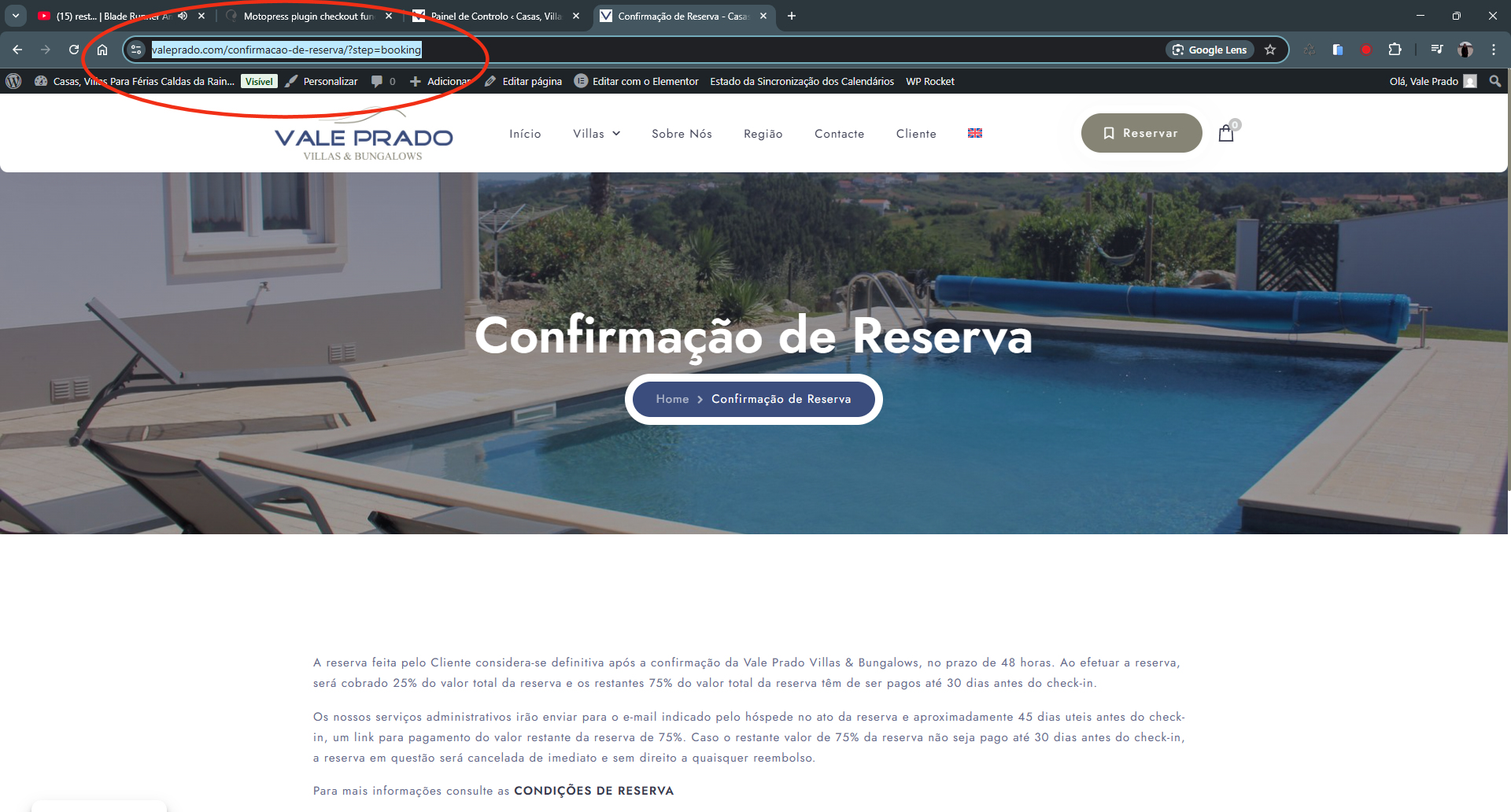 |
| April 11, 2025 at 5:29 pm #16924002 | |
|
Andreas W. WPML Supporter since 12/2018 Languages: English (English ) German (Deutsch ) Timezone: America/Lima (GMT-05:00) |
My apologies for the confusion! We handle many support requests (chats and tickets) every day and sometimes we simply do not have the capacity to read a whole ticket again. On the staging, the issue persists when testing only with WooCommerce, Elementor, Hotel Booking, and WPML (incl. Addons) on the Twenty Twenty-Five Theme. As I mentioned earlier, this seems to be an issue between Hotel Booking and WPML, and to be able to escalate the issue, we need to try to recreate it on a new test site. I have tried that earlier but struggled with setting up Hotel Booking. I can offer to give this another try, but I would need you again to install the latest version of Hotel Booking, as our old sandbox has expired. New sandbox: Please leave me a comment on this ticket once the latest version of the plugin has been installed. Also, it would be advisable to reach out to Motopress and ask them if they are aware of such issues - did you already receive any answer from them? |
| April 14, 2025 at 12:01 pm #16929142 | |
|
diogoT-2 |
Hello, i have talked to you before about the staging site and we have agreed that it is best for me to clone the existing site to a staging created by me, i have already sent you the access to the staging site, the problem is that you have acceessed it and instead of making tests in portuguese language as required by me you have made tests in english language, so the problem was only that, i will send you again the satging access: hidden link login: Vale Prado pass: G&T565SW5Q5//(/8DYW0QMJ the plugin and wordpress are on the latest version i have talked before with motopress but their technical staff told me that the problem was with WPML, that is the reason i have asked you for help hope now you anderstand the matter, thanks Diogo T |
| April 15, 2025 at 10:41 am #16933389 | |
|
Andreas W. WPML Supporter since 12/2018 Languages: English (English ) German (Deutsch ) Timezone: America/Lima (GMT-05:00) |
Yes, I have tested on the staging and I can confirm an issue with the PT version. To be able to take further internal steps, we need to replicate the issue on a new test site and then escalate the issue to the compatilbity team. This way we can confirm if we handle a general issue that needs to be reported to MotoPress. Please install the latest version of Hotel Booking: Leave me a comment once you are done with this task. |
| April 16, 2025 at 3:42 pm #16940076 | |
|
diogoT-2 |
Hello again, the problem is that the license of the motopress plugin is already being used in valeprado.com, it is only for one site and the plugin will not function properly without a license, we have talked about this before. I dont have enough experience or spare time to install and configure the whole site for testing purposes in your sandbox, please check our conversations before, we have already talked about this, i can clone the entire site to your sandbox if you want, using the all in one wp migration plugin, do you want me to do that instead? then you can do whatever you want with the cloned site and the motopress plugin will function. Diogo T |
| April 16, 2025 at 5:00 pm #16940560 | |
|
Andreas W. WPML Supporter since 12/2018 Languages: English (English ) German (Deutsch ) Timezone: America/Lima (GMT-05:00) |
Hello Diogo, My apologies for the delay in handling this issue as our support queue is very busy these weeks. I hope for your understanding. We actually have a partnership with Motopress and I am able to obtain Hotel Booking for testing. As I did already earlier, I created a test site to replicate the issue and I am running to the point, where I have set up everything but I can not select any dates when trying to make a booking. I am not able to figure out why is that. Please have a look at the test site: Why might it be that I can still not select any date on the calendar? If you do not have an answer to that, please consult the MotoPress Support Team and ask them for cooperation in trying to recreate the issue. Also, please make sure that this test site uses the same Hotel Booking settings, as your live site to try to recreate the issue. Best regards |
| April 17, 2025 at 12:02 pm #16943776 | |
|
diogoT-2 |
Hello Andreas, i have tried to fix that but i also could not figure out what is happening, i will talk to support in motopress for them to help in this issue, is there any way i can send a link with all our conversations so they can be immediatley aware of the situation? This problem is happening for too much time, i know sometimes i am also delayed in answering but i am solving other issues with other customers, as soon as you answer this ticket i will contact motopress, also is there any way that i can put both wpml and motopress in contact so you guys can work as a team to manage this issue in a more efficient way? |
| April 22, 2025 at 3:07 pm #16956020 | |
|
Andreas W. WPML Supporter since 12/2018 Languages: English (English ) German (Deutsch ) Timezone: America/Lima (GMT-05:00) |
Hello, After updating Hotel Booking to version 5.2.0 it seems to work on the staging site. If I test in a minimal setup. The orders are being processed as expected. I was able to identify further now what is kind of unexpected here. You place an order on PT and you land on: This page uses the shortcode: [mphb_checkout] This is the Motopress Hotel Booking Checkout. We can place the order and the order is processed. If I do the same in English, I will be sent after this checkout page to another checkout page, which is the one from WooCommerce. This means, that the difference is that in English there is an additional Checkout steps using the WooCommerce Checkout page while this page is actually using the following shortcode: [woocommerce_checkout] This step is omitted when purchasing an order on-site default language PT. It looks like you actually use a WooCommerce product called "Reservation" to create a booking with Hotel Booking, while Hotel Booking actually has its own checkout process. I am not understanding how this WooCommerce product is connected to your Accommodations and I doubt that this is the correct workflow in this case. I suggest you consult this with the Motopress Team and then get back to me if further assistance is needed. --- You can also forward this comment to Motopress and ask them to please take a look into the test site and let us know what we are missing to make the calendar work on the accommodations: Best regards  |
| April 23, 2025 at 3:57 pm #16961245 | |
|
diogoT-2 |
Hello Andreas, at last good news, it seems now you are understanding the issue, i have updated all valeprado.com backoffice, but the problem unfortunately persists. I have sent the link of this ticket to motopress on their ticket system and explained the issue to them again, as soon as i have an answer i willl inform you, thanks! Diogo |







The topic ‘[Closed] Motopress plugin checkout functions in English but not in Portuguese language’ is closed to new replies.