This thread is resolved. Here is a description of the problem and solution.
Problem:
If you're experiencing issues where a popup created with Popup Maker does not open on a translated page, even though both the page and the popup have been translated, this might be similar to the issue we addressed. In this case, the popup worked on the original language page but not on the translated version.
Solution:
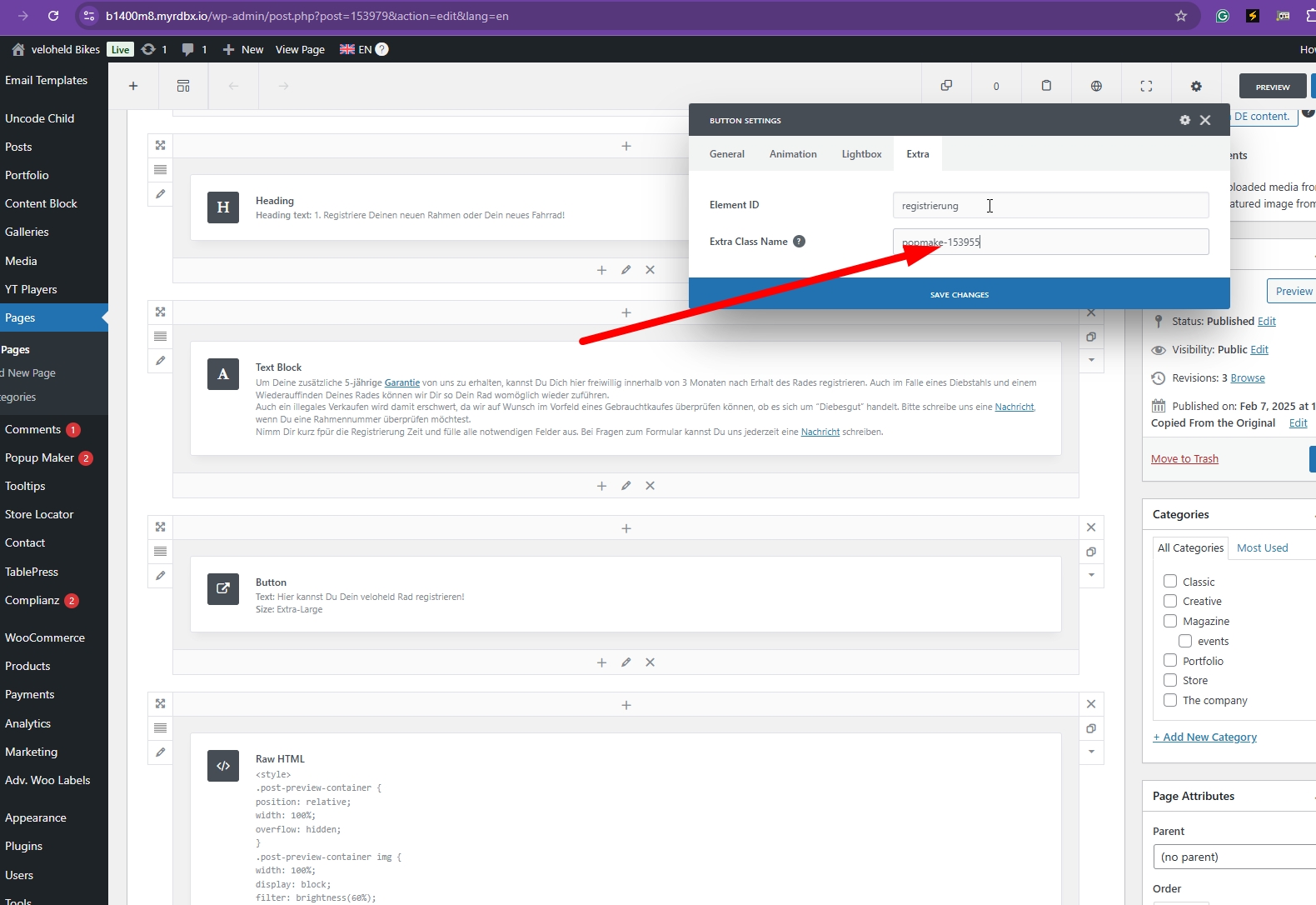
First, ensure that the popup ID is correctly set for the translated versions. You can locate the popup id in Popup Maker > Popup. Then, manually adjust the popup ID in Button Settings > Extra > Extra Class name "popmake-153955".
If changing the popup ID does not resolve the issue, it could be related to a theme error. We recommend checking the debug log for errors and consulting with the theme author if necessary. For instance, a PHP error related to a 'call to a member function get_type() on null' in the theme's files was identified as the cause in a similar situation.
Please note that this solution might be outdated or not applicable to your specific case. We highly recommend checking related known issues at https://wpml.org/known-issues/, verifying the version of the permanent fix, and confirming that you have installed the latest versions of themes and plugins. If the problem persists, please open a new support ticket.
This is the technical support forum for WPML - the multilingual WordPress plugin.
Everyone can read, but only WPML clients can post here. WPML team is replying on the forum 6 days per week, 22 hours per day.