
This thread is resolved. Here is a description of the problem and solution.
Problem:
You are experiencing 404 errors on product category pages in your DE webshop when using the 'Smart OpenGraph by PixelYourSite' plugin, which is overwriting the WooCommerce product category slug, making it untranslatable by WPML.
Solution:
To resolve this issue temporarily, you can:
1. Change the WordPress Permalink structure to "Plain".
2. Disable the 'Smart OpenGraph by PixelYourSite' plugin if possible.
3. If you prefer to keep the plugin, go to WPML > String Translation, search for the product category slug "product-category", and delete its entry from String Translation to ensure the category base slug is not translated.
If these steps do not resolve your issue or if the solution becomes outdated, we recommend checking related known issues at https://wpml.org/known-issues/, verifying the version of the permanent fix, and confirming that you have installed the latest versions of themes and plugins. If the problem persists, please open a new support ticket at WPML support forum.
This is the technical support forum for WPML - the multilingual WordPress plugin.
Everyone can read, but only WPML clients can post here. WPML team is replying on the forum 6 days per week, 22 hours per day.
Tagged: Compatibility
This topic contains 19 replies, has 2 voices.
Last updated by Andreas W. 4 years, 2 months ago.
Assisted by: Andreas W..
| Author | Posts |
|---|---|
| February 5, 2022 at 11:05 am #10514185 | |
 bartV-47 |
I am trying to resolve the issue with the product categories 404 in our DE webshop. The NL and BE webshop works fine. What I already did: Link to a page where the issue can be seen: I expected to see: Instead, I got: Now I receive a 404 page and our categories aren't working in our DE shop. |
| February 5, 2022 at 6:20 pm #10515727 | |
 Andreas W. WPML Supporter since 12/2018 Languages: English (English ) German (Deutsch ) Timezone: America/Lima (GMT-05:00) |
Hello, It appears that all your archives use the same category base slug: Those URLs here actually work: hidden link Please verify at WPML -> Taxonomy Translation -> Product Categories that on the bottom of the page the category base slug is assigned to the correct default language and translated. Then also check the same slug translation at WooCommerce -> WooCommerce Multilingual -> Categories. At last also verify the endpoint translation for the rpduct category at WooCommerce -> WooCommerce Multilingual -> Store URLs. If all those sections are looking good but the slug is still not translating, then it could be that the site is having a compatlbity issue between WPML and a third plugin and I will need access to a staging site or take a copy for troubleshooting the issue. Let me know if further assistance is needed. Best regards |
| February 6, 2022 at 10:53 am #10517407 | |
|
bartV-47 |
Hello Andreas, Well the URL's seems to be working only with a wrong translation. I have checked the category base slug but strange thing is that the original and translated is different then the current one live on production. See attached. Also in the Woocommerce settings it's the same. I can give you access to the website, how could this be done in a safe way? Greetings, 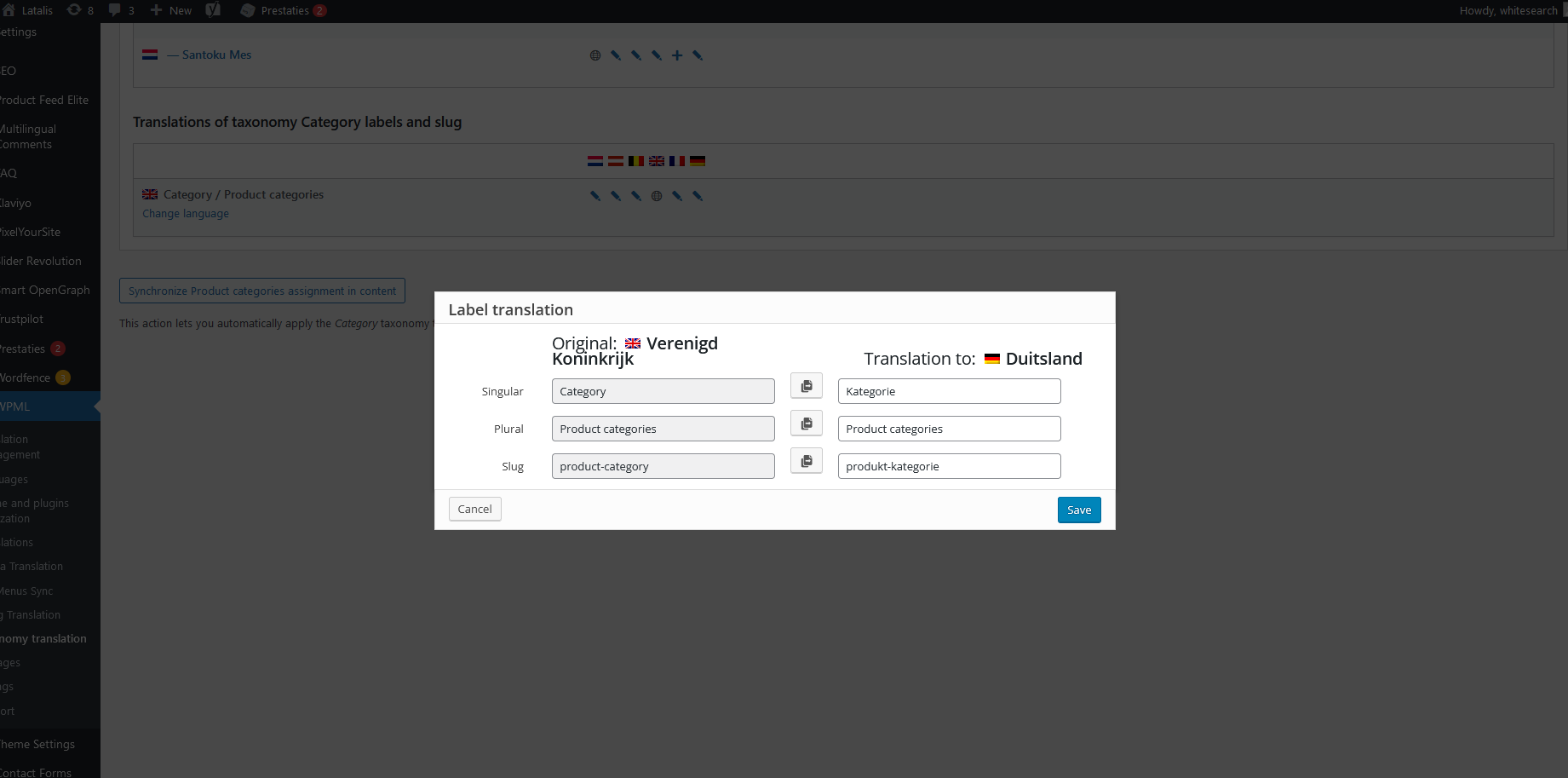 |
| February 6, 2022 at 9:30 pm #10519245 | |
|
Andreas W. WPML Supporter since 12/2018 Languages: English (English ) German (Deutsch ) Timezone: America/Lima (GMT-05:00) |
Hello Bart, I would like to request temporary access (wp-admin and FTP) to your site to take a better look at the issue. It would be better for a testing site where the issue is replicated. You will find the needed fields for this below the comment area when you log in to leave your next reply. The information you will enter is private which means only you and I can see and have access to it. Maybe I'll need to replicate your site locally. For this, I’ll need to temporarily install a plugin called “All In One WP Migration” on your site. This will allow me to create a copy of your site and your content. Once the problem is resolved I will delete the local site. Let me know if this is ok with you. IMPORTANT Please make a backup of site files and database before providing us access. The steps are also shown in this video: hidden link Best regards |
| February 9, 2022 at 5:37 am #10538007 | |
|
Andreas W. WPML Supporter since 12/2018 Languages: English (English ) German (Deutsch ) Timezone: America/Lima (GMT-05:00) |
Hello, My apologies for the delay, but troubleshooting your site results in beeing kind of complex due to the amount if active plugins and I need some more time for this task. I took a copy of your site, and it appears that this issue seems ot be related to the Savoy Theme, as I can not confirm the same issue when testing the site on the Storefront Theme with domains in different languages running only WooCommerce and WPML. On the other side, when testing only with WooCommerce and WPML on the Savoy Theme I can see the issue, but only when using domains in different languages. Apart from that I even see errors related to other plugins on the debug.log, but it unclear to me for now what they might be causing, as they seem not to be related direclty to the reported issue. I will continue testing tomorrow and get back to you with the final results shortly. Best regards |
| February 11, 2022 at 8:37 am #10558457 | |
|
Andreas W. WPML Supporter since 12/2018 Languages: English (English ) German (Deutsch ) Timezone: America/Lima (GMT-05:00) |
Hello, Now, I am at the point where I can still confirm an issue on minimal setup: I got on all product archives the slug /product-categorie/ and the archives work, but for some reason the slug does not change. This occurs on the copy of your site, when it only runs WPML and WooCommerce on a default theme, and it only occurs on the WPML language switcher when using different domains per language. The odd thing is, that I was trying today to recreate the issue on a new WordPress install with domains in different languages but the issue does not occur. Somehow the issue disappears on the site copy if I switch the WPML site default language to English, but I am not able to recreate that on my own new test-site. It could be that the issue is related to a corrupted DB entry, just at the moment I am honestly stuck here and I need to consult our second tier support team. Once I received feedback from one of my teammates I will be in contact again. Best regards |
| February 12, 2022 at 3:27 am #10564915 | |
|
Andreas W. WPML Supporter since 12/2018 Languages: English (English ) German (Deutsch ) Timezone: America/Lima (GMT-05:00) |
Hello, It appears that there was an issue on the DB which we fixed now but apart from that the site seems to have two issue related to the the WooCommerce permalinks. Now, the language switcher is redirecting to the correct category slug translations, which before was not the case, but the archives remain on a 404. So, at this point I will take a new site copy in order to troubleshoot this issue and I will be in contact shortly. Best regards |
| February 12, 2022 at 4:36 am #10565143 | |
|
Andreas W. WPML Supporter since 12/2018 Languages: English (English ) German (Deutsch ) Timezone: America/Lima (GMT-05:00) |
Hello, The issue with the 404 on product cateogry archive pages on your site is triggered by the plugin "Smart OpenGraph by PixelYourSite". If I disable the plugin the issue gone. Would be able to provide a copy of the latest version of that plugin, so that I can try to recreate the issue? If so, let me know and I will provide access to a test-site. Best regards |
| February 12, 2022 at 11:54 am #10566017 | |
|
bartV-47 |
Hello, Thank you for your great research and fixes! I see that the same version is installed on the production website, 1.0.4 So you can grab those files. Ps. I also only can upload images in this comment box. Greetings, |
| February 13, 2022 at 12:36 am #10567143 | |
|
Andreas W. WPML Supporter since 12/2018 Languages: English (English ) German (Deutsch ) Timezone: America/Lima (GMT-05:00) |
Hello Bart, I am not able to recreate the same issue on a test-site that is using the latest versions of WooCommerce and WPML while testing it on domains in different languages. Now, the reason for that could be that the Smart Open Graph Plugin is not activated, as I do not have a key for this plugin. I would like to ask you how we could proceed here? Would you be able to provide a key for testing purpose? Please also make sure to update all your plugins, specifically WooCommerce, as it is currently outdated on your site. Best regards |
| February 14, 2022 at 8:43 am #10572205 | |
|
bartV-47 |
Hello Andreas, Well the license key missing could be the issue. Only I need to add a domain for receiving a license. Do you have a domain for me? Greetings, |
| February 15, 2022 at 5:08 pm #10586837 | |
|
Andreas W. WPML Supporter since 12/2018 Languages: English (English ) German (Deutsch ) Timezone: America/Lima (GMT-05:00) |
Hello Bart, I have left you a private message with access credentials for our test server. Please leave me a short message on this ticket once the site is ready for testing. Best regards |
| February 16, 2022 at 9:57 am #10591489 | |
|
bartV-47 |
Hello Andreas, I have installed the Pixelyoursite plugins + activated the license. It should work now. Greetings, |
| February 17, 2022 at 1:53 am #10598861 | |
|
Andreas W. WPML Supporter since 12/2018 Languages: English (English ) German (Deutsch ) Timezone: America/Lima (GMT-05:00) |
Hello Bart, Thank you very much. I was able to recreate the issue with 404 errors on the product archive pages when using domains in different languages and I have escalated this issue to our compatibility team. In order to avoid the issue for now, please: - Switch WordPress Permalink structure to "Plain" or - disable "Smart OpenGraph by PixelYourSite", if possible. As soon I receive more feedback about this issue from our team I will be in contact. Best regards |
| February 17, 2022 at 8:28 am #10600487 | |
|
bartV-47 |
Hello Andreas, Great that you know where the issue is. I have disabled the Smart Opengraph plugin and now the categories URL's are working fine. So for now I will disable it. Let me know when it has been resolved. Greetings, |






