Skip to content Skip to sidebar

This thread is resolved. Here is a description of the problem and solution.

Problem:
The client is experiencing an issue where product variations such as color and size are not included in the

line_items.name

attribute in the WooCommerce REST API response when the 'WPML Multilingual & Multicurrency for WooCommerce' plugin is active.

Solution:
1. Verify product attribute translation settings through the WooCommerce Multilingual attributes tab.
2. Synchronize product variations using WPML troubleshooting tools and re-save the variable product.
3. Check how variations are displayed in the backend order details in WooCommerce admin and verify the order language.
4. Use the

?lang=nl

parameter in the REST API call.
5. If these steps do not resolve the issue, reproduce the API request on a staging site with the same plugin/theme setup to confirm if there is a compatibility or integration issue between WPML and WooCommerce REST API for variable products.
6. Examine any filters or overrides on the REST API response, particularly those added by WPML or the theme.

If the problem persists, we recommend checking related known issues at https://wpml.org/known-issues/, verifying the version of the permanent fix, and confirming that you have installed the latest versions of themes and plugins. If the solution provided here is outdated or not applicable to your case, please open a new support ticket at WPML support forum.

This is the technical support forum for WPML - the multilingual WordPress plugin.

Everyone can read, but only WPML clients can post here. WPML team is replying on the forum 6 days per week, 22 hours per day.

This topic contains 3 replies, has 0 voices.

Last updated by Carlos Rojas 4 months, 1 week ago.

Assisted by: Carlos Rojas.

Author Posts
October 28, 2025 at 8:01 am

salesC-2

Background of the issue:
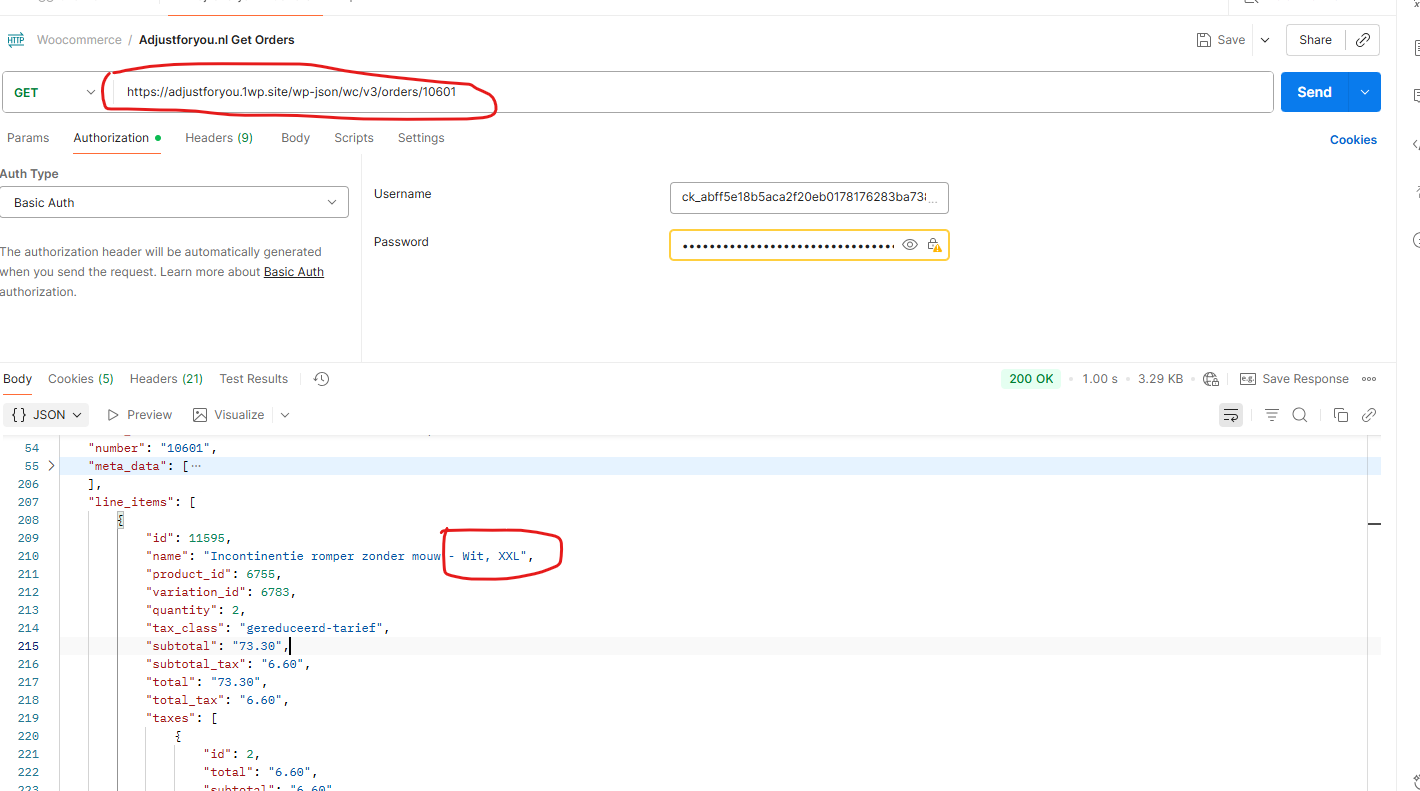
I am trying to fetch all orders using our invoicing system via REST API, specifically from the URL hidden link. By default, the ordered product name, including variations like color and size, should appear in the line_items.name attribute in the REST API response.

Symptoms:
When "WPML Multilingual & Multicurrency for WooCommerce" is installed, the ordered variation is not included in the line_items.name attribute. Only the product name is shown, without variations like color and size.

Questions:
Why are product variations not included in the line_items.name attribute when "WPML Multilingual & Multicurrency for WooCommerce" is installed?
How can I ensure that product variations appear in the REST API response?

October 30, 2025 at 12:20 pm #17532594

Carlos Rojas
WPML Supporter since 03/2017

Languages: English (English ) Spanish (Español )

Timezone: Europe/Madrid (GMT+01:00)

Hello,
My name is Carlos, and I will continue working on this ticket

Please follow these steps:
- Go to Settings -> Permalinks -> Product permalinks -> Select 'Default' and save the changes
- Go to WooCommerce -> WPML Multilingual & Multicurrency for WooCommerce -> Store URLs tab -> Translate the product slug
- Go to WooCommerce -> WPML Multilingual & Multicurrency for WooCommerce -> Status tab -> Fix any issues that might appear in the first two sections
- Double-check if the issue has disappeared

Can you tell me the results of the steps described above?

November 3, 2025 at 8:40 am #17539719

salesC-2

HI Carlos,

Problem is not solved. I have translated also all product variations (color and size) but still not shown in the REST API response.

November 3, 2025 at 10:51 am #17540392

Carlos Rojas
WPML Supporter since 03/2017

Languages: English (English ) Spanish (Español )

Timezone: Europe/Madrid (GMT+01:00)

Hi there,
Thank you very much for your message.

You mentioned you translated all product variations; however, I can only see one product in the secondary language, and it is not linked to a product in the original language, which means it is not technically a translation.

Can you describe the steps you followed to translate the product variations? You can attach screenshots or share a link to a video describing the steps. This will be very helpful to understand the situation.