Home›Support›English Support›[Resolved] Setting All Previous Content & Features To New Default Language (Jetsmartfilters)
[Resolved] Setting All Previous Content & Features To New Default Language (Jetsmartfilters)
This thread is resolved. Here is a description of the problem and solution.
Problem: If you're experiencing issues with the translation page not loading after adding custom languages, and encountering errors related to languages mapped to English, this might be due to a known issue in our code. Solution: We recommend implementing a temporary workaround until the permanent fix is available in WPML 4.8. You can find the workaround details here: Custom Database Prefix and Having 30+ Languages Can Cause a Database Error When Visiting Translation Dashboard.
This issue may arise particularly if you are using a custom prefix for your database tables, similar to our local environment setup.
Please try this solution and let us know how it goes. If this solution does not resolve your issue or seems irrelevant due to being outdated or not applicable to your specific case, we highly recommend checking related known issues at https://wpml.org/known-issues/, verifying the version of the permanent fix, and confirming that you have installed the latest versions of themes and plugins. If further assistance is needed, please open a new support ticket at WPML support forum.
This is the technical support forum for WPML - the multilingual WordPress plugin.
Everyone can read, but only WPML clients can post here. WPML team is replying on the forum 6 days per week, 22 hours per day.
The issue with WPML -> Translation Management is the following:
When opening WPML → Translation Management, the browser console shows an Axios 500 error. The server response body says the database table wp_icl_translations does not exist. That missing core WPML table causes PHP to fail during the TM request, producing the 500.
It focused on String Translation tables, but it works for any missing table.
❌ Please make a full website backup before proceeding ❌
If after following it, you still have the problem in WPML -> Translation Management, please do it again, but this time enable the debug information. It will help us to understand why the tables are not being created:
Please follow the instructions mentioned on this page: https://wpml.org/documentation/support/debugging-wpml/
Then, try to reproduce the issue and check your installation's **wp-content** folder to see if a file named **"debug.log"** was created (it will only be generated if a server error occurs).
If the file was created, please upload it to a platform like **Google Drive** or **Dropbox** (whichever you usually use) and share the link with me (make sure it is publicly accessible) so I can analyze it.
I've tried the functions.php code unfortunately this didn't work so I decided it would be quicker to reset WPML and add the custom languages again. So I did the following and the translation page is loading.
WPML > Support > Troubleshooting > Scroll down and Reset and Deactivate WPML.
So now I want to set International (En) as the default language and have /int/ in the URL to match the current live site (Drupal). hidden link
Going back to your first reply do I do the following to change from English (En) to International (En) (mapped to English)
- Go to WPML → Translation Management → Dashboard, filter by each JetEngine CPT (Opportunities, Regions, etc.) and “Select all”.
- Click Duplicate → To INT; wait until the bulk queue finishes.
- In WPML -> Settings -> Media Translation → and click Start to duplicate media so every attachment gets an INT entry.
- Go to WPML → Support → Troubleshooting and run:
-- Set language information
-- Fix post type assignment
-- Fix term taxonomy relationships
- Go to Settings → Permalinks and save to flush the permalinks
If you reset WPML, I assume that you didn't have any content translated yet.
After resetting, you should setup WPML. At this stage you can set your original and default language to INT. I think that's the easiest way.
So:
- Reset WPML again
- When setting it up, create the custom language
- Set this custom language as the original language of the site
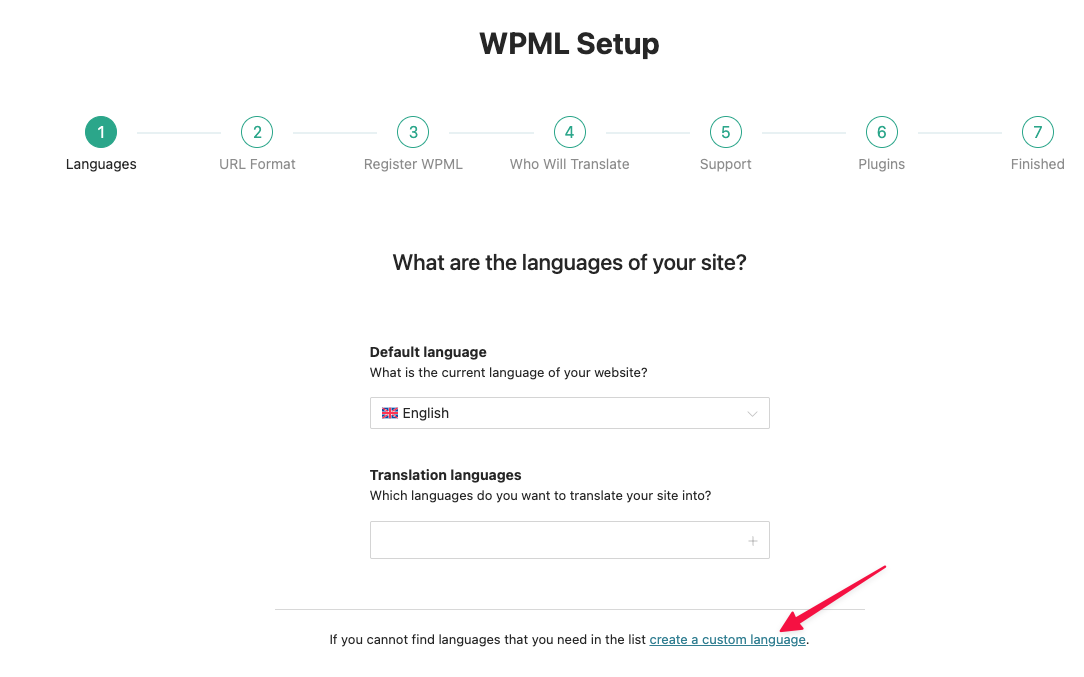
Take a look at the screenshot I am attaching, there you can see the link to create the custom language during the setup.
After clicking there you'll see a pop-up. In the first step select English, United States (or UK, whatever you prefer). Then, the pop up will expand and you'll be able to set the language name (INT).
I never advise resetting WPML if there is already translated content. As you mentioned that you did (and nothing broke), I assumed you don't and suggested that easier way to accomplish the setup that you need.
If you reset WPML and choose a custom language when setting it up, it should not break. It's a standard feature, like choosing French or English as your original language. Of course, before doing major changes, we always advise to ❌ Please make a full website backup before proceeding ❌
The translation page is not loading again. It broke when I added some custom languages again. I didn't' check back after each language added to see which one/s broke this. I've tried removing some, however the page never loads (white screen) after clicking the red x - remove language.
It's also complaining about languages that are mapped to English again. That automatic translations are not supported - which I assumed is fine if the default is English they don't need translating.
I'm not sure what is breaking things exactly. It's definitely a custom language or possibly adding a language that maps to the default.
Can you please advise what I can do? You still have the login details.
I forgot I restored the site before the languages broke (before I added yourself).
I've re-added yourself with same credentials.
I have mapped the languages to English, however it's complaining because that is the default. I don't think that warning would break anything like you said though.
It looks like the server can't reach some external URLs that WPML needs to manage and perform the translations.
In WPML -> Translation Management, I checked the browser's console and there is an error:
Failed to load resource: the server responded with a status of 404
ams.wpml.org/mini_app/localization/int.json?version=3.29.9:1
Can you please check with your hosting and make sure that the following domains are not getting blocked:
wpml.org
cdn.wpml.org
api.wpml.org
api.toolset.com
cloudfront.net
ams.wpml.org
Also, if it's possible for you test the following:
❌ Please make a full website backup before proceeding ❌
Disable all plugins except WPML-related and temporarily change the theme to a default WordPress such as Twenty Twenty-five.
Is the issue resolved with these settings? If so, please reactivate one by one to see which conflicts.
I have asked the hosting provider just now and they have confirmed there is nothing blocking those domains.
I have removed virtually all plugins only leaving a few essential ones running and it still doesn't work.
My concern is that everything works fine until I start adding custom languages then it breaks. It loaded up 100% of the time prior consistently.
I don't doubt what you are seeing however I can make it work consistently without removing plugins/themes but I can't even delete a custom language without getting a WSOD.
Would you mind if we looked into the custom languages direction more as with the same plugins and themes activated prior to adding custom languages there were zero issues.
I will rollback now to before it broke again. I will be able to pinpoint the exact moment it breaks as it's somewhere between the start of adding these custom languages and now, but what can I do when it breaks?
If you agree, let's do the following:
- Revert to the previous state
- Enable the debug information (I'll explain how to do this below)
- Add the languages as you did before but pay attention to the Translation Dashboard to see when it fails. Also take note of the steps you do until it fails.
Once it breaks, please revert again and share with me the debug log. I'll make a copy of the site and debug it locally to find the root cause of the issue.
Makes sense?
To enable the debug information, please follow the instructions mentioned on this page: https://wpml.org/documentation/support/debugging-wpml/
Then, try to reproduce the issue and check your installation's **wp-content** folder to see if a file named **"debug.log"** was created (it will only be generated if a server error occurs).
If the file was created, please upload it to a platform like **Google Drive** or **Dropbox** (whichever you usually use) and share the link with me (make sure it is publicly accessible) so I can analyze it.
So I've reverted, enabled debug (had it enabled previously).
Installed the languages now. I did set the default as a custom language International (INT) > mapped to English.
Set translate for custom post types created with JetEngine.
It's still working.
I have a debug log now showing issues from yesterday/today but wont' upload that to drive unless you want me to?
I've cleared this log file (backed up first) I will add the custom languages now, and send you that debug log as you requested.
It's broken after adding a custom Irish (English) language.
Interestingly Irish is actually a language on the standard language options however I assumed that would be Gaeilge not English as that's actually Irish.
What email can I send this debug log file too? The only one I have is noreply@