Skip to content Skip to sidebar

This thread is resolved. Here is a description of the problem and solution.

Problem:
The client was unable to save settings to designate a content type as not translatable on their multisite installation. The settings page did not allow the settings to save, resulting in no houses being displayed on the page because there were no Spanish versions of the content.
Solution:
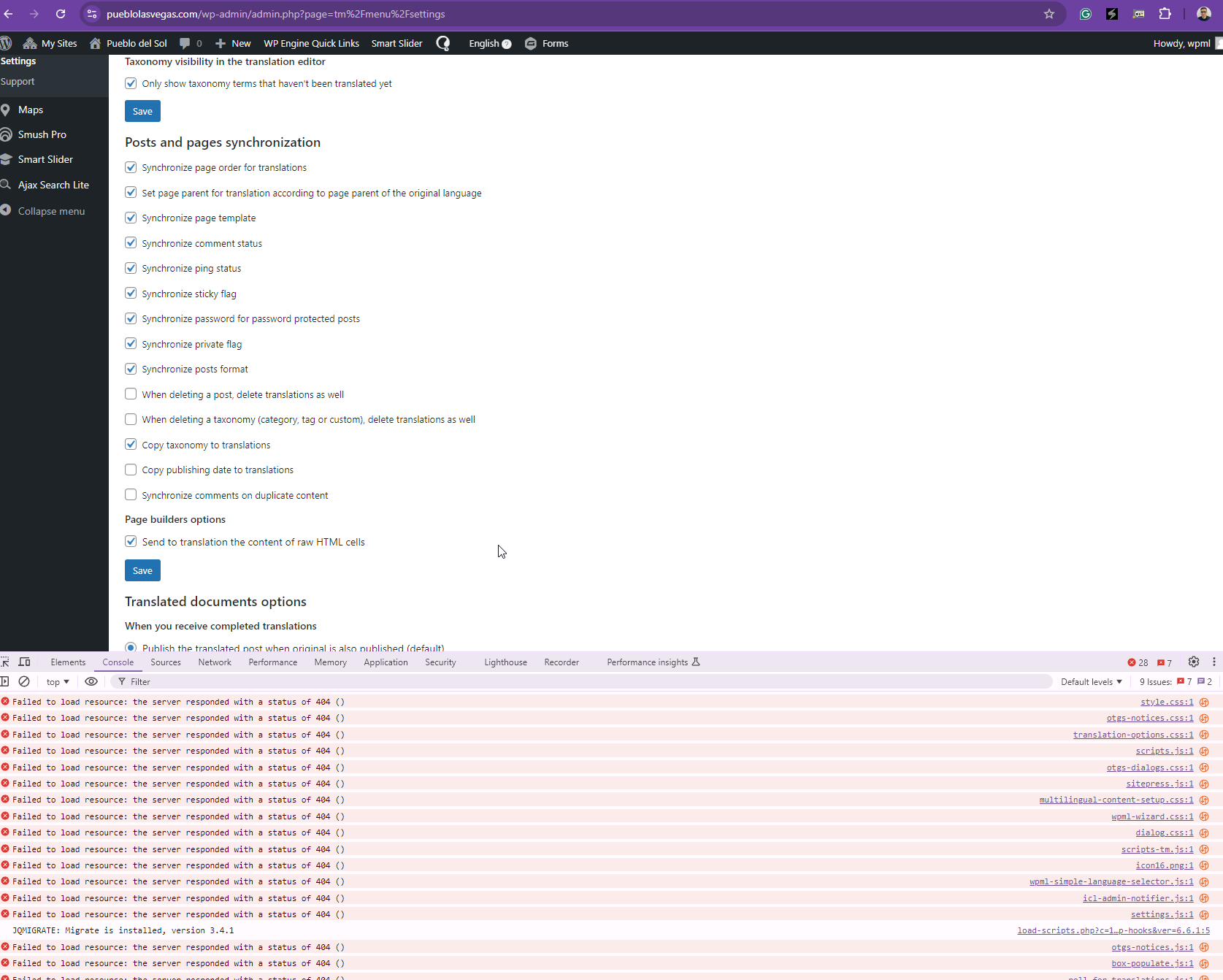
We recommended the client to perform a full backup of their site. After ensuring the backup, we advised deleting all WPML plugins and then reinstalling them. This approach was necessary because there were many missing WPML files, which likely caused the issue with settings not being saved. Reinstalling the plugins resolved not only the initial problem but also fixed several other issues that the client had not yet reported.

If this solution does not resolve your issue, or if it seems outdated or irrelevant to your case, we highly recommend checking related known issues at https://wpml.org/known-issues/, verifying the version of the permanent fix, and confirming that you have installed the latest versions of themes and plugins. Should these steps not provide a resolution, please do not hesitate to open a new support ticket at WPML support forum for further assistance.

This is the technical support forum for WPML - the multilingual WordPress plugin.

Everyone can read, but only WPML clients can post here. WPML team is replying on the forum 6 days per week, 22 hours per day.

This topic contains 6 replies, has 2 voices.

Last updated by Kor 1 year, 6 months ago.

Assisted by: Kor.

Author Posts
October 11, 2024 at 5:02 pm #16280002

jeremyS-9

Background of the issue:
I am trying to save some settings to designate a content type as not translatable. The issue can be seen on this page: hidden link.

Symptoms:
The settings page is not allowing settings to save. Instead of seeing a list of houses for sale in the middle of the page, I see no houses because the site doesn't have any Spanish versions of that content.

Questions:
How can I get my settings to save? I believe there might be quite a few issues going on, cannot clear any caches or deal with the tasks on the troubleshooting page either.

October 11, 2024 at 5:06 pm #16280848

Kor

Thanks for your reply.

I will need to closely examine your website. Therefore, I will require temporary access (WP-Admin and FTP) to a test site where the problem has been replicated, if possible. This will enable me to provide better assistance and determine if any configurations need to be modified.

Please note that it is important to have a backup for security purposes and to prevent any potential data loss. You can use the UpdraftPlus plugin (https://wordpress.org/plugins/updraftplus/) to fulfill your backup requirements.

Your upcoming reply will be treated with confidentiality and will only be visible to you and me.

✙ To resolve the issue, I may need your consent to deactivate and reactivate plugins and the theme, as well as make configuration changes on the site if necessary. This emphasizes the significance of having a backup.

October 14, 2024 at 12:50 pm #16286106

jeremyS-9

Any updates here? Thank you.

October 14, 2024 at 2:00 pm #16286446

Kor

Thanks for your reply. My apologies for the delay due to the weekend. Just letting you know that I'm still looking into this and I will come back to you as

October 14, 2024 at 2:06 pm #16286526

Kor

Thanks for your reply. Could you grant me full "administrative" account to your multisite?

October 14, 2024 at 2:16 pm #16286562

jeremyS-9

Same account has been added to the top level multisite install

October 14, 2024 at 2:59 pm #16286784

Kor

Thanks for your reply. I still can't access the plugin page. Could you please delete all WPML plugins and then reinstall it again? I can see lots of WPML files missing as shown in the attached screenshot.

Screenshot_36.png
October 14, 2024 at 3:50 pm #16287103

jeremyS-9

I thought that had been done, but wow - that solved everything. Even a few other issues I hadn't got round to asking about. Thank you for your time, this all looks to be working as expected. Looks like updating the plugin wasn't as effective as a complete re-install.