
This thread is resolved. Here is a description of the problem and solution.
Problem:
The client was experiencing a 504 error on their multilingual e-commerce site when accessing a product page in English, despite the page working fine in other languages. The permalink settings were set to 'post name' for general links and 'custom' with a '/product/' base for product links.
Solution:
Upon further investigation, we discovered that the issue was also related to an outdated theme. The client was using the Deli theme, a child theme of the Storefront theme, which was not updated. After updating the Storefront theme, the 504 error was resolved.
If this solution does not apply to your case, or if it seems outdated, we highly recommend checking related known issues at https://wpml.org/known-issues/, verifying the version of the permanent fix, and confirming that you have installed the latest versions of themes and plugins. If the issue persists, please open a new support ticket at WPML support forum.
This is the technical support forum for WPML - the multilingual WordPress plugin.
Everyone can read, but only WPML clients can post here. WPML team is replying on the forum 6 days per week, 22 hours per day.
Tagged: Bug
This topic contains 11 replies, has 1 voice.
Last updated by guadalupeS 1 month, 3 weeks ago.
Assisted by: Itamar.
| Author | Posts |
|---|---|
| February 10, 2026 at 4:39 pm #17810468 | |
 guadalupeS |
Plugins are updated to latest version, max_execution time is set to 180, other time limits have been updated as well by the hosting provider. But the error remains for English language products. |
| February 10, 2026 at 4:58 pm #17810561 | |
|
guadalupeS |
I've retried in Plesk to generate debug files for WordPress....but no debug file is generated in spite of the error 504. |
| February 10, 2026 at 6:39 pm #17810902 | |
 Itamar WPML Supporter since 02/2016 Languages: Hebrew (עברית ) Timezone: Asia/Jerusalem (GMT+03:00) |
Hi, I'll continue to help you with this issue. I can see a 504 error, for example, here: hidden link. Please consider changing the Language URL format to 'Different languages in directories'. You can do it in WPML -> Languages -> Language URL format. After that, go to Settings -> Permalinks and re-save the permalinks (click the Save Changes button). If you can't switch to the 'Different languages in directories' option, please only go to Settings -> Permalinks, and re-save and see if it helps. Please let me know how it goes. Thanks, |
| February 12, 2026 at 12:05 pm #17816819 | |
|
guadalupeS |
Hi, I changed to using different languages in directories, but unfortunately that didn't help. With respect to permalinks, if it is any useful information to you, the "permalink structure" is set to "post name" and the "product permalinks" is set to "custom" with a "custom base" set to "/product/" With kind regards, |
| February 12, 2026 at 12:15 pm #17816888 | |
|
guadalupeS |
Hi, I found something strange that may or may not be related. We own the domains "engrano.fr" and "engrano.nl", because we used to be located in The Netherlands but since october 2023 we're in France. We kept the old domain name just in case. French: hidden link So for French and Dutch it uses "engrano.fr", but for English it uses "engrano.nl". So it feels like something didn't completely go right making the changes as described above when we moved from The Netherlands to France. However, until 2 weeks ago we didn't experience any problems. With kind regards, |
| February 12, 2026 at 3:07 pm #17817525 | |
|
Itamar WPML Supporter since 02/2016 Languages: Hebrew (עברית ) Timezone: Asia/Jerusalem (GMT+03:00) |
Hi, and thanks for trying my suggestions. If you need further help with this, please share the access details to your site with me. I'm enabling a private message for the following reply. Privacy and Security Policy |
| February 12, 2026 at 9:09 pm #17818905 | |
|
Itamar WPML Supporter since 02/2016 Languages: Hebrew (עברית ) Timezone: Asia/Jerusalem (GMT+03:00) |
Hi, I have found that when the 504 error occurs, the following error is logged into the debug.log file. [12-Feb-2026 20:43:21 UTC] PHP Fatal error: Maximum execution time of 180 seconds exceeded in /var/www/vhosts/engrano.nl/staging.engrano.fr/wp-content/plugins/sitepress-multilingual-cms/vendor/wpml/collect/src/Illuminate/Support/Traits/Macroable.php on line 56 I'm consulting our second-tier supporters about this problem and will keep you updated here. Please note that my weekends are Friday to Saturday. If you need further assistance, I'll be available to continue checking this issue and helping you next week. I appreciate your patience. |
| February 15, 2026 at 8:25 pm #17823846 | |
|
Itamar WPML Supporter since 02/2016 Languages: Hebrew (עברית ) Timezone: Asia/Jerusalem (GMT+03:00) |
Hi, Our second-tier supportersuggest trying the following. 1. Duplicate the product with the problem and see if it also happens with the duplicate product. 2. If it persists, we suspect a collision with the theme or another plugin might cause this problem. If possible, get your site into a minimum environment by switching to a default WordPress theme like TwentyTwenty-Four and activating only WPML. First, you must check if the problem persists when just the theme is switched to TwentyTwenty-Four (for example). If it persists, deactivate all plugins except WPML and its add-ons and WooCommerce without any extensions. Then, please check if the problem persists. If it does not persist, start by activating the plugins individually and check whether the issue returns; then report to me which plugin was the culprit. Regards, |
| February 18, 2026 at 8:08 am #17831067 | |
|
guadalupeS |
Hi, I made a duplicate for 2 products that give the error 504, and the duplicates work fine without an error. With kind regards, |
| February 18, 2026 at 9:22 am #17831362 | |
|
Itamar WPML Supporter since 02/2016 Languages: Hebrew (עברית ) Timezone: Asia/Jerusalem (GMT+03:00) |
Hi, Guadalupe Sierra. In this case, please allow me to take a copy of your site. To do this, I must install a plugin such as Duplicator or All-in-One Migration. Please let me know if you agree. Regards, |
| February 18, 2026 at 9:29 am #17831399 | |
|
guadalupeS |
Hi, Well, the link I gave you is already copy of the live site, so feel free to make changes to that copy and even copy the copy. Kind regards, |
| February 18, 2026 at 1:42 pm #17832743 | |
|
Itamar WPML Supporter since 02/2016 Languages: Hebrew (עברית ) Timezone: Asia/Jerusalem (GMT+03:00) |
I have found that you are using the Deli theme, a child theme of the Storefront theme. The Storefront theme was not updated on your site. SO I updated it. Please see the attached screenshot. This resolved the problem. I no longer face the 504 error. For example, with this product: hidden link. Can you please confirm that the problem has been resolved? Thanks, 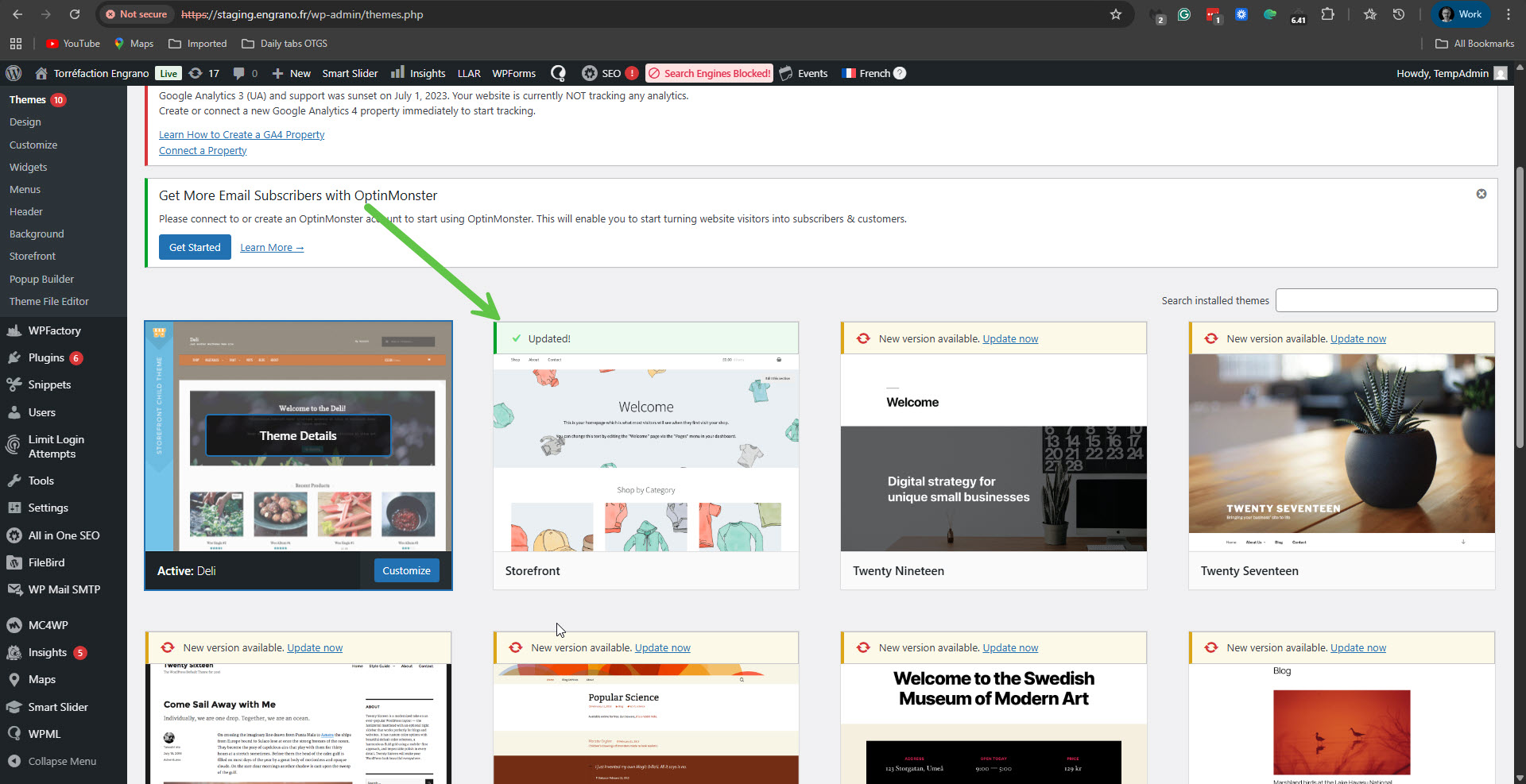 |
| February 18, 2026 at 1:48 pm #17832770 | |
|
guadalupeS |
I immediately updated it on the live site as well and indeed, the problem is resolved. Thank you very very much! Guadalupe Sierra |






