
This is the technical support forum for WPML - the multilingual WordPress plugin.
Everyone can read, but only WPML clients can post here. WPML team is replying on the forum 6 days per week, 22 hours per day.
| Sun | Mon | Tue | Wed | Thu | Fri | Sat |
|---|---|---|---|---|---|---|
| - | 9:00 – 13:00 | 9:00 – 13:00 | 9:00 – 13:00 | 9:00 – 13:00 | 9:00 – 13:00 | - |
| - | 14:00 – 18:00 | 14:00 – 18:00 | 14:00 – 18:00 | 14:00 – 18:00 | 14:00 – 18:00 | - |
Supporter timezone: America/Los_Angeles (GMT-07:00)
Tagged: Known issue
This topic contains 39 replies, has 1 voice.
Last updated by Bobby 2 weeks, 4 days ago.
Assisted by: Bobby.
| Author | Posts |
|---|---|
| August 26, 2025 at 9:33 pm #17349743 | |
 Bobby WPML Supporter since 04/2015 Languages: English (English ) Timezone: America/Los_Angeles (GMT-07:00) |
I would like to request temporary access (wp-admin and FTP) to your site to test the issue. **Before we proceed It is necessary to take FULL BACKUP of your database and your website. Providing us with access, you agree that a backup has been taken ** I often use the Duplicator plugin for this purpose: http://wordpress.org/plugins/duplicator/ NOTE: If access to the live site is not possible and the staging site does not exist please provide me with a duplicator package created with the duplicator plugin. Thank you, |
| August 29, 2025 at 10:38 am #17357821 | |
 bikbulatovaE |
New ocurance on kula-tactical.com It kills our conversion rate each time. Should I test this function in WPML > Language ? (screenshot)  |
| August 31, 2025 at 5:19 pm #17360729 | |
|
Bobby WPML Supporter since 04/2015 Languages: English (English ) Timezone: America/Los_Angeles (GMT-07:00) |
Thank you, I have been able to see the issue on your live site. Unfortunately I am still not able to reproduce this behavior on a sandbox. I have escalated this issue for further investigation by our compatibiltiy team, however, I would like to verify the folloiwing in the meantime to make sure we are all on the same page when testing. 1. I can see in WPML -> String Translation many strings registered in English BUT showing Dutch (as you've mentioned) 2. When I use the customizer (under the EN language) and navigate to something like Single Product -> Extras I can see a Dutch string directly added in there. 3. Based on our conversation here when this happens you go to WPML → String Translation → admin_texts_astra-settings and change the original/default language on the mixed strings. --> you change it to Dutch, is that correct? The reason I ask this is because there is a slight chance this "fix" could also add to the issue. Again, I have escalated this and will update you as soon as there is some feedback! |
| September 3, 2025 at 8:39 am #17368757 | |
|
bikbulatovaE |
3/ Yes it's the best fix. But still unstable. At the end the best fix is to not translate at all those strings. Should we test the ID Ajust option for the theme, in the settings ? |
| September 3, 2025 at 1:40 pm #17370714 | |
|
Bobby WPML Supporter since 04/2015 Languages: English (English ) Timezone: America/Los_Angeles (GMT-07:00) |
Do you ever at any time add the Dutch strings to the customizer directly? As I do see them there Id like to verify if those were added manually in an attrmpt to fix this issue. You can use that feature but its not typically needed for compatible themes such as Astra |
| September 3, 2025 at 2:11 pm #17370955 | |
|
Bobby WPML Supporter since 04/2015 Languages: English (English ) Timezone: America/Los_Angeles (GMT-07:00) |
to clarify why I am asking this: The issue we still see here when reviewing is this: 1. Go to WPML->String Translations and review the Astra Admin strings While these strings are added in Dutch manually within the customizer, they are registered in English. This is expected, and is why only EN strings should be added in the customizer and the Dutch translations in String Translation. |
| September 6, 2025 at 4:26 pm #17381177 | |
|
bikbulatovaE |
We don't speak dutch at all. No dutch text was added to the customizer. Bobby it seems you are still asking about the nature of this bug. This bug replace original strings with translated strings and do however not change the language tag of the main string. It lets it taged with the original language. So here we got dutch put instead of original english strings. The string langage tag didn't change. It still displays that yes it's english. |
| September 8, 2025 at 6:30 am #17382378 | |
|
bikbulatovaE |
Waiting for a fix |
| September 8, 2025 at 8:29 pm #17385020 | |
|
Bobby WPML Supporter since 04/2015 Languages: English (English ) Timezone: America/Los_Angeles (GMT-07:00) |
Hello, I've shared some information and a screencast of what we see from our side. Can you please review and let me know your results. |
| September 12, 2025 at 12:08 pm #17397471 | |
|
bikbulatovaE |
You're really leading me around in circles. I followed this process a long time ago. It doesn't work. Replacing the content in the theme editor doesn't solve the problem, it makes the strings to change with a new language after each customizer update. The only way to deal with this: delete all translations-write back the default languagecontent-and forget about the translation of those strings, OR, change the default language for the mixed strings (stronger results than any other workaround/fixes). In any case, the customizer is UNUESABLE with those strings translated. Any update will cause a mix of languages. I'm actually having this problem on yet another site: hidden link Check out my looms. Sorry for the cut. |
| September 17, 2025 at 8:56 pm #17411239 | |
|
Bobby WPML Supporter since 04/2015 Languages: English (English ) Timezone: America/Los_Angeles (GMT-07:00) |
I understand how frustrating this can be and definitely not trying to take you around in circles here. Based on your video -- if the string is in customizer in the different language that would cause issues. WPML pulls the strings directly from the theme options (customizer), the best place to resolve this is by changing it directly in there and not via String Translation. If a string is showing in Spanish and is added in Spanish within the customizer that would be an issue. ---------------------------------- I have created a sandbox for us. The sandbox is a brand new installation with Astra installed. At the moment it looks OK and it has picked up the correct strings. If possible, please access the sandbox using this link hidden link and follow the same steps to translate the strings as you do on your site. Share with us the steps you take and let us know if the issue reproduces so I can let our compatibility team know. Note that we have not been able to reproduce this behavior yet. |
| September 19, 2025 at 4:04 pm #17417404 | |
|
bikbulatovaE |
1/ I added astra pro. It seems that the strings we have problems with, are added thanks to astra pro plugin. 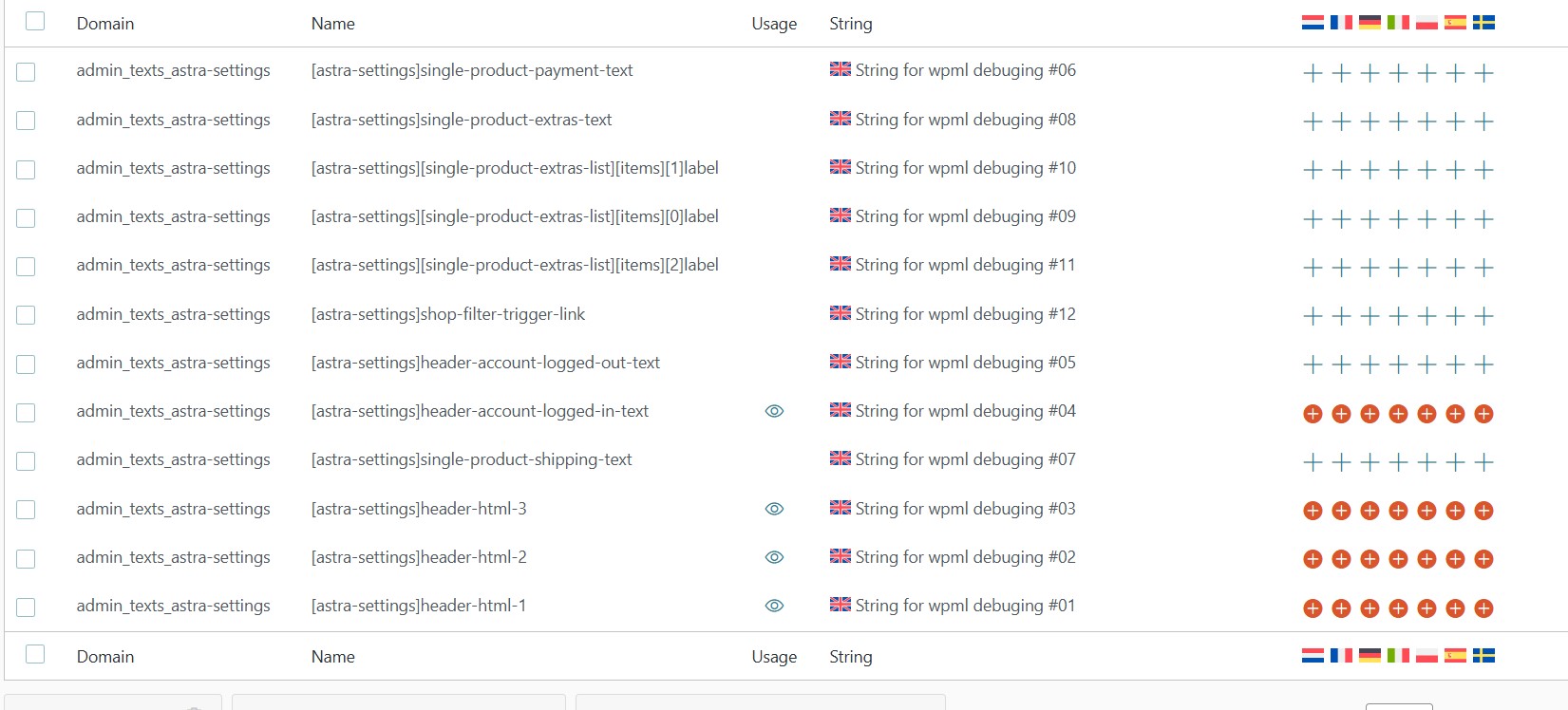 |
| September 22, 2025 at 7:34 pm #17423186 | |
|
Bobby WPML Supporter since 04/2015 Languages: English (English ) Timezone: America/Los_Angeles (GMT-07:00) |
Thank you for working with us through this issue. See my screenshot, I added credits and automatically translated these strings to get a full translation rather than just test translation. I will follow through tomorrow to see if any strings are affected, at the moment it looks OK. All String Translation was done via WPML->Translation Dashboard->Strings and sent to auto translation.  |
| September 23, 2025 at 6:53 pm #17426911 | |
|
Bobby WPML Supporter since 04/2015 Languages: English (English ) Timezone: America/Los_Angeles (GMT-07:00) |
Hi there, Checked back on the status of the strings and I am still unable to reproduce. Regarding the strings you fixed on your site, are those working ok at the moment? If yes I'd advise doing the same fix for all strings not in the default language within customizer  |
| September 23, 2025 at 7:11 pm #17426948 | |
|
bikbulatovaE |
Hi! We have automatic security updates of plugins/themes enabled. Translations were always ok for some time. Then after a couple of days or weeks, it's messed up. I can't really understand why it's so random. |







The topic ‘[Closed] strings’ is closed to new replies.